
# Welcome to Hiero Documentation

[![OpenSSF Scorecard](https://api.scorecard.dev/projects/github.com/hiero-ledger/hiero-docs/badge)](https://scorecard.dev/viewer/?uri=github.com/hiero-ledger/hiero-docs) [![CII Best Practices](https://bestpractices.coreinfrastructure.org/projects/10697/badge)](https://bestpractices.coreinfrastructure.org/projects/10697) [![License](https://img.shields.io/badge/license-apache2-blue.svg)](https://github.com/hiero-ledger/hiero-docs/tree/master/LICENSE/README.md)

## Welcome to Hiero Documentation

Hiero, a [Linux Foundation Decentralized Trust](http://www.lfdecentralizedtrust.org/) project, is an open-source, vendor-neutral distributed ledger technology used to build the [Hedera](https://hedera.com/) public ledger.

<table data-card-size="large" data-view="cards"><thead><tr><th align="center"></th><th data-hidden data-card-target data-type="content-ref"></th><th data-hidden data-card-cover data-type="files"></th></tr></thead><tbody><tr><td align="center"><a href="https://hiero.org/"><strong>LEARN THE BASICS</strong></a></td><td><a href="https://hiero.org/">https://hiero.org/</a></td><td></td></tr><tr><td align="center"><a href="/getting-started"><strong>GET STARTED</strong></a></td><td><a href="#set-up-your-environment">#set-up-your-environment</a></td><td></td></tr><tr><td align="center"><a href="https://hiero.org/#roadmap"><strong>ROADMAP</strong></a></td><td><a href="https://hiero.org/#roadmap">https://hiero.org/#roadmap</a></td><td></td></tr><tr><td align="center"><a href="https://hiero.org/#contribute"><strong>CONTRIBUTE</strong></a></td><td><a href="https://hiero.org/#contribute">https://hiero.org/#contribute</a></td><td></td></tr></tbody></table>

### Contribute

* To contribute, please refer to the [**Hiero-Ledger's contribution guidelines**](https://github.com/hiero-ledger/.github/blob/main/CONTRIBUTING.md)

### Code of Conduct

This project is governed by the [**Contributor Covenant Code of Conduct**](https://github.com/hashgraph/.github/blob/main/CODE_OF_CONDUCT.md). By participating, you are expected to uphold this code of conduct.

### About Users and Maintainers

* Users and Maintainers guidelines are located in [**Hiero-Ledger's CONTRIBUTING.md file**](https://github.com/hiero-ledger/.github/blob/main/CONTRIBUTING.md#about-users-and-maintainers) under the "About-Users-and-Maintainers" section.

### License

[Apache License 2.0](https://www.apache.org/licenses/LICENSE-2.0)


# Getting Started with Hiero

Welcome to the Hiero Getting Started section where you'll find information on how to get involved in Hiero and a collection of step-by-step guides designed to help you set up and explore a fully functional Hiero local node (network).

## Get Involved in Hiero

**➡** [**Start Here**](https://hiero.org/) - Learn about what is Hiero, who are the main participants and where to find collaboration opportunities.

**➡** [**Get Caught Up With The Latest News**](https://hiero.org/blog/) - Read our latest blog project news and events happening in our community.

**➡** [**Learn More About LFDT and Hiero**](https://www.lfdecentralizedtrust.org/projects/hiero) - Learn more about Hiero from Linux Foundation Decentralized Trust blog site.

**➡** [**Clone The Code**](https://github.com/hiero-ledger/) - Learn more about the code base in GitHub.

**➡** [**Attend our Technical Steering Committee Meeting**](https://zoom-lfx.platform.linuxfoundation.org/meetings/hiero?view=week\&occurrence=1760450400) - Our Technical Committee Meetings are open and welcomes anyone who is interested in learning about the latest project status and direction.

**➡** [**Attend any of our public meetings**](https://zoom-lfx.platform.linuxfoundation.org/meetings/hiero?view=month) - Explore any of our public project meetings. These meetings are designed to welcome everyone interested in learning more and contributing to any of Hiero's components.

## Hiero Setup Guides

The [**Hiero Local Node**](https://github.com/hashgraph/hedera-local-node) project empowers developers to deploy their own local network for development and testing. This network includes essential services such as the consensus node, mirror node, JSON-RPC relay, and more that can be deployed using multiple methods.

**➡** [**Deploy Your Hiero Local Node**](#deploy-your-hiero-local-node)

**➡** [**Available Services and Dashboards**](#available-services-and-dashboards)

***

### Deploy Your Hiero Local Node

Choose to deploy between Docker with the Hiero CLI, managing your node via the official NPM package, or leveraging Cloud Development Environments (CDEs) like Gitpod or GitHub Codespaces. These guides are designed to help you quickly and efficiently establish a testing environment. This flexibility enables you to work from any device without being tied down by a static local setup.

<table data-view="cards"><thead><tr><th align="center"></th><th></th><th data-hidden data-card-cover data-type="files"></th><th data-hidden data-card-target data-type="content-ref"></th></tr></thead><tbody><tr><td align="center"><a href="/getting-started/how-to-set-up-a-hedera-local-node"><strong>Set Up with Docker</strong></a></td><td>Use Docker and the Hiero CLI to spin up a complete local network on your machine. This includes a consensus node, mirror node, JSON-RPC relay, and other supporting services.</td><td><a href="https://3596653444-files.gitbook.io/~/files/v0/b/gitbook-x-prod.appspot.com/o/spaces%2FAIZo5YJIyeFrIN8PCQgB%2Fuploads%2Fgit-blob-acf334700e636ab12207309e9a7798ab73056daa%2Fhiero-docker-icon.png?alt=media">hiero-docker-icon.png</a></td><td><a href="/getting-started/how-to-set-up-a-hedera-local-node">Set Up Hiero Local Node Using Docker</a></td></tr><tr><td align="center"><a href="/getting-started/setup-hedera-node-cli-npm"><strong>Use the NPM CLI Tool</strong></a></td><td>Use the CLI tool to install and run the Hiero local node using the official NPM package. This lets you start, stop, and generate accounts directly via CLI commands.</td><td><a href="https://3596653444-files.gitbook.io/~/files/v0/b/gitbook-x-prod.appspot.com/o/spaces%2FAIZo5YJIyeFrIN8PCQgB%2Fuploads%2Fgit-blob-9a9ef11aeb604f72abef32cdce81ddb6bc82231e%2Fhiero-cli-tool-icon.png?alt=media">hiero-cli-tool-icon.png</a></td><td><a href="/getting-started/setup-hedera-node-cli-npm">Set Up Hiero Node Using NPM CLI Tool</a></td></tr><tr><td align="center"><a href="/getting-started/how-to-run-hedera-local-node-in-a-cloud-development-environment-cde"><strong>Use Cloud Development Environments (CDEs)</strong></a></td><td>Use a Cloud Development Environment (CDE) like Gitpod or GitHub Codespaces to build a virtual dev environment with the preconfigured Hiero node.</td><td><a href="https://3596653444-files.gitbook.io/~/files/v0/b/gitbook-x-prod.appspot.com/o/spaces%2FAIZo5YJIyeFrIN8PCQgB%2Fuploads%2Fgit-blob-db5b17b8f1e66acbef2ea5ec1da471632cc2acf3%2Fhiero-cloud-env-icon.png?alt=media">hiero-cloud-env-icon.png</a></td><td><a href="/getting-started/how-to-run-hedera-local-node-in-a-cloud-development-environment-cde">Set Up Hiero Local Node in Cloud Development Environments (CDEs)</a></td></tr></tbody></table>

***

### **Available Services and Dashboards**

The Hiero local node comes with various services, each serving different functions, and accessible locally. You can use these services on `localhost`.

{% hint style="info" %}
In Gitpod and Codespaces, "localhost" refers to a virtual cloud server you're accessing via your browser. These platforms redirect local addresses to your cloud workspace, making it feel like you're working on a local setup.
{% endhint %}

These are the `localhost` endpoints for each service:

<table><thead><tr><th width="327.8828125">Type</th><th>Endpoint</th></tr></thead><tbody><tr><td>Consensus Node Endpoint</td><td><a href="http://localhost:50211/">http://localhost:50211/</a></td></tr><tr><td>Mirror Node GRPC Endpoint</td><td><a href="http://localhost:5600/">http://localhost:5600/</a></td></tr><tr><td>Mirror Node REST API Endpoint</td><td><a href="http://localhost:5551/">http://localhost:5551/</a></td></tr><tr><td>JSON RPC Relay Endpoint</td><td><a href="http://localhost:7546/">http://localhost:7546/</a></td></tr><tr><td>JSON RPC Relay Websocket Endpoint</td><td><a href="http://localhost:8546/">http://localhost:8546/</a></td></tr><tr><td>Mirror Node Explorer</td><td><a href="http://localhost:8080/devnet/dashboard">http://localhost:8080/devnet/dashboard</a></td></tr><tr><td>Grafana UI</td><td><a href="http://localhost:3000/">http://localhost:3000/</a></td></tr><tr><td>Prometheus UI</td><td><a href="http://localhost:9090/">http://localhost:9090/</a></td></tr></tbody></table>


# Set Up Hiero Local Node Using Docker

In this tutorial, we will adopt, set up, and run a Hiero node locally using Docker. By the end of this tutorial, you'll be equipped to run a Hiero local node and generate keys, allowing you to test your projects and deploy projects in your local environment.

***

## Prerequisites

* [Node.js](https://nodejs.org/en) >= v14.x
* [NPM](https://docs.npmjs.com/downloading-and-installing-node-js-and-npm) >= v6.14.1&#x37;**\*\***
* Minimum 16GB RAM
* [Docker](https://www.docker.com/) >= v20.10.x
* [Docker Compose](https://docs.docker.com/compose/) >= v2.12.3
* Have Docker running on your machine with the correct configurations.

<details>

<summary><a href="https://github.com/hashgraph/hedera-local-node#requirements">Docker configuration 🛠️</a></summary>

Ensure the **`VirtioFS`** file sharing implementation is enabled in the docker settings.

Ensure the following configurations are set at minimum in Docker **Settings** -> **Resources** and are available for use:

* **CPUs:** 6
* **Memory:** 8GB
* **Swap:** 1 GB
* **Disk Image Size:** 64 GB

Ensure the **`Allow the default Docker sockets to be used (requires password)`** is enabled in Docker **Settings -> Advanced**.

**Note:** The image may look different if you are on a different version

</details>

{% hint style="info" %}

#### ***Note***

***\*\***&#x4C;ocal node can be run using Docker, NPM, or on CDEs but we will use Docker for this tutorial.* [*Here*](https://github.com/hashgraph/hedera-local-node#official-npm-release) *are the installation steps for NPM.*
{% endhint %}

***

## Table of Contents

1. [Start Your Local Network](#start-your-local-network)
2. [Generate Keys](#generate-keys)
3. [Stop Your Local Network](#stop-your-local-network)
4. [Additional Resources](#additional-resources)

***

## Start Your Local Network

Open a new terminal and navigate to your preferred directory where your Hiero Local Node project will live. Run the following command to clone the repo and install dependencies to your local machine:

```bash
git clone https://github.com/hiero-ledger/hiero-local-node.git
cd hiero-local-node
npm install
```

For Windows users: You will need to update the file endings of `compose-network/mirror-node/init.sh` by running this in WSL:

```bash
dos2unix compose-network/mirror-node/init.sh
```

Ensure Docker is installed and open on your machine before running this command to get the network up and running:

```bash
// starts and generates the first 30 accounts
npm run start -- -d

or

// will start local node but will not generate the first 30 accounts
docker compose up -d
```

***

## Generate Keys

To generate accounts with random private keys, run the `generate-accounts` command. Specify the number of accounts generated by appending the number to the `hedera generate-account` command. For example, to generate 5 accounts, run `hedera generate-accounts 5`.

<details>

<summary><code>hedera generate-accounts 5</code></summary>

```
Generating accounts in synchronous mode...
|-----------------------------------------------------------------------------------------|
|-----------------------------| Accounts list ( ECDSA  keys) |----------------------------|
|-----------------------------------------------------------------------------------------|
|    id    |                            private key                            |  balance |
|-----------------------------------------------------------------------------------------|
| 0.0.1033 - 0xced34a00d3fff542e350a5e61cb41509812bf23ea581f83a0a862c94d8c69704 - 10000 ℏ |
| 0.0.1034 - 0xa4189ab682ba43925ce654ca09800bba86cf8b1b7f889006d5170d95f4fed365 - 10000 ℏ |
| 0.0.1035 - 0xf9106e9841677136c9cbe8c114dab80470ca62a15bfe9c777006bcb114288c22 - 10000 ℏ |
| 0.0.1036 - 0xe3517a9235971be1e1f95e791f3ffd7d753a652799fa11f1ace626036c4db275 - 10000 ℏ |
| 0.0.1037 - 0x636926cf2f6f9fd0a58043c600390eeef0bbed9d4b8a113ea68a8d67f922d04e - 10000 ℏ |
|-----------------------------------------------------------------------------------------|

|--------------------------------------------------------------------------------------------------------------------------------------|
|------------------------------------------------| Accounts list (Alias ECDSA keys) |--------------------------------------------------|
|--------------------------------------------------------------------------------------------------------------------------------------|
|    id    |               public address               |                             private key                            | balance |
|--------------------------------------------------------------------------------------------------------------------------------------|
| 0.0.1038 - 0xaBE90e20f394629e054Bc1E8F1338Fe8ea94F0b5 - 0x444913bd258f764e62db6c87abde7ca52ec22985db8c91b8c3b2b4f2c51775f0 - 10000 ℏ |
| 0.0.1039 - 0x26d941d8E1f6bF9B0F7e5156fA6ff02acEd0DF3E - 0xea25f427caf7029989669f93926b7902dde5361b176b4bc17b8ec0a967beaa0b - 10000 ℏ |
| 0.0.1040 - 0x64001c2d1f3a8d3574435B4F125944018E2E584D - 0xf2deb678a1e67e288d8a128334f41c890e7600b2a5471ecc9a3af4824e3021b7 - 10000 ℏ |
| 0.0.1041 - 0x6bE22CD9D16b64969683B74897E4EBB30c7c30E8 - 0xb9c2480cdbdddb2ecd6e032b87820c29e8791ad4f53b89f829269d856c835819 - 10000 ℏ |
| 0.0.1042 - 0x992d8aD211b28B23589c0b3Fe30de6C90662C4aB - 0x7e8bb0d85a8d80fa2eb2c9f6bd5c9b1a2c2f9f6992c7fffd201c8e81f0ec0000 - 10000 ℏ |
|--------------------------------------------------------------------------------------------------------------------------------------|

|-----------------------------------------------------------------------------------------|
|-----------------------------| Accounts list (ED25519 keys) |----------------------------|
|-----------------------------------------------------------------------------------------|
|    id    |                            private key                            |  balance |
|-----------------------------------------------------------------------------------------|
| 0.0.1043 - 0xd4917e152ca922b8bfbafffc3486512ae25ec0a75b05c44f517b11cd12fd949b - 10000 ℏ |
| 0.0.1044 - 0xbaeec69382fbb43e4d521b3d8717c9cba610a1fbcaededaaf4408c3138a683ae - 10000 ℏ |
| 0.0.1045 - 0x1f5c4b2efd3c36d29e9d2e16a825abd001f99bff2388bb8c6011cd5f956023c9 - 10000 ℏ |
| 0.0.1046 - 0x1976acdd5e71ce7e8db4cb0aa112fa1c16876155f0f20b9b7029916073f1d67f - 10000 ℏ |
| 0.0.1047 - 0x6e29f48b11ffc77e277f0500d607b35956da58f1ed30aad003fb1846bfffc483 - 10000 ℏ |
|-----------------------------------------------------------------------------------------|
```

</details>

{% hint style="info" %}
**Please note**: Since the first 10 accounts generated are with predefined private keys, if you need 5 generated with random keys, you will run `hedera start 15`. The same rule applies when you use the `hedera generate-accounts` command.
{% endhint %}

Grab any of the account private keys generated from the ***Alias ECDSA keys Accounts list***. This will be used as the `LOCAL_NODE_OPERATOR_PRIVATE_KEY` environment variable value in your `.env` file of your project.

***

## Stop Your Local Network

To stop your local node, you can run the `hedera stop` command. If you want to keep any files created manually in the working directory, please save them before executing this command.

<details>

<summary><code>hedera stop</code></summary>

```
Stopping the network...
Stopping the docker containers...
Cleaning the volumes and temp files...
```

</details>

Alternatively, run `docker compose down -v; git clean -xfd; git reset --hard` to stop the local node and reset it to its original state.

<details>

<summary><code>docker compose down -v; git clean -xfd; git reset --hard</code></summary>

```bash
[+] Running 27/27
 ✔ Container mirror-node-web3           Removed            3.5s 
 ✔ Container json-rpc-relay-ws          Removed           10.8s 
 ✔ Container mirror-node-monitor        Removed            3.7s 
 ✔ Container relay-cache                Removed            0.9s 
 ✔ Container prometheus                 Removed            0.9s 
 ✔ Container record-sidecar-uploader    Removed            0.0s 
 ✔ Container grafana                    Removed            0.9s 
 ✔ Container hedera-explorer            Removed           10.4s 
 ✔ Container json-rpc-relay             Removed           10.7s 
 ✔ Container account-balances-uploader  Removed            0.1s 
 ✔ Container envoy-proxy                Removed            1.0s 
 ✔ Container mirror-node-grpc           Removed            2.7s 
 ✔ Container mirror-node-rest           Removed           10.4s 
 ✔ Container network-node               Removed           10.8s 
 ✔ Container mirror-node-importer       Removed           10.4s 
 ✔ Container record-streams-uploader    Removed            0.0s 
 ✔ Container haveged                    Removed            0.0s 
 ✔ Container mirror-node-db             Removed            0.3s 
 ✔ Container minio                      Removed            0.0s 
 ✔ Volume prometheus-data               Removed            0.0s 
 ✔ Volume minio-data                    Removed            0.0s 
 ✔ Volume mirror-node-postgres          Removed            0.1s 
 ✔ Volume grafana-data                  Removed            0.2s 
 ✔ Network network-node-bridge          Removed            0.1s 
 ✔ Network hedera-local-node_default    Removed            0.2s 
 ✔ Network cloud-storage                Removed            0.2s 
 ✔ Network mirror-node                  Removed            0.2s 
Removing .husky/_/
Removing network-logs/
Removing node_modules/
HEAD is now at ......
```

</details>

***📣 Note**: All available commands can be checked out* [*here*](https://github.com/hashgraph/hedera-local-node/tree/main?tab=readme-ov-file#using-hedera-local)*.*

***

## Additional Resources

**➡** [**Hiero Local Node Repository**](https://github.com/hashgraph/hedera-local-node#readme)

**➡** [**Hiero Local Node CLI Tool Commands**](https://github.com/hashgraph/hedera-local-node#using-hedera-local)

**➡** [**Hiero Local Node Docker Setup** ](https://www.youtube.com/watch?v=KOhzu6ftmbY)**\[Video Tutorial]**


# Set Up Hiero Node Using NPM CLI Tool

In this tutorial, we will adopt, set up, and run a Hiero node locally using the [@hashgraph/hedera-local](https://www.npmjs.com/package/@hashgraph/hedera-local) NPM Command Line Interface (CLI) tool with `docker compose`.

{% hint style="info" %}
This tutorial is based on the [Hiero Local Node README documentation](https://github.com/hashgraph/hedera-local-node).
{% endhint %}

***

## Prerequisites

To get started with this tutorial, ensure that you have the following software installed:

* [Node.js](https://nodejs.org/) >= v14.x (Check version: `node -v`)
* NPM >= v6.14.17 (Check version: `npm -v`)
* [Docker](https://www.docker.com/) >= v20.10.x (Check version: `docker -v`)
* [Docker Compose](https://docs.docker.com/compose/) >= v2.12.3 (Check version: `docker compose version`)
* Hardware: Minimum 16GB RAM

### Installation

* Node.js and NPM: Refer to the [official installation guide](https://nodejs.org/en/learn/getting-started/how-to-install-nodejs).
* Docker: See [Docker Setup Guide](https://github.com/hashgraph/hedera-local-node?tab=readme-ov-file#note) to get Docker up and running (note: specific instructions may vary based on the OS).

## Getting Started

Clone the GitHub repo and navigate to the project folder using the commands below;

```bash
git clone https://github.com/hiero-ledger/hiero-local-node.git
cd hiero-local-node
```

### Install CLI Tool

The command below can be used to install the official release from the [NPM](https://www.npmjs.com/package/@hashgraph/hedera-local) repository.

```bash
npm install @hashgraph/hedera-local -g
```

{% hint style="warning" %}

#### **Note**

This version may not reflect the most recent changes to the main branch of this repository. It also uses a baked-in version of the Docker Compose definitions and will not reflect any local changes made to the repository.
{% endhint %}

#### Local development Installation

Install the dependencies locally.

```bash
npm install && npm install -g
```

### Running the Node:

Start the local node (Note: Ensure Docker is running):

```bash
npm run start
```

**You can pass the following CLI flags, this would be used later in the following sections:**

```bash
--d / --detached - Start the local node in detached mode.
--h / --host - Override the default host.
```

**Other NPM commands:**

* `npm run restart` to restart the network
* `npm run stop` to stop the network
* `npm run generate-accounts` to generate new accounts - network must be running first

**You should see the following response in the terminal:**

{% code overflow="wrap" fullWidth="false" %}

```bash
hiero-local-node % npm run start

> @hashgraph/hedera-local@2.26.2 restart
> npm run build && node ./build/index.js restart


> @hashgraph/hedera-local@2.26.2 build
> rimraf ./build && tsc

[Hedera-Local-Node] INFO (StateController) [✔︎] Starting restart procedure!
[Hedera-Local-Node] INFO (CleanUpState) ⏳ Initiating clean up procedure. Trying to revert unneeded changes to files...
[Hedera-Local-Node] INFO (CleanUpState) [✔︎] Clean up of consensus node properties finished.
[Hedera-Local-Node] INFO (CleanUpState) [✔︎] Clean up of mirror node properties finished.
[Hedera-Local-Node] INFO (StopState) ⏳ Initiating stop procedure. Trying to stop docker containers and clean up volumes...
[Hedera-Local-Node] INFO (StopState) ⏳ Stopping the network...
[Hedera-Local-Node] INFO (StopState) [✔︎] Hiero Local Node was stopped successfully.
[Hedera-Local-Node] INFO (InitState) ⏳ Making sure that Docker is started and it is correct version...
[Hedera-Local-Node] INFO (DockerService) ⏳ Checking docker compose version...
[Hedera-Local-Node] INFO (DockerService) ⏳ Checking docker resources...
[Hedera-Local-Node] WARNING (DockerService) [!] Port 3000 is in use.
[Hedera-Local-Node] INFO (InitState) ⏳ Setting configuration with latest images on host 127.0.0.1 with dev mode turned off using turbo mode in single node configuration...
[Hedera-Local-Node] INFO (InitState) [✔︎] Local Node Working directory set to /Users/owanate/Library/Application Support/hedera-local.
[Hedera-Local-Node] INFO (InitState) [✔︎] Hedera JSON-RPC Relay rate limits were disabled.
[Hedera-Local-Node] INFO (InitState) [✔︎] Needed environment variables were set for this configuration.
[Hedera-Local-Node] INFO (InitState) [✔︎] Needed bootsrap properties were set for this configuration.
[Hedera-Local-Node] INFO (InitState) [✔︎] Needed bootsrap properties were set for this configuration.
[Hedera-Local-Node] INFO (InitState) [✔︎] Needed mirror node properties were set for this configuration.
[Hedera-Local-Node] INFO (StartState) ⏳ Starting Hiero Local Node...
```

{% endcode %}

To generate default accounts and start the local node in detached mode, use the command below:

```bash
npm run start -- -d
```

**You should see the following response in the terminal:**

{% code overflow="wrap" fullWidth="false" %}

```bash
hiero-local-node % npm run start -- -d

> @hashgraph/hedera-local@2.26.2 start
> npm run build && node ./build/index.js start -d


> @hashgraph/hedera-local@2.26.2 build
> rimraf ./build && tsc
[Hedera-Local-Node] INFO (StartState) [✔︎] Hiero Local Node successfully started!
[Hedera-Local-Node] INFO (NetworkPrepState) ⏳ Starting Network Preparation State...
[Hedera-Local-Node] INFO (NetworkPrepState) [✔︎] Imported fees successfully!
[Hedera-Local-Node] INFO (NetworkPrepState) [✔︎] Topic was created!
[Hedera-Local-Node] INFO (AccountCreationState) ⏳ Starting Account Creation state in synchronous mode ...
[Hedera-Local-Node] INFO (AccountCreationState) |-----------------------------------------------------------------------------------------|
[Hedera-Local-Node] INFO (AccountCreationState) |-----------------------------| Accounts list (ECDSA keys) |----------------------------|
[Hedera-Local-Node] INFO (AccountCreationState) |-----------------------------------------------------------------------------------------|
[Hedera-Local-Node] INFO (AccountCreationState) |    id    |                            private key                            |  balance |
[Hedera-Local-Node] INFO (AccountCreationState) |-----------------------------------------------------------------------------------------|
[Hedera-Local-Node] INFO (AccountCreationState) | 0.0.1002 - 0x7f109a9e3b0d8ecfba9cc23a3614433ce0fa7ddcc80f2a8f10b222179a5a80d6 - 10000 ℏ |
[Hedera-Local-Node] INFO (AccountCreationState) | 0.0.1003 - 0x6ec1f2e7d126a74a1d2ff9e1c5d90b92378c725e506651ff8bb8616a5c724628 - 10000 ℏ |
[Hedera-Local-Node] INFO (AccountCreationState) | 0.0.1004 - 0xb4d7f7e82f61d81c95985771b8abf518f9328d019c36849d4214b5f995d13814 - 10000 ℏ |
[Hedera-Local-Node] INFO (AccountCreationState) | 0.0.1005 - 0x941536648ac10d5734973e94df413c17809d6cc5e24cd11e947e685acfbd12ae - 10000 ℏ |
[Hedera-Local-Node] INFO (AccountCreationState) | 0.0.1006 - 0x5829cf333ef66b6bdd34950f096cb24e06ef041c5f63e577b4f3362309125863 - 10000 ℏ |
[Hedera-Local-Node] INFO (AccountCreationState) | 0.0.1007 - 0x8fc4bffe2b40b2b7db7fd937736c4575a0925511d7a0a2dfc3274e8c17b41d20 - 10000 ℏ |
[Hedera-Local-Node] INFO (AccountCreationState) | 0.0.1008 - 0xb6c10e2baaeba1fa4a8b73644db4f28f4bf0912cceb6e8959f73bb423c33bd84 - 10000 ℏ |
[Hedera-Local-Node] INFO (AccountCreationState) | 0.0.1009 - 0xfe8875acb38f684b2025d5472445b8e4745705a9e7adc9b0485a05df790df700 - 10000 ℏ |
[Hedera-Local-Node] INFO (AccountCreationState) | 0.0.1010 - 0xbdc6e0a69f2921a78e9af930111334a41d3fab44653c8de0775572c526feea2d - 10000 ℏ |
[Hedera-Local-Node] INFO (AccountCreationState) | 0.0.1011 - 0x3e215c3d2a59626a669ed04ec1700f36c05c9b216e592f58bbfd3d8aa6ea25f9 - 10000 ℏ |
[Hedera-Local-Node] INFO (AccountCreationState) |-----------------------------------------------------------------------------------------|
[Hedera-Local-Node] INFO (AccountCreationState) |--------------------------------------------------------------------------------------------------------------------------------------|
[Hedera-Local-Node] INFO (AccountCreationState) |------------------------------------------------| Accounts list (Alias ECDSA keys) |--------------------------------------------------|
[Hedera-Local-Node] INFO (AccountCreationState) |--------------------------------------------------------------------------------------------------------------------------------------|
[Hedera-Local-Node] INFO (AccountCreationState) |    id    |               public address               |                             private key                            | balance |
[Hedera-Local-Node] INFO (AccountCreationState) |--------------------------------------------------------------------------------------------------------------------------------------|
[Hedera-Local-Node] INFO (AccountCreationState) | 0.0.1012 - 0x67d8d32e9bf1a9968a5ff53b87d777aa8ebbee69 - 0x105d050185ccb907fba04dd92d8de9e32c18305e097ab41dadda21489a211524 - 10000 ℏ |
.....
[Hedera-Local-Node] INFO (AccountCreationState) |-----------------------------------------------------------------------------------------|
[Hedera-Local-Node] INFO (AccountCreationState) [✔︎] Accounts created succefully!
[Hedera-Local-Node] INFO (CleanUpState) ⏳ Initiating clean up procedure. Trying to revert unneeded changes to files...
[Hedera-Local-Node] INFO (CleanUpState) [✔︎] Clean up of consensus node properties finished.
[Hedera-Local-Node] INFO (CleanUpState) [✔︎] Clean up of mirror node properties finished.
```

{% endcode %}

![Running Hedera Node on Terminal](https://3596653444-files.gitbook.io/~/files/v0/b/gitbook-x-prod.appspot.com/o/spaces%2FAIZo5YJIyeFrIN8PCQgB%2Fuploads%2Fgit-blob-07cfb8a609a582053249adf3fe84b0a131b47e45%2F01-hedera-local-node-terminal-npm-cli-running.png?alt=media)

## Verify Running Node

There are different ways to verify that a node is running;

* Check Block Number using Hashscan Block Explorer
* Send `cURL` request to `getBlockNumber`

### Check Block Number using Hashscan Block Explorer

Visit the local mirror node explorer endpoint (<http://localhost:8080/devnet/dashboard>) in your web browser. Ensure that `LOCALNET` is selected, as this will show you the Hedera network running within your local network.

Select any of the listed blocks to view the details (Consensus, Block, Transaction Hash, etc) for a particular block.

![Hedera Explorer - View LOCALNET](https://3596653444-files.gitbook.io/~/files/v0/b/gitbook-x-prod.appspot.com/o/spaces%2FAIZo5YJIyeFrIN8PCQgB%2Fuploads%2Fgit-blob-308cf6b9331ffd6d5014fa94929af55e93f4dae7%2F02-hedera-local-node-terminal-view-localnet.png?alt=media)

![Hedera Explorer - View LOCALNET Details](https://3596653444-files.gitbook.io/~/files/v0/b/gitbook-x-prod.appspot.com/o/spaces%2FAIZo5YJIyeFrIN8PCQgB%2Fuploads%2Fgit-blob-c881b1d4f1f6b4c229e792275fca4c6f9add02c7%2F03-hedera-local-node-terminal-view-localnet-details.png?alt=media)

### Send cURL request to getBlockNumber

Let's verify that we are able to interact with Hedera Testnet using JSON-RPC by issuing an `eth_getBlockByNumber` JSON-RPC request.

**Enter the curl command below:**

{% code overflow="wrap" %}

```bash
  curl http://localhost:7546/ \
  -X POST \
  -H "Content-Type: application/json" \
  --data '{"method":"eth_getBlockByNumber","params":["latest",false],"id":1,"jsonrpc":"2.0"}'
```

{% endcode %}

**You should get the following response:**

{% code overflow="wrap" %}

```bash
curl http://localhost:7546/ \
  -X POST \
  -H "Content-Type: application/json" \
  --data '{"method":"eth_getBlockByNumber","params":["latest",false],"id":1,"jsonrpc":"2.0"}'
{"result":{"timestamp":"0x667c000e","difficulty":"0x0","extraData":"0x","gasLimit":"0xe4e1c0","baseFeePerGas":"0xa54f4c3c00","gasUsed":"0x0","logsBloom":"0x00000000000000000000000000000000000000000000000000000000000000000000000000000000000000000000000000000000000000000000000000000000000000000000000000000000000000000000000000000000000000000000000000000000000000000000000000000000000000000000000000000000000000000000000000000000000000000000000000000000000000000000000000000000000000000000000000000000000000000000000000000000000000000000000000000000000000000000000000000000000000000000000000000000000000000000000000000000000000000000000000000000000000000000000000000000","miner":"0x0000000000000000000000000000000000000000","mixHash":"0x0000000000000000000000000000000000000000000000000000000000000000","nonce":"0x0000000000000000","receiptsRoot":"0x0000000000000000000000000000000000000000000000000000000000000000","sha3Uncles":"0x1dcc4de8dec75d7aab85b567b6ccd41ad312451b948a7413f0a142fd40d49347","size":"0x93d","stateRoot":"0x0000000000000000000000000000000000000000000000000000000000000000","totalDifficulty":"0x0","transactions":[],"transactionsRoot":"0x56e81f171bcc55a6ff8345e692c0f86e5b48e01b996cadc001622fb5e363b421","uncles":[],"withdrawals":[],"withdrawalsRoot":"0x0000000000000000000000000000000000000000000000000000000000000000","number":"0x1604","hash":"0xfef0932ffb429840fe765d6d87c77425e2991326ddae6747dcce5c929c69ef38","parentHash":"0xef1ef331626f4f50ba2541d440b45cac51c5d8d6b4c46407a00c15d593c31e96"},"jsonrpc":"2.0","id":1}%
```

{% endcode %}

### Troubleshooting

Find below some common errors and how to troubleshoot them:

**Error: Node cannot start properly because necessary ports are in use!**

{% code overflow="wrap" fullWidth="false" %}

```bash
hiero-local-node % npm run start -- -d

> @hashgraph/hedera-local@2.26.2 start
> npm run build && node ./build/index.js start -d


> @hashgraph/hedera-local@2.26.2 build
> rimraf ./build && tsc

[Hedera-Local-Node] INFO (StateController) [✔︎] Starting start procedure!
[Hedera-Local-Node] INFO (InitState) ⏳ Making sure that Docker is started and it is correct version...
[Hedera-Local-Node] INFO (DockerService) ⏳ Checking docker compose version...
[Hedera-Local-Node] INFO (DockerService) ⏳ Checking docker resources...
[Hedera-Local-Node] ERROR (DockerService) [✘] [✘] Port 5551 is in use.
[Hedera-Local-Node] ERROR (DockerService) [✘] [✘] Port 8545 is in use.
[Hedera-Local-Node] ERROR (DockerService) [✘] [✘] Port 5600 is in use.
[Hedera-Local-Node] ERROR (DockerService) [✘] [✘] Port 5433 is in use.
[Hedera-Local-Node] ERROR (DockerService) [✘] [✘] Port 8082 is in use.
[Hedera-Local-Node] ERROR (DockerService) [✘] [✘] Port 6379 is in use.
[Hedera-Local-Node] WARNING (DockerService) [!] Port 7546 is in use.
[Hedera-Local-Node] WARNING (DockerService) [!] Port 8080 is in use.
[Hedera-Local-Node] WARNING (DockerService) [!] Port 3000 is in use.
[Hedera-Local-Node] ERROR (DockerService) [✘] [✘] Node cannot start properly because necessary ports are in use!
```

{% endcode %}

{% hint style="success" %}

#### **Fix**

* **Option 1:** Instead of starting another instance of the network, use the `npm run generate-accounts` to generate new accounts for an already started network.
* **Option 2:** If you get the above error, ensure that you terminate any existing Docker processes for the local node, as well as any other processes that are bound to these port numbers, before running the npm start command. You can run `docker compose down -v`, `git clean -xfd`, `git reset --hard` to fix this.
  {% endhint %}

## Useful Terms

For an in-depth explanation of the different terms below, see the [glossary documentation](https://docs.hedera.com/hedera/support-and-community/glossary).

* Accounts list (ED25519 keys)
* Private keys
* Public address

## Next Steps

Want to learn how to deploy smart contracts on Hedera? Visit the guide on how to [Deploy a Smart Contract Using Hardhat and Hedera JSON-RPC Relay](https://docs.hedera.com/hedera/tutorials/smart-contracts/deploy-a-smart-contract-using-hardhat-hedera-json-rpc-relay).

## Summary

In this tutorial, we successfully set up and ran the Hedera local node using the [NPM CLI](https://www.npmjs.com/package/@hashgraph/hedera-local) tool, generated default accounts, and solved common errors encountered when running the local node.

## Useful Resources

* Set and Run a Hiero Node using the [Local Hedera Package](https://github.com/hashgraph/hedera-local-node?tab=readme-ov-file#using-hedera-local).
* [Setup node using Docker CLI](https://github.com/hashgraph/hedera-local-node?tab=readme-ov-file#docker).
* Use [local network variables](https://github.com/hashgraph/hedera-local-node?tab=readme-ov-file#network-variables) to interact with Consensus and Mirror Nodes
* Using [Grafana and Prometheus Endpoints](https://github.com/hashgraph/hedera-local-node?tab=readme-ov-file#grafana--prometheus).

<table data-card-size="large" data-view="cards"><thead><tr><th align="center"></th><th data-hidden data-card-target data-type="content-ref"></th></tr></thead><tbody><tr><td align="center"><p>Writer: Owanate, Technical Writer</p><p><a href="https://github.com/owans">GitHub</a> | <a href="https://https/medium.com/@owanateamachree">Medium</a></p></td><td><a href="https://medium.com/@owanateamachree">https://medium.com/@owanateamachree</a></td></tr><tr><td align="center"><p>Editor: Krystal, Technical Writer</p><p><a href="https://github.com/theekrystallee">GitHub</a> | <a href="https://twitter.com/theekrystallee">Twitter</a></p></td><td><a href="https://twitter.com/theekrystallee">https://twitter.com/theekrystallee</a></td></tr></tbody></table>


# Set Up Hiero Local Node in Cloud Development Environments (CDEs)

<table data-card-size="large" data-view="cards"><thead><tr><th align="center"></th><th data-hidden data-card-cover data-type="files"></th><th data-hidden data-card-target data-type="content-ref"></th></tr></thead><tbody><tr><td align="center"><a href="/getting-started/how-to-run-hedera-local-node-in-a-cloud-development-environment-cde/codespaces"><strong>Run in GitHub Codespaces</strong></a></td><td><a href="https://3596653444-files.gitbook.io/~/files/v0/b/gitbook-x-prod.appspot.com/o/spaces%2FAIZo5YJIyeFrIN8PCQgB%2Fuploads%2Fgit-blob-6a858c2cc529b81dead070c6f0d2afc59d6c4567%2Fhiero-github-icon.png?alt=media">hiero-github-icon.png</a></td><td><a href="/getting-started/how-to-run-hedera-local-node-in-a-cloud-development-environment-cde/codespaces">Run in Codespaces</a></td></tr><tr><td align="center"><a href="/getting-started/how-to-run-hedera-local-node-in-a-cloud-development-environment-cde/gitpod"><strong>Run in Gitpod</strong></a></td><td><a href="https://3596653444-files.gitbook.io/~/files/v0/b/gitbook-x-prod.appspot.com/o/spaces%2FAIZo5YJIyeFrIN8PCQgB%2Fuploads%2Fgit-blob-e54bf6d173ff23a59e56c5879221fee32272f516%2Fhiero-gitpod-icon.png?alt=media">hiero-gitpod-icon.png</a></td><td><a href="/getting-started/how-to-run-hedera-local-node-in-a-cloud-development-environment-cde/gitpod">Run in Gitpod</a></td></tr></tbody></table>


# Run in Codespaces

Codespaces is a cloud development environment (CDE) that's hosted in the cloud. You can customize your project for GitHub Codespaces by committing configuration files to your repository (often known as Configuration-as-Code), which creates a repeatable codespaces configuration for all users of your project. [GitHub Codespaces overview](https://docs.github.com/en/codespaces/overview)

***

## Prerequisites

* Review the [Quickstart for GitHub Codespaces](https://docs.github.com/en/codespaces/getting-started/quickstart) guide.
* Install the VSCode Desktop application.
* In [Editor preference](https://github.com/settings/codespaces) change your client to `Visual Studio Code` (Should not be `Visual Studio Code for the Web`)

***

## Configure Dev Container

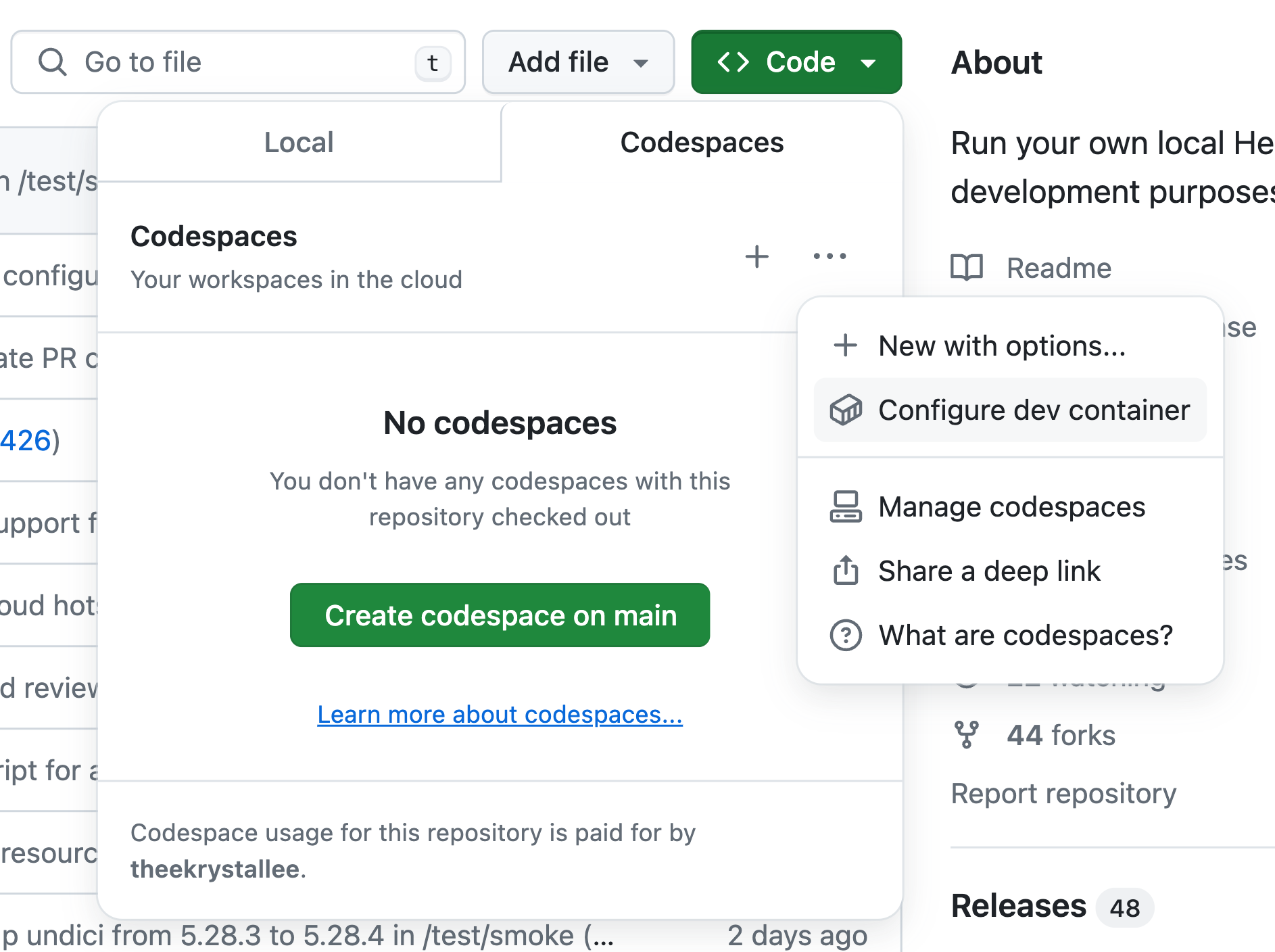
To configure the dev container, open the [Hiero Local Node repo](https://github.com/hashgraph/hedera-local-node) and click on `Code`->`Codespaces`->`...`-> `Configure dev container`.

<figure><img src="https://3596653444-files.gitbook.io/~/files/v0/b/gitbook-x-prod.appspot.com/o/spaces%2FAIZo5YJIyeFrIN8PCQgB%2Fuploads%2Fgit-blob-5bb66442ba8bf9abc9f8835fb3c7a799c4ec53a9%2Fcodespace-config-dev-container.png?alt=media" alt="" width="563"><figcaption></figcaption></figure>

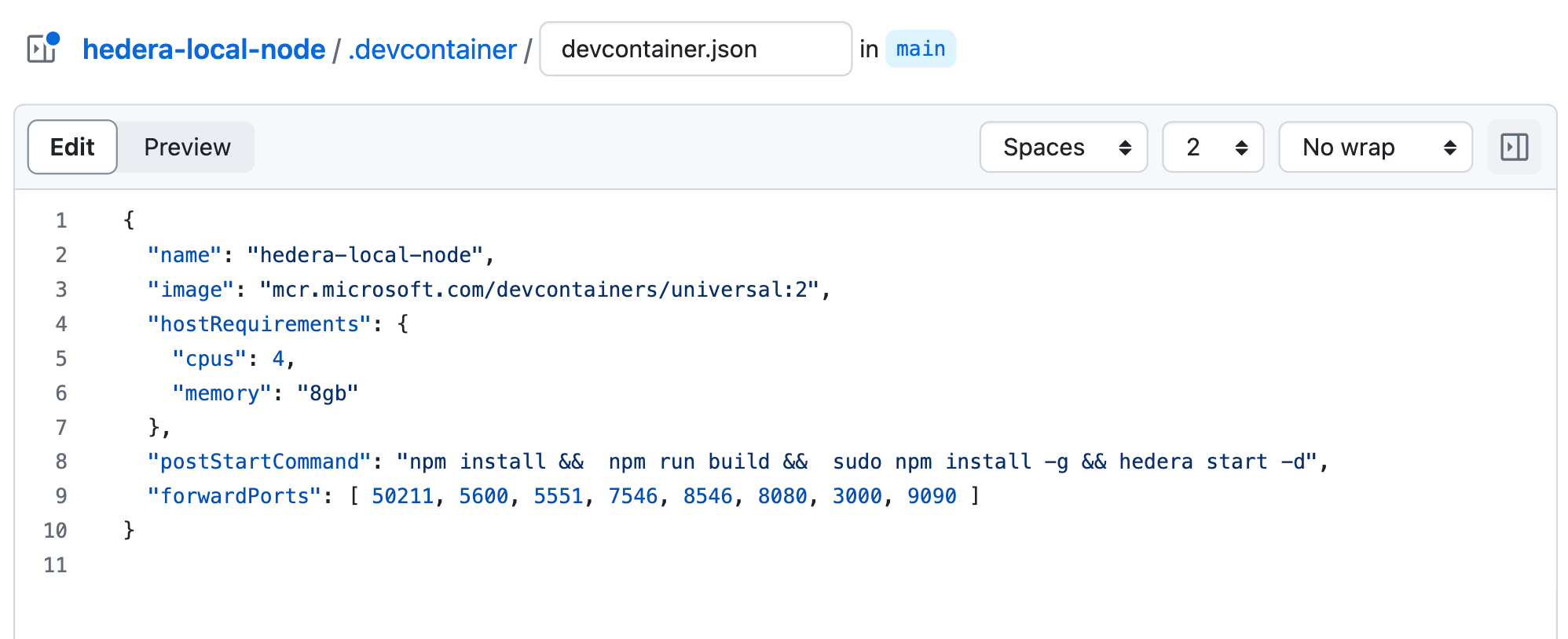
This will open the dev container configuration file where you can customize your configuration like the CPUs and memory.

<figure><img src="https://3596653444-files.gitbook.io/~/files/v0/b/gitbook-x-prod.appspot.com/o/spaces%2FAIZo5YJIyeFrIN8PCQgB%2Fuploads%2Fgit-blob-198078a90f7578b93ac053eb5a80773fdbde7b68%2Fcodespace-config-file.png?alt=media" alt=""><figcaption></figcaption></figure>

{% hint style="info" %}
**Note**: If you make changes to your config file, commit and push your changes before running local node, to ensure the project starts with the right configuration.
{% endhint %}

## Creating and Running Your Codespace

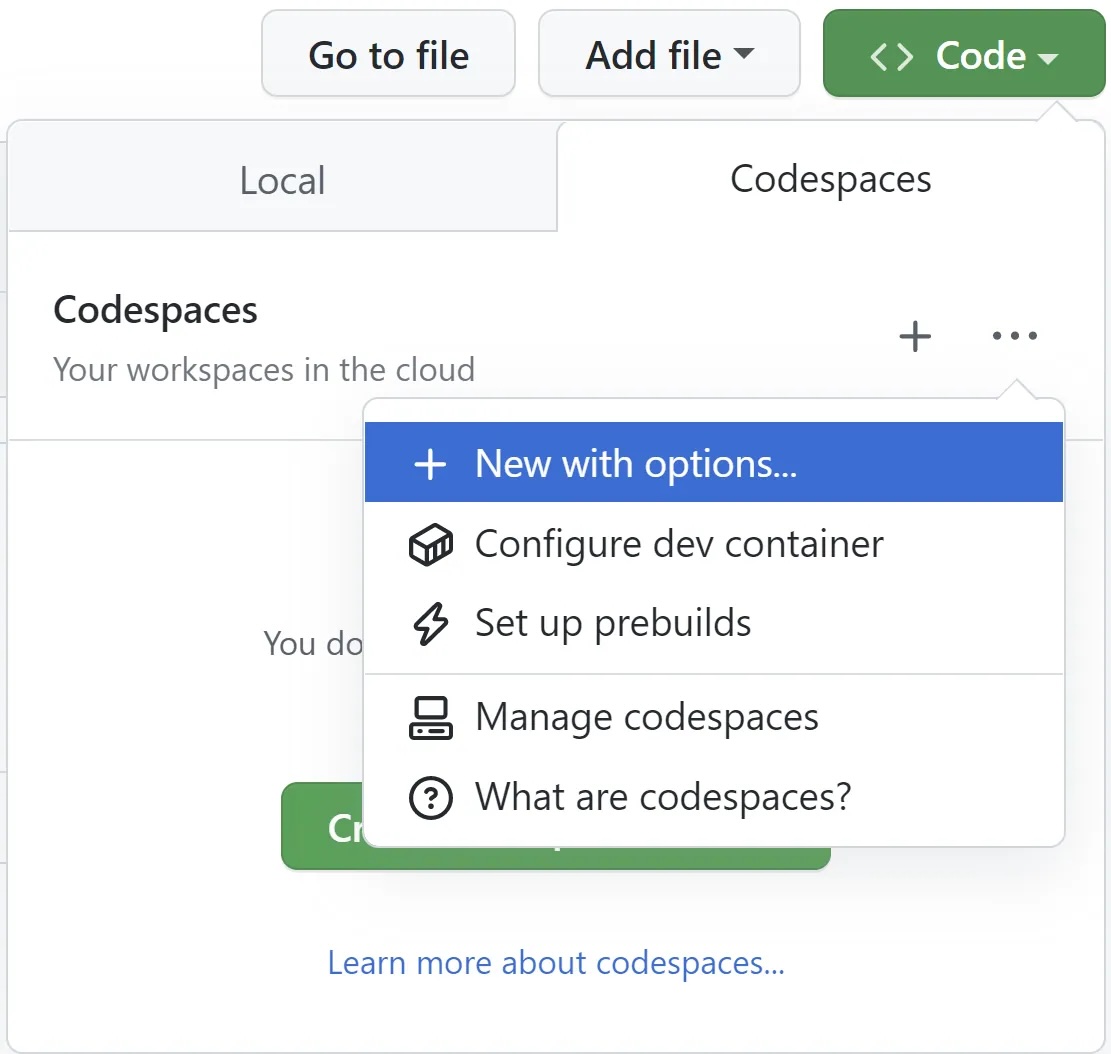
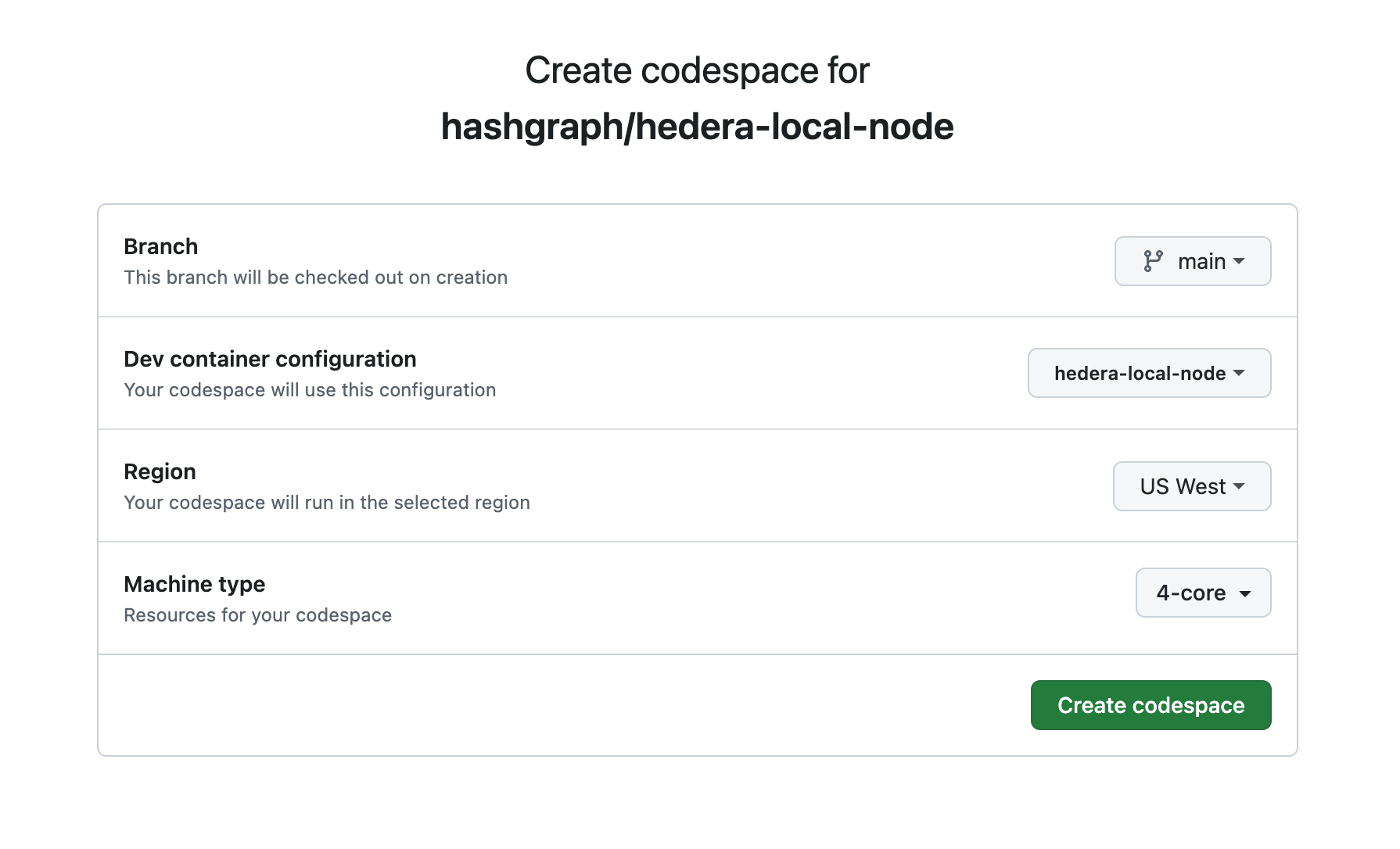
Open the [Hiero Local Node repo](https://github.com/hashgraph/hedera-local-node) and click on the `Code`->`Codespaces`->`...`-> `New with options...` button and choose the appropriate settings:

<figure><img src="https://3596653444-files.gitbook.io/~/files/v0/b/gitbook-x-prod.appspot.com/o/spaces%2FAIZo5YJIyeFrIN8PCQgB%2Fuploads%2Fgit-blob-920c83d8017f652e2de802e20ff047387809cf03%2Flocal-node-codespaces.jpeg?alt=media" alt="" width="563"><figcaption></figcaption></figure>

Once your codespace is created, the template repository will be automatically cloned into it. Your codespace is all set up, and the local node is running!

<figure><img src="https://3596653444-files.gitbook.io/~/files/v0/b/gitbook-x-prod.appspot.com/o/spaces%2FAIZo5YJIyeFrIN8PCQgB%2Fuploads%2Fgit-blob-3c2922e85434e07ad8a264e9ef9cef5cf1260b25%2Flocal-node-codespace-config.png?alt=media" alt=""><figcaption></figcaption></figure>

***

## Conclusion and Additional Resources

Congrats on successfully setting up your Codespace and running a Hiero Local Node!

**➡** [**Hiero Local Node Repository**](https://github.com/hashgraph/hedera-local-node#readme)

**➡** [**Quickstart for GitHub Codespaces**](https://docs.github.com/en/codespaces/getting-started/quickstart)

**➡** [**Adding Dev Container Config to Repo**](https://docs.github.com/en/codespaces/setting-up-your-project-for-codespaces/adding-a-dev-container-configuration)


# Run in Gitpod

The local network comprises the consensus node, mirror node, [JSON-RPC relay](https://github.com/hashgraph/hedera-json-rpc-relay#readme), and other Consensus Node services and now be set up without Docker and draining your computer’s resources by using Gitpod. Gitpod provides Cloud Development Environments (CDEs) and allows developers to work from any device without the need to maintain static and brittle local development environments. By the end of this tutorial, you will have your Hedera local node running on Gitpod.

***

## Prerequisites

* Signed into your GitHub account in your browser.
* [Register](https://gitpod.io/login/) a Gitpod account with your GitHub account.
* If this is your first time using Gitpod, please read the [Gitpod getting started](https://www.gitpod.io/docs/introduction/getting-started) guide.
* Install the [Gitpod browser extension](https://www.gitpod.io/docs/configure/user-settings/browser-extension).
* The Mirror Node Web Explorer requires [VS Code Desktop](https://www.gitpod.io/docs/references/ides-and-editors/vscode) to be installed, as [VS Code Browser](https://www.gitpod.io/docs/references/ides-and-editors/vscode-browser) has limitations related to communicating with local ports, e.g. `http://127.0.0.1:5551/`.

***

## Set Up Gitpod Permissions

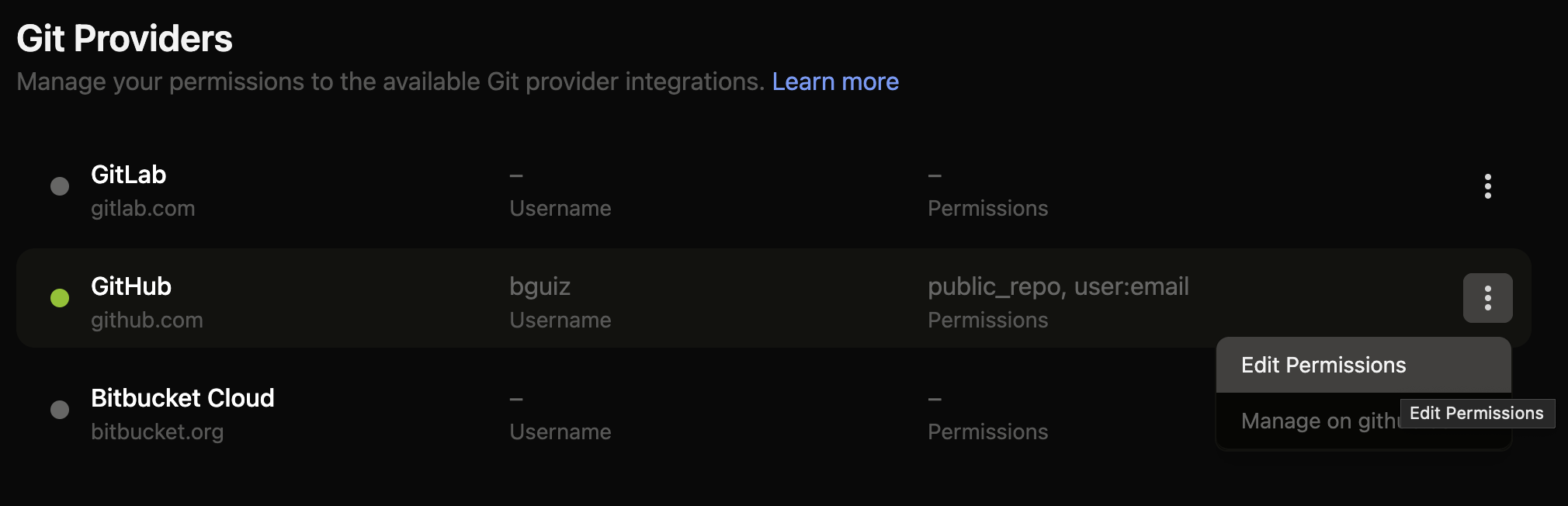
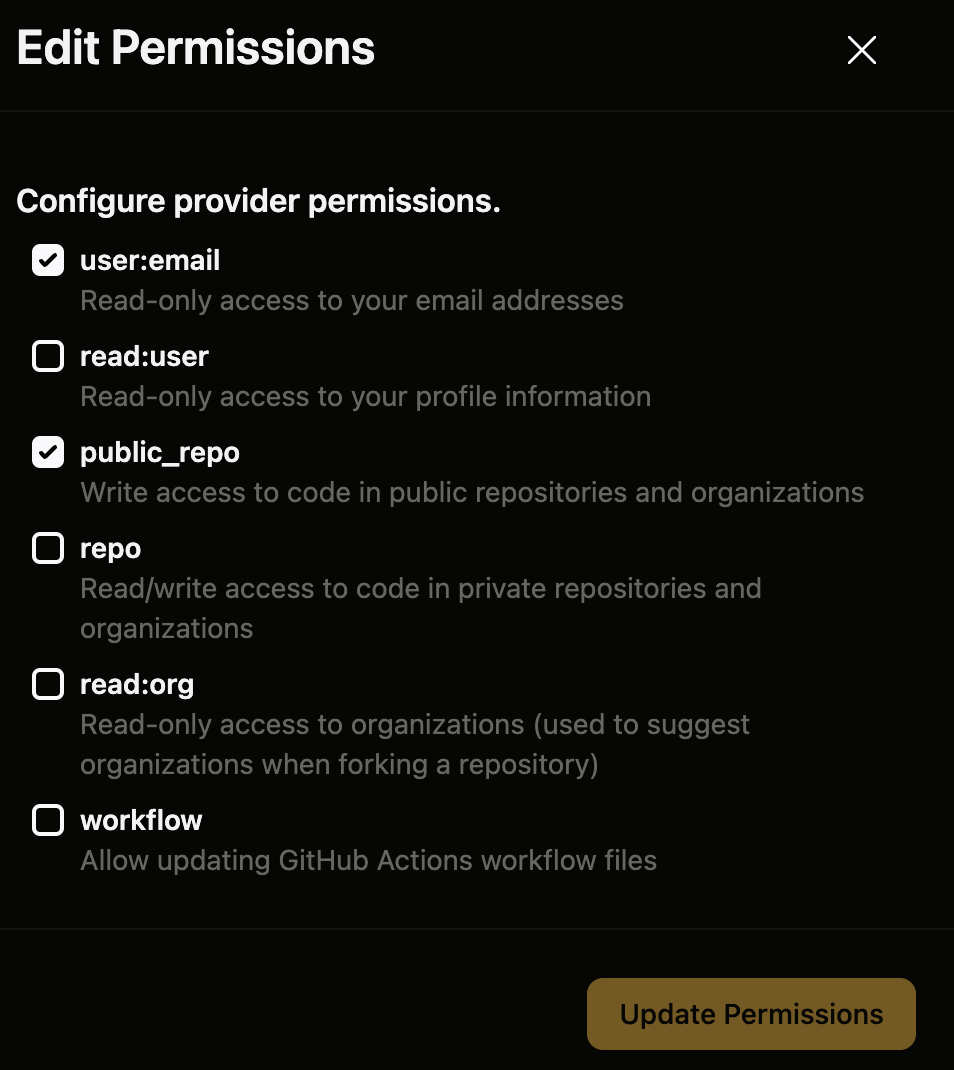
Enable `public_repo` permission for the GitHub provider on [Gitpod’s Git integrations page](https://gitpod.io/user/integrations).

<figure><img src="https://3596653444-files.gitbook.io/~/files/v0/b/gitbook-x-prod.appspot.com/o/spaces%2FAIZo5YJIyeFrIN8PCQgB%2Fuploads%2Fgit-blob-ce1dae34f34bf7892945885dfc6933f7120e0b3e%2Fgitpod-git-providers-table.png?alt=media" alt=""><figcaption></figcaption></figure>

<figure><img src="https://3596653444-files.gitbook.io/~/files/v0/b/gitbook-x-prod.appspot.com/o/spaces%2FAIZo5YJIyeFrIN8PCQgB%2Fuploads%2Fgit-blob-5c761fd1c88d4f9e79efad1dd5a2cccfb4381d66%2Fgitpod-git-providers-edit-permissions-dialog.png?alt=media" alt="" width="563"><figcaption></figcaption></figure>

***

## Running the Hiero Local Node

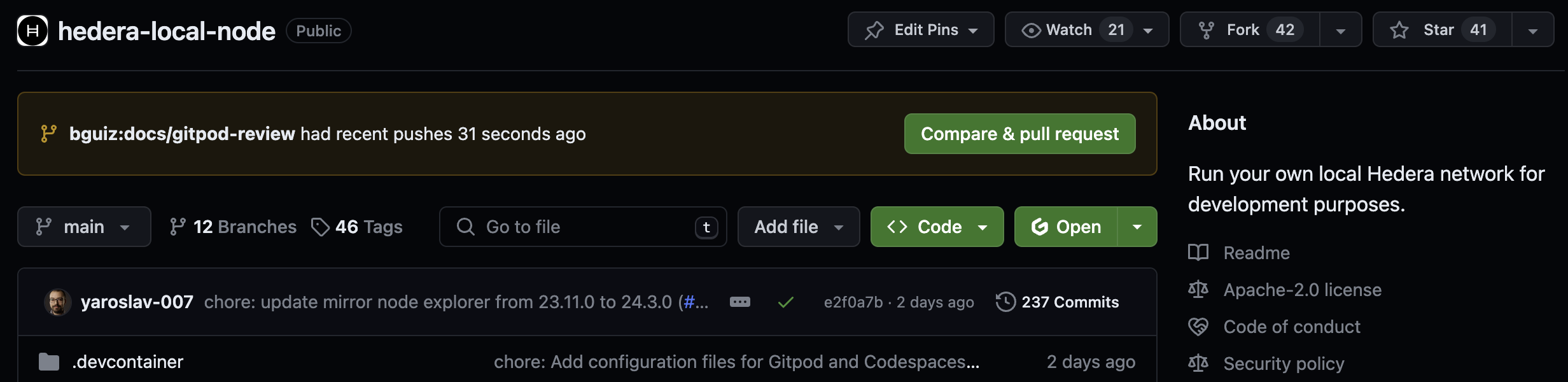
The `hiero-local-node` project repository already has a Gitpod configuration file ([`.gitpod.yml`](https://github.com/hashgraph/hedera-local-node/blob/main/.gitpod.yml)), which makes it easy to run it within a workspace on Gitpod. Open the [Hiero Local Node repo](https://github.com/hashgraph/hedera-local-node). Click on the Gitpod `Open` button.

<figure><img src="https://3596653444-files.gitbook.io/~/files/v0/b/gitbook-x-prod.appspot.com/o/spaces%2FAIZo5YJIyeFrIN8PCQgB%2Fuploads%2Fgit-blob-f40cdec849514fb77187c11a54f94b190c8f5772%2Fgitpod-button-github-repo.png?alt=media" alt=""><figcaption></figcaption></figure>

The Gitpod browser extension modifies the Github UI to add this button. This will spin up a new Gitpod workspace with your choice of CDE which will run the Hiero Local Node in your cloud environment.

### **Testing the Setup**

To confirm everything is running smoothly, run the `curl` commands below to query the mirror node for a list of accounts, query the JSON-RPC relay for the latest block, and open the mirror node explorer (HashScan) using the local endpoint (<http://localhost:8080/devnet/dashboard>).

**Mirror Node REST API**

The following command queries the Mirror Node for a list of accounts on your Hedera network.

```bash
curl "http://localhost:5551/api/v1/accounts" \
  -X GET
```

See the [Mirror Node interact API docs](https://testnet.mirrornode.hedera.com/api/v1/docs/) for a full list of available APIs.

**JSON RPC Relay**

The following command queries the RPC Relay for the latest block on your Hedera network.

{% code overflow="wrap" %}

```bash
curl "<http://localhost:7546>" \\
  -X POST \\
  -H "Content-Type: application/json" \\
  --data '{"method":"eth_getBlockByNumber","params":["latest",false],"id":1,"jsonrpc":"2.0"}'
```

{% endcode %}

See the [endpoint table](https://github.com/hashgraph/hedera-json-rpc-relay/blob/main/docs/rpc-api.md#endpoint-table) in `hiero-json-rpc-relay` for a full list of available RPCs.

**Mirror Node Explorer (Hashscan)**

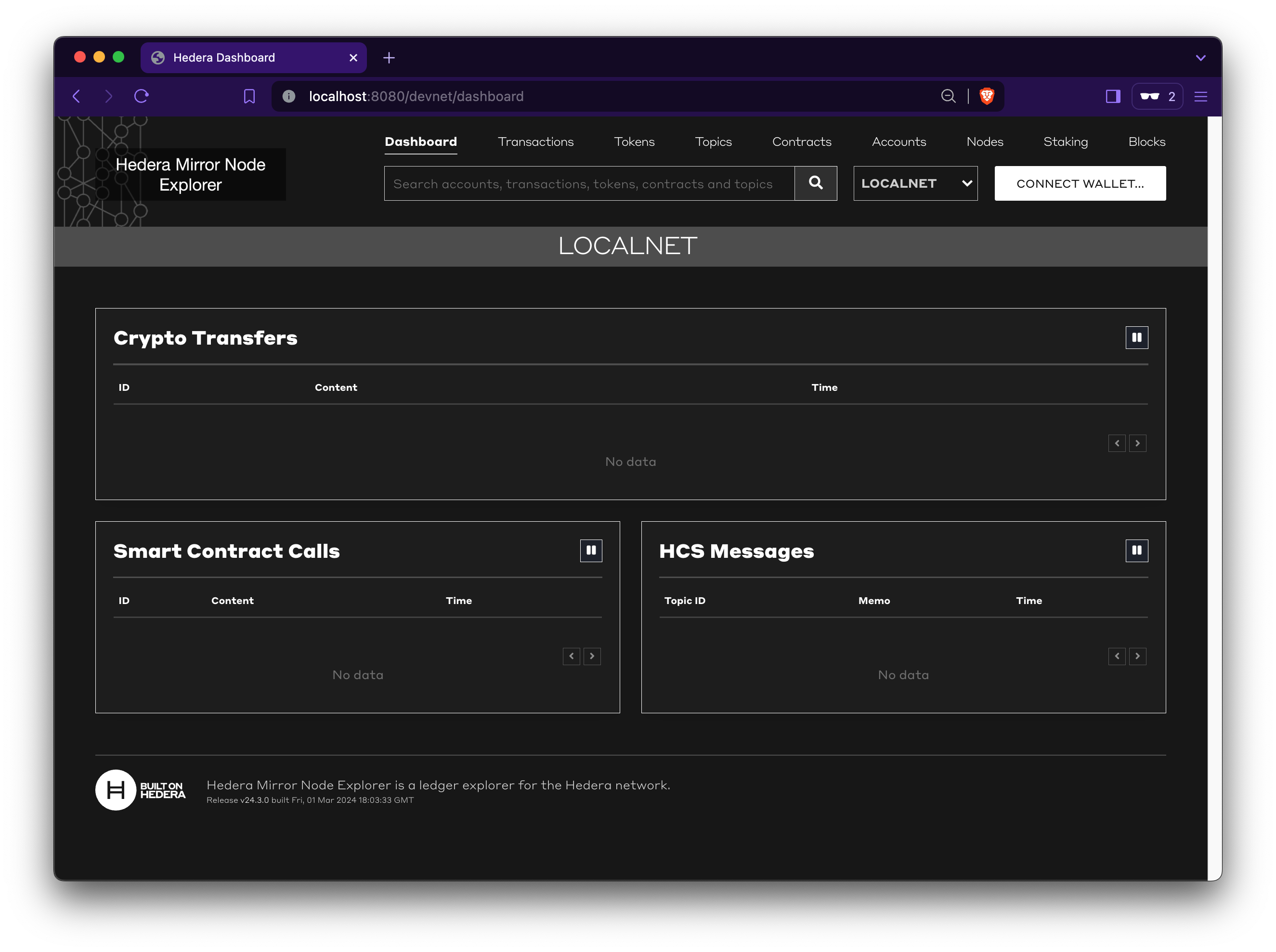
Visit the local mirror node explorer endpoint (<http://localhost:8080/devnet/dashboard>) in your web browser. Ensure that `LOCALNET` is selected, as this will show you the Hedera network running within your Gitpod, and not one of the public nodes.

<figure><img src="https://3596653444-files.gitbook.io/~/files/v0/b/gitbook-x-prod.appspot.com/o/spaces%2FAIZo5YJIyeFrIN8PCQgB%2Fuploads%2Fgit-blob-5a58d40cb9fc5a27a7c19ce2784a55405e9c3e4c%2Fmirror-node-explorer-localnet.png?alt=media" alt=""><figcaption></figcaption></figure>

### Shut Down the Gitpod Workspace

{% hint style="warning" %}
**Note**: Gitpod usage is billed by the hour on paid plans, and hours are limited on the free plans. Therefore, once completed, remember to stop the Gitpod workspace.
{% endhint %}

<figure><img src="https://3596653444-files.gitbook.io/~/files/v0/b/gitbook-x-prod.appspot.com/o/spaces%2FAIZo5YJIyeFrIN8PCQgB%2Fuploads%2Fgit-blob-a2bea1a378989cb2ec7a89647013a49062fe16c4%2Fgitpod-stop-workspace.png?alt=media" alt="" width="563"><figcaption></figcaption></figure>

***

## Conclusion and Additional Resources

Congrats on successfully setting up your Gitpod workspace and running a Hiero Local Node!

**➡** [**Hiero Local Node Repository**](https://github.com/hashgraph/hedera-local-node#readme)

**➡** [**Gitpod Documentation**](https://www.gitpod.io/docs/introduction/getting-started)


# Hiero SDKs

Hiero supported and community-maintained SDKs

There are several options for friendly, language-specific access to the Hiero API and its network services.

## Hiero SDK Collaboration Hub

The [**Hiero SDK Collaboration Hub**](https://github.com/hiero-ledger/sdk-collaboration-hub) repo serves as a collaborative space for design proposals, contribution guidelines, templates, and other helpful documentation to support Hiero SDK contributors.

To follow the latest news and collaborate with other maintainers in Hiero's SDKs, join our [**bi-weekly meeting**](https://zoom-lfx.platform.linuxfoundation.org/meetings/hiero?view=week\&occurrence=1760968800).

## Hiero Consensus Node SDKs

Hiero and the developer community contribute to and maintain Hiero Consensus Node SDKs across various languages.

{% hint style="info" %}
**Note:** The Hiero JavaScript SDK supports React Native with Expo on Android devices and Android emulators. It does not currently support React Native Bare.
{% endhint %}

<table data-view="cards"><thead><tr><th align="center"></th><th align="center"></th><th align="center"></th><th align="center"></th><th data-hidden data-card-cover data-type="files"></th><th data-hidden data-card-target data-type="content-ref"></th></tr></thead><tbody><tr><td align="center"><strong>Hiero Java SDK</strong></td><td align="center">Maintainer: Hiero</td><td align="center">License: Apache 2.0</td><td align="center"><a href="https://github.com/hashgraph/hedera-sdk-java"><mark style="color:purple;"><strong>GITHUB</strong></mark></a></td><td></td><td><a href="https://github.com/hashgraph/hedera-sdk-java">https://github.com/hashgraph/hedera-sdk-java</a></td></tr><tr><td align="center"><strong>Hiero JavaScript SDK</strong></td><td align="center">Maintainer: Hiero</td><td align="center">License: Apache 2.0</td><td align="center"><a href="https://github.com/hashgraph/hedera-sdk-js"><mark style="color:purple;"><strong>GITHUB</strong></mark></a></td><td></td><td><a href="https://github.com/hashgraph/hedera-sdk-js">https://github.com/hashgraph/hedera-sdk-js</a></td></tr><tr><td align="center"><strong>Hiero Go SDK</strong></td><td align="center">Maintainer: Hiero</td><td align="center">License: Apache 2.0</td><td align="center"><a href="https://github.com/hashgraph/hedera-sdk-go"><mark style="color:purple;"><strong>GITHUB</strong></mark></a></td><td></td><td><a href="https://github.com/hashgraph/hedera-sdk-go">https://github.com/hashgraph/hedera-sdk-go</a></td></tr><tr><td align="center"><strong>Hiero Swift SDK</strong></td><td align="center">Maintainer: Hiero</td><td align="center">License: Apache 2.0</td><td align="center"><a href="https://github.com/hashgraph/hedera-sdk-swift"><mark style="color:purple;"><strong>GITHUB</strong></mark></a></td><td></td><td><a href="https://github.com/hashgraph/hedera-sdk-swift">https://github.com/hashgraph/hedera-sdk-swift</a></td></tr><tr><td align="center"><strong>Hiero Rust SDK</strong></td><td align="center">Maintainer: Hiero</td><td align="center">License: Apache 2.0</td><td align="center"><a href="https://github.com/hiero-ledger/hiero-sdk-rust"><mark style="color:purple;"><strong>GITHUB</strong></mark></a></td><td></td><td><a href="https://github.com/hiero-ledger/hiero-sdk-rust">https://github.com/hiero-ledger/hiero-sdk-rust</a></td></tr><tr><td align="center"><strong>Hiero C++ SDK</strong></td><td align="center">Maintainer: Hiero</td><td align="center">License: Apache 2.0</td><td align="center"><a href="https://github.com/hiero-ledger/hiero-sdk-cpp"><mark style="color:purple;"><strong>GITHUB</strong></mark></a></td><td></td><td><a href="https://github.com/hiero-ledger/hiero-sdk-cpp">https://github.com/hiero-ledger/hiero-sdk-cpp</a></td></tr><tr><td align="center"><strong>Hiero Python SDK</strong></td><td align="center">Maintainer: Community</td><td align="center">License: Apache 2.0</td><td align="center"><a href="https://github.com/hiero-ledger/hiero-sdk-python"><mark style="color:purple;"><strong>GITHUB</strong></mark></a></td><td></td><td><a href="https://github.com/hiero-ledger/hiero-sdk-python">https://github.com/hiero-ledger/hiero-sdk-python</a></td></tr><tr><td align="center"><strong>Hiero DID SDK Python</strong></td><td align="center">Maintainer: Hiero</td><td align="center">License: Apache 2.0</td><td align="center"><a href="https://github.com/hiero-ledger/hiero-did-sdk-python"><mark style="color:purple;"><strong>GITHUB</strong></mark></a></td><td></td><td><a href="https://github.com/hiero-ledger/hiero-did-sdk-python">https://github.com/hiero-ledger/hiero-did-sdk-python</a></td></tr></tbody></table>

Want to help contribute or have a project you'd like to see, here? Join the [community calls](https://www.lfdecentralizedtrust.org/meeting-calendar) to propose your project, or add a [pull request](https://github.com/hiero-ledger/hiero-docs)!


# Hiero Block Node

Hiero Block Nodes form the decentralised data layer of a Hiero network — receiving, verifying, storing, and serving the block stream produced by Consensus Nodes.

<table data-view="cards"><thead><tr><th></th><th></th><th data-hidden data-card-target data-type="content-ref"></th></tr></thead><tbody><tr><td><strong>Block Node Introduction</strong></td><td>New to Block Nodes? Start here - what a Block Node is, who it is for, and where to go next based on your role.</td><td><a href="/block-node-home/block-node-introduction">Block Node Introduction</a></td></tr><tr><td><strong>Block Node Overview</strong></td><td>What a Block Node is, how it fits in the Hiero network, tiers, deployment profiles, and operator responsibilities.</td><td><a href="/block-node-home/block-node-overview">Block Node Overview</a></td></tr><tr><td><strong>Block Node Types and Tiers</strong></td><td>Full taxonomy of Block Node types: Rolling-History, Full Node, Light Node, Private-Cloud, Archive Server, and Community Node.</td><td><a href="/block-node-home/block-node-types">Block Node Types and Tiers</a></td></tr><tr><td><strong>Deployment</strong></td><td>Hardware requirements, Solo Provisioner setup, Kubernetes deployment, and local development quickstart.</td><td><a href="/block-node-home/deployment">Deployment</a></td></tr></tbody></table>


# Block Node Introduction

The Hiero network reaches consensus on transactions continuously, bundling each round of results into a **block** - a permanent, cryptographically signed record of everything that finalized in that round. A **Block Node** is a server that receives these blocks, verifies their authenticity, stores them, and streams them to applications and services that need them.

If you have used a [Mirror Node](/block-node-home/reference/glossary#mirror-node), you know the model: block data is indexed into a database and exposed through a REST API you query for history. A Block Node is different - it delivers each block over a live [block stream](/block-node-home/reference/glossary#block-stream) directly to your application, in real time, with a cryptographic proof that the data came from [Consensus Nodes](/block-node-home/reference/glossary#consensus-node) and not from a third-party index. That means your application can react to transactions the moment they finalize and independently verify that the data is exactly what the network agreed on.

## Who is this for?

**Consensus Node operators and Governing Council members.** Your Consensus Node publishes blocks to [Tier 1 Block Nodes](/block-node-home/reference/glossary#tier-1-block-node), which are responsible for storing that data and distributing it to the rest of the network. Understanding Block Nodes helps you know how your blocks are stored, how they are redistributed, and what operational behavior to expect when you pair with a Tier 1 operator.

**Developers and enterprises building on Hiero.** If you are building a wallet, explorer, analytics platform, or compliance tool, Block Nodes expose the block stream over gRPC: subscribe once and each finalized block is pushed to your application automatically. You can also query any block by number and retrieve cryptographic proofs on demand, so you can give users independently verifiable data without depending on a third-party index.

**Community and permissionless operators.** You do not need Council membership or Consensus Node access to run a Block Node. [Tier 2 operators](/block-node-home/reference/glossary#tier-2-block-node) connect to an existing Block Node, receive the same verified block stream, and redistribute it to downstream consumers - whether to run a public stream service, power a regional deployment, or supply data to applications without operating a Consensus Node. No permission required.

**Mirror Node operators.** Your current setup downloads record files from Google Cloud Storage. That model is being replaced: Mirror Nodes will migrate to consuming block streams from Block Nodes directly. Block Nodes are the upstream data source your pipeline is moving to, and this documentation explains how that integration works.

**Just learning or exploring.** You do not need to run or integrate with a Block Node to understand how they work. Read through the sections below to build a mental model of where Block Nodes sit in the Hiero ecosystem, then follow the "Where to go next" links for deeper technical details or deployment guides.

## Background

Block stream infrastructure is driven by two [Hiero Improvement Proposals](/block-node-home/reference/glossary#hip-hiero-improvement-proposal): [HIP-1056](https://hips.hedera.com/hip/hip-1056) standardized the block stream format, and [HIP-1081](https://hips.hedera.com/hip/hip-1081) defined Block Nodes as the dedicated infrastructure for receiving it.

Before block streams, Consensus Nodes wrote batched record files to a shared cloud storage bucket and Mirror Nodes downloaded those files on a periodic polling schedule. Block streams replace that file-pull model with a stream-push design: blocks flow directly from consensus to consumers in real time, with a chain of cryptographic proofs linking each block back to the Consensus Nodes that produced it.

## How it works

Consensus Nodes produce a block for every round of consensus and publish it directly to Tier 1 Block Nodes. Each Tier 1 Block Node verifies the block's cryptographic proof - checking that the block was signed by the Consensus Nodes and has not been altered - stores it, and fans it out downstream to Mirror Nodes, Tier 2 Block Nodes, and applications that subscribe directly.

[Tier 2 Block Nodes](/block-node-home/reference/glossary#tier-2-block-node) follow the same pattern one level downstream: they connect to a Tier 1 Block Node or another Tier 2, receive the same verified stream, and redistribute it to their own subscribers. This lets community operators run their own distribution layer without needing direct access to Consensus Nodes.

![block-node-network-architecture](https://3596653444-files.gitbook.io/~/files/v0/b/gitbook-x-prod.appspot.com/o/spaces%2FAIZo5YJIyeFrIN8PCQgB%2Fuploads%2Fgit-blob-0472eadd9564e9e89ba7518ae9f42dffc02bc21e%2Fblock-node-network-architecture.svg?alt=media)

*Consensus Nodes publish block streams to Tier 1 Block Nodes. Tier 1 Block Nodes verify each block's proof, store it, and redistribute the stream downstream to Mirror Nodes, Tier 2 Block Nodes, and directly subscribed applications.*

## What Block Nodes do

A Block Node performs five core functions for every block it receives:

* **Ingest** a live block stream from one or more Consensus Nodes or upstream Block Nodes.
* **Verify** each block's cryptographic integrity against the [block proof](/block-node-home/reference/glossary#block-proof) produced by Consensus Nodes.
* **Store** verified blocks on local NVMe, bulk HDD, or S3-compatible cloud archive, depending on the operator's deployment profile.
* **Stream** blocks downstream to Mirror Nodes, other Block Nodes, and applications over gRPC.
* **Serve** individual blocks on demand via random-access retrieval and cryptographic block proofs, enabling use cases like historical audits, compliance checks, and re-verification of past transactions.

## Where to go next

**To learn more about Block Nodes:**

* [Block Node Overview](/block-node-home/block-node-overview) - covers tiers, deployment profiles, and operator responsibilities in depth.
* [Block Node Types and Tiers](/block-node-home/block-node-types) - describes the full taxonomy of node types.

**To start development or deployment:**

* **Tier 1 operator** (Council member or trusted network partner) - [Production Prerequisites](/block-node-home/production-runbook/prerequisites)
* **Tier 2 operator** - [Deploy with Solo Provisioner](/block-node-home/deployment/solo-weaver-single-node-k8s-deployment) or [Bare-Metal Kubernetes Deployment](/block-node-home/deployment/single-node-k8s-deployment)
* **Developer** - [Block Node gRPC API Quickstart](https://github.com/hiero-ledger/hiero-docs/tree/master/block-node/block-node/api-quickstart.md) to query and subscribe to the block stream. To run your own instance, see [Deploy with Solo Provisioner](/block-node-home/deployment/solo-weaver-single-node-k8s-deployment).


# Block Node Overview

Block Nodes represent a new class of nodes in a Hiero network designed to increase decentralization and network data distribution. They enable operators to assume responsibility for long-term block and state storage while supporting the security and performance characteristics of a Hiero network.

This overview document provides operators with the essential concepts needed to understand Block Node roles and responsibilities before diving into deployment.

## What is a Block Node?

A Block Node is a special kind of server that keeps a complete, trustworthy copy of what is happening on a Hiero network. It receives a stream of already-agreed blocks from [Consensus Nodes](/block-node-home/reference/glossary#consensus-node), delivers the block stream via the subscribe API, checks that each block is valid, stores valid blocks, and serves single blocks via API query. In the future Block Nodes will also maintain an accurate copy of the current network state and will serve state related queries via new APIs.

Instead of pushing this data into centralized cloud storage, Block Nodes act as a decentralized data layer for the network. They stream blocks to [Mirror Nodes](/block-node-home/reference/glossary#mirror-node) and other Block Nodes, answer questions from apps and services about past blocks or current state, and serve the cryptographic proofs produced by Consensus Nodes so users can independently verify that the data is correct.

## How Block Nodes differ from other nodes

| **Aspect**                     | **Consensus Node**                                                                                        | **Block Node**                                                                                                    | **Mirror Node**                                                                                                                    |
| ------------------------------ | --------------------------------------------------------------------------------------------------------- | ----------------------------------------------------------------------------------------------------------------- | ---------------------------------------------------------------------------------------------------------------------------------- |
| Primary role                   | Reach consensus and update canonical state.                                                               | Ingest, verify, store, and serve blocks, and state.                                                               | Provide value‑added access to historical data and analytics.                                                                       |
| Produces blocks                | Yes – produces finalized block streams per **(**[**HIP-1056**](https://hips.hedera.com/hip/hip-1056)**)** | No – consumes and verifies blocks from Consensus Nodes or upstream Block Nodes.                                   | No – will consume data from Block Nodes once the cutover lands; today Mirror Nodes still download record files from cloud storage. |
| Maintains full consensus state | Yes – authoritative state, optimized for consensus.                                                       | (planned) Manages an active copy of network state locally, updated with `StateChanges`; supports reconnect flows. | No – maintains data in an indexed form as needed for queries and analytics.                                                        |
| Data APIs                      | gRPC for transactions/queries; no history.                                                                | Streaming gRPC APIs for live and historical blocks, random-access retrieval, state, and proofs.                   | Public REST and custom APIs for queries and observability.                                                                         |
| Who runs it                    | Governing Council and approved operators.                                                                 | Tier 1: Council / trusted; Tier 2: permissionless operators, service providers, app teams, and infra providers.   | Permissionless operators, service providers, and app teams.                                                                        |

## Role in the Hiero Network

Block Nodes act as the trusted historians and data providers for a Hiero network. They receive block streams from Consensus Nodes, verify that each block and its data are correct, and durably store valid blocks for downstream consumption. Block Nodes distribute blocks to downstream clients—including Mirror Nodes, other Block Nodes, and applications—so anyone can access real-time or historical data. Each block includes cryptographic proofs produced by Consensus Nodes, making it possible for users and applications to independently verify the accuracy of the network's history without relying on a single provider.

Block Nodes provide these core services:

* [Block Stream](/block-node-home/reference/glossary#block-stream) ingestion, verification, and distribution.
* Storage and serving of cryptographic [block proofs](/block-node-home/reference/glossary#block-proof) produced by Consensus Nodes, enabling independent verification of block data.
* Durable storage of blocks on local disk or S3-compatible archival storage.
* Real-time and historical data streaming to downstream clients.
* Random-access retrieval of blocks at specific block heights.
* State snapshot creation and reconnect services *(planned — not currently in active development)*.

![block-node-network-architecture](https://3596653444-files.gitbook.io/~/files/v0/b/gitbook-x-prod.appspot.com/o/spaces%2FAIZo5YJIyeFrIN8PCQgB%2Fuploads%2Fgit-blob-0472eadd9564e9e89ba7518ae9f42dffc02bc21e%2Fblock-node-network-architecture.svg?alt=media)

### How Data Flows Through the Network

The diagram above illustrates the complete data flow:

1. **Consensus Nodes produce blocks** - Users submit transactions via gRPC to Consensus Nodes, which reach consensus through Hashgraph and produce finalized blocks with block proofs containing [aggregated signatures](/block-node-home/reference/glossary#aggregated-signatures).
2. **Block Nodes receive and verify** - [Tier 1](/block-node-home/reference/glossary#tier-1-block-node) Block Nodes receive block streams directly from Consensus Nodes, verify block integrity, and store verified blocks and state to local disk and (optionally) S3-compatible archival storage.
3. **Block Nodes distribute downstream** - block streams fan out to:
   * **Mirror Nodes** - for public REST APIs and explorer services
   * **Tier 2 Block Nodes** - for geographic redundancy and permissionless participation
   * **Applications** - via gRPC/REST APIs for custom integrations
4. **Block Nodes support Consensus Node recovery** *(planned)* - When a Consensus Node falls behind, it will be able to request reconnect data from Block Nodes to quickly resynchronize. This capability is not currently in active development.

## Example Use Cases

* Running an API server for wallets, explorers, or dApps to access verified blockchain data.
* Operating analytics or aggregation pipelines using live and historical block streams.
* Providing specialized compliance, archival, or network recovery support for Hiero services.

## Block Node Tiers and Configuration

A Block Node's tier describes where it gets its block stream from. The same core software runs at every tier; the differences are operational.

| **Tier**                                                        | **Description**                                                  | **Typical Operators**               | **Key Focus**                              |
| --------------------------------------------------------------- | ---------------------------------------------------------------- | ----------------------------------- | ------------------------------------------ |
| [Tier 1](/block-node-home/reference/glossary#tier-1-block-node) | Receive streams directly from Consensus Nodes; high reliability. | Governing Council, trusted entities | Verification, reconnect, state management. |
| [Tier 2](/block-node-home/reference/glossary#tier-2-block-node) | Receive streams from Tier 1 or another Tier 2; permissionless.   | Community, enterprises              | Streaming, proofs, geographic redundancy.  |

Beyond tiers, operators can deploy a Block Node in different types — for example Full Node, Rolling-History, Light Node, Private-Cloud, Archive Server, or Community Node — by combining different sets of plugins. See [Block Node Types and Tiers](/block-node-home/block-node-types) for the full taxonomy.

### Choose Your Tier

**Choose Tier 1 if:**

* You are a member of the Hiero network's governance structure or trusted network partner.
  * In the public Hiero network a governance member is an Hiero Governing Council member.
* You have authorization to peer directly with Consensus Nodes.
* You can commit to high-availability SLAs (99.9%+ uptime).
* You want to provide reconnect services to Consensus Nodes.
* You are able to operate a bare‑metal server that meets the recommended hardware specifications described in the [Block Node Hardware Specifications](/block-node-home/deployment/block-node-hardware-specifications).

**Choose Tier 2 if:**

* You are a community operator, enterprise, or infrastructure provider.
* You want to participate without special permissions (permissionless).
* You can receive block streams from existing Tier 1 or Tier 2 Block Nodes.
* Your focus is on streaming verified data to applications or Mirror Nodes.
* Your goals include developing and providing value-added services based on Block Stream data.

> **Note:** Tier 2 nodes are truly permissionless—anyone can deploy one without approval or registration. You simply configure your node to connect to one or more existing Block Nodes (Tier 1 or Tier 2) for upstream block streams.

### Choose Your Deployment Profile

Once you know your tier, select the plugin profile that matches your storage strategy. Profiles are pre-built Helm values overrides shipped in the [`charts/block-node-server/values-overrides/`](https://github.com/hiero-ledger/hiero-block-node/tree/main/charts/block-node-server/values-overrides) directory and applied with the `-f` flag during Helm install, or selected interactively by Solo Provisioner.

| Goal                                           | Profile                                                                                                                                                                                                   | Storage strategy                                  | Hardware sizing                                                                                                             |
| ---------------------------------------------- | --------------------------------------------------------------------------------------------------------------------------------------------------------------------------------------------------------- | ------------------------------------------------- | --------------------------------------------------------------------------------------------------------------------------- |
| Tier 1 — full block history on local disk      | [`plugin-profile-lfh`](https://github.com/hiero-ledger/hiero-block-node/blob/main/charts/block-node-server/values-overrides/plugin-profile-lfh.yaml)                                                      | Local NVMe (recent) + local HDD (archive)         | [LFH spec](/block-node-home/deployment/block-node-hardware-specifications#local-full-history-lfh)                           |
| Tier 1 — recent blocks local, history in cloud | [`plugin-profile-rfh`](https://github.com/hiero-ledger/hiero-block-node/blob/main/charts/block-node-server/values-overrides/plugin-profile-rfh.yaml)                                                      | Local NVMe (recent) + S3-compatible cloud archive | [RFH spec](/block-node-home/deployment/block-node-hardware-specifications#remote-full-history-rfh)                          |
| Tier 1 — local history and cloud backup        | [`plugin-profile-all`](https://github.com/hiero-ledger/hiero-block-node/blob/main/charts/block-node-server/values-overrides/plugin-profile-all.yaml)                                                      | Local NVMe + local HDD + S3 archive               | [LFH spec](/block-node-home/deployment/block-node-hardware-specifications#local-full-history-lfh)                           |
| Tier 2 — full history on local disk            | [`plugin-profile-lfh`](https://github.com/hiero-ledger/hiero-block-node/blob/main/charts/block-node-server/values-overrides/plugin-profile-lfh.yaml) with `stream-publisher` removed from `plugins.names` | Local NVMe (recent) + local HDD (archive)         | [LFH spec](/block-node-home/deployment/block-node-hardware-specifications#local-full-history-lfh)                           |
| Tier 2 — recent blocks local, history in cloud | [`plugin-profile-rfh`](https://github.com/hiero-ledger/hiero-block-node/blob/main/charts/block-node-server/values-overrides/plugin-profile-rfh.yaml) with `stream-publisher` removed from `plugins.names` | Local NVMe (recent) + S3-compatible cloud archive | [RFH spec](/block-node-home/deployment/block-node-hardware-specifications#remote-full-history-rfh)                          |
| Development, testing, or testnet / previewnet  | [`plugin-profile-minimal`](https://github.com/hiero-ledger/hiero-block-node/blob/main/charts/block-node-server/values-overrides/plugin-profile-minimal.yaml)                                              | No block storage (health and status only)         | [Testnet / previewnet sizing](/block-node-home/deployment/block-node-hardware-specifications#testnet-and-previewnet-sizing) |

> **Note:** For Tier 2, no dedicated profile file exists. Start from `plugin-profile-lfh` (local history) or `plugin-profile-rfh` (cloud archive) and remove `stream-publisher` from `plugins.names`. See [configuration.md](/block-node-home/configuration/configuration#plugin-management) for the full `plugins.names` reference.

For CPU, RAM, disk, and NIC requirements for each profile, see [Block Node Hardware Specifications](/block-node-home/deployment/block-node-hardware-specifications).

## Operator Responsibilities

Block Node operators are responsible for:

* Keeping their Block Node online, monitored, and synchronized with the latest network state.
* Managing storage and retention for blocks and state snapshots.
* Securing access to APIs and infrastructure, including authentication, authorization, and network boundaries.
* Applying software upgrades in line with Hedera/Hiero releases and Block Node compatibility guidance.
* Choosing and configuring which services to expose (streaming, random access, proofs, reconnect/state snapshots) for their consumers.

## Getting Started

* [Deploy with Solo Provisioner](/block-node-home/deployment/solo-weaver-single-node-k8s-deployment) — step-by-step instructions for deploying a single Block Node instance on a cloud VM using Solo Provisioner (recommended).
* [Deploy on Bare Metal (Kubernetes)](/block-node-home/deployment/single-node-k8s-deployment) — instructions for deploying the Block Node Server Helm chart in a single-node Kubernetes environment.
* [Load Testing with Solo and NLG](/block-node-home/operations/load-testing-a-deployed-block-node-using-solo-and-nlg) — validate Block Node capacity with production-scale load before connecting to the live network.


# Block Node Types and Tiers

## Overview

[Block Nodes](/block-node-home/reference/glossary#block-node) are built from the same core software with different combinations of plugins enabled. This flexibility supports many deployment shapes - each suited to a different set of operational needs - but the many names used for these configurations have led to significant confusion.

This document is intended for Block Node operators and general readers. It defines the Block Node type and tier taxonomy, explains how the two dimensions relate to each other, and provides starting guidance for choosing a deployment configuration. It does not describe deployment steps, plugin configuration, or hardware specifications - those are covered in the linked documents.

This document is the canonical reference for two independent dimensions that describe any Block Node:

* **Tier** - where a Block Node gets its [block stream](/block-node-home/reference/glossary#block-stream) from (Tier 1 directly from Consensus Nodes; Tier 2 from another Block Node).
* **Type** - what the node stores and which services it exposes (Full Node, Rolling-History, and so on).

For step-by-step deployment guidance, Helm plugin profiles, and hardware sizing, see [Block Node Overview](/block-node-home/block-node-overview).

## Block Node Types and Tiers Visualized

![Block Node Type Diagram](https://3596653444-files.gitbook.io/~/files/v0/b/gitbook-x-prod.appspot.com/o/spaces%2FAIZo5YJIyeFrIN8PCQgB%2Fuploads%2Fgit-blob-58616ffdf88bb2d65af40fe94df27b9b9ded485b%2FBlock-Node-Tiers-and-Types.svg?alt=media)

## Choosing Your Deployment

Use these questions to identify which type fits your situation, then see [Block Node Overview - Choose Your Deployment Profile](/block-node-home/block-node-overview#choose-your-deployment-profile) for the corresponding Helm plugin profile and hardware sizing.

1. **Do you receive blocks directly from Consensus Nodes?** Yes → Tier 1. No → Tier 2.
2. **Do you need to retain the complete block history from genesis?** Yes → Full Node. No → Rolling-History (or Light Node for development and testing).
3. **Do you need to stream blocks to downstream clients** (Mirror Nodes, other Block Nodes)? Not all profiles include downstream streaming - check the profile table in Block Node Overview before choosing.
4. **Are you building or testing a new service on previewnet or testnet?** → Light Node (`plugin-profile-minimal`).

> **Note:** If you are a new community operator, Rolling-History is the most common starting point for a Tier 2 node. It covers the typical use case of serving recent blocks without committing to full genesis-to-present storage. See [Block Node Overview - Choose Your Deployment Profile](/block-node-home/block-node-overview#choose-your-deployment-profile) for the corresponding Helm profiles.

## Block Node Services

These service categories are referenced in the Block Node Types definitions below. They describe the role a node plays in the broader network based on the history it retains and serves.

* **Full History** - A service provided by some block nodes that choose to make available the entire history of the associated Hiero network, from genesis (or general availability in the case of the Hedera network).
* **Partial History** - A service provided by some block nodes that choose to make available a subset of the history of the associated Hiero network, starting from a particular block, or for a particular duration, or based on other criteria.
* **Private Archive** - A service provided by some block nodes that receive the block stream and store the data in an archive for the benefit of a particular entity, rather than the network as a whole. Examples include cloud buckets, long-term tape, or replicated local disks. Private archives are often intended for disaster recovery or offline analysis.
* **Future extensions&#x20;*****(planned)*** - The plugin system is designed to support additional services in future releases, such as custom analytics, interledger bridges, dApp-specific stream processing, and filtered block streams. None of these are provided by a standard Block Node deployment today.

## Block Node Types

* **Rolling-History** - A type of node that manages only recent block history.
  * **Retention:** Typically one day, or another operator-configured duration.
  * **Storage:** Recent blocks on local storage; optionally archives older blocks to S3-compatible cloud storage.
  * **Common use:** Most Tier 2 nodes are expected to be this type.
  * **Services:** Partial History for the retained window; optionally Private Archive.
* **Full Node** - A type of node that retains the complete block history of the network on local storage, from genesis.
  * **Storage:** Local NVMe for recent blocks; local bulk disk (HDD) for the long-term compressed block archive. See [Block Node Hardware Specifications](/block-node-home/deployment/block-node-hardware-specifications) for sizing requirements.
  * **Planned:** State management and state proof services are planned for a future release and are not yet available.
* **Light Node** - A minimal Rolling-History deployment for developing and testing new block stream based services, or for providing lightweight services that do not require extended history.
  * **Plugins:** Runs health, status, and block-access plugins without production-scale block storage or block verification.
  * **Environments:** A practical option for testnet, previewnet, or local development. See [Block Node Hardware Specifications](/block-node-home/deployment/block-node-hardware-specifications) for sizing guidance.
* **Private-Cloud** - A Block Node that ingests and stores the block stream within a private organizational boundary, serving an entity's internal needs rather than the public network.
  * **Tier:** Can be Tier 1 (receiving blocks directly from Consensus Nodes) or Tier 2 (subscribing to an upstream Block Node).
  * **Services:** Can provide almost any service, or only a few, depending on the organization's requirements.
  * **Typical use cases:** Disaster recovery archives and offline analysis pipelines.
* **Archive Server** - **Not currently deployable as a standard profile.** A theoretical type of node that provides cold storage.
  * **Status:** No plugin profile for this configuration exists in the current release.
* **Community Node** - A Block Node operated by any entity other than a network council member or an entity contracted by the network council to operate Block Nodes.
  * **Designation:** An operator-class label, not a technical deployment shape - a Community Node can be a Full Node, Rolling-History, Light Node, or any other type.

## Block Node Tiers

* **Tier 1** - A Block Node that receives its block stream data directly from Consensus Nodes.
  * **Role:** Critical to the operation of the Consensus Network.
  * **Operators:** It is expected that, eventually, each Consensus Node operator will need to run their own Tier 1 Block Node, typically in a Full Node configuration.
  * **Verification:** All Tier 1 nodes verify blocks before storing them.
* **Tier 2** - A Block Node that receives its block stream data from another Block Node (typically a Tier 1 Block Node) via the block stream subscribe API.
  * **Access:** Permissionless - any operator can deploy one without approval or registration by configuring the node to subscribe to one or more existing Block Nodes.
  * **Verification:** Still required to verify the block stream they receive.
  * **Options:** Some Tier 2 nodes may choose to operate a Full Node configuration and offer Full History services.

## Relationship Between Type and Tier

Tier and Type are independent dimensions - knowing a node's Tier does not determine its Type, and vice versa. Any combination is valid, with the following notes:

* **Full Node** is the expected Tier 1 configuration, but a Tier 2 operator may also choose to retain full history.
* **Rolling-History** is the most common Tier 2 deployment, but a Tier 1 operator may also choose to retain only recent blocks locally while archiving older ones to cloud storage.
* **Light Node** is suited for Tier 2 development and testing deployments; Tier 1 operators are expected to retain block history.
* **Private-Cloud** can be Tier 1 (receiving blocks directly from Consensus Nodes) or Tier 2 (subscribing to an upstream Block Node), depending on the organization's network position.
* **Community Node** describes who operates the node, not what it does technically - it applies to any Type at any Tier.

## Related documentation

* [Block Node Overview](/block-node-home/block-node-overview) - tier selection, Helm deployment profiles, and hardware sizing.
* [Block Node Hardware Specifications](/block-node-home/deployment/block-node-hardware-specifications) - storage, CPU, and NIC requirements per deployment profile.
* [Configuration Reference](/block-node-home/configuration/configuration) - full `plugins.names` reference and all configuration options.
* [Deploy with Solo Provisioner](/block-node-home/deployment/solo-weaver-single-node-k8s-deployment) - step-by-step deployment on a cloud VM.
* [Deploy on Bare Metal (Kubernetes)](/block-node-home/deployment/single-node-k8s-deployment) - manual Helm chart deployment.


# Architecture Overview

This document describes the internal architecture of the Block Node — how it is structured internally, which modules it is composed of, and how data flows through the plugin system. It is useful for operators who want to understand what happens inside the node, and for contributors developing or customising plugins.

For a higher-level view of how Block Nodes fit in the Hiero network — how they receive block streams from Consensus Nodes and serve them to Mirror Nodes — see the [Block Node Overview](/block-node-home/block-node-overview).

***

The Block Node is primarily designed to process gRPC streams of Block Items and distribute them efficiently across system components and to clients using a plugin-based architecture for additional service processing.

## How The Block Node Works

1. **Startup:** `BlockNodeApp` loads configuration, loads plugins, registers API services and starts the web server.
2. **Event Distribution:** Distribute events from APIs and internal notifications.
   * Incoming gRPC block streams from a publisher are received and passed to the `BlockMessagingFacility`.
   * Block items are distributed via a block items ring buffer to registered plugins.
   * Plugins may publish notification events to the `BlockMessagingFacility`.
   * Notifications are distributed via a notification ring buffer to registered plugins.
3. **Plugin Processing:** Each registered plugin processes block items and notifications independently, enabling dynamic, asynchronous, and extensible workflows.

## System Architecture Diagram

The overall architecture of the Block Node is illustrated below:&#x20;

Additional details regarding Service interactions are illustrated in [Block-Node-Nano-Services](https://github.com/hiero-ledger/hiero-docs/tree/master/block-node/assets/Block-Node-Nano-Services.svg) diagram.

## API Data Flows

Multiple API data flows occur within the Block Node, primarily centered around block item processing and distribution. Key flows include:

* **Block Stream Publish API Flow:** Incoming block items from gRPC streams are handled via the `StreamPublisherPlugin` and distributed to plugins via the `BlockMessagingFacility`.
* **Block Access API Flow:** Block access requests from gRPC clients are routed to the appropriate block provider plugins for retrieval.
* **Block Stream Subscription API Flow:** The unverified block stream is served to subscribers via the `SubscriberServicePlugin`.
* **Backfilling Flow:** Missing historical blocks are retrieved by the `BackfillPlugin`.

These flows are illustrated in detail in the [Data Flow](https://github.com/hiero-ledger/hiero-docs/tree/master/block-node/block-node/architecture/data-flow.md) document.

## Key Concepts

* **Event-Driven:** The Block Node receives gRPC streams of Block Items, which are distributed to plugins and drive the processing logic.
* **Plugin System:** All major features are implemented as plugins, conforming to the `BlockNodePlugin` interface. Plugins are dynamically loaded and initialized at startup.
* **Messaging:** The `BlockMessagingFacility` is responsible for distributing event messages (via LMAX Disruptor) to registered handlers defined in plugins.
* **Block Management:** Block storage and access is managed by implementations of `BlockProviderPlugin` in cooperation with one implementation of the `HistoricalBlockFacility`. Together these aggregate multiple block providers and expose a unified view of available blocks.
* **Block Verification:** Blocks are verified for integrity using the `BlockVerificationServicePlugin` which builds the virtual merkle tree and validates the block proof prior to persistence.

## Plugins

The Block Node's functionality is extended through a variety of plugins, each implementing the `BlockNodePlugin` interface. Key plugins include:

* **BackfillPlugin:** Helps to ensure the stored block stream is complete by retrieving missing blocks from other Block Nodes.
* **BlockAccessServicePlugin:** Provides a block retrieval API.
* **BlocksFilesHistoricPlugin:** Provides long term block persistence and retrieval.
* **BlocksFilesRecentPlugin:** Provides short term block persistence and retrieval, with a retention policy to limit storage use and duration.
* **CloudStorageArchivePlugin:** Archives blocks to cloud storage (replaces the deprecated S3-Archive plugin).
* **CloudStorageExpandedPlugin:** Provides expanded cloud storage with additional access controls.
* **HealthServicePlugin:** Provides kubernetes health check endpoints, additional status endpoints to integrate with Kubernetes features, and overall system health decision support.
* **RosterBootstrapRsaPlugin:** Bootstraps the RSA roster used for WRB verification at first startup.
* **RosterBootstrapTssPlugin:** Bootstraps the TSS roster for post-cutover block verification.
* **ServerStatusServicePlugin:** Provides block node status API endpoints.
* **StreamPublisherPlugin:** Provides a block stream publishing API as documented in the [communication protocol](https://github.com/hiero-ledger/hiero-docs/tree/master/block-node/design/communication-protocol/README.md).
* **SubscriberServicePlugin:** Provides an *unverified* Block Subscription API.
* **BlockVerificationServicePlugin:** Verifies incoming blocks for integrity prior to persistence.

For additional details on plugins, refer to the [Plugins](https://github.com/hiero-ledger/hiero-docs/tree/master/block-node/block-node/architecture/plugins.md).

## Modules

The repo structure is organized into multiple Java modules, each encapsulating specific functionality. Plugin modules are loaded dynamically at runtime using the JPMS service loader mechanism.

### Main Modules

The following modules under `block-node` directory form the core of the Block Node system.

* `app`: Main application logic and entrypoint (`BlockNodeApp.java`).
* `spi`: Service Provider Interfaces for well known plugins and facilities.
* `messaging`: Core messaging facilities for distributing block items.
* `health`: Kubernetes Health check plugin.

### Additional Modules

The following modules provide additional functionality and are loaded as plugins if present:

* `block-access`: Plugin for accessing block data.
* `block-providers`: Plugin for various block storage backends.
* `server-status`: Plugin for Server status API.
* `stream-publisher`: Plugin for a Stream publishing API.
* `stream-subscriber`: Plugin for Stream subscribing API.
* `block-verification`: Plugin for Block verification.
* `cloud-storage-archive`: Plugin for cloud-based block archiving (replaces `s3-archive`).
* `cloud-storage-expanded`: Plugin for expanded cloud storage.
* `roster-bootstrap-rsa`: Plugin for RSA-based roster bootstrapping.
* `roster-bootstrap-tss`: Plugin for TSS-based roster bootstrapping.


# Deployment

Choose a deployment path based on your environment and operational requirements.

<table data-view="cards"><thead><tr><th></th><th></th><th data-hidden data-card-target data-type="content-ref"></th></tr></thead><tbody><tr><td><strong>Hardware Requirements</strong></td><td>CPU, RAM, disk, and network specifications for each Block Node plugin profile and tier.</td><td><a href="/block-node-home/deployment/block-node-hardware-specifications">Hardware Requirements</a></td></tr><tr><td><strong>Deploy with Solo Provisioner (Recommended)</strong></td><td>Single-command deployment on a cloud VM using Solo Provisioner with automated Kubernetes and Helm setup.</td><td><a href="/block-node-home/deployment/solo-weaver-single-node-k8s-deployment">Deploy with Solo Provisioner (Recommended)</a></td></tr><tr><td><strong>Manual Kubernetes Deployment</strong></td><td>Manual Helm install on a pre-existing single-node Kubernetes cluster for operators with an existing cluster.</td><td><a href="/block-node-home/deployment/single-node-k8s-deployment">Manual Kubernetes Deployment</a></td></tr><tr><td><strong>Local Development Quickstart</strong></td><td>Build and run the Block Node locally for development and testing without a Kubernetes cluster.</td><td><a href="/block-node-home/deployment/quickstart">Local Development Quickstart</a></td></tr></tbody></table>


# Hardware Requirements

This document defines the minimum hardware requirements and storage/network benchmark targets for running a Block Node (BN) in a production environment. It covers [Tier 1](/block-node-home/reference/glossary#tier-1-block-node) mainnet, [Tier 2](/block-node-home/reference/glossary#tier-2-block-node) rolling-history, and testnet/previewnet deployments.

***

## Which specification applies to you

| Node type                                              | Network               | See section                                                                   |
| ------------------------------------------------------ | --------------------- | ----------------------------------------------------------------------------- |
| Tier 1 — receives stream directly from Consensus Nodes | Mainnet               | [Tier 1 Mainnet Server Specifications](#tier-1-mainnet-server-specifications) |
| Tier 2 — receives stream from another Block Node       | Mainnet               | [Tier 2 Server Specifications](#tier-2-server-specifications)                 |
| Any tier                                               | Testnet or Previewnet | [Testnet and Previewnet Sizing](#testnet-and-previewnet-sizing)               |

***

## Tier 1 Mainnet Server Specifications

Two deployment profiles are supported based on how block history is stored at the Tier 1 level:

### Local Full History (LFH)

All block history is stored locally on the server. The NVMe holds recent/live blocks and live state; the bulk disk holds the long-term compressed block archive.

| Component         | Minimum Specification                                                                                                       |
| ----------------- | --------------------------------------------------------------------------------------------------------------------------- |
| CPU               | 24 cores / 48 threads, single socket, ≥ 2.0 GHz base clock, Geekbench 6 single-core ≥ 1500, Passmark single-threaded ≥ 2800 |
| RAM               | 256 GB                                                                                                                      |
| Fast NVMe Disk    | 7.5 TB NVMe SSD (recent blocks + live state; 7.5TB usable, see note on enterprise sizing and OS disk)                       |
| Bulk Storage Disk | 100 TB HDD or equivalent (compressed block archive)                                                                         |
| Network           | 2 × 10 Gbps NICs                                                                                                            |
| OS                | Linux host OS (Ubuntu 24.04 LTS or Debian 13.x LTS recommended)                                                             |

#### Recommendations

* NICs: 25 Gbps or higher are recommended for better throughput and future-proofing, although 10 Gbps is the stated minimum.
* Bulk storage: 500 TB is recommended for [LFH](/block-node-home/reference/glossary#local-full-history-lfh) to accommodate long-term block history and state growth. A lower 300 TB is considered adequate, potentially with a shorter upgrade timeline, and 100 TB is the minimum requirement for Tier 1.
* Servers may be sourced from bare metal providers or cloud providers offering dedicated instances. LFH configurations require significant storage capacity and are typically sourced from bare metal providers or purchased outright for self hosting or colocation.
* **Enterprise NVMe sizing**: Enterprise-grade drives marketed as "8 TB" are commonly shipped at lower usable capacities (e.g. 7.84 TB, 7.68 TB, or 6.4 TB) due to overprovisioning for endurance. These capacities are acceptable provided the application's usable space requirement is met: 7.5 TB.
* **OS disk**: A **separate dedicated drive for the OS is strongly recommended** so that the OS does not compete with the application for NVMe space and disk I/O. This is not always possible due to port and drive slot limitations on some server models, but it should be prioritized when possible. If no separate OS drive is available and the OS must share the Fast NVMe:
  * A minimum of **at least the application's working set** of NVMe space must remain available to the block node at all times; do not allow the OS partition to grow unbounded, and allow at least 10 GB for OCI image storage.
  * Logs and other ephemeral OS data should be **eagerly reclaimed** (e.g. via aggressive log rotation) to avoid crowding out application I/O.
  * Scheduled maintenance tasks (log rotation, `tmpwatch`, `journald` vacuum, etc.) should **not** be configured to run at or near UTC midnight, when block-node I/O activity is typically elevated.

***

## Tier 2 Server Specifications

[Tier 2 Block Nodes](/block-node-home/block-node-types) receive their block stream from another Block Node rather than directly from Consensus Nodes. Most Tier 2 nodes are expected to operate as Rolling-History nodes, retaining only a configurable window of recent blocks. Tier 2 nodes are still required to verify the block stream they receive, but are not required to store the full history of the network.

### Full History Tier 2

Tier 2 nodes that choose to store the complete block history and manage live state should use the [Tier 1 LFH specification](#local-full-history-lfh).

### Remote Full History (RFH)

Block history is stored remotely (e.g. cloud object store). Historical data is offloaded to object storage n real time after processing. No state services are offered and most if not all services are expected to be private.

| Component         | Minimum Specification                                                                                                       |
| ----------------- | --------------------------------------------------------------------------------------------------------------------------- |
| CPU               | 16 cores / 32 threads, single socket, ≥ 2.0 GHz base clock, Geekbench 6 single-core ≥ 1500, Passmark single-threaded ≥ 2800 |
| RAM               | 128 GB                                                                                                                      |
| Bulk Storage Disk | 100 GB HDD or equivalent                                                                                                    |
| Network           | 2 × 10 Gbps NICs                                                                                                            |
| OS                | Linux host OS (Ubuntu 24.04 LTS or Debian 13.x LTS recommended)                                                             |

### Rolling-History (Partial History) Tier 2

A Rolling-History Tier 2 node does not store full blockchain history. CPU and RAM requirements match Tier 1 — the primary driver is the State Management task (which handles live state and serves downstream subscribers), not verification or persistence alone. Exact minimums for nodes that do not manage live state have not yet been formally benchmarked. The `stream-publisher` plugin is not deployed, so there is no inbound stream from Consensus Nodes. Bulk HDD storage is sized to the retention window rather than the full block history.

| Component         | Minimum Specification                                                             |
| ----------------- | --------------------------------------------------------------------------------- |
| CPU               | 24 cores / 48 threads, single socket, ≥ 2.0 GHz base clock                        |
| RAM               | 256 GB                                                                            |
| Fast NVMe Disk    | 7.5 TB NVMe SSD (recent blocks + live state; partially optional — see note below) |
| Bulk Storage Disk | Size to retention window (see table below)                                        |
| Network           | 10 Gbps NIC minimum (see [Network Requirements](#network-requirements))           |
| OS                | Linux host OS (Ubuntu 24.04 LTS or Debian 13.x LTS recommended)                   |

> **Note:** The Fast NVMe Disk is at least partially optional for Rolling-History Tier 2 nodes. Its necessity depends on whether the node manages live state and serves downstream subscribers. Consult your Hashgraph PoC for the current recommended configuration if you are not managing live state.

**Bulk storage by retention window (at 10K TPS mainnet, 20% headroom):**

| Retention | On-disk estimate (zstd, 20% headroom) |
| --------- | ------------------------------------: |
| 7 days    |                                2.8 TB |
| 30 days   |                               11.9 TB |
| 90 days   |                               35.6 TB |
| 1 year    |                              144.5 TB |

Estimates use the same block-size model as the mainnet tables below: `Block_zstd = 88,963 + 372.8 × T bytes` (T = transactions per block at 10K TPS mainnet). The 7.5 TB NVMe tier supports approximately 19 days of blocks at 10K TPS with 20% headroom. Operators retaining longer windows should provision additional HDD bulk storage.

***

## Testnet and Previewnet Sizing

Testnet and previewnet run at significantly lower TPS than mainnet, reducing both CPU load and storage requirements.

### Recommended VM sizing

For automated deployment using [Solo Provisioner](https://github.com/hashgraph/solo-weaver), select a machine with at least 16 vCPUs and 32 GB RAM (for example, GCP `e2-standard-16`) for `previewnet` or `testnet` profiles. For local testing and learning deployments, `e2-standard-8` (4 physical cores, 8 vCPUs, 32 GB RAM) is the minimum. See the [Virtual Machine Single Node Kubernetes Deployment Guide](/block-node-home/deployment/solo-weaver-single-node-k8s-deployment) for the full step-by-step walkthrough.

> **Note:** [Solo Provisioner](/block-node-home/reference/glossary#solo-provisioner) (`sudo solo-provisioner block node install -p testnet` or `-p previewnet`) handles storage provisioning automatically based on the selected profile. Manual sizing from this section is needed only when deploying outside the Solo Provisioner flow.

### Storage estimates

Applying the block size model at lower TPS:

| TPS | On-disk / block (zstd) | Per day (zstd) | Per month (zstd) |
| --: | ---------------------: | -------------: | ---------------: |
| 100 |                0.13 MB |          11 GB |           330 GB |
| 500 |                0.28 MB |          24 GB |           715 GB |

Actual testnet block sizes vary with transaction mix; these figures serve as planning estimates. Storage requirements are significantly smaller than mainnet.

***

## Storage Benchmark Targets

The Block Node is I/O-intensive. The following benchmarks define the **aggregate** sustained throughput, IOPS, and latency targets that storage must meet to avoid becoming a bottleneck. Values represent aggregate disk performance across all drives in the configuration, not per-drive requirements.

### Disk Performance Targets

| Disk Type | Sustained Write | Sustained Read | Write IOPS    | Read IOPS     | Random Read AIO IOPS | P99 Write Latency | P99 Read Latency |
| --------- | --------------- | -------------- | ------------- | ------------- | -------------------- | ----------------- | ---------------- |
| Fast NVMe | 4 GBps          | 6 GBps         | 350k (random) | 900k (random) | 1M                   | < 300 µs          | < 200 µs         |
| Bulk Disk | 300 MBps        | 1 GBps         | 1200          | 4000          | n/a                  | —                 | —                |

#### Notes

* IOPS profile numbers are averages; peak IOPS will be defined by the speed of cache, not the speed of the disk itself.
* The Fast NVMe disk serves recent/live block storage and live state management; the Bulk Disk serves the historic block archive in LFH configurations.
* P99 latency targets apply only to the Fast NVMe tier. Bulk Disk latency is workload-dependent and not explicitly bounded.

#### Bulk tier hardware

* **Medium**: HDD is the intended medium for the bulk tier. SSD or NVMe is not required at the 100 TB+ capacity and is typically cost-prohibitive at that scale.
* **Aggregate, not per-drive**: The IOPS and bandwidth targets are aggregate across all drives in the configuration, not per-drive requirements. Achievable with at least 12 drives in RAID-0; fewer may be sufficient depending on the specific hardware.
* **Caching layer**: With sufficient physical drives, a dedicated read/write cache layer in front of the bulk drives is not needed and is not recommended.

***

## Network Requirements

| Requirement              | Target                        |
| ------------------------ | ----------------------------- |
| Minimum NIC throughput   | 10 Gbps (25 Gbps recommended) |
| CN ↔ BN latency          | < 10ms total P95              |
| CN ↔ BN ↔ Client latency | < 25ms total P95              |

#### Notes

* Consensus Nodes (CNs) and Block Nodes (BNs) must have strong and stable network connections without excessive latency.
* Excessive (over 30ms) inter-node latency risks stream backpressure and increased buffering requirements.

***

## Network Throughput and Storage Growth Estimates

This section provides capacity planning estimates for operators sizing storage and network links. All figures are derived from a linear block-size model fitted to 13 real mainnet blocks from an \~11K TPS mixed-workload test (R² = 0.9996). The model constants are:

```
Block_zstd(T) =   88,963 + 372.8 × T   bytes   (on-disk, zstd-compressed)
Block_raw(T)  =  245,737 + 910.5 × T   bytes   (wire, uncompressed)

T = transactions per block = TPS × block_interval
```

#### Assumptions used in the tables below

* Block interval: 1 second (1 block/sec — conservative; mainnet in early 2026 runs at 0.5 blocks/sec)
* Compression ratio: 2.39× (zstd, from v3 mixed-workload model)
* Worst-case egress subscribers: 33 (13 Block Nodes backfilling + 10 Mirror Nodes + 10 DApps)
* Worst-case ingress: 4 parallel catch-up streams from Consensus Nodes (workload assumption for capacity planning, not a software-enforced limit; the actual per-node TCP connection cap is configured by `server.maxTcpConnections`, default 1000)

### Block Size by TPS

Derived directly from the model constants above.

|    TPS | Tx/block | On-disk / block (zstd) | Wire size / block (raw) |
| -----: | -------: | ---------------------: | ----------------------: |
|  2,000 |    2,000 |                0.83 MB |                 1.58 MB |
| 10,000 |   10,000 |                3.82 MB |                 8.86 MB |
| 20,000 |   20,000 |                7.54 MB |                17.96 MB |

### Daily and Monthly On-Disk Storage (local block files, zstd)

> These figures cover raw block storage only. Allow additional headroom for Live State, indexes, overhead, and recent working files.

|    TPS | Per day (zstd) | Per month (zstd) |
| -----: | -------------: | ---------------: |
|  2,000 |          72 GB |           2.2 TB |
| 10,000 |         330 GB |           9.9 TB |
| 20,000 |         652 GB |          19.6 TB |

#### Planning target (20% headroom over model)

|    TPS | Per day (planned) | Per month (planned) |
| -----: | ----------------: | ------------------: |
|  2,000 |             86 GB |              2.6 TB |
| 10,000 |            396 GB |             11.9 TB |
| 20,000 |            782 GB |             23.5 TB |

### Ingress Bandwidth (Consensus Node → Block Node)

Steady-state ingress carries one uncompressed block stream. Worst-case reflects 4 Consensus Nodes simultaneously streaming to a single BN (flow-control limited).

|    TPS | Steady-state ingress | Worst-case ingress (4× catch-up) |
| -----: | -------------------: | -------------------------------: |
|  2,000 |           \~1.8 MB/s |                         \~8 MB/s |
| 20,000 |          \~17.5 MB/s |                        \~70 MB/s |

> NIC sizing is driven by egress (see below), not ingress.
>
> Ingress values are all based assuming uncompressed data, with HTTP automatic compression a reasonable compression value of 3x smaller may be used.

### Egress Bandwidth (Block Node → Subscribers)

Each downstream subscriber (Mirror Node, Block Node, DApp) receives its own uncompressed stream. All figures use the raw (uncompressed) wire size.

|    TPS | Per subscriber / day | Per subscriber / month | 33 subscribers / day | 33 subscribers / month |
| -----: | -------------------: | ---------------------: | -------------------: | ---------------------: |
|  2,000 |               156 GB |                 4.6 TB |               5.1 TB |                 154 TB |
| 20,000 |               1.5 TB |                  45 TB |                50 TB |                 1.5 PB |

**Worst-case peak bandwidth (burst — 4 in-flight blocks per subscriber):**

|    TPS | Steady-state egress (33 sub) | Burst egress (33 sub, 4× in-flight) |
| -----: | ---------------------------: | ----------------------------------: |
|  2,000 |                    \~60 MB/s |                           \~67 MB/s |
| 20,000 |                   \~580 MB/s |                          \~648 MB/s |

> At 20K TPS with 33 active subscribers, burst egress approaches \~6 Gbps Block Nodes serving many live subscribers at high TPS **require** at least a 10 Gbps NIC and may need 25 Gbps or multiple bonded 10 Gbps links for headroom.
>
> Egress values are all based assuming uncompressed data; with HTTP automatic compression a reasonable compression value of 3x smaller may be used.

### Sizing Summary

| Scenario | On-disk (1 year, zstd, no headroom) | Peak ingress | Burst egress (33 sub) | NIC minimum |
| -------- | ----------------------------------: | -----------: | --------------------: | ----------: |
| 2K TPS   |                             26.3 TB |      80 Mbps |            \~600 Mbps |     10 Gbps |
| 20K TPS  |                              237 TB |     700 Mbps |              \~6 Gbps |    10+ Gbps |

> The 100 TB bulk disk minimum (LFH) covers approximately 4 years at 2K TPS or approximately 5 months at 20K TPS. The recommended 500 TB covers approximately 4 years at 10K TPS.

***

## Additional Considerations

* **Clock speed**: Base CPU clock speed must be ≥ 2.0 GHz. Higher clock speeds reduce per-block processing latency, which is important for keeping up with mainnet block production rates.
* **CPU socket configuration**: Only single-socket configurations have been tested. Dual-socket configurations are not recommended until explicitly validated; operators using dual-socket hardware do so at their own risk and should expect potential NUMA-related performance issues.
* **PCIe generation**: PCIe 4.0 or higher is required to sustain the combined NVMe and network maximum throughput targets above. PCIe 3.0 configurations may be bandwidth-limited.
* **OS disk**: A separate dedicated OS drive is strongly recommended. If the OS shares the Fast NVMe disk, ensure sufficient capacity remains reserved for the application, reclaim ephemeral data aggressively, and avoid scheduling maintenance tasks at UTC midnight. Allow at least 10 GB for OCI image storage.


# Deploy with Solo Provisioner (Recommended)

## Overview

This guide walks you through deploying a Hiero Block Node on a Google Cloud Platform (GCP) virtual machine using Solo Provisioner (formerly Solo Weaver). Solo Provisioner handles VM provisioning, Kubernetes setup, and Block Node Helm chart installation in a single flow.

GCP is used as the worked example. The same flow applies on other cloud providers — substitute the equivalent VM-creation and SSH steps for your provider.

## Prerequisites

Before you begin, ensure you have:

* Access to a cloud provider account (such as Google Cloud, AWS, or Azure) with permissions to create and manage VM instances.
* The `gcloud` CLI installed and authenticated (if using Google Cloud).

## Step-by-Step Guide

### Step 1: Create a Google Cloud VM

1. Open the [Google Cloud Console](https://console.cloud.google.com/).
2. In the project switcher at the top of the page, confirm the project you want to use is selected. To create a new project, click the project switcher and choose **New project**.
3. From the Welcome page's **Quick access** panel (or the navigation menu, ☰), open **Compute Engine**, then click **Create instance**.
4. Select a machine type appropriate for your Block Node profile. Solo Provisioner's preflight check measures **physical CPU cores** (not vCPUs), and the `local` profile requires a minimum of 3 physical cores. The recommendations below account for that:
   * **For a `local` profile (testing or learning)**: Choose **`e2-standard-8`** or larger (4 physical cores, 8 vCPUs, 32 GB RAM).
   * **For `previewnet` or `testnet`**: Select a machine with at least \~16 vCPUs (for example, **`e2-standard-16`**) and adequate RAM (≥ 32 GB) for non-mainnet block volume.
   * **For `mainnet` (Tier 1)**: Solo Provisioner on a single GCP VM is generally not the right deployment shape for production Tier 1. See [Block Node Hardware Specifications](/block-node-home/deployment/block-node-hardware-specifications) for the canonical hardware target, and follow the [Bare Metal Single Node Kubernetes Deployment](/block-node-home/deployment/single-node-k8s-deployment#prerequisites) guide as the recommended path.

     ![Solo Provisioner GCP VM configuration](https://3596653444-files.gitbook.io/~/files/v0/b/gitbook-x-prod.appspot.com/o/spaces%2FAIZo5YJIyeFrIN8PCQgB%2Fuploads%2Fgit-blob-569ba1e7cca80aad6d85d166fcc08941c4790865%2Fblock-node-solo-provisioner-vm-create.png?alt=media)
5. Set the region and zone (defaults are fine unless you have a preference).
6. For the boot disk, select **Debian GNU/Linux 12 (bookworm)**, which Solo Provisioner is tested against. Other current Debian and Ubuntu LTS releases are also supported. Avoid relying on the cloud provider's default image, since the default may change over time.
7. Leave other instance settings at defaults for a standard deployment.
8. Click **Create** to launch the VM.
9. Wait until the instance status is **Running** before proceeding.

### Step 2: Install Solo Provisioner

The install script in this section downloads the correct Solo Provisioner binary for your VM's architecture automatically. You don't need to download anything manually. For air-gapped environments or other advanced cases, see [Manual install (advanced)](#manual-install-advanced) at the end of this section.

> All `solo-provisioner` commands except `-h` (help) and `-v` (version) must be run with `sudo`. Running other commands without `sudo` produces permission errors against the state files under `/opt/solo/weaver/`.

1. In the Google Cloud Console, open your VM's details page. You can also reach the SSH menu from the **Compute Engine > VM instances** list.
2. Select the **down arrow** next to **SSH**, then choose **View gcloud command**.
3. Copy the suggested `gcloud compute ssh` command displayed.
4. On your local machine, run the command in a terminal. It will look similar to:

   ```bash
   gcloud compute ssh --zone <ZONE> <INSTANCE_NAME> --project <PROJECT_ID>
   ```

* **Expected output**:

  On first connection, `gcloud` may generate an SSH key pair and prompt for a passphrase. On subsequent connections, key generation is skipped. Either way, the session ends at a Debian shell prompt similar to:

  ```bash
  Warning: Permanently added 'compute.7411203429349784578' (ED25519) to the list of known hosts.
  Linux instance-20260604-091229 6.1.0-49-cloud-amd64 #1 SMP PREEMPT_DYNAMIC Debian 6.1.174-1 (2026-05-26) x86_64

  The programs included with the Debian GNU/Linux system are free software;
  the exact distribution terms for each program are described in the
  individual files in /usr/share/doc/*/copyright.

  Debian GNU/Linux comes with ABSOLUTELY NO WARRANTY, to the extent
  permitted by applicable law.
  Last login: Thu Jun  4 09:24:14 2026 from 82.192.139.114
  <user>@<instance-name>:~$
  ```

5. Install the tool using the official script:

   ```bash
   curl -sSL https://raw.githubusercontent.com/hashgraph/solo-weaver/main/install.sh | bash
   ```

* **Expected output**: the script fetches the latest release, verifies the checksum, runs the binary's `install` subcommand (which creates the `weaver` service account), and prints the help summary. The load-bearing lines confirming success look like:

  ```
  🔍 Fetching latest release info...
  🔖 Latest release: v0.18.1
  ⬇️ Downloading asset 353998752 → solo-provisioner-linux-amd64 ...
  ⬇️ Downloading asset 353998741 → solo-provisioner-linux-amd64.sha256 ...
  🔐 Verifying SHA256...
  ✅ Checksum OK
  Installing Solo Provisioner...
  2026-06-04T09:51:43Z INF Superuser privilege validated
  2026-06-04T09:51:43Z INF Created group weaver:2500
  2026-06-04T09:51:43Z INF Created user weaver:2500
  2026-06-04T09:51:44Z INF Created symlink to solo-provisioner binary in /usr/local/bin
  2026-06-04T09:51:44Z INF Solo Provisioner installed successfully
  🎉 Solo Provisioner installed successfully!
  ```

  The script then prints the binary's help summary (the same output as `solo-provisioner -h`). The exact `Latest release` value, asset IDs, and timestamps will reflect whatever's current when you run.

6. Verify that Solo Provisioner is installed correctly by running the version check:

   ```bash
   sudo solo-provisioner -v
   ```

* **Expected output**:

  ```bash
  {"version":"<version>","commit":"<git-sha>","goversion":"<go-version>"}
  ```

  The exact `version` value will match whichever release the install script downloaded.

#### Manual install (advanced)

If you prefer not to use the install script — for example, in an air-gapped environment — download the binary directly from the [official Solo Provisioner releases page](https://github.com/hashgraph/solo-weaver/releases):

* `solo-provisioner-linux-amd64` for x86\_64 VMs
* `solo-provisioner-linux-arm64` for ARM-based VMs

The GitHub Releases UI labels these as `solo-provisioner (linux/amd64)` and `solo-provisioner (linux/arm64)`, but the underlying filenames use the dash-separated form.

Transfer the binary to your VM, then make it executable and run its `install` subcommand:

```bash
chmod +x solo-provisioner-linux-amd64
sudo ./solo-provisioner-linux-amd64 install
```

Then continue from the version-check step above.

### Step 3: Install the Block Node

The `block node install` command performs the full install in one pass: it creates the `weaver` service account if it doesn't already exist, runs system preflight checks, installs and configures Kubernetes components, installs MetalLB for load balancing, and deploys the Block Node Helm chart into the cluster. The whole flow takes several minutes.

1. Run the install command with `sudo` and the desired profile (`local`, `previewnet`, `testnet`, `mainnet`, or `perfnet`):

   ```bash
   sudo solo-provisioner block node install -p <profile>
   ```

   Replace `<profile>` with one of: `local`, `testnet`, `previewnet`, `mainnet`, or `perfnet`.
2. By default the install runs interactively and prompts for namespace, Helm release name, chart version, retention thresholds, storage paths, and plugin preset. Pressing Enter at each prompt accepts the default value shown. The defaults are appropriate for an initial deployment on a single VM:

   ```
   Kubernetes Namespace: block-node
   Helm Release Name: block-node
   Storage Path Mode: Individual paths under /mnt/fast-storage
   Plugin Preset: Tier 1 — Local Full History (blocks stored on local disk)
   ```
3. To skip the prompts and accept all defaults, append `--non-interactive`:

   ```bash
   sudo solo-provisioner block node install -p local --non-interactive
   ```

On a successful run you will see a `Completed successfully` summary along with the paths to the setup report and provisioner log under `/opt/solo/weaver/logs/`.

#### Additional Options

* **Custom Helm values**: `--values <path-to-values.yaml>`

  ```bash
  sudo solo-provisioner block node install -p testnet --values my-values.yaml
  ```
* **Custom configuration**: `--config <path-to-config.yaml>`

  ```bash
  sudo solo-provisioner block node install -p testnet --values my-values.yaml --config config.yaml
  ```

  **Example `config.yaml`:**

  ```yaml
  log:
     level: debug
     consoleLogging: true
     fileLogging: false
  blockNode:
     namespace: "block-node"
     release: "block-node"
     chart: "oci://ghcr.io/hiero-ledger/hiero-block-node/block-node-server"
     version: "0.35.1"
     storage:
        basePath: "/mnt/fast-storage"
  ```

> The chart version shown reflects the default bundled with the current Solo Provisioner release. Check the [hiero-block-node releases page](https://github.com/hiero-ledger/hiero-block-node/releases) to confirm the latest available version before deploying.
>
> The legacy `block node setup` subcommand is deprecated. Use `block node install` for all Solo Provisioner v0.3.0+ deployments. See [Solo Provisioner v0.3.0 release notes](https://github.com/hashgraph/solo-weaver/releases/tag/v0.3.0).

### Step 4: Verify the Block Node Deployment

After completing the setup, confirm that your Block Node is deployed and running by checking the Kubernetes cluster:

1. Verify with **`kubectl`** (recommended)
   1. From the VM (where Solo Provisioner configured Kubernetes access), list all pods:

      ```bash
      kubectl get pods -A
      ```
   2. Look for Block Node pods. Ensure they show **`Running`** status and all containers are ready (e.g., **`1/1`** or **`2/2`**).
2. Verify with **K9s** (optional):

   If you prefer a text-based Kubernetes dashboard:

   1. Ensure [**Install `k9s`**](https://k9scli.io/) is available on your VM or on a machine that can reach the cluster.
   2. To Inspect pods, namespaces, and logs. Run:

      ```bash
      k9s
      ```

      To list pods across all namespaces, press 0: ![Solo Provisioner GCP VM K9s Pods](https://3596653444-files.gitbook.io/~/files/v0/b/gitbook-x-prod.appspot.com/o/spaces%2FAIZo5YJIyeFrIN8PCQgB%2Fuploads%2Fgit-blob-b9ec42cd5512db2b7c1c4c1c427e9624ff16a9f1%2Fblock-node-solo-provisioner-vm-k9s-pods.png?alt=media)

      To list instances in all namespaces, press o: ![Solo Provisioner GCP VM K9s Nodes](https://3596653444-files.gitbook.io/~/files/v0/b/gitbook-x-prod.appspot.com/o/spaces%2FAIZo5YJIyeFrIN8PCQgB%2Fuploads%2Fgit-blob-29e2fe76ba3800c88803e1e403ce1d4f26954f90%2Fblock-node-solo-provisioner-vm-k9s-pods-nodes.png?alt=media)
   3. Confirm the Block Node `StatefulSet/Pods` are healthy.

If the pods are running and healthy, your Block Node is successfully installed and running on the Google Cloud VM.

### Step 5: Test Block Node Accessibility with grpcurl

1. **Install grpcurl**:

   ```bash
   curl -L https://github.com/fullstorydev/grpcurl/releases/download/v1.8.7/grpcurl_1.8.7_linux_x86_64.tar.gz -o grpcurl.tar.gz
   sudo tar -xzf grpcurl.tar.gz -C /usr/local/bin grpcurl
   rm grpcurl.tar.gz
   ```
2. **Download and extract the latest protobuf files** from the official release:

   ```bash
   curl -s https://api.github.com/repos/hiero-ledger/hiero-block-node/releases/latest | grep "browser_download_url.*block-node-protobuf.*tgz" | cut -d : -f 2,3 | tr -d \" | wget -qi -
   ```
3. **Determine the protobuf version directory.** The previous `wget` step downloads an archive named `block-node-protobuf-<VERSION>.tgz` and extracts it into a `block-node-protobuf-<VERSION>` directory. Use the same `<VERSION>` string in the next command. Inspect the working directory if you are unsure:

   ```bash
   ls -d block-node-protobuf-*
   ```
4. **Call the `serverStatus` endpoint** to verify the node is accessible:

   ```bash
   grpcurl -plaintext -emit-defaults -import-path block-node-protobuf-<VERSION> -proto block-node/api/node_service.proto -d '{}' <BLOCK_NODE_IP>:<GRPC_PORT> org.hiero.block.api.BlockNodeService/serverStatus
   ```

   * `<BLOCK_NODE_IP>` depends on where you are running `grpcurl`:
     * **From inside the VM** (most common, since `gcloud compute ssh` puts you on the VM): use the VM's internal IP (`hostname -I` returns it) or the Kubernetes service IP from `kubectl get svc -n block-node`. `localhost` does not work because the Block Node is published on the cluster service network, not the host loopback.
     * **From outside the VM**: use the VM's external IP from the GCP VM details page. By default, GCP firewall rules block all inbound traffic except SSH (port 22). To reach the Block Node's server-status API from outside, add a firewall rule allowing TCP on the server-status port (`40982` in LFH profile; `40840` in base-chart default) to the VM's network tag.
   * `<GRPC_PORT>` is the server-status port exposed by your Block Node. In the LFH profile this is `40982` (`SERVER_STATUS_PORT`); in a base-chart deployment it is `40840` (see `server.port` in [configuration.md](/block-node-home/configuration/configuration)).
5. **Review the output** for status information confirming the node is running and serving requests.

   Expected output:

   ```bash
   {
      "firstAvailableBlock": "18446744073709551615",
      "lastAvailableBlock": "18446744073709551615",
      "onlyLatestState": false
   }

   ```

> Note: The value `18446744073709551615` means the node has not stored any blocks yet. After the node finishes syncing, these fields will show real block numbers.

### Step 6: Deprovisioning and Shutdown

If you need to permanently remove a Block Node deployment (for decommissioning, upgrades, or migration):

* **Test environments:** Delete the VM from the Compute Engine page in Google Cloud Console to remove all associated resources.
* **Production nodes:** Follow organizational and project-specific procedures for graceful shutdown, backup, and ongoing monitoring to avoid service interruption or data loss.

## Troubleshooting

See below for common errors, causes, and solutions during Block Node setup:

1. Error: “Profile not set”
   * **Cause:** The **`Block Node install`** command was run without specifying a profile.
   * **Fix:** Re-run with a valid profile, for example:

     ```bash
     sudo solo-provisioner block node install -p testnet
     ```
2. Error: “solo-provisioner must be run with superuser privileges”

   * **Cause:** The **`block node install -p`** command was run without **`sudo`**.
   * **Fix:** Add **`sudo`** before your command:

   ```bash
   sudo solo-provisioner block node install -p testnet
   ```
3. Error: “CPU does not meet Block Node (Local) requirements (minimum 3 cores)” or “Insufficient memory”
   * **Cause:** The VM machine type does not meet the minimum physical CPU core count for the selected profile. Solo Provisioner counts physical cores, not vCPUs, so `e2-standard-2` (1 core) and `e2-standard-4` (2 cores) both fail the `local` profile preflight.
   * **Fix:**
     * Delete your current VM.
     * Create a new VM with at least the minimum core count: **`e2-standard-8`** (4 cores) for the `local` profile, **`e2-standard-16`** or larger for `testnet` and `previewnet`, and follow the [Block Node Hardware Specifications](/block-node-home/deployment/block-node-hardware-specifications) for `mainnet`.
     * Repeat the installation steps.


# Manual Kubernetes Deployment

This document provides instructions for deploying the Block Node Server Helm chart in a Single-Node Kubernetes environment. This setup is ideal for production environments on bare metal or cloud VMs.

## Prerequisites

A server with a supported operating system and sufficient resources to run Kubernetes and the Block Node Server is required.

For full hardware specifications — including minimum CPU, RAM, disk, and NIC requirements for both deployment profiles, storage I/O benchmark targets, and network latency requirements — see the [**Block Node Hardware Specifications**](/block-node-home/deployment/block-node-hardware-specifications) document.

Quick reference for minimum mainnet deployments:

| Profile                   | CPU                           | RAM    | Fast NVMe | Bulk Storage | NICs        |
| ------------------------- | ----------------------------- | ------ | --------- | ------------ | ----------- |
| Local Full History (LFH)  | 24c / 48t, ≥ 2.0 GHz, PCIe 4+ | 256 GB | 8 TB      | 100 TB       | 2 × 10 Gbps |
| Remote Full History (RFH) | 24c / 48t, ≥ 2.0 GHz, PCIe 4+ | 256 GB | 8 TB      | —            | 2 × 10 Gbps |

Note: Servers may be acquired from bare metal or cloud providers that offer dedicated instances. LFH configurations require significant storage and are typically sourced from bare metal providers, or purchased outright and self-hosted, or colocated.

## Server Provisioning

Once a server has been acquired, it needs to be provisioned with the necessary software components to run Kubernetes and the Block Node Server.

Assuming a Linux based environment, a node operator has two options at this time

1. [Solo Provisioner](https://github.com/hashgraph/solo-weaver) installation (recommended)
2. Custom provisioner script

### Solo Provisioner

Solo Provisioner (formerly known as Solo Weaver) is a go-based tool to simplify the provisioning of Hiero network components (like the block node) in a streamlined and automated fashion. For a step-by-step GCP VM walkthrough using Solo Provisioner (including `local`, `previewnet`, and `testnet` profiles), see the [Virtual Machine Single Node Kubernetes Deployment Guide](/block-node-home/deployment/solo-weaver-single-node-k8s-deployment). For production Tier 1 mainnet, the [Block Node Hardware Specifications](/block-node-home/deployment/block-node-hardware-specifications) take precedence over the smaller VM sizings used there.

To utilize the Solo Provisioner experience

1. Install Solo Provisioner on the server

```bash
curl -sSL https://raw.githubusercontent.com/hashgraph/solo-weaver/main/install.sh | bash
solo-provisioner --help
```

2. Run the provisioning and install flow Follow the [Setup Block Node](https://github.com/hashgraph/solo-weaver/blob/main/docs/quickstart.md#setup-block-node) steps.

### Custom Provisioning Script

A node operator with sufficient knowledge and expertize may desire to create a script that factors in their cloud provider and business needs when provisioning the machine.

In this case the following recipe steps are suggested as a guide when designing your script

1. Disable Linux Swap
2. Configure [Sysctl for Kubernetes](https://kubernetes.io/docs/tasks/administer-cluster/sysctl-cluster/)
3. Setup Bind Mounts
4. Setup [Kubelet](https://kubernetes.io/docs/reference/command-line-tools-reference/kubelet/) and its Systemd Service
5. Setup [Kubectl](https://kubernetes.io/docs/reference/kubectl/kubectl/)
6. Setup [Helm](https://helm.sh/)
7. Setup [K9s](https://k9scli.io/)
8. Setup [CRI-O](https://cri-o.io/) and its Systemd Service
9. Setup [Kubeadm](https://kubernetes.io/docs/reference/setup-tools/kubeadm/)
10. Initialize Cluster
11. Setup and start [Cilium](https://cilium.io/)
12. Setup [MetalLB](https://metallb.io/)
13. Check ClusterHealth

Note: The script recipe is provided as-is (with no maintenance) and may require further edits by operators depending on their OS and version. The recipe focuses on setting up k8s, supporting helm based installation and kubectl modification in addition to metalLB load balancing.

## Installation Steps

With the server provisioned, follow these steps to deploy the Block Node Server on a single-node Kubernetes cluster:

Note 1: Skip steps 1 through 7 if you utilize Solo Provisioner as will install the block node for you.

Note 2: Some steps are marked as intermediate, indicating they will change due to improvements.

1. **ENV variables setup**: Set some helpful environment variables for your deployment in a \`.env file:

   ```bash
   NAMESPACE=<insert namepace>
   RELEASE=<insert release name>
   VERSION=<insert latest stable block node GA version>
   POD=${RELEASE}-block-node-server-0
   ```

   A sample `.env` file is provided at [.env.sample](https://github.com/hiero-ledger/hiero-block-node/blob/main/tools-and-tests/scripts/node-operations/sample.env).
2. (Intermediate) **Automate with Task**: Use the provided [Taskfile.yml](https://github.com/hiero-ledger/hiero-block-node/blob/main/tools-and-tests/scripts/node-operations/Taskfile.yml) to streamline the deployment process. The Taskfile includes tasks for installing Helm charts, configuring the Block Node Server, and managing the Kubernetes cluster.
3. (Intermediate) **Setup `kubectl` and `helm` environments**:

   ```bash
   task load-kubectl-helm
   ```
4. **Configure Persistent Volume Creation Script**: Create Persistent Volume (PV)s and Persistent Volume Claim (PVC)s for Block Node Server data storage.

   Update [./values-overrides/host-paths.yaml](https://github.com/hiero-ledger/hiero-block-node/blob/main/charts/block-node-server/values-overrides/host-paths.yaml) with the appropriate namespace.

   ```bash
   kubectl apply -f ./k8s/single-node/pv-pvc.yaml -n ${NAMESPACE}
   ```
5. **Configure Helm Chart Values**: Customize the Helm chart values for your deployment.

   Update [./lfh-values.yaml](https://github.com/hiero-ledger/hiero-block-node/blob/main/charts/block-node-server/values-overrides/lfh-values.yaml) or [./rfh-values.yaml](https://github.com/hiero-ledger/hiero-block-node/blob/main/charts/block-node-server/values-overrides/rfh-values.yaml) with your specific configuration settings.
6. **Install Block Node Server Helm Chart**: Deploy the Block Node Server using Helm.

   ```bash
   task helm-release
   ```
7. **Verify Deployment**: Check the status of the Block Node Server deployment to ensure it is running correctly.

   ```bash
   kubectl get pods -n ${NAMESPACE}
   kubectl logs ${POD} -n ${NAMESPACE}
   ```

   Expected output should indicate that the Block Node Server is operational.

   ```bash
   # [org.hiero.block.node.app.BlockNodeApp start] Started BlockNode Server : State = RUNNING, Historic blocks =
   ```
8. **Access Block Node Server**: Connect to the Block Node Server using the configured service endpoint.

   Install `grpcurl` if not already installed:

   ```bash
   task setup-grpcurl
   ```

   Install protobuf compiler if not already installed:

   ```bash
   task setup-bn-proto
   ```

   Use `grpcurl` to interact with the Block Node Server:

   ```bash
   grpcurl -plaintext -emit-defaults -import-path block-node-protobuf-<VERSION> -proto block-node/api/node_service.proto -d '{}' <host>:40982 org.hiero.block.api.BlockNodeService/serverStatus
   ```

   Expected output should show the server status:

   ```bash
   # expected response will be, 18446744073709551615 implies -1 which is expected on a new BN
   {
     "firstAvailableBlock": "18446744073709551615",
     "lastAvailableBlock": "18446744073709551615",
     "onlyLatestState": false,
     "versionInformation": null
   }
   ```
9. **Helm Chart Upgrades**: To upgrade the Block Node Server Helm chart to a newer version, update the `VERSION` variable in your `.env` file and run:

   ```bash
   task helm-upgrade
   ```
10. **(Caution) Reset Block Node Server Data**: To reset the Block Node Server (clear data and install version), run:

    ```bash
    task reset-upgrade
    ```
11. **Uninstall Block Node Server**: To uninstall the Block Node Server and remove all associated resources, run:

```bash
task clear-release
```

> **See also:** [Resetting and Upgrading the Block Node](/block-node-home/operations/resetting-and-upgrading-the-block-node) - covers when and why to reset or upgrade, pre- and post-operation checks, rollback, and troubleshooting that complement the one-line commands above.


# Local Development Quickstart

## Configuration

Refer to the [Configuration](https://github.com/hiero-ledger/hiero-docs/tree/master/block-node/configuration-overview.md) for configuration options.

## Running locally

* Server subproject qualifier: `:app`
* Assuming your working directory is the repo root

> **NOTE:** one may use the `-p` flag for `./gradlew` in order to avoid specifying the target subproject repeatedly on each task when running multiple tasks. When running only a single task, however, it is recommended to use the project qualifier (i.e. `:app:`) for both simplicity and clarity.

### Build the Server

> **NOTE:** if you have not done so already, it is generally recommended to build the entire repo first:
>
> ```bash
> ./gradlew clean build -x test
> ```

1. To quickly build the Server sources (without running tests), do the following:

   ```bash
   ./gradlew clean build -x test
   ```
2. Before building the server ensure your tests run successfully:

   ```bash
   ./gradlew clean qualityGate build runSuites
   ```
3. To build the Server docker image, do the following:

   ```bash
   ./gradlew :app:createDockerImage
   ```

### Run the Server

1. To start the Server, do the following:

   ```bash
   ./gradlew :app:startDockerContainer
   ```

### Run the Server with Debug

1. To start the Server with debug enabled, do the following:

   ```bash
   ./gradlew :app:startDockerDebugContainer
   ```
2. Attach your remote jvm debugger to port 5005.

### Stop the Server

1. To stop the Server do the following:

   ```bash
   ./gradlew :app:stopDockerContainer
   ```


# Configuration

Configure your Block Node for your network, storage strategy, and integration requirements.

<table data-view="cards"><thead><tr><th></th><th></th><th data-hidden data-card-target data-type="content-ref"></th></tr></thead><tbody><tr><td><strong>Configuration Reference</strong></td><td>Complete reference for all Block Node configuration properties, environment variables, and Helm chart values.</td><td><a href="/block-node-home/configuration/configuration">Configuration Reference</a></td></tr><tr><td><strong>Network Ports and Protocols</strong></td><td>Port assignments, traffic directions, TLS posture, and production exposure for all Block Node services.</td><td><a href="/block-node-home/configuration/network-ports-and-protocols">Network Ports and Protocols</a></td></tr><tr><td><strong>Streaming from Consensus Nodes</strong></td><td>Configure Consensus Nodes to stream block data to your Block Node via the publish gRPC API.</td><td><a href="/block-node-home/configuration/consensus-node-to-block-node-configuration">Streaming from Consensus Nodes</a></td></tr><tr><td><strong>On-Chain Registration</strong></td><td>Register your Block Node on-chain to make it discoverable by Consensus Nodes and other network participants.</td><td><a href="/block-node-home/configuration/block-node-on-chain-registration">On-Chain Registration</a></td></tr></tbody></table>


# Configuration Reference

## Overview

This document outlines configuration options for the Hiero Block Node. Most settings are controlled via environment variables for flexible deployment.

Each plugin has its own properties, but this focuses on core options and core plugins.

## Logging configuration

Application logging is **not** controlled by environment variables. It is configured through a `java.util.logging` `logging.properties` file (global, per-package, and per-class levels), selected at startup via `-Djava.util.logging.config.file`. In Kubernetes the level and any per-package/class overrides are set through `blockNode.logs.level` and `blockNode.logs.loggingProperties` in the chart values.

See the [Logging Reference](https://github.com/hiero-ledger/hiero-docs/tree/master/block-node/block-node/logging.md) for the format and step-by-step examples of changing the level, and the [Logging Architecture](https://github.com/hiero-ledger/hiero-docs/tree/master/block-node/design/architecture/Logging-Architecture.md) for the design.

## Core Configuration Options

| ENV Variable                          | Description                                                                                 | Default |
| ------------------------------------- | ------------------------------------------------------------------------------------------- | ------: |
| BLOCK\_NODE\_EARLIEST\_MANAGED\_BLOCK | Earliest block managed by this node. Older blocks may exist but won’t be fetched or stored. |       0 |

### Server Configuration

| ENV Variable                                 | Description                                                                                                            | Default     |
| -------------------------------------------- | ---------------------------------------------------------------------------------------------------------------------- | ----------- |
| SERVER\_MAX\_MESSAGE\_SIZE\_BYTES            | Max message size (bytes) for HTTP/2. Also the cumulative byte ceiling for a single block on the publish stream.        | 131,072,000 |
| SERVER\_SOCKET\_SEND\_BUFFER\_SIZE\_BYTES    | Send buffer size (bytes).                                                                                              | 131,072     |
| SERVER\_SOCKET\_RECEIVE\_BUFFER\_SIZE\_BYTES | Receive buffer size (bytes). Override to 131072 for memory-constrained deployments (see `values-overrides/nano.yaml`). | 8,388,608   |
| SERVER\_PORT                                 | Default port for all services. Individual plugins may bind to a different port via their own config.                   | 40840       |
| SERVER\_SHUTDOWN\_DELAY\_MILLIS              | Delay before shutdown (ms).                                                                                            | 500         |
| SERVER\_MAX\_TCP\_CONNECTIONS                | Max TCP connections allowed.                                                                                           | 1000        |
| SERVER\_IDLE\_CONNECTION\_PERIOD\_MINUTES    | Period for idle connections check (minutes).                                                                           | 5           |
| SERVER\_IDLE\_CONNECTION\_TIMEOUT\_MINUTES   | Timeout for idle connections (minutes).                                                                                | 30          |
| SERVER\_TCP\_NO\_DELAY                       | Disable Nagle's algorithm (TCP\_NODELAY). Reduces latency for small, frequent writes.                                  | true        |
| SERVER\_BACKLOG\_SIZE                        | Maximum length of the queue of incoming connections on the server socket.                                              | 8,192       |
| SERVER\_WRITE\_QUEUE\_LENGTH                 | Number of write buffers queued for write operations.                                                                   | 8,192       |

### WebServerHttp2 Configuration

| ENV Variable                               | Description                                                                  |   Default |
| ------------------------------------------ | ---------------------------------------------------------------------------- | --------: |
| SERVER\_HTTP2\_FLOW\_CONTROL\_TIMEOUT      | Outbound flow control blocking timeout (ms).                                 |       500 |
| SERVER\_HTTP2\_INITIAL\_WINDOW\_SIZE       | Sender's maximum window size (bytes) for stream-level flow control.          | 8,388,608 |
| SERVER\_HTTP2\_MAX\_CONCURRENT\_STREAMS    | Max concurrent streams the server will allow.                                |         8 |
| SERVER\_HTTP2\_MAX\_EMPTY\_FRAMES          | Max consecutive empty frames allowed on connection.                          |        10 |
| SERVER\_HTTP2\_MAX\_FRAME\_SIZE            | Largest frame payload size (bytes) the sender is willing to receive.         | 8,388,608 |
| SERVER\_HTTP2\_MAX\_HEADER\_LIST\_SIZE     | Max field section size (bytes) the sender is prepared to accept.             |     8,192 |
| SERVER\_HTTP2\_MAX\_RAPID\_RESETS          | Max rapid resets (stream RST sent by client before any data sent by server). |        50 |
| SERVER\_HTTP2\_RAPID\_RESET\_CHECK\_PERIOD | Period for counting rapid resets (ms).                                       |    10,000 |

### Application State Configuration

| ENV Variable                                        | Description                                                                                                                                                                                                                                                                                                                                                  | Default                                                               |
| --------------------------------------------------- | ------------------------------------------------------------------------------------------------------------------------------------------------------------------------------------------------------------------------------------------------------------------------------------------------------------------------------------------------------------ | --------------------------------------------------------------------- |
| APP\_STATE\_TSS\_BOOTSTRAP\_FILE\_PATH              | Path where [TSS](/block-node-home/reference/glossary#tss-hintsts) data (ledger ID, current roster, [WRAPS](/block-node-home/reference/glossary#wraps) VK) is persisted across restarts.                                                                                                                                                                      | /opt/hiero/block-node/application-state/tss-bootstrap-roster.json     |
| APP\_STATE\_RSA\_BOOTSTRAP\_FILE\_PATH              | Path where the single current RSA node address book is persisted across restarts. Used by single-book deployments that have not yet migrated to the address book history file.                                                                                                                                                                               | /opt/hiero/block-node/application-state/rsa-bootstrap-roster.json     |
| APP\_STATE\_RSA\_ADDRESS\_BOOK\_HISTORY\_FILE\_PATH | Path to the block-number-keyed RSA address book history file (JSON-encoded `RangedAddressBookHistory`). When present, this file takes precedence over `APP_STATE_RSA_BOOTSTRAP_FILE_PATH` and enables verification of historical [WRBs](/block-node-home/reference/glossary#wrb-wrapped-record-block) against the address book that was in effect per block. | /opt/hiero/block-node/application-state/rsa-address-book-history.json |
| APP\_STATE\_BLOCK\_RANGES\_FILE\_PATH               | Path where the set of available and stored block ranges is persisted. Written every 1,000 blocks received.                                                                                                                                                                                                                                                   | /opt/hiero/block-node/application-state/block-ranges.json             |
| KNOWN\_PUBLISHERS\_FILE\_PATH                       | Path where connections for known publisher are persisted. Read only on start.                                                                                                                                                                                                                                                                                | /opt/hiero/block-node/application-state/known-publishers.json         |
| INBOUND\_PARTNERS\_FILE\_PATH                       | Path where connections for designated inbound partners are persisted. Read only on start.                                                                                                                                                                                                                                                                    | /opt/hiero/block-node/application-state/inbound-partners.json         |
| OUTBOUND\_PARTNERS\_FILE\_PATH                      | Path where connections for designated outbound partners are persisted. Read only on start.                                                                                                                                                                                                                                                                   | /opt/hiero/block-node/application-state/outbound-partners.json        |
| APP\_STATE\_UPDATE\_SCAN\_INTERVAL                  | How often (ms) the application state facility checks for pending TSS data updates. Minimum 100.                                                                                                                                                                                                                                                              | 500                                                                   |
| APP\_STATE\_UPDATE\_INITIAL\_DELAY                  | Delay (ms) before the application state facility begins its first scan.                                                                                                                                                                                                                                                                                      | 0                                                                     |

Stored blocks are all blocks reported as persisted by any plugin. Block availability is derived from `HistoricalBlockFacility` at query time and is not persisted separately. The stored block range set is loaded at startup and persisted to disk automatically.

#### RSA address book history vs. single-book file

The BN supports two modes for RSA key material:

* **Single-book mode** (`APP_STATE_RSA_BOOTSTRAP_FILE_PATH`): the original mode — one `NodeAddressBook` covering the current network state. Sufficient for deployments that only handle live blocks.
* **History mode** (`APP_STATE_RSA_ADDRESS_BOOK_HISTORY_FILE_PATH`): a `RangedAddressBookHistory` containing one entry per address book era, each scoped to a `[startBlock, endBlock]` range. Required for verifying historical Wrapped Record Blocks (WRBs) against the keys that were in effect when those blocks were produced.

When the history file is present at startup it takes precedence. When only the single-book file is present, the BN wraps it into a single open-ended era (covering all block numbers) so verification behaviour is unchanged.

### Metrics Endpoint Configuration

The metrics HTTP server is provided by the `hiero-metrics` library and exposes Prometheus-format metrics. Its properties are prefixed with `metrics.exporter.openmetrics.http.` and can be set via:

* `app.properties` (classpath, lowest priority)
* JVM system properties (`-D` flags via `JAVA_TOOL_OPTIONS`, highest priority)
* Helm chart `blockNode.metrics.*` values (which inject `-D` flags automatically)

| Chart Value                  | JVM Property                                 | Description                         |  Default |
| ---------------------------- | -------------------------------------------- | ----------------------------------- | -------: |
| `blockNode.metrics.hostname` | `metrics.exporter.openmetrics.http.hostname` | Bind address for the metrics server |  0.0.0.0 |
| `blockNode.metrics.port`     | `metrics.exporter.openmetrics.http.port`     | Prometheus endpoint port            |    16007 |
| `blockNode.metrics.path`     | `metrics.exporter.openmetrics.http.path`     | HTTP path for metrics endpoint      | /metrics |

> **Note:** These properties come from the `hiero-metrics` library, not from a Block Node `@ConfigData` record. They cannot be set via environment variable mapping (`AutomaticEnvironmentVariableConfigSource`). The chart injects them as JVM system properties through `JAVA_TOOL_OPTIONS`.

## Plugin Management

The Block Node is composed of plugins. The Helm chart determines which plugins are loaded into the running pod from the `plugins.*` values block. The next section ([Configurations By Plugin](#configurations-by-plugin)) covers the per-plugin environment-variable settings; this section covers how plugins themselves are selected and added. For the design rationale, see [Deployment with Selected Plugins](https://github.com/hiero-ledger/hiero-docs/tree/master/block-node/design/deployment-with-selected-plugins.md).

### Default Hiero plugins

A base Block Node deployment ships with no plugins; the Helm chart downloads them into the container at pod start. The chart's default plugin set is focused on a [Tier 1](/block-node-home/reference/glossary#tier-1-block-node) [Local Full History (LFH)](/block-node-home/reference/glossary#local-full-history-lfh) profile, enabled via `plugins.names`. The value is a comma-separated string of plugin identifiers:

```yaml
plugins:
  names: "facility-messaging,block-access-service,health,server-status,stream-publisher,stream-subscriber,block-verification,blocks-file-historic,blocks-file-recent,backfill"
```

> **Note:** All [Tier 2](/block-node-home/reference/glossary#tier-2-block-node) Block Nodes should drop `stream-publisher` from `plugins.names`. The presence of `stream-publisher` is the main difference between a Tier 1 and a Tier 2 deployment.

To change which plugins load, edit the list. Adding a name causes that plugin to be downloaded and loaded on the next pod start. Removing a name skips it on the next start, but the previously-installed JAR remains in the plugins folder unless the folder is cleared between runs (for example, by recreating the PVC or the volume backing the plugins directory). Operators do not need to rebuild the Block Node image — the chart resolves plugins from configured sources at pod start.

#### Plugin sources

The chart supports two sources for downloading plugins; both are configurable:

* **`plugins.repositories`** (recommended for production): Maven repositories the init container queries to resolve plugin artifacts. Defaults to Maven Central and Sonatype Snapshots. Operators running at scale should add a local mirror to `plugins.repositories` to reduce dependency on public infrastructure.
* **`plugins.mavenImage`** (intended for local and Solo testing): a container image with plugin JARs pre-built into it. Used as a fallback when network-based resolution from `plugins.repositories` isn't appropriate.

| Chart value            | Purpose                                             | Default                                                                                                                                                               |
| ---------------------- | --------------------------------------------------- | --------------------------------------------------------------------------------------------------------------------------------------------------------------------- |
| `plugins.names`        | Comma-separated list of plugin identifiers to load  | `facility-messaging,block-access-service,health,server-status,stream-publisher,stream-subscriber,block-verification,blocks-file-historic,blocks-file-recent,backfill` |
| `plugins.repositories` | Maven repositories used to resolve plugin artifacts | `central` (`https://repo1.maven.org/maven2`), `sonatype-snapshots` (`https://central.sonatype.com/repository/maven-snapshots`)                                        |
| `plugins.mavenImage`   | Container image used as a fallback plugin source    | `maven:3-eclipse-temurin-25-alpine`                                                                                                                                   |

### Third-party plugins (Maven-resolvable)

To add a plugin published to a Maven repository, list its full coordinates under `plugins.thirdParty`:

```yaml
plugins:
  thirdParty:
    - "com.example:my-custom-plugin:1.0.0"
```

Third-party plugins are resolved alongside the default Hiero set using the repositories listed in `plugins.repositories`. To pull from a private repository, append it to `plugins.repositories` with the appropriate `id` and `url`.

### Non-Maven plugins (manual JAR placement)

For plugins not published to a Maven repository, add an init container under `blockNode.initContainers` that places the JAR (and its transitive dependencies) into the plugin directory at pod start. The chart's `values.yaml` carries a commented example using `wget` to download a JAR. Dependencies are **not** auto-resolved on this path — the operator must supply every JAR the plugin needs.

A more robust pattern for fully operator-managed plugins is to mount a pre-populated PVC containing the JAR set; the chart supports this through standard Kubernetes volume mounts. See [Deployment with Selected Plugins](https://github.com/hiero-ledger/hiero-docs/tree/master/block-node/design/deployment-with-selected-plugins.md) for the design boundary on what the chart resolves versus what the operator supplies.

## Configurations By Plugin

### Cloud Storage Archive Plugin Configuration

| ENV Variable                                             | Description                                                                                                                                                                                                |    Default |
| -------------------------------------------------------- | ---------------------------------------------------------------------------------------------------------------------------------------------------------------------------------------------------------- | ---------: |
| CLOUD\_STORAGE\_ARCHIVE\_GROUPING\_LEVEL                 | Files per archive in powers of ten (1=10, 2=100, …, 6=1,000,000).                                                                                                                                          |          5 |
| CLOUD\_STORAGE\_ARCHIVE\_PART\_SIZE\_MB                  | The size of each multi-part upload part in megabytes. Minimum value is 5, maximum value is 2047                                                                                                            |         10 |
| CLOUD\_STORAGE\_ARCHIVE\_ENDPOINT\_URL                   | Endpoint URL for the cloud archive service (e.g., `https://s3.amazonaws.com/`).                                                                                                                            |         "" |
| CLOUD\_STORAGE\_ARCHIVE\_BUCKET\_NAME                    | Bucket name where cloud archive files are stored.                                                                                                                                                          |         "" |
| CLOUD\_STORAGE\_ARCHIVE\_OBJECT\_KEY\_PREFIX             | Optional prefix prepended to every S3 object key (e.g. `blocks`). When set, the full key format is `{prefix}/AAAA/BBBB/CCCC/DDDD/EEE.tar`. Leave empty for no prefix.                                      |         "" |
| CLOUD\_STORAGE\_ARCHIVE\_STORAGE\_CLASS                  | Storage class (e.g., STANDARD, INTELLIGENT\_TIERING, GLACIER, DEEP\_ARCHIVE). Values available at [AWS S3 storage classes](https://docs.aws.amazon.com/AmazonS3/latest/userguide/storage-class-intro.html) | "STANDARD" |
| CLOUD\_STORAGE\_ARCHIVE\_REGION\_NAME                    | Region for the cloud archive service (e.g., `us-east-1`).                                                                                                                                                  |         "" |
| CLOUD\_STORAGE\_ARCHIVE\_ACCESS\_KEY                     | Access key for the archive service.                                                                                                                                                                        |         "" |
| CLOUD\_STORAGE\_ARCHIVE\_SECRET\_KEY                     | Secret key for the archive service.                                                                                                                                                                        |         "" |
| CLOUD\_STORAGE\_ARCHIVE\_MAX\_CONCURRENT\_TEMP\_ARCHIVES | Maximum number of temporary archive uploads that may run in parallel. Must be between 1 and 16.                                                                                                            |          4 |
| CLOUD\_STORAGE\_ARCHIVE\_GAP\_BUFFER\_SIZE               | Number of blocks to buffer when a gap is detected before triggering recovery. Must be between 1 and 10.                                                                                                    |          5 |

### Backfill Plugin Configuration

| ENV Variable                                  | Description                                                                                                            |   Default |
| --------------------------------------------- | ---------------------------------------------------------------------------------------------------------------------- | --------: |
| BACKFILL\_START\_BLOCK                        | First block this BN deploy wants.                                                                                      |         0 |
| BACKFILL\_END\_BLOCK                          | Max block number, -1 means no limit.                                                                                   |        -1 |
| BACKFILL\_BLOCK\_NODE\_SOURCES\_PATH          | File path for BN sources (PBJ JSON `block-nodes.json`).                                                                |        "" |
| BACKFILL\_SCAN\_INTERVAL                      | Scan interval for gap detection (ms).                                                                                  |     60000 |
| BACKFILL\_MAX\_RETRIES                        | Max attempts to fetch a block, minimum 1.                                                                              |         3 |
| BACKFILL\_INITIAL\_RETRY\_DELAY               | Initial retry delay (ms), grows linearly.                                                                              |      5000 |
| BACKFILL\_FETCH\_BATCH\_SIZE                  | Number of blocks per gRPC call.                                                                                        |        10 |
| BACKFILL\_DELAY\_BETWEEN\_BATCHES             | Delay (ms) between block batches.                                                                                      |      1000 |
| BACKFILL\_INITIAL\_DELAY                      | Initial delay (ms) before starting backfill.                                                                           |     15000 |
| BACKFILL\_PER\_BLOCK\_PROCESSING\_TIMEOUT     | Timeout (ms) to wait for a block batch.                                                                                |      1000 |
| BACKFILL\_GRPC\_OVERALL\_TIMEOUT              | Overall gRPC timeout (connect, read, poll) in ms.                                                                      |     60000 |
| BACKFILL\_MAX\_INCOMING\_BUFFER\_SIZE         | Max gRPC incoming buffer size in bytes (min 10 MB, max 300 MB).                                                        | 104857600 |
| BACKFILL\_ENABLE\_TLS                         | Enable TLS if supported by block-node client.                                                                          |     false |
| BACKFILL\_MAX\_PROTOBUF\_MESSAGE\_SIZE\_BYTES | Max protobuf message size (bytes) accepted when parsing a block fetched over the wire during backfill.                 | 131072000 |
| BACKFILL\_GREEDY                              | When true, searches and retrieves blocks beyond latestAcknowledged to prevent the BN from falling too far behind live. |     false |
| BACKFILL\_HISTORICAL\_QUEUE\_CAPACITY         | Bounded queue capacity for historical block fetch tasks (min 1, max 1000).                                             |        20 |
| BACKFILL\_LIVE\_TAIL\_QUEUE\_CAPACITY         | Bounded queue capacity for live-tail block fetch tasks (min 1, max 100).                                               |        10 |
| BACKFILL\_HEALTH\_PENALTY\_PER\_FAILURE       | Health score penalty applied per failed fetch attempt to a peer node.                                                  |    1000.0 |
| BACKFILL\_MAX\_BACKOFF\_MS                    | Maximum backoff (ms) before retrying a failed peer node (minimum: 30,000).                                             |   300,000 |

**Note:** The following can be configured in the JSON file at `BACKFILL_BLOCK_NODE_SOURCES_PATH`:

* Per-node gRPC timeout overrides: `grpc_connect_timeout`, `grpc_read_timeout`, `grpc_poll_wait_time`
* Advanced HTTP/2 tuning: `grpc_webclient_tuning`

See [Backfill Plugin Design](https://github.com/hiero-ledger/hiero-docs/tree/master/block-node/design/backfill-plugin.md#blocknode-sources-configuration-file-structure) for the JSON schema.

### Block Access Plugin Configuration

| ENV Variable        | Description                                                                                     | Default |
| ------------------- | ----------------------------------------------------------------------------------------------- | ------: |
| BLOCK\_ACCESS\_PORT | Dedicated port for the block-access gRPC service. When unset, the service shares `SERVER_PORT`. | (unset) |

### Files Historic Plugin Configuration

| ENV Variable                                               | Description                                                                                                     |                             Default |
| ---------------------------------------------------------- | --------------------------------------------------------------------------------------------------------------- | ----------------------------------: |
| FILES\_HISTORIC\_ROOT\_PATH                                | Root path for saving historic blocks.                                                                           | /opt/hiero/block-node/data/historic |
| FILES\_HISTORIC\_COMPRESSION                               | Compression type (e.g., ZSTD).                                                                                  |                                ZSTD |
| FILES\_HISTORIC\_POWERS\_OF\_TEN\_PER\_ZIP\_FILE\_CONTENTS | Files per zip in powers of ten (1=10, 2=100, …, 6=1,000,000).                                                   |                                   4 |
| FILES\_HISTORIC\_BLOCK\_RETENTION\_THRESHOLD               | Number of zips to retain. 0 means keep indefinitely.                                                            |                                   0 |
| FILES\_HISTORIC\_MAX\_FILES\_PER\_DIR                      | Max files per directory, as a number of digits, to avoid filesystem issues.                                     |                                   3 |
| FILES\_HISTORIC\_STAGED\_BLOCK\_NOTIFICATIONS\_ENABLED     | Send a Persisted Notification for every block as soon as it is staged, instead of once per completed zip batch. |                               false |

> **Retention arithmetic:** Effective blocks retained = `FILES_HISTORIC_BLOCK_RETENTION_THRESHOLD` × 10^`FILES_HISTORIC_POWERS_OF_TEN_PER_ZIP_FILE_CONTENTS`. Example: `FILES_HISTORIC_BLOCK_RETENTION_THRESHOLD=5` with `FILES_HISTORIC_POWERS_OF_TEN_PER_ZIP_FILE_CONTENTS=4` retains 50,000 blocks. A value of `0` for `FILES_HISTORIC_BLOCK_RETENTION_THRESHOLD` keeps blocks indefinitely.
>
> **Staged notifications caveat:** with `FILES_HISTORIC_STAGED_BLOCK_NOTIFICATIONS_ENABLED=true`, a block is not retrievable from this plugin until its batch is zipped, so the Persisted Notification can arrive before the block is actually accessible.

### Files Recent Plugin Configuration

| ENV Variable                               | Description                                         |                         Default |
| ------------------------------------------ | --------------------------------------------------- | ------------------------------: |
| FILES\_RECENT\_LIVE\_ROOT\_PATH            | Root path for saving live blocks.                   | /opt/hiero/block-node/data/live |
| FILES\_RECENT\_COMPRESSION                 | Compression type (e.g., ZSTD).                      |                            ZSTD |
| FILES\_RECENT\_MAX\_FILES\_PER\_DIR        | Max files per directory to avoid filesystem issues. |                               3 |
| FILES\_RECENT\_BLOCK\_RETENTION\_THRESHOLD | Block retention count. `0` means keep indefinitely. |                          96,000 |

### Health Plugin Configuration

| ENV Variable | Description                                                                                                                              | Default |
| ------------ | ---------------------------------------------------------------------------------------------------------------------------------------- | ------: |
| HEALTH\_PORT | Dedicated port for the health HTTP endpoints. The Health plugin always runs on its own dedicated web server; this port is always active. |   40983 |

### Messaging Plugin Configuration

| ENV Variable                                | Description                                                                               | Default |
| ------------------------------------------- | ----------------------------------------------------------------------------------------- | ------: |
| MESSAGING\_BLOCK\_ITEM\_QUEUE\_SIZE         | Max messages in block item queue. Each batch \~100 items. Must be power of 2.             |     512 |
| MESSAGING\_BLOCK\_NOTIFICATION\_QUEUE\_SIZE | Max block notifications queued. Each may hold a full block in memory. Must be power of 2. |      32 |

### Archive Plugin Configuration (S3 Archive)

| ENV Variable               | Description                                                                   |            Default |
| -------------------------- | ----------------------------------------------------------------------------- | -----------------: |
| ARCHIVE\_BLOCKS\_PER\_FILE | Number of blocks per archive file. Must be a positive power of 10.            |             100000 |
| ARCHIVE\_ENDPOINT\_URL     | Endpoint URL for the archive service (e.g., `https://s3.amazonaws.com/`).     |                 "" |
| ARCHIVE\_BUCKET\_NAME      | Bucket name where archive files are stored.                                   | block-node-archive |
| ARCHIVE\_BASE\_PATH        | Base path inside the bucket for archive files.                                |             blocks |
| ARCHIVE\_STORAGE\_CLASS    | Storage class (e.g., STANDARD, INTELLIGENT\_TIERING, GLACIER, DEEP\_ARCHIVE). |           STANDARD |
| ARCHIVE\_REGION\_NAME      | Region for the archive service (e.g., `us-east-1`).                           |          us-east-1 |
| ARCHIVE\_ACCESS\_KEY       | Access key for the archive service.                                           |                 "" |
| ARCHIVE\_SECRET\_KEY       | Secret key for the archive service.                                           |                 "" |

### Server Status Plugin Configuration

| ENV Variable         | Description                                                                                      | Default |
| -------------------- | ------------------------------------------------------------------------------------------------ | ------: |
| SERVER\_STATUS\_PORT | Dedicated port for the server-status gRPC service. When unset, the service shares `SERVER_PORT`. | (unset) |

### Publisher Plugin Configuration

| ENV Variable                                      | Description                                                                                                                                                                                                                                                                                                                                                                                            |                   Default |
| ------------------------------------------------- | ------------------------------------------------------------------------------------------------------------------------------------------------------------------------------------------------------------------------------------------------------------------------------------------------------------------------------------------------------------------------------------------------------ | ------------------------: |
| PRODUCER\_BATCH\_FORWARD\_LIMIT                   | Max number of blocks to forward in a batch. Must be ≥ 100,000.                                                                                                                                                                                                                                                                                                                                         | 9,223,372,036,854,775,807 |
| PRODUCER\_PUBLISHER\_UNAVAILABILITY\_TIMEOUT      | The time in seconds to wait when we have no active publishers before sending a publisher unavailability timeout status update. Must be ≥ 0.                                                                                                                                                                                                                                                            |                       300 |
| PRODUCER\_STALE\_RESEND\_PRUNE\_BUFFER            | Number of blocks behind `lastPersistedBlockNumber` that a `blocksToResend` entry may sit before `handlePersisted` prunes it. Entries within the buffer are still considered fillable by a publisher; entries older than the buffer are dropped (the gap is owned by [backfill](/block-node-home/reference/glossary#backfill) at that point). Set to \~CN block-history depth. Must be 0 ≤ value ≤ 200. |                       100 |
| PRODUCER\_FLOW\_CONTROL\_REFRESH\_INTERVAL\_NANOS | Duration (ns) between flow-control refresh cycles. The manager resets per-handler message budgets and checks aggregate consumption at this cadence. Must be 100,000 ≤ value ≤ 100,000,000.                                                                                                                                                                                                             |                10,000,000 |
| PRODUCER\_DUPLICATE\_BLOCK\_SKIP\_WINDOW          | Number of blocks behind `lastPersistedBlockNumber` for which a duplicate block header is answered with `SkipBlock` instead of `EndOfStream(DUPLICATE_BLOCK)`. A publisher only slightly behind can fast-forward without reconnecting; duplicates further behind than the window still close the stream so the publisher reconnects. Must be 1 ≤ value ≤ 10.                                            |                         5 |
| PRODUCER\_PORT                                    | Dedicated port for the publisher gRPC service. When unset, the service shares `SERVER_PORT`.                                                                                                                                                                                                                                                                                                           |                   (unset) |

### RSA Bootstrap Plugin Configuration

| ENV Variable                                                    | Description                                                                                  |   Default |
| --------------------------------------------------------------- | -------------------------------------------------------------------------------------------- | --------: |
| ROSTER\_BOOTSTRAP\_RSA\_MIRROR\_NODE\_BASE\_URL                 | The URL of the mirror node from which to request the node address book.                      |        "" |
| ROSTER\_BOOTSTRAP\_RSA\_MN\_INITIAL\_QUERY\_INTERVAL\_MILLIS    | The initial period between queries to the mirror node until a node address book is found.    |      5000 |
| ROSTER\_BOOTSTRAP\_RSA\_MN\_SUBSEQUENT\_QUERY\_INTERVAL\_MILLIS | The subsequent period between queries to the mirror node after a node address book is found. |     60000 |
| ROSTER\_BOOTSTRAP\_RSA\_MIRROR\_NODE\_CONNECT\_TIMEOUT\_SECONDS | TCP connect timeout when calling the Mirror Node.                                            |         5 |
| ROSTER\_BOOTSTRAP\_RSA\_MIRROR\_NODE\_READ\_TIMEOUT\_SECONDS    | Per-request read timeout when calling the Mirror Node.                                       |        10 |
| ROSTER\_BOOTSTRAP\_RSA\_MIRROR\_NODE\_PAGE\_SIZE                | Number of nodes requested per paginated Mirror Node call.                                    |       100 |
| ROSTER\_BOOTSTRAP\_RSA\_BLOCK\_NODE\_SOURCES\_PATH              | File path to the JSON file containing a list of block node servers to query for RSA data.    |        "" |
| ROSTER\_BOOTSTRAP\_RSA\_BN\_INITIAL\_QUERY\_INTERVAL\_MILLIS    | The initial period between queries to the block node until a node address book is found.     |      5000 |
| ROSTER\_BOOTSTRAP\_RSA\_BN\_SUBSEQUENT\_QUERY\_INTERVAL\_MILLIS | The subsequent period between queries to the block node after a node address book is found.  |     60000 |
| ROSTER\_BOOTSTRAP\_RSA\_GRPC\_OVERALL\_TIMEOUT                  | Overall gRPC timeout (connect, read, poll) in ms.                                            |     60000 |
| ROSTER\_BOOTSTRAP\_RSA\_MAX\_INCOMING\_BUFFER\_SIZE             | Maximum block size used for the BlockNode Client                                             | 104857600 |
| ROSTER\_BOOTSTRAP\_RSA\_ENABLE\_TLS                             | Flag indicating whether TLS should be enabled for the BlockNode client.                      |     false |

### Subscriber Plugin Configuration

| ENV Variable                                    | Description                                                                                            |   Default |
| ----------------------------------------------- | ------------------------------------------------------------------------------------------------------ | --------: |
| SUBSCRIBER\_LIVE\_QUEUE\_SIZE                   | Queue size (in batches) for transferring live data between messaging and client threads. Must be ≥100. |      4000 |
| SUBSCRIBER\_MAXIMUM\_FUTURE\_REQUEST            | Max blocks ahead of latest "live" block a request can start from. Must be ≥10.                         |      4000 |
| SUBSCRIBER\_MINIMUM\_LIVE\_QUEUE\_CAPACITY      | Minimum free capacity in the live queue before dropping oldest blocks. Typically \~10% of queue size.  |       400 |
| SUBSCRIBER\_MAX\_PROTOBUF\_MESSAGE\_SIZE\_BYTES | Max protobuf message size (bytes) accepted when parsing a block to stream to a subscriber.             | 131072000 |
| SUBSCRIBER\_PORT                                | Dedicated port for the subscriber gRPC service. When unset, the service shares `SERVER_PORT`.          |   (unset) |

### TSS Bootstrap Plugin Configuration

| ENV Variable                                        | Description                                                                               |   Default |
| --------------------------------------------------- | ----------------------------------------------------------------------------------------- | --------: |
| ROSTER\_BOOTSTRAP\_TSS\_BLOCK\_NODE\_SOURCES\_PATH  | File path to the JSON file containing a list of block node servers to query for TSS data. |        "" |
| ROSTER\_BOOTSTRAP\_TSS\_QUERY\_PEER\_INTERVAL       | The amount of time in milliseconds between queries to the Peer Block Nodes for TSS data.  |     60000 |
| ROSTER\_GRPC\_OVERALL\_TIMEOUT                      | Overall gRPC timeout (connect, read, poll) in ms.                                         |     60000 |
| ROSTER\_BOOTSTRAP\_TSS\_MAX\_INCOMING\_BUFFER\_SIZE | Maximum block size used for the BlockNode Client                                          | 104857600 |
| ROSTER\_BOOTSTRAP\_TSS\_ENABLE\_TLS                 | Flag indicating whether TLS should be enabled for the BlockNode client.                   |     false |

### Verification Plugin Configuration

| ENV Variable                                           | Description                                                                                                                     |                                  Default |
| ------------------------------------------------------ | ------------------------------------------------------------------------------------------------------------------------------- | ---------------------------------------: |
| VERIFICATION\_RECENTLY\_VERIFIED\_BLOCKS\_BUFFER\_SIZE | Size of recently verified blocks buffer. Affects informational failures.                                                        |                                      100 |
| VERIFICATION\_ACTIVE\_SESSIONS\_BUFFER\_SIZE           | Size of active active sessions allowed simultaneously.                                                                          |                                      100 |
| VERIFICATION\_FIRST\_ORDERED\_BLOCK                    | The first block number that requires the strict ordering guarantee. All blocks below this number will report immediate success. |                                        0 |
| VERIFICATION\_ALL\_SOURCES\_REQUIRE\_ORDERING          | Flag, indicating if all sources require the strict ordering guarantee on the last verified block high watermark.                |                                     true |
| VERIFICATION\_DUMP\_ENABLED                            | Flag, indicating if the bad block dumper is enabled. (Write blocks that failed verification to disk)                            |                                    false |
| VERIFICATION\_DUMP\_DIRECTORY\_PATH                    | Root path to be used by the bad block dumper.                                                                                   | /opt/hiero/block-node/verification/dumps |
| VERIFICATION\_DUMP\_RETENTION\_DAYS                    | How many days dumped blocks will be retained for.                                                                               |                                        7 |

> *NOTE* the `VERIFICATION_ALL_SOURCES_REQUIRE_ORDERING` value should remain `true` in all "Tier 1" Block Nodes.
>
> *NOTE* even if the `VERIFICATION_ALL_SOURCES_REQUIRE_ORDERING` value is set to false, strict ordering will always be imposed for the `PUBLISHER` source. In that scenario, it is possible that gaps can happen, because sources, other than `PUBLISHER`, can supply a valid block, much higher than last verified. This concern is understood and accepted.

### Verification Plugin Configuration (DEPRECATED)

| ENV Variable                                             | Description                                                                    |                                                                 Default |
| -------------------------------------------------------- | ------------------------------------------------------------------------------ | ----------------------------------------------------------------------: |
| VERIFICATION\_ALL\_BLOCKS\_HASHER\_ENABLED               | Enable the all-blocks hasher to compute and verify a rolling root hash.        |                                                                   false |
| VERIFICATION\_ALL\_BLOCKS\_HASHER\_FILE\_PATH            | Path to the persisted root hash file for all previous blocks.                  | /opt/hiero/block-node/application-state/rootHashOfAllPreviousBlocks.bin |
| VERIFICATION\_ALL\_BLOCKS\_HASHER\_PERSISTENCE\_INTERVAL | How often (in blocks) the hasher persists its state to disk.                   |                                                                      10 |
| VERIFICATION\_TSS\_PARAMETERS\_FILE\_PATH                | Path to the persisted TSS parameters file (ledger ID, address book, WRAPS VK). |              /opt/hiero/block-node/application-state/tss-parameters.bin |
| VERIFICATION\_DUMP\_ENABLED                              | Write failing block bytes and metadata to disk for post-incident diagnostics.  |                                                                   false |
| VERIFICATION\_DUMP\_DIRECTORY\_PATH                      | Directory where bad-block dump files are written.                              |                                /opt/hiero/block-node/verification/dumps |
| VERIFICATION\_DUMP\_RETENTION\_DAYS                      | Number of days to retain dump files before the daily purge removes them.       |                                                                       7 |

> **Note:** `VERIFICATION_ALL_BLOCKS_HASHER_ENABLED` must remain `false` (the default). The all-blocks hasher requires a strictly sequential block stream; out-of-order or forward-arriving blocks will cause it to fall out of sync and produce incorrect root hashes.

### Cloud Storage Expanded Plugin Configuration

Uploads each [verified block](/block-node-home/reference/glossary#verified-block) as a single ZSTD-compressed `.blk.zstd` object to any S3-compatible store (AWS S3, GCS S3-interop, MinIO, etc.). The plugin is **disabled by default** — setting `CLOUD_EXPANDED_ENDPOINT_URL` to a non-empty value activates it.

| ENV Variable                                          | Description                                                                                                       |  Default |
| ----------------------------------------------------- | ----------------------------------------------------------------------------------------------------------------- | -------: |
| CLOUD\_STORAGE\_EXPANDED\_ENDPOINT\_URL               | S3-compatible endpoint URL. **Blank disables the plugin.**                                                        |       "" |
| CLOUD\_STORAGE\_EXPANDED\_BUCKET\_NAME                | Name of the S3 bucket where blocks are stored. Required; must not be blank.                                       |       "" |
| CLOUD\_STORAGE\_EXPANDED\_OBJECT\_KEY\_PREFIX         | Prefix prepended to every object key (e.g. `blocks`). Set to `""` for no prefix.                                  |       "" |
| CLOUD\_STORAGE\_EXPANDED\_STORAGE\_CLASS              | S3 storage class for uploaded objects. Must be `STANDARD` for the current bucky-client version.                   | STANDARD |
| CLOUD\_STORAGE\_EXPANDED\_REGION\_NAME                | AWS / S3-compatible region name. Required; must not be blank.                                                     |       "" |
| CLOUD\_STORAGE\_EXPANDED\_ACCESS\_KEY                 | S3 access key (not logged).                                                                                       |       "" |
| CLOUD\_STORAGE\_EXPANDED\_SECRET\_KEY                 | S3 secret key (not logged).                                                                                       |       "" |
| CLOUD\_STORAGE\_EXPANDED\_UPLOAD\_TIMEOUT\_SECONDS    | Max seconds per block upload before treating the upload as failed.                                                |       60 |
| CLOUD\_STORAGE\_EXPANDED\_RETRY\_ENABLED              | Hold failed uploads in memory and retry them in the background instead of failing immediately. Never disk-backed. |     true |
| CLOUD\_STORAGE\_EXPANDED\_RETRY\_INTERVAL\_SECONDS    | Fixed interval at which the background retry tick re-attempts every buffered block.                               |       10 |
| CLOUD\_STORAGE\_EXPANDED\_RETRY\_MAX\_AGE\_SECONDS    | Maximum time a block may remain buffered for retry before it is dropped as a terminal failure.                    |       60 |
| CLOUD\_STORAGE\_EXPANDED\_RETRY\_MAX\_PENDING\_BLOCKS | Maximum number of blocks held in the in-memory retry buffer at once.                                              |       30 |

Object keys follow the format `{prefix}/AAAA/BBBB/CCCC/DDDD/EEE.blk.zstd`, where the 19-digit zero-padded block number is split into a 4/4/4/4/3 folder hierarchy:

| Block number | Object key                                |
| ------------ | ----------------------------------------- |
| 1            | `blocks/0000/0000/0000/0000/001.blk.zstd` |
| 1 234 567    | `blocks/0000/0000/0000/1234/567.blk.zstd` |
| 108 273 182  | `blocks/0000/0000/0010/8273/182.blk.zstd` |


# Network Ports and Protocols

This document defines the network ports, traffic directions, and TLS posture of a Block Node, so an operator can configure firewalls, security groups, and Kubernetes `NetworkPolicy` correctly before deploying.

## Key terms

**Initiator**

The component that opens the TCP connection. For every gRPC flow in this document the initiator is the gRPC client; the Block Node accepts the connection on a listening port.

**Direction**

Relative to the Block Node. Inbound traffic terminates on a Block Node port; outbound traffic originates from the Block Node and terminates on a port elsewhere.

**TLS-in-process**

Whether the Block Node binary itself terminates TLS. The Block Node does not terminate TLS in-process for any port; TLS is terminated upstream by a Kubernetes Ingress, load balancer, or similar.

**Production exposure**

Whether the port is intended to be reachable from outside the Kubernetes cluster in a production deployment. Internal-cluster ports are still subject to `NetworkPolicy` within the cluster.

***

## Port summary

The ports listed in this table are **defaults**. All ports are configurable, and the API-to-port mapping may vary by Block Node deployment. As of Block Node 0.36, each gRPC API uses a dedicated port. In a production Kubernetes deployment using the Helm chart, the MetalLB LoadBalancer provides a unified external entry point at port `40840`; intra-cluster traffic uses the per-service ports.

| API / Function                           | Default port | Protocol         | Direction (vs BN) | Initiator                              | TLS in-process | TLS upstream typical                     | Production exposure                       |
| ---------------------------------------- | ------------ | ---------------- | ----------------- | -------------------------------------- | -------------- | ---------------------------------------- | ----------------------------------------- |
| Publish API                              | `40984`      | gRPC over HTTP/2 | Inbound           | Consensus Node                         | No (h2c)       | Yes, at Ingress / LB                     | External (LoadBalancer / Ingress)         |
| Subscribe API                            | `40980`      | gRPC over HTTP/2 | Inbound           | Mirror Node / peer Block Node          | No (h2c)       | Yes, at Ingress / LB                     | External (LoadBalancer / Ingress)         |
| Status API                               | `40982`      | gRPC over HTTP/2 | Inbound           | Any Block Node client                  | No (h2c)       | Yes, at Ingress / LB                     | External (LoadBalancer / Ingress)         |
| Health and readiness probes              | `40983`      | HTTP/1.1 GET     | Inbound           | Kubelet                                | No (h2c)       | n/a (intra-cluster)                      | Internal (ClusterIP only)                 |
| Block Access API                         | `40981`      | gRPC over HTTP/2 | Inbound           | Authorized clients                     | No (h2c)       | Yes, at Ingress / LB                     | External (LoadBalancer / Ingress)         |
| MetalLB LoadBalancer (front-end)         | `40840`      | TCP              | Inbound           | External clients                       | No             | Yes, at Ingress / LB                     | External (Kubernetes LoadBalancer)        |
| Prometheus metrics                       | `16007`      | HTTP             | Inbound           | Prometheus / monitoring                | No             | Typically internal only                  | Internal (ClusterIP / NodePort)           |
| JVM remote debug (dev/test)              | `5005`       | TCP / JDWP       | Inbound           | Debugger                               | n/a            | n/a                                      | **Dev / test only - never in production** |
| Backfill (peer Block Node Subscribe API) | `40980`      | gRPC over HTTP/2 | **Outbound**      | This Block Node (when backfill loaded) | No (h2c)       | Optional, gated by `BACKFILL_ENABLE_TLS` | External (peer Block Node)                |

***

## Common confusions

Operators familiar with the Hedera consensus network may reach for the wrong port number. The two networks use different defaults.

| Component                   | Default gRPC port(s)                                                                               |
| --------------------------- | -------------------------------------------------------------------------------------------------- |
| **Block Node (LFH)**        | `40984` (Publish), `40980` (Subscribe), `40982` (Status), `40983` (Health), `40981` (Block Access) |
| **Block Node (base chart)** | `40840` (all services share `service.port` when `blockNode.ports.*` are unset)                     |
| **Hedera Consensus Node**   | `50211`                                                                                            |

`50211` is the Hedera Consensus Node's public gRPC port and is unrelated to the Block Node. In a Tier 1 LFH deployment, Mirror Nodes subscribe to the Block Node on port `40980`, not `50211`. See the [Port summary](#port-summary) for the full per-service breakdown.

***

## Port reference

### gRPC Block Stream APIs

The Block Node exposes gRPC APIs that form its primary network surface. In the LFH production profile each API runs on its own dedicated port; the API name is the stable identifier — port numbers are configurable defaults.

* **Publish API** — Consensus Nodes stream finalized blocks into the Block Node via `BlockStreamPublishService`. Initiator: Consensus Node.
* **Subscribe API** — Mirror Nodes and downstream Block Nodes consume the block stream via `BlockStreamSubscribeService.subscribeBlockStream`. Initiator: subscriber.
* **Status API** — clients query block-range availability, available services, and response latency via `BlockNodeService.serverStatus`. Initiator: any Block Node client.

Health probes run on their own dedicated HTTP port (see [Health and readiness probes](#health-and-readiness-probes)).

| API           | LFH default port | Helm value (`blockNode.ports.*`) | Env var              | Allowed range  | Protocol               | Direction |
| ------------- | ---------------- | -------------------------------- | -------------------- | -------------- | ---------------------- | --------- |
| Publish API   | `40984`          | `publisher`                      | `PRODUCER_PORT`      | `1024`–`65535` | gRPC over HTTP/2 (h2c) | Inbound   |
| Subscribe API | `40980`          | `subscriber`                     | `SUBSCRIBER_PORT`    | `1024`–`65535` | gRPC over HTTP/2 (h2c) | Inbound   |
| Status API    | `40982`          | `serverStatus`                   | `SERVER_STATUS_PORT` | `1024`–`65535` | gRPC over HTTP/2 (h2c) | Inbound   |
| Block Access  | `40981`          | `blockAccess`                    | `BLOCK_ACCESS_PORT`  | `1024`–`65535` | gRPC/HTTP over HTTP/2  | Inbound   |

> **Base chart defaults.** When `blockNode.ports.*` entries are `null` (base `values.yaml` defaults for `publisher`, `subscriber`, `blockAccess`, `serverStatus`), all services share `service.port` (default `40840`). The LFH profile (`lfh-values.yaml`) sets all per-service ports explicitly. Non-LFH deployments (development, testing) typically use the shared `40840` port.

#### Notes

* The Block Node forwards block items to subscribers as they arrive from the publisher, without first verifying the block. Verification is self-contained at the consumer via the [Block Proof](/block-node-home/reference/glossary#block-proof) carried with each block; see [HIP-1056](https://hips.hedera.com/hip/hip-1056).
* The connection is closed by the server when the requested block range is fully served, or on internal error. A stream-maximum-duration close condition is defined but is not currently enforced; firewalls should accommodate long-lived streams.
* For the operator-facing companion view of who connects from the Mirror Node side, see [Connecting a Mirror Node to a Block Node](/block-node-home/integrations/connecting-a-mirror-node-to-a-block-node).

### 16007 - Prometheus metrics

The Block Node exposes OpenMetrics-format counters and gauges via Helidon's metrics HTTP server. Scraped by Prometheus or a compatible collector.

| Field          | Value                                                                                  |
| -------------- | -------------------------------------------------------------------------------------- |
| Default port   | `16007`                                                                                |
| Protocol       | HTTP (cleartext)                                                                       |
| Direction      | Inbound                                                                                |
| Initiator      | Prometheus / monitoring collector                                                      |
| TLS in-process | No                                                                                     |
| Path           | `/metrics` (default `metrics.exporter.openmetrics.http.path`)                          |
| Helm value     | `blockNode.metrics.port` (also `blockNode.metrics.hostname`, `blockNode.metrics.path`) |
| JVM property   | `metrics.exporter.openmetrics.http.port`                                               |

#### Notes

* The metrics endpoint is typically reachable only from within the cluster. Most deployments scrape it via a sidecar or a `ServiceMonitor`; exposing it externally is rarely needed and increases attack surface.
* The Prometheus convention of suffixing counter names with `_total` is applied at scrape time; the underlying metric name in the Block Node is registered without the suffix.
* Port `16007` is dedicated exclusively to metrics and is independent of all Block Node gRPC services and web servers. It does not share a port with any other service in any deployment profile — including base-chart deployments where all gRPC services share `service.port`.

### 5005 - JVM remote debug (dev/test only)

JDWP for attaching a Java debugger. **Must not be enabled in production.**

| Field              | Value                                                                                                                                                                                                              |
| ------------------ | ------------------------------------------------------------------------------------------------------------------------------------------------------------------------------------------------------------------ |
| Default port       | `5005`                                                                                                                                                                                                             |
| Protocol           | JDWP over TCP                                                                                                                                                                                                      |
| Direction          | Inbound                                                                                                                                                                                                            |
| Initiator          | Debugger                                                                                                                                                                                                           |
| TLS in-process     | n/a                                                                                                                                                                                                                |
| Enabled where      | `block-node/app/docker/docker-compose.yml` (debug profile only)                                                                                                                                                    |
| Enabled how        | `JAVA_TOOL_OPTIONS=… -agentlib:jdwp=transport=dt_socket,server=y,suspend=y,address=*:5005`                                                                                                                         |
| Helm chart default | **Not enabled.** The chart's `JAVA_TOOL_OPTIONS` helper injects only logging and metrics flags; `-agentlib:jdwp` is never added by chart defaults. Verified by rendering `helm template charts/block-node-server`. |

#### Notes

* The docker-compose debug profile binds JDWP on `*:5005` - every network interface. This is acceptable on a single-developer host but unacceptable anywhere reachable from a network the operator does not control.
* The Helm chart does not inject the `-agentlib:jdwp` argument. An operator who enables JDWP in a chart-managed deployment must also constrain the pod's network exposure with a `NetworkPolicy`; there is no in-process authentication on JDWP.
* Enabling JDWP significantly reduces the performance of the software. Do not leave it enabled outside of debug sessions.

### Backfill egress - peer Block Node connection

When the `backfill` plugin is enabled, the Block Node acts as a gRPC client to a peer Block Node to pull historical blocks. This is the only flow in this document where the Block Node is the initiator.

| Field         | Value                                                                                                                                                           |
| ------------- | --------------------------------------------------------------------------------------------------------------------------------------------------------------- |
| Target port   | Subscribe API port on each peer Block Node (`40980` in LFH profile; `40840` in base-chart default)                                                              |
| Protocol      | gRPC over HTTP/2; subscribes via `BlockStreamSubscribeService.subscribeBlockStream`                                                                             |
| Direction     | **Outbound** from this Block Node                                                                                                                               |
| Initiator     | This Block Node                                                                                                                                                 |
| TLS           | Off by default (`BACKFILL_ENABLE_TLS=false`); see [TLS requirements](#tls-requirements)                                                                         |
| Sources list  | `BACKFILL_BLOCK_NODE_SOURCES_PATH` points to a JSON file on disk; default empty (`""`)                                                                          |
| Plugin loaded | The `backfill` plugin is loaded by chart defaults. Egress occurs only if `BACKFILL_BLOCK_NODE_SOURCES_PATH` is set to a non-empty file listing peer Block Nodes |

#### Notes

* A Block Node with no `BACKFILL_BLOCK_NODE_SOURCES_PATH` file mounted makes no outbound gRPC connections of this kind. The plugin, if present, loads but stays idle.
* The list of peer Block Nodes is operator-supplied via a JSON file mounted into the pod. Firewalls and security groups must permit egress to every listed peer's Subscribe API port (`40980` in LFH; `40840` in base-chart default).

### Health and readiness probes

Kubernetes probes query the Block Node's dedicated health HTTP server with HTTP/1.1 GET requests. This service always runs on a separate dedicated port.

| Field          | Value                                                              |
| -------------- | ------------------------------------------------------------------ |
| Port           | `40983`                                                            |
| Helm value     | `blockNode.ports.health`                                           |
| Env var        | `HEALTH_PORT`                                                      |
| Liveness path  | `/healthz/livez` (default; `blockNode.health.liveness.endpoint`)   |
| Readiness path | `/healthz/readyz` (default; `blockNode.health.readiness.endpoint`) |
| Protocol       | HTTP/1.1 GET                                                       |
| Direction      | Inbound                                                            |
| Initiator      | Kubelet                                                            |

#### Notes

* Probe traffic is intra-cluster only - kubelet to pod IP. Cluster-external firewalls do not need a rule for it.
* A `NetworkPolicy` that restricts ingress to specific ports must explicitly allow the kubelet to reach the health port (`40983` default), or the probes will fail and Kubernetes will restart the pod.

***

## Traffic flows by node tier

The `tier` of a Block Node describes where its block stream originates. [Tier 1](/block-node-home/reference/glossary#tier-1-block-node) nodes receive data via the Publish API port and [Tier 2](/block-node-home/reference/glossary#tier-2-block-node) nodes request data via the Subscribe API port. The operator-visible difference is which API is used. For full tier and type taxonomy, see [Block Node Types](/block-node-home/block-node-types).

Block Node tiers and types are visualised in the network architecture diagram at [block-node-network-architecture.svg](https://github.com/hiero-ledger/hiero-docs/tree/master/block-node/assets/block-node-network-architecture.svg).

> **Port values in the tables below** are for the LFH production profile. Base-chart default is `40840` for all gRPC services and `40983` for health probes when `blockNode.ports.*` entries are unset.

### Tier 1 Block Node

Receives the block stream **directly from Consensus Nodes**. The Consensus Node is the gRPC client; the Block Node accepts on the Publish API port (`40984` in LFH). A Tier 1 deployment is the connection point between the consensus network and downstream block-stream consumers.

| Flow                                  | Direction | Port              | Notes                                                                                                          |
| ------------------------------------- | --------- | ----------------- | -------------------------------------------------------------------------------------------------------------- |
| Publish (Consensus Node → Block Node) | Inbound   | `40984` gRPC      | One stream per active Consensus Node publisher                                                                 |
| Subscribe (Mirror / Tier 2 → BN)      | Inbound   | `40980` gRPC      | Multiple long-lived subscribers                                                                                |
| Status (clients → BN)                 | Inbound   | `40982` gRPC      | Publishers and subscribers query the Status API for available blocks, available services, and response latency |
| Block Access (clients → BN)           | Inbound   | `40981` gRPC/HTTP | Block retrieval API                                                                                            |
| Metrics scrape                        | Inbound   | `16007` HTTP      | Intra-cluster                                                                                                  |
| Probes                                | Inbound   | `40983` HTTP/1.1  | Intra-cluster from kubelet                                                                                     |
| Backfill (optional)                   | Outbound  | `40980` to peer   | Only if `backfill` plugin present and enabled; targets the peer's Subscribe API port                           |

A Tier 1 Block Node typically declares the `PUBLISH`, `SUBSCRIBE_STREAM`, and `STATUS` APIs on its registered endpoint. `STATE_PROOF` is uncommon at Tier 1; it is usually offered at Tier 2 nodes that serve clients directly.

### Tier 2 Block Node

Receives the block stream **from another Block Node** - typically a Tier 1, but a Tier 2 may also pull from another Tier 2. The publish path is replaced by a subscribe-from-upstream path; otherwise the network surface matches Tier 1.

| Flow                                 | Direction    | Port                      | Notes                                                                                                             |
| ------------------------------------ | ------------ | ------------------------- | ----------------------------------------------------------------------------------------------------------------- |
| Pull from upstream Block Node        | **Outbound** | `40980` to peer (typical) | Mechanism is operator-dependent.                                                                                  |
| Subscribe (Mirror / downstream → BN) | Inbound      | `40980` gRPC              | Same shape as Tier 1                                                                                              |
| Status (clients → BN)                | Inbound      | `40982` gRPC              | Subscribers and other clients query the Status API for available blocks, available services, and response latency |
| Block Access (clients → BN)          | Inbound      | `40981` gRPC/HTTP         | Block retrieval API                                                                                               |
| Metrics scrape                       | Inbound      | `16007` HTTP              | Intra-cluster                                                                                                     |
| Probes                               | Inbound      | `40983` HTTP/1.1          | Intra-cluster from kubelet                                                                                        |
| Backfill (optional)                  | Outbound     | `40980` to peer           | Only if `backfill` plugin present and enabled; targets the peer's Subscribe API port                              |

A Tier 2 Block Node typically declares `SUBSCRIBE_STREAM` and `STATUS` on its registered endpoint, and may add `STATE_PROOF` if it serves proofs to clients.

#### Notes for both tiers

* The block stream travelling between Block Nodes is forwarded unverified. This affects what TLS gives and does not give (next section), but does not change the tier model.
* "Archive Server" and other deployment types can run at either tier and use the same ports. See [Block Node Types](/block-node-home/block-node-types) for the type taxonomy.
* For server sizing alongside firewall planning (NIC throughput, network targets), see [Block Node Hardware Specifications](/block-node-home/deployment/block-node-hardware-specifications).

***

## TLS requirements

The Block Node process does not terminate TLS for any inbound port. TLS is terminated upstream by a Kubernetes Ingress, a service mesh sidecar, or a load balancer. This is true today and is the documented deployment posture.

| Connection                                                       | TLS in-process at BN      | TLS upstream (typical)                   | Notes                                                                                                 |
| ---------------------------------------------------------------- | ------------------------- | ---------------------------------------- | ----------------------------------------------------------------------------------------------------- |
| gRPC publish (CN → BN, `40984` LFH / `40840` default)            | No                        | Yes, at Ingress / LB                     | CN connects to the Ingress hostname; Ingress strips TLS and forwards h2c to the pod                   |
| gRPC subscribe (MN / Tier 2 → BN, `40980` LFH / `40840` default) | No                        | Yes, at Ingress / LB                     | Same path as publish                                                                                  |
| Backfill egress (BN → peer BN, Subscribe API port)               | No (Block Node is client) | Optional, gated by `BACKFILL_ENABLE_TLS` | Default `false`. When `true`, the Block Node initiates a TLS-wrapped connection to the peer's Ingress |
| Metrics scrape (Prometheus → BN, `16007`)                        | No                        | Typically intra-cluster, often plaintext | If exposed beyond the cluster, terminate TLS at the collector or at an Ingress                        |
| Probes (kubelet → BN, `40983`)                                   | No                        | n/a (intra-cluster)                      | Kubelet uses HTTP/1.1 GET against the pod IP; `40983` is set in both base `values.yaml` and LFH       |
| Debug attach (debugger → BN, `5005`)                             | n/a                       | n/a                                      | Dev/test only; do not expose                                                                          |

Two cautions worth surfacing:

* **TLS at the transport is not the same as block verification.** The Block Node forwards block items as they arrive from the Consensus Node; the consumer verifies each block self-contained from its Block Proof. A TLS-encrypted stream does not turn into a verified stream by virtue of being encrypted. See [HIP-1056](https://hips.hedera.com/hip/hip-1056) for the Block Proof structure and [HIP-1200](https://hips.hedera.com/hip/hip-1200) for the [TSS](/block-node-home/reference/glossary#tss-hintsts) threshold signature scheme that signs each block.
* **Self-signed certificates are acceptable for testing but not for production.** A Block Node operator registering an endpoint on-chain via [HIP-1137](https://hips.hedera.com/hip/hip-1137) signals TLS expectations to clients via the `requires_tls` field on each `RegisteredServiceEndpoint`. See [Block Node On-Chain Registration](/block-node-home/configuration/block-node-on-chain-registration).

***

## Firewall policy requirements

The Block Node Helm chart does not ship a `NetworkPolicy` template or any other firewall manifest. Operators express the policy in whichever primitive their environment uses - Kubernetes `NetworkPolicy`, a cloud-provider security group, a host-level firewall, or a service mesh. The list below states what any such policy must allow or deny for a Block Node deployment, derived row-by-row from the [Port summary](#port-summary).

### Must allow (LFH production profile)

* **Inbound TCP `40984`** from Consensus Node source IPs only — restrict this port to known publisher IPs; deny all other inbound.
* **Inbound TCP `40980`** from Mirror Nodes and peer Block Nodes that subscribe to this Block Node.
* **Inbound TCP `40981`** from authorized block-access clients.
* **Inbound TCP `40982`** from monitoring and operator tooling (server-status API).
* **Inbound TCP `40983`** from the Kubernetes kubelet (liveness and readiness probes: `/healthz/livez`, `/healthz/readyz`). Probe traffic is intra-cluster only.
* **Inbound TCP `16007`** from the monitoring system that scrapes Prometheus metrics. Typically intra-cluster; rarely needs external exposure.
* **Outbound TCP `40980`** to each peer Block Node listed in `BACKFILL_BLOCK_NODE_SOURCES_PATH`, if the `backfill` plugin has been configured with a non-empty sources file. A Block Node without a backfill sources file makes no such outbound connections.

> **Additional outbound connections.** The backfill egress rule above covers the most common explicitly-configured outbound flow. Depending on profile and enabled plugins, a Block Node may also make outbound connections for Mirror Node integration, RSA and TSS bootstrap, and (for the Remote Full History profile) S3-compatible object storage. Solo Provisioner will manage inbound and outbound firewall rules automatically in a future release when traffic shaping support is enabled.
>
> **Base-chart default (non-LFH deployments).** When per-service ports are not set, replace the per-port rules above with a single **Inbound TCP `40840`** rule covering all services, and **Outbound TCP `40840`** for backfill egress. The kubelet health probe still uses **Inbound TCP `40983`** and Prometheus metrics still uses **Inbound TCP `16007`** — both ports are set explicitly in the base `values.yaml` regardless of whether the LFH profile is active.

### Must deny

* **Inbound TCP `5005`** in any production deployment. JDWP has no in-process authentication; the Helm chart does not enable it by default and a production cluster should not open it.

### Selecting the right primitive

* On Kubernetes, a `NetworkPolicy` scoped to the Block Node pod (typically by `app.kubernetes.io/name: block-node-server` label) expresses the above. Restrict `from:` and `to:` to specific namespace or pod selectors rather than `{}` open-to-all.
* On bare-metal or cloud-VM deployments, a host firewall or cloud security group enforces the same rules. Cloud security groups vary in stateful vs stateless semantics; consult the provider's documentation.
* DNS egress to a resolver is required if `BACKFILL_BLOCK_NODE_SOURCES_PATH` lists peer Block Nodes by hostname (the JSON file accepts either hostnames or IPs).


# Streaming from Consensus Nodes

## Overview

> **Scope:** On Hedera mainnet and testnet, `application.properties` is overwritten on each release by the Network Management Tool (NMT), and `block-nodes.json` is generated and installed by NMT at deployment time. Manual edits to either file on managed nodes will be overwritten. This guide applies to private or permissioned networks where operators manage configuration directly.
>
> Private networks should also be aware that certain CN releases will introduce new default values - for example, the default streaming behaviour may change from writing records to local disk to streaming blocks to Block Nodes automatically. When a private network upgrades to such a release, a `block-nodes.json` file still needs to be installed to identify which Block Node(s) to stream to.

A Consensus Node (CN) produces a stream of block data. When block streaming is enabled but no Block Node targets are reachable - because `block-nodes.json` is absent or all configured nodes are unavailable - the CN behaves in one of three ways depending on its settings:

1. Write blocks to disk and continue.
2. Proceed normally and discard blocks not sent to a Block Node.
3. Enter a `CHECKING` state and pause the network until a Block Node becomes reachable.

Once Record Streams are fully replaced by Block Streams, only option (3) will apply - a missing or misconfigured `block-nodes.json` will halt consensus.

To route the block stream to a Block Node, two CN settings must point to streaming-enabled values and a `block-nodes.json` configuration file must exist on disk.

This guide shows how to:

1. Verify the two stream configuration settings that gate block streaming.
2. Create the `block-nodes.json` file that identifies which Block Node(s) to stream to.
3. Confirm the streaming connection is active using CN logs and Block Node metrics.
4. Optionally tune advanced connection behaviour.

## Prerequisites

Before you begin, ensure you have:

* A deployed and healthy Block Node:
  * [Bare Metal Single Node Kubernetes Deployment](/block-node-home/deployment/single-node-k8s-deployment)
  * [Virtual Machine Single Node Kubernetes Deployment](/block-node-home/deployment/solo-weaver-single-node-k8s-deployment)
* A running Consensus Node with permission to edit its `application.properties` and the `data/config` directory. See [hiero-consensus-node releases](https://github.com/hiero-ledger/hiero-consensus-node/releases) for available versions.
* Network access from the CN host to the Block Node host on the Block Node's gRPC port. Port `40840` is the historical default, but starting with Block Node 0.36 each service uses a separate port - consult your Helm values or release notes for the current publish-service port. Confirm reachability with `nc -vz <BN_HOST> <PORT>` before proceeding.

## Step 1 - Verify stream configuration on the Consensus Node

Two CN settings control whether blocks are streamed at all. Both must be set to streaming-enabled values or the `block-nodes.json` file is completely ignored.

### blockStream.writerMode

Controls where the CN writes blocks. Set in `application.properties` as `blockStream.writerMode=<value>`.

| Value           | Behaviour                                                                  | Streams to Block Node? |
| --------------- | -------------------------------------------------------------------------- | ---------------------- |
| `FILE`          | Write blocks to local disk only. `block-nodes.json` is completely ignored. | No                     |
| `FILE_AND_GRPC` | Write blocks to local disk **and** stream to Block Nodes via gRPC.         | **Yes**                |
| `GRPC`          | Stream to Block Nodes via gRPC only. No local block files are written.     | **Yes**                |

The current default is `FILE_AND_GRPC`. If your CN was configured with `FILE` (the value used before WRB streaming was enabled), change it to `FILE_AND_GRPC` or `GRPC`.

> Note: The defaults for both `writerMode` and `streamMode` match the Hedera mainnet configuration and are hard-coded in `BlockStreamConfig.java`. Verify your CN's effective values rather than assuming the default applies.

### blockStream.streamMode

Controls which stream type the CN produces. Set in `application.properties` as `blockStream.streamMode=<value>`.

| Value     | Behaviour                                                          |
| --------- | ------------------------------------------------------------------ |
| `RECORDS` | Produce record streams only. Block streaming is disabled entirely. |
| `BLOCKS`  | Produce block streams only.                                        |
| `BOTH`    | Produce both record streams and block streams.                     |

The current default is `BOTH`. If this is set to `RECORDS`, block streaming is disabled regardless of `writerMode`. Ensure it is `BOTH` or `BLOCKS`.

## Step 2 - Create block-nodes.json

The CN reads target Block Node addresses from a JSON file on startup and watches it continuously for changes.

### File location

The file must be named exactly `block-nodes.json` and placed in the directory configured by:

```
blockNode.blockNodeConnectionFileDir = data/config   # default
```

The path is relative to the CN working directory. On mainnet and testnet this directory is managed by NMT and may change between releases; confirm the active path in the CN process environment or release notes before proceeding.

### File schema

The file is a JSON object with a single `nodes` array. Each entry has the following fields:

| Field                       | Type    | Required | Description                                                                                                                                                                                                                                                                                                                                                                                   |
| --------------------------- | ------- | -------- | --------------------------------------------------------------------------------------------------------------------------------------------------------------------------------------------------------------------------------------------------------------------------------------------------------------------------------------------------------------------------------------------- |
| `address`                   | string  | Yes      | Hostname or IP address of the Block Node. Must be resolvable by the CN's OS DNS stack.                                                                                                                                                                                                                                                                                                        |
| `streamingPort`             | integer | Yes      | TCP port the Block Node listens on for incoming block streams. LFH (Local Full History) profile default: `40984` (`PRODUCER_PORT`). Base-chart default: `40840`.                                                                                                                                                                                                                              |
| `servicePort`               | integer | No       | TCP port for Block Node service APIs (e.g., `serverStatus`). Defaults to `streamingPort` if omitted. **Set this explicitly when using per-service ports** (BN 0.36+ or LFH profile) where the publisher and status ports differ - the CN uses this port for readiness checks and will fail to connect if it points to the wrong service. LFH profile default: `40982` (`SERVER_STATUS_PORT`). |
| `priority`                  | integer | Yes      | Connection priority. **Lower value = higher priority.** `0` is the highest priority. Nodes with the same priority are selected randomly among available candidates.                                                                                                                                                                                                                           |
| `messageSizeSoftLimitBytes` | integer | No       | Soft limit on per-request payload size in bytes. Requests are packed up to this size; an oversized single item may exceed it. Defaults to `2,097,152` (2 MB) if omitted.                                                                                                                                                                                                                      |
| `messageSizeHardLimitBytes` | integer | No       | Hard limit on per-item payload size in bytes. Items larger than this value are rejected. Defaults to `131,072,000` (125 MB) if omitted.                                                                                                                                                                                                                                                       |

> **Note:** Both size limits must not exceed what the Block Node is configured to accept. Setting either limit higher than the Block Node's own `server.maxMessageSizeBytes` (or equivalent) will cause streaming errors on oversized items.

### Example: single Block Node

```json
{
  "nodes": [
    {
      "address": "10.0.0.5",
      "streamingPort": 40984,
      "servicePort": 40982,
      "priority": 0
    }
  ]
}
```

### Example: two Block Nodes with failover

The CN connects to the highest-priority node available. If that node becomes unreachable, it falls back to the next priority group.

```json
{
  "nodes": [
    {
      "address": "bn-primary.example.com",
      "streamingPort": 40984,
      "servicePort": 40982,
      "priority": 0
    },
    {
      "address": "bn-secondary.example.com",
      "streamingPort": 40984,
      "servicePort": 40982,
      "priority": 1
    }
  ]
}
```

### Live reload

The CN watches `block-nodes.json` for create, modify, and delete events. Changes take effect immediately - **no CN restart is required.** If the file is deleted, the CN clears its Block Node list and stops establishing new connections until a valid file is recreated. If a reload fails to parse, the CN logs a warning and continues using the previous configuration.

### How assignment and failback work

The CN selects a streaming target whenever it starts or needs to re-establish a connection:

1. **Initial selection** - At startup, the CN contacts each listed BN via its `servicePort` to confirm readiness, then selects the BN with the **lowest `priority` value** that is available. When two or more BNs share the same priority, one is chosen at random.
2. **High-latency trigger** - The CN measures acknowledgement latency for each request sent to the active BN. If the BN returns acknowledgements slower than `blockNode.highLatencyThreshold` (default: 30 s) for `blockNode.highLatencyEventsBeforeSwitching` (default: 5) consecutive requests, the CN considers the connection high-latency and switches to the next-best available BN.
3. **Switching** - After switching, the CN waits at least `blockNode.globalCoolDownSeconds` (default: 10 s) before making another switch. The CN logs `Selected new block node for streaming: HOST:PORT (wantedBlock: N)` each time it switches. The failed BN also enters a per-node cooldown (default: 15–30 s depending on failure type) before it is eligible for selection again.
4. **Higher-priority recovery** - Every \~200 ms, the connection monitor checks whether any BN with a lower priority number than the current active connection has become available (cooldown expired and no active connection). When the preferred primary recovers and its cooldown expires, the CN switches back automatically - typically within seconds of recovery, not at the daily reset.
5. **Periodic reset** - Every `blockNode.streamResetPeriod` (default: 24 h, with up to 30 min of jitter), the CN proactively resets its streaming connection to prevent long-lived connection drift, then re-selects among all available BNs by priority.

> **Note:** The CN logs `No block nodes available for streaming` when every listed BN is unreachable. In this state, the CN does not stream blocks until a BN becomes reachable. Ensure at least one BN in `block-nodes.json` is always reachable.

## Step 3 - Confirm streaming is active

### On the Consensus Node

After creating `block-nodes.json`, watch the CN application log for these messages in order:

| Log message                                                          | Meaning                                                                                                                             |
| -------------------------------------------------------------------- | ----------------------------------------------------------------------------------------------------------------------------------- |
| `Starting block node connection manager...`                          | CN has seen the config file and is initialising.                                                                                    |
| `Block node configuration loaded (version: N)`                       | `block-nodes.json` parsed successfully. `N` is a monotonically increasing counter that starts at `1` and increments on each reload. |
| `Block node configuration watcher started`                           | CN is now watching the file for future changes.                                                                                     |
| `Block node connection manager started`                              | Connection manager is active.                                                                                                       |
| `[HOST:PORT] Block node is available for streaming (wantedBlock: N)` | CN reached the BN's status API and confirmed it is ready.                                                                           |
| `Selected new block node for streaming: HOST:PORT (wantedBlock: N)`  | Active streaming connection established.                                                                                            |

If you see instead:

| Log message                                                                   | Action                                                                                                                        |
| ----------------------------------------------------------------------------- | ----------------------------------------------------------------------------------------------------------------------------- |
| `Streaming is not enabled; block node connection manager will not be started` | `blockStream.writerMode` is `FILE`. Change it to `FILE_AND_GRPC` or `GRPC`.                                                   |
| `Block node configuration file does not exist at PATH`                        | `block-nodes.json` is missing or in the wrong directory. Check `blockNode.blockNodeConnectionFileDir`.                        |
| `No block nodes available for streaming`                                      | CN cannot reach any listed Block Node. Check network connectivity and firewall rules on the `streamingPort` (`40984` in LFH). |

### On the Block Node

Once the CN is streaming, the Block Node metric `blocknode_publisher_block_items_received_total` will begin incrementing. Monitor it via the Block Node metrics endpoint (default port `16007`) or via Grafana.

```bash
curl -s http://<BN_HOST>:16007/metrics | grep blocknode_publisher_block_items_received_total
```

A steadily increasing value confirms the Block Node is receiving blocks from the CN. A value of `0` or no metric present means the CN has not yet established a streaming connection.

See [Block Node Metrics](/block-node-home/operations/metrics) for the full metrics reference and [Block Node Troubleshooting](/block-node-home/reference/troubleshooting) if the connection does not establish.

## Optional - Tune connection behaviour

The following `blockNode.*` settings in the CN's `application.properties` control how the CN manages Block Node connections. The defaults are appropriate for most deployments.

| Setting                                      | Default | Description                                                                                                                 |
| -------------------------------------------- | ------- | --------------------------------------------------------------------------------------------------------------------------- |
| `blockNode.streamResetPeriod`                | `24h`   | How often the CN proactively resets its streaming connection. Periodic resets prevent long-lived connections from drifting. |
| `blockNode.highLatencyThreshold`             | `30s`   | Block acknowledgement latency above which the CN considers the connection high-latency.                                     |
| `blockNode.highLatencyEventsBeforeSwitching` | `5`     | Number of consecutive high-latency acknowledgements before the CN considers switching to another Block Node.                |
| `blockNode.globalCoolDownSeconds`            | `10`    | Minimum time in seconds between connection switches, regardless of cause.                                                   |
| `blockNode.grpcOverallTimeout`               | `30s`   | gRPC client connection timeout.                                                                                             |

### Pairing strategy

These guidelines help choose which BN to assign as primary and how to tune the connection settings for your deployment:

* **Minimise round-trip latency to the primary BN.** Block acknowledgement latency - how long the CN waits for the BN to confirm each request - determines how often the high-latency circuit breaker fires. Place your primary BN (priority 0) on the lowest-latency network path from the CN: ideally the same data centre or availability zone. Acknowledgement latency well below `highLatencyThreshold` (default 30 s) is normal; values near or above the threshold during normal operation indicate a network or BN performance problem worth investigating before relying on automatic failover.
* **Assign distinct priorities for distinct failure domains.** If you have BNs in different regions or data centres, assign `priority: 0` to the closest one and `priority: 1` (or higher) to the others. The CN switches to a higher-priority-number BN only when the lower-priority-number BN fails or becomes high-latency.
* **Reserve equal-priority groups for equivalent BNs.** BNs with the same priority are selected at random. Use same-priority groups only when the BNs are genuinely interchangeable - for example, two replicas in the same cluster. Do not use same-priority groups to implement load balancing: the CN sends the entire block stream to one BN at a time.
* **Watch for frequent switches.** The CN switches once per `streamResetPeriod` (default: daily) as a normal periodic reset. If it logs `Selected new block node for streaming` more often than that - more than once a day outside of planned CN restarts - the primary BN's acknowledgement latency is approaching `highLatencyThreshold`. Investigate the BN's CPU, memory, and disk I/O. As a temporary measure, increase `highLatencyEventsBeforeSwitching` to tolerate more transient spikes before switching.
* **Return to the preferred primary automatically.** After a failover, the primary BN enters a per-node cooldown (default: 15–30 s depending on failure type). Once the cooldown expires, the connection monitor proactively checks every \~200 ms for a higher-priority available BN and switches back without waiting for the daily `streamResetPeriod` reset. If the primary does not come back automatically, verify it is reachable on its `servicePort` - the log message `[HOST:PORT] Block node is available for streaming` confirms a successful reachability check.

## Troubleshooting

| Symptom                                                                                                             | Likely cause                                                                                                                                      | Resolution                                                                                                                                                                                                                                       |
| ------------------------------------------------------------------------------------------------------------------- | ------------------------------------------------------------------------------------------------------------------------------------------------- | ------------------------------------------------------------------------------------------------------------------------------------------------------------------------------------------------------------------------------------------------ |
| `blocknode_publisher_block_items_received_total` stays at `0` after setup                                           | The CN has not established a streaming connection. Any of the three causes below may apply.                                                       | Check the CN logs for the error messages listed in Step 3. Confirm `blockStream.writerMode` is not `FILE` and `block-nodes.json` is present in the correct directory.                                                                            |
| CN log: `Streaming is not enabled; block node connection manager will not be started`                               | `blockStream.writerMode` is set to `FILE`.                                                                                                        | Set `blockStream.writerMode=FILE_AND_GRPC` in `application.properties` and restart the CN.                                                                                                                                                       |
| CN log: `Block node configuration file does not exist at PATH`                                                      | `block-nodes.json` is absent or in the wrong directory.                                                                                           | Create the file at the path shown in the log, or set `blockNode.blockNodeConnectionFileDir` to the directory that contains the file.                                                                                                             |
| CN log: `No block nodes available for streaming`                                                                    | The CN cannot reach any Block Node listed in `block-nodes.json` - either the address/port is wrong or a firewall is blocking the connection.      | Verify the `address` and `streamingPort` values in `block-nodes.json`. Run `nc -vz <address> <streamingPort>` from the CN host. In LFH deployments the publish port is `40984`; open that inbound on the BN host if the test fails.              |
| `nc -vz <BN_HOST> <streamingPort>` fails from the CN host                                                           | The publish port is blocked between the CN and BN hosts.                                                                                          | Check host firewall rules on both the CN and BN hosts. Open TCP inbound on `streamingPort` (`40984` in LFH) on the BN host. If running in Kubernetes, check network policy and security group rules.                                             |
| The `address` in `block-nodes.json` resolves to the wrong host or not at all                                        | The hostname is not resolvable from the CN host's DNS.                                                                                            | Run `nslookup <address>` or `dig <address>` from the CN host. Use an IP address instead of a hostname if DNS resolution is unreliable.                                                                                                           |
| CN logs show a successful connection but the BN still shows `blocknode_publisher_block_items_received_total` at `0` | The CN connected to the `servicePort` (status API) but may be streaming to the wrong `streamingPort`, or the BN's publisher plugin is not loaded. | Confirm `streamingPort` in `block-nodes.json` matches the BN's publisher port (`40984` in LFH profile). Check the BN logs for publisher plugin startup messages.                                                                                 |
| `block-nodes.json` was updated but the CN did not reload the configuration                                          | Some editors replace files atomically (write to a temp file then rename), which may not trigger the inotify create event the CN watches for.      | Check CN logs for file-watcher errors. If the reload did not fire, delete the file and recreate it - the CN also watches for create events and will reload on the new file.                                                                      |
| The CN frequently switches between Block Nodes                                                                      | The primary Block Node's acknowledgement latency is exceeding `blockNode.highLatencyThreshold` (`30s` by default) on consecutive blocks.          | Check Block Node performance (CPU, memory, disk I/O). Increase `blockNode.highLatencyEventsBeforeSwitching` to tolerate more high-latency events before switching. See [Block Node Troubleshooting](/block-node-home/reference/troubleshooting). |


# On-Chain Registration

This document explains how Block Node operators publish their nodes to the on-chain registry defined in [HIP-1137](https://hips.hedera.com/hip/hip-1137), why it matters, and what it means for the operational lifecycle of a Block Node.

## Overview

Before this on-chain registry, finding a Block Node meant relying on a published list, a deployment ticket, or a direct relationship with the operator - there was no on-chain way to discover Block Nodes. The registry changes that: operators publish their node type and service endpoints via a HAPI transaction, and Mirror Nodes, RPC Relays, and SDKs query the network to find them.

Registration is supplementary to existing operational practice - your Block Node continues to function without being registered - but it is what makes your node discoverable:

* **Clients find your Block Node by querying the network rather than by trusting a hard-coded list:** Mirror Nodes, Relays, and SDKs rely on an authoritative on-chain source.
* **Your operator identity is on-chain:** the administrative key that controls your registered node is a verifiable identity clients can use to know who runs the service.
* **Updates are self-sovereign:** when you change endpoints, rotate keys, or move a service behind TLS, you publish the change yourself via a signed transaction - no central list has to be updated for you.

For a [**Tier 1**](/block-node-home/reference/glossary#tier-1-block-node) Block Node, registration is how Mirror Node operators who consume your stream learn that your node exists. For a [**Tier 2**](/block-node-home/reference/glossary#tier-2-block-node) Block Node operated as a local buffer for many Mirror Nodes (see [Mirror Node Integration](/block-node-home/integrations/mirror-node-integration)), registration is optional but recommended if you want others to subscribe to your buffer.

## Availability across networks

The on-chain registry lands in the following release tags:

| Component      | Release  | What it brings                                                                                                                                                                                                                                                                                                                                                                                             |
| -------------- | -------- | ---------------------------------------------------------------------------------------------------------------------------------------------------------------------------------------------------------------------------------------------------------------------------------------------------------------------------------------------------------------------------------------------------------- |
| Consensus Node | `v0.75`  | The `RegisteredNodeCreate` / `RegisteredNodeUpdate` / `RegisteredNodeDelete` HAPI transactions (HieroFunctionality codes 101 / 102 / 103). Handlers live at [`hedera-node/hedera-addressbook-service-impl/.../handlers/`](https://github.com/hiero-ledger/hiero-consensus-node/tree/main/hedera-node/hedera-addressbook-service-impl/src/main/java/com/hedera/node/app/service/addressbook/impl/handlers). |
| Mirror Node    | `v0.156` | The `/api/v1/network/registered-nodes` REST endpoint and the `associated_registered_nodes` field on `/api/v1/network/nodes`. Implemented at [`rest-java/.../NetworkController.java`](https://github.com/hiero-ledger/hiero-mirror-node/blob/main/rest-java/src/main/java/org/hiero/mirror/restjava/controller/NetworkController.java).                                                                     |

The rollout dates for `v0.75` on each network are network-operations decisions - check the [Consensus Node](https://github.com/hiero-ledger/hiero-consensus-node/releases) and [Mirror Node](https://github.com/hiero-ledger/hiero-mirror-node/releases) release pages before scheduling your first registration on mainnet.

## What gets registered

The `RegisteredNode` record stored in network state has the following fields:

| Field                     | Required                  | Meaning                                                                                                                                                                                                                                                                   |
| ------------------------- | ------------------------- | ------------------------------------------------------------------------------------------------------------------------------------------------------------------------------------------------------------------------------------------------------------------------- |
| `registered_node_id`      | yes (assigned by network) | A `uint64` assigned by the network on creation. Unique within a shard/realm and never reused, even after deletion. Distinct from any consensus-node ID in the same network.                                                                                               |
| `admin_key`               | yes                       | The key that controls this entry. Must sign every create / update / delete transaction targeting this node. Recommended to be one or more public keys **not associated with any network account**. May be a `KeyList` or `ThresholdKey`; should not be a contract ID key. |
| `description`             | optional                  | Free-form text, ≤ 100 bytes UTF-8. Useful for distinguishing nodes (`alpha`, `us-east-archive-1`, etc.).                                                                                                                                                                  |
| `service_endpoint` (list) | yes                       | At least 1, at most 50 entries. Each describes one service endpoint. A single registered node may expose endpoints serving multiple node types or multiple different `BlockNodeApi` values.                                                                               |
| `node_account`            | optional                  | An `AccountID` that identifies the entity financially responsible for the node. May be different from the operator. May be omitted, set, changed, or removed at the operator's discretion.                                                                                |

The `registered_node_id` is returned in the `TransactionReceipt` of a successful `createRegisteredNode` - record it; you will need it for every subsequent update or delete.

## Service endpoints

Each entry in `service_endpoint` carries (per the `RegisteredServiceEndpoint` message):

* An address - either an `ip_address` (IPv4 or IPv6, big-endian byte order) or a `domain_name` (FQDN, ≤ 250 ASCII characters). The two are mutually exclusive per endpoint.
* A `port` (`uint32`, `0`–`65535`).
* A `requires_tls` flag. If `true`, clients must connect over TLS. Self-signed certificates are permitted for testing but should not be used in production.
* A `block_node` discriminator carrying a list of `BlockNodeApi` values declaring which API(s) the endpoint serves. The `block_node` discriminator is one of several endpoint discriminators the registry supports (others cover mirror node, relay node, and additional node types); it is included only when the endpoint represents a Block Node.

The `BlockNodeApi` values:

| Value              | Meaning                                                                                                                                       |
| ------------------ | --------------------------------------------------------------------------------------------------------------------------------------------- |
| `STATUS`           | The Block Node Status API (`BlockNodeService.serverStatus` and related).                                                                      |
| `PUBLISH`          | The Block Node Publish API (Consensus Nodes publish block streams here).                                                                      |
| `SUBSCRIBE_STREAM` | The Block Node Subscribe API (Mirror Nodes and other consumers read block streams here).                                                      |
| `STATE_PROOF`      | The Block Node State Proof API.                                                                                                               |
| `OTHER`            | Any other Block Node API; the consumer must consult node-specific documentation and is recommended to query the detail status endpoint first. |

A single endpoint may declare multiple values from this enum if it serves more than one API on the same host/port. Most production deployments split APIs across endpoints - for example, one endpoint for `PUBLISH` and a separate endpoint for `SUBSCRIBE_STREAM` - because the bandwidth and security profiles differ. Even when endpoints are spread across different hosts, they all belong to one logical node — any client connecting to any of them must see the same block data. Starting with Block Node 0.39, each gRPC service exposes a dedicated port — `40984` for `PUBLISH`, `40980` for `SUBSCRIBE_STREAM`, and `40982` for `STATUS`. Register the externally reachable port your LoadBalancer or ingress exposes for each API; see [Network Ports and Protocols](/block-node-home/configuration/network-ports-and-protocols) for the complete port reference.

### Which APIs to declare for your deployment

Not every Block Node serves every API. Use the following as a starting point and trim it to what your deployment actually exposes:

| Deployment shape                                                       | Recommended `endpoint_api` set                                                        |
| ---------------------------------------------------------------------- | ------------------------------------------------------------------------------------- |
| Tier 1 receiving from Consensus Nodes and feeding downstream consumers | `PUBLISH`, `SUBSCRIBE_STREAM`, `STATUS`                                               |
| Tier 2 buffer in front of Mirror Nodes (no upstream from Consensus)    | `SUBSCRIBE_STREAM`, `STATUS` (add `STATE_PROOF` if the node serves proofs to clients) |
| Archive node serving historical retrieval, not live ingest             | `SUBSCRIBE_STREAM`, `STATUS` (no `PUBLISH`)                                           |
| Specialized or experimental APIs not in the enum                       | `OTHER` (consumers must consult node-specific documentation)                          |

Declare only the APIs each endpoint truly serves. A declared but unimplemented API surfaces as a bug to clients that route to it on the basis of the registry.

### Which address to declare

`service_endpoint` is the address a client will use to reach your Block Node. In a typical Kubernetes deployment with several internal and external addresses, register only the **externally reachable** address - the LoadBalancer or ingress hostname / IP that clients can actually dial.

The Block Node process itself does not terminate TLS (see [Block Node Configuration](/block-node-home/configuration/configuration)). If TLS termination happens at an upstream load balancer or ingress, set `requires_tls = true` and confirm the certificate the load balancer presents is one the clients can validate against. Do **not** register internal-only cluster addresses such as `ClusterIP` services or pod IPs; those are not reachable from outside the cluster.

## Registration lifecycle

Three operator-visible steps. All three transactions also support deferred execution via `SchedulableTransactionBody` if a registry change needs to be coordinated with other approvals or scheduled for a specific time.

### Step 1: Create the registration

Submit a `RegisteredNodeCreateTransactionBody`, signed by the new `admin_key`. On success, the transaction receipt carries the assigned `registered_node_id` - **record this value safely**; it is your handle for every subsequent update or delete. If lost, recover it by listing all Block Node registrations on the network and filtering by your `admin_key`, endpoint host, or description:

**Before you begin, gather:**

* **Externally reachable endpoint** - the hostname or public IP your Block Node is reachable at from outside your network, such as the address your load balancer or ingress exposes. Do not register internal cluster addresses such as `ClusterIP` services or pod IPs.
* **Admin key pair** - a fresh ED25519 key pair used to authorize all future updates and deletions. The SDK examples in [Submit the transaction](#submit-the-transaction) show how to generate one; for production, use an HSM or KMS and store the private key immediately after generating it.
* **Funded payer account** - a Hiero account with enough HBAR to cover the transaction fee (approximately $0.09 at the pegged schedule rate; see [Fees and throttles](#fees-and-throttles)).

> **Mainnet only:** On Hedera mainnet, `RegisteredNodeCreate` is a privileged transaction. It can only be submitted by a payer account in the range `0.0.2`–`0.0.55`.

```bash
curl -s "https://{MIRROR_NODE_HOST}/api/v1/network/registered-nodes?type=BLOCK_NODE" \
  | jq '.registered_nodes[] | select(.service_endpoints[]?.domain_name == "{YOUR_ENDPOINT_HOST}")'
```

#### Worked example

A Tier 1 mainnet Block Node operated at `bn.example.com` would typically register with two endpoints:

```
RegisteredNodeCreateTransactionBody
  admin_key:    ThresholdKey(2-of-3, three operator-controlled Ed25519 keys, not tied to a network account)
  description:  "acme-mainnet-1"
  node_account: 0.0.1234567   # operator's billing account
  service_endpoint:
    - domain_name:  "bn.example.com"
      port:         40984
      requires_tls: true
      block_node:
        endpoint_api: [PUBLISH]
    - domain_name:  "bn.example.com"
      port:         40980
      requires_tls: true
      block_node:
        endpoint_api: [SUBSCRIBE_STREAM]
    - domain_name:  "bn.example.com"
      port:         40982
      requires_tls: true
      block_node:
        endpoint_api: [STATUS]
```

Splitting publish, subscribe, and status across separate endpoints lets each path scale and be secured independently. Single-endpoint registrations (all APIs on one host/port) are also valid for simpler deployments. Add a `STATE_PROOF` endpoint when the proof service is available on your deployment.

#### Submit the transaction

Two paths to submit the create transaction:

* **`yahcli`** - the DevOps CLI bundled with consensus-node. The `registerednodes create / update / delete` subcommands wrap the three transactions directly. Source at [`hedera-node/yahcli/.../commands/registerednodes/`](https://github.com/hiero-ledger/hiero-consensus-node/tree/main/hedera-node/yahcli/src/main/java/com/hedera/services/yahcli/commands/registerednodes); usage in [`hedera-node/yahcli/README.md`](https://github.com/hiero-ledger/hiero-consensus-node/blob/main/hedera-node/yahcli/README.md).
* **Any official Hiero SDK** - all seven expose `RegisteredNodeCreateTransaction` (and the Update / Delete equivalents): [Java](https://github.com/hiero-ledger/hiero-sdk-java), [JavaScript](https://github.com/hiero-ledger/hiero-sdk-js), [Go](https://github.com/hiero-ledger/hiero-sdk-go), [Rust](https://github.com/hiero-ledger/hiero-sdk-rust), [Swift](https://github.com/hiero-ledger/hiero-sdk-swift), [C++](https://github.com/hiero-ledger/hiero-sdk-cpp), [Python](https://github.com/hiero-ledger/hiero-sdk-python).

The Java and JavaScript examples below implement the endpoint set from the [worked example](#worked-example) above. Initialize your `client` with your operator account ID and key before running either example; see the [Hiero SDKs index](https://docs.hiero.org/sdks) for per-language setup guides.

**Java** (`com.hedera.hashgraph:sdk`):

```java
import com.hedera.hashgraph.sdk.*;
import java.util.List;

// Generate the admin key. Store the private key in secure storage before proceeding.
PrivateKey adminKey = PrivateKey.generateED25519();

BlockNodeServiceEndpoint publishEndpoint = new BlockNodeServiceEndpoint()
    .setDomainName("bn.example.com")
    .setPort(40984)
    .setRequiresTls(true)
    .setEndpointApis(List.of(BlockNodeApi.PUBLISH));

BlockNodeServiceEndpoint subscribeEndpoint = new BlockNodeServiceEndpoint()
    .setDomainName("bn.example.com")
    .setPort(40980)
    .setRequiresTls(true)
    .setEndpointApis(List.of(BlockNodeApi.SUBSCRIBE_STREAM));

BlockNodeServiceEndpoint statusEndpoint = new BlockNodeServiceEndpoint()
    .setDomainName("bn.example.com")
    .setPort(40982)
    .setRequiresTls(true)
    .setEndpointApis(List.of(BlockNodeApi.STATUS));

TransactionReceipt receipt = new RegisteredNodeCreateTransaction()
    .setAdminKey(adminKey)
    .setDescription("acme-mainnet-1")
    .addServiceEndpoint(publishEndpoint)
    .addServiceEndpoint(subscribeEndpoint)
    .addServiceEndpoint(statusEndpoint)
    .freezeWith(client)
    .sign(adminKey)
    .execute(client)
    .getReceipt(client);

// Record this value. It is required for every subsequent update or deletion.
long registeredNodeId = receipt.registeredNodeId;
System.out.println("registered_node_id: " + registeredNodeId);
```

**JavaScript** (`@hiero-ledger/sdk`):

```javascript
import {
  BlockNodeApi,
  BlockNodeServiceEndpoint,
  PrivateKey,
  RegisteredNodeCreateTransaction,
} from "@hiero-ledger/sdk";

// Generate the admin key. Store the private key in secure storage before proceeding.
const adminKey = PrivateKey.generateED25519();

const publishEndpoint = new BlockNodeServiceEndpoint()
  .setDomainName("bn.example.com")
  .setPort(40984)
  .setRequiresTls(true)
  .setEndpointApis([BlockNodeApi.Publish]);

const subscribeEndpoint = new BlockNodeServiceEndpoint()
  .setDomainName("bn.example.com")
  .setPort(40980)
  .setRequiresTls(true)
  .setEndpointApis([BlockNodeApi.SubscribeStream]);

const statusEndpoint = new BlockNodeServiceEndpoint()
  .setDomainName("bn.example.com")
  .setPort(40982)
  .setRequiresTls(true)
  .setEndpointApis([BlockNodeApi.Status]);

const createTx = await new RegisteredNodeCreateTransaction()
  .setAdminKey(adminKey.publicKey)
  .setDescription("acme-mainnet-1")
  .addServiceEndpoint(publishEndpoint)
  .addServiceEndpoint(subscribeEndpoint)
  .addServiceEndpoint(statusEndpoint)
  .freezeWith(client)
  .sign(adminKey);

const receipt = await (await createTx.execute(client)).getReceipt(client);

// Record this value. It is required for every subsequent update or deletion.
const registeredNodeId = receipt.registeredNodeId;
console.log("registered_node_id:", registeredNodeId.toString());
```

For other SDKs (Go, Rust, Swift, C++, Python), the pattern is the same: build the transaction, sign with the `admin_key`, execute against the target network, and read `registered_node_id` from the receipt. The full lifecycle example for each SDK is linked from the [Hiero SDKs index](https://docs.hiero.org/sdks).

#### Verify the registration

After the create transaction returns `SUCCESS`, confirm the entry is visible through the Mirror Node REST surface:

```bash
curl -s "https://{MIRROR_NODE_HOST}/api/v1/network/registered-nodes?registerednode.id=eq:{YOUR_REGISTERED_NODE_ID}"
```

Expected response shape (trimmed):

```json
{
  "registered_nodes": [
    {
      "admin_key": { "_type": "ProtobufEncoded", "key": "<your-public-key-hex>" },
      "created_timestamp": "1586567700.453054001",
      "description": "acme-mainnet-1",
      "registered_node_id": 12345,
      "service_endpoints": [
        {
          "block_node": { "endpoint_apis": ["PUBLISH"] },
          "domain_name": "bn.example.com",
          "ip_address": null,
          "port": 40984,
          "requires_tls": true,
          "type": "BLOCK_NODE"
        },
        {
          "block_node": { "endpoint_apis": ["SUBSCRIBE_STREAM"] },
          "domain_name": "bn.example.com",
          "ip_address": null,
          "port": 40980,
          "requires_tls": true,
          "type": "BLOCK_NODE"
        },
        {
          "block_node": { "endpoint_apis": ["STATUS"] },
          "domain_name": "bn.example.com",
          "ip_address": null,
          "port": 40982,
          "requires_tls": true,
          "type": "BLOCK_NODE"
        }
      ],
      "timestamp": { "from": "1586567700.453054001", "to": null }
    }
  ]
}
```

Confirm that `registered_node_id`, `service_endpoints` (host, port, `endpoint_apis`, `requires_tls`), `admin_key`, and `description` match what you submitted. Mirror Nodes index the registry from block-stream data, so allow a short propagation delay (typically seconds) before treating a missing entry as a failure.

### Step 2: Update the registration

Submit a `RegisteredNodeUpdateTransactionBody` whenever a registered field changes:

* Endpoints change - you move to a new host, add a new API, add or remove TLS, etc.
* You rotate the `admin_key`.
* You change the `node_account` (set to `0.0.0` to remove it).
* The `description` should change.

The update transaction must be signed by the **current** `admin_key`. If you set a new `admin_key` in the same update, the new key applies from the next transaction onward. Updates are **replace** semantics on the `service_endpoint` list - if you set it, the whole list is replaced, not patched.

#### Rotating the `admin_key`

1. Generate the new key (single key, `KeyList`, or `ThresholdKey`) and store it in the operator's secret-management system **before** submitting any transaction. Losing the new key after step 3 below leaves the registration unreachable.
2. Compose a single `RegisteredNodeUpdateTransactionBody` that sets `admin_key` to the new key and changes no other fields you do not need to.
3. Sign with **both** the **current** `admin_key` and the **new** `admin_key`. Submit.
4. On `SUCCESS`, the new key is authoritative. Every subsequent update or delete must be signed with the new key.
5. Verify by submitting a no-op-style update (for example, re-publishing the existing `description`) signed with the new key, and confirming `SUCCESS`. Only after that confirmation should the old key be destroyed.

If your registration uses a `KeyList` or `ThresholdKey`, you can rotate one member at a time without ever being keyless - the recommended posture for production.

#### After a reset or upgrade

A Block Node software upgrade or [data reset](/block-node-home/operations/resetting-and-upgrading-the-block-node) does **not** affect the registration. Submit a `RegisteredNodeUpdateTransactionBody` only if the upgrade or reset changes a registered field (endpoint, key, account, description).

### Step 3: Delete the registration

Submit a `RegisteredNodeDeleteTransactionBody` with the `registered_node_id`. Must be signed by the current `admin_key`, or authorized by the network's governance structure (which an operator should rely on only in administrative-takeover scenarios).

If your `registered_node_id` is currently listed in any consensus node's `associated_registered_nodes` list, the delete will be rejected until you remove it from that list first — see [Linking to a consensus node](#linking-to-a-consensus-node-optional) below for the `NodeUpdate` procedure.

A deleted `registered_node_id` is gone for good - the value will not be reused for any future registration, so even if you re-register the same Block Node you will receive a new `registered_node_id`.

### Linking to a consensus node *(optional)*

If you also operate a Hiero consensus node, you can declare the association between the two via the `Node.associated_registered_node` list on the consensus-node side (up to 20 entries per consensus node). This is managed by the existing `NodeUpdate` transaction on the consensus-node side; the registered-node side requires no separate action.

To remove an association before deleting a registered node, submit `NodeUpdate` with the updated `associated_registered_node_list` (omit the `registered_node_id` you are about to delete, or set the list to empty to clear all associations).

## Fees and throttles

All three transactions share a fee schedule and throttle configuration identical across previewnet, testnet, and mainnet at `v0.75`. The base fee is `9_000_000` tinycents (≈ $0.09 USD at the schedule's pegged rate) per the [`simpleFeesSchedules.json`](https://github.com/hiero-ledger/hiero-consensus-node/blob/main/hedera-node/configuration/mainnet/upgrade/simpleFeesSchedules.json) format; the full schedule lives in [`feeSchedules.json`](https://github.com/hiero-ledger/hiero-consensus-node/blob/main/hedera-node/configuration/mainnet/upgrade/feeSchedules.json).

`RegisteredNodeCreate` is rate-limited network-wide at ≈ 2 ops/sec (`milliOpsPerSec = 2000`), sharing a throttle bucket with `CryptoCreate` and `NodeCreate` per [`throttles.json`](https://github.com/hiero-ledger/hiero-consensus-node/blob/main/hedera-node/configuration/mainnet/upgrade/throttles.json). `RegisteredNodeUpdate` and `RegisteredNodeDelete` fall under the standard `ThroughputLimits` bucket and are not separately rate-limited. For a planned onboarding of multiple Block Nodes, sequence the create transactions with **at least 1 second between submissions** and be prepared to retry on throttle rejection — the bucket is shared with other consensus-network-level create operations, so your slot is not guaranteed.

## Recommended practices

* **Test on previewnet or testnet before mainnet.** HIP-1137 ships on all three networks together at `v0.75`; submit a throwaway registration on a non-production network first to validate your transaction shape, key custody, and verification steps. There is no recovery from a lost `admin_key`, and the create throttle is network-wide — both reasons to dry-run.
* **Use an `admin_key` not tied to any network account.** The administrative key controls the registration; entangling it with a treasury or transaction-signing account adds unnecessary blast radius if the operator account is ever compromised.
* **Use a `KeyList` or `ThresholdKey` for production.** Single-key control is acceptable for dev/test but exposes the registration to single-point-of-failure key loss.
* **Treat the `registered_node_id` as operational metadata.** Store it alongside your deployment records. Without it, every subsequent management transaction requires looking your node up from the registry first.
* **Plan endpoint changes as transactions, not edits.** Because updates replace the entire `service_endpoint` list, the operator must submit the complete desired endpoint set, not a delta. Treat endpoint changes the same way as infrastructure changes - in a change-management ticket, reviewed before submission.
* **Keep `node_account` current.** If the account is set but resolves to a deleted or invalid account, the next update transaction will fail. Fix it by submitting a `RegisteredNodeUpdateTransactionBody` that sets `node_account` to a valid `AccountID`, or to `0.0.0` to clear it.

## How clients find your Block Node

Three surfaces are exposed by the existing Hiero infrastructure once you are registered:

* **Mirror Node REST API.** `GET /api/v1/network/registered-nodes` returns the full registry with the protobuf-encoded `admin_key`, the service endpoints, the timestamps, and the `registered_node_id` for each entry. Clients filter with `type=BLOCK_NODE`, paginate via `limit` and `registerednode.id`, and sort via `order`. See the [Mirror node update](https://hips.hedera.com/hip/hip-1137#mirror-node-update) section of the HIP for the exact response shape.
* **Automatic Mirror Node pickup.** Mirror Nodes running with `hiero.mirror.importer.block.autoDiscoveryEnabled = true` pick up your registration from the registry without any per-Mirror-Node configuration change - see [hiero-mirror-node#13013](https://github.com/hiero-ledger/hiero-mirror-node/issues/13013) and the [Mirror Node Integration](/block-node-home/integrations/mirror-node-integration) guide for the consumer side.
* **Consensus node address book.** The existing `/api/v1/network/nodes` endpoint now includes an `associated_registered_nodes` field on each consensus-node entry, listing the registered nodes operated by the same entity.

## Troubleshooting

### Transaction returns `INVALID_ADMIN_KEY`

The transaction was not signed by the `admin_key` declared in the transaction body, or the key does not satisfy the `KeyList` / `ThresholdKey` threshold. Verify that:

1. The key passed to `.setAdminKey(...)` and the key used to `.sign(...)` are the same key pair.
2. For a multi-sig `admin_key`, enough members have signed to meet the threshold before you call `execute`.
3. You have not confused the operator key (the account paying the fee) with the `admin_key` (the key that controls the registration). Both sign the transaction, but they serve different roles.

### gRPC returns UNIMPLEMENTED (code 12)

The target network is running a Consensus Node version that pre-dates HIP-1137. The gRPC methods `AddressBookService/createRegisteredNode`, `updateRegisteredNode`, and `deleteRegisteredNode` are available from Consensus Node `v0.75` onward. Check the [Consensus Node release page](https://github.com/hiero-ledger/hiero-consensus-node/releases) and the [Availability across networks](#availability-across-networks) table above.

### Transaction is throttled (`BUSY` or `THROTTLED_AT_CONSENSUS`)

`RegisteredNodeCreate` shares a throttle bucket with `CryptoCreate` and `NodeCreate`, capped at approximately 2 ops/sec network-wide. If you are onboarding multiple Block Nodes, space create submissions by at least 1 second and implement exponential back-off on throttle rejections. `RegisteredNodeUpdate` and `RegisteredNodeDelete` are not separately rate-limited.

### `RegisteredNodeCreate` rejected on mainnet

On Hedera mainnet, `RegisteredNodeCreate` is a privileged transaction - only accounts in the range `0.0.2`–`0.0.55` may be the transaction payer. Confirm the account you set as the operator (the fee-payer) is in that range. On previewnet and testnet, any funded account may be the payer.

### Registration is not visible in the Mirror Node REST API

Mirror Nodes index the registry from block-stream data. Allow up to 30 seconds after a `SUCCESS` receipt before treating a missing entry as a failure. If the entry does not appear after a minute, confirm the Mirror Node version is `v0.156` or later (the release that adds `/api/v1/network/registered-nodes`).

### `RegisteredNodeDelete` returns `REGISTERED_NODE_STILL_ASSOCIATED`

If the `registered_node_id` you are deleting is still listed in a consensus node's `associated_registered_nodes`, the delete returns `REGISTERED_NODE_STILL_ASSOCIATED`. Remove the association first: submit `NodeUpdate` with the `registered_node_id` removed from the list (or with an empty list to clear all associations), wait for `SUCCESS`, then resubmit the delete.

### `registered_node_id` is unknown

If you lost the assigned ID, recover it by querying the Mirror Node for your endpoint hostname or admin key:

```bash
curl -s "https://{MIRROR_NODE_HOST}/api/v1/network/registered-nodes?type=BLOCK_NODE" \
  | jq '.registered_nodes[] | select(.service_endpoints[]?.domain_name == "{YOUR_ENDPOINT_HOST}")'
```

## Backwards compatibility

The on-chain registry is entirely net-new functionality. Existing transactions, message types, and APIs are unaffected. A Block Node that does not register continues to function exactly as before - clients that already know its address will still connect. Only discoverability via the registry is gated on registration.

## Security considerations

**`admin_key` exclusivity - no recovery if lost.** Every create, update, and delete on a registered node must be signed by that node's `admin_key`. **If the `admin_key` is lost, there is no recovery mechanism** - the network cannot re-issue the key, and the registration cannot be reassigned. The most that the network's governance structure (on mainnet, the Hedera Council) can do is sign a `Delete` transaction to remove the orphaned registration, after which the operator must create a new one with a fresh `registered_node_id`. To avoid the situation: use a `ThresholdKey` so any single key loss is recoverable from the surviving members, and consider Decentralized Recovery or HSM-backed custody for production-critical key material.


# Integrations

Connect external services and clients to your Block Node.

<table data-view="cards"><thead><tr><th></th><th></th><th data-hidden data-card-target data-type="content-ref"></th></tr></thead><tbody><tr><td><strong>Mirror Node Integration</strong></td><td>Overview of how Mirror Nodes connect to Block Nodes to receive the block stream after the cutover boundary.</td><td><a href="/block-node-home/integrations/mirror-node-integration">Mirror Node Integration</a></td></tr><tr><td><strong>Connecting a Mirror Node</strong></td><td>Step-by-step guide to configure a Mirror Node to subscribe to a Block Node's block stream.</td><td><a href="/block-node-home/integrations/connecting-a-mirror-node-to-a-block-node">Connecting a Mirror Node</a></td></tr></tbody></table>


# Mirror Node Integration

This document explains why Mirror Nodes consume block streams from a Block Node and the high-level model operators must understand before configuring the integration.

For step-by-step configuration and verification commands, see the companion guide on [Connecting a Mirror Node to a Block Node](/block-node-home/integrations/connecting-a-mirror-node-to-a-block-node).

## Why Mirror Nodes subscribe to Block Nodes

After the Hiero record-stream-to-block-stream [cutover](/block-node-home/reference/glossary#cutover-release) ([HIP-1193](https://github.com/hiero-ledger/hiero-improvement-proposals/blob/main/HIP/hip-1193.md)), Mirror Nodes consume finalized block data from Block Nodes over a long-lived gRPC stream instead of polling record files from cloud storage. Subscribing to a Block Node gives a Mirror Node:

* **Low-latency live data** - blocks are pushed as they are produced, rather than waiting for batch file uploads to a cloud bucket.
* **Self-contained cryptographic verification** - Block Streams incorporate a [Block Proof](/block-node-home/reference/glossary#block-proof) for each block that cryptographically verifies that block with no additional data.
* **Random-access historical replay** - a single gRPC call can replay an arbitrary block range to a freshly provisioned Mirror Node.
* **A decentralized data plane** - Mirror Nodes can subscribe to one or more Block Nodes ([Tier 1](/block-node-home/reference/glossary#tier-1-block-node) or [Tier 2](/block-node-home/reference/glossary#tier-2-block-node)) for redundancy.
* **Local storage and consolidation** - Mirror Node operators may choose to operate a local Block Node to independently store block data and redistribute the Block Stream to multiple Mirror Nodes from a single connection.

The network-level placement of Block Nodes between Consensus Nodes and Mirror Nodes is illustrated in the Block Node overview diagram:

![block-node-network-architecture](https://3596653444-files.gitbook.io/~/files/v0/b/gitbook-x-prod.appspot.com/o/spaces%2FAIZo5YJIyeFrIN8PCQgB%2Fuploads%2Fgit-blob-0472eadd9564e9e89ba7518ae9f42dffc02bc21e%2Fblock-node-network-architecture.svg?alt=media)

## Subscription model

A Mirror Node subscribes to a Block Node by opening a **server-streaming gRPC call** to the `BlockStreamSubscribeService.subscribeBlockStream` RPC. The Block Node streams `SubscribeStreamResponse` messages back until the requested block range is fully served, the connection reaches the maximum connection lifetime, the client disconnects, or an error occurs.

### Request

A `SubscribeStreamRequest` expects two `uint64` fields:

| Field                | Meaning                                                                                                                                                                                                                                                                                                                  |
| -------------------- | ------------------------------------------------------------------------------------------------------------------------------------------------------------------------------------------------------------------------------------------------------------------------------------------------------------------------ |
| `start_block_number` | Block number of the first block to return. The proto requires this to be less than or equal to the latest available block; the implementation additionally accepts requests up to `subscriber.maximumFutureRequest` blocks ahead of the latest live block and rejects anything beyond with `INVALID_START_BLOCK_NUMBER`. |
| `end_block_number`   | Block number of the last block to return, **or** `uint64_max` (`0xFFFFFFFFFFFFFFFF`) to stream indefinitely as new blocks arrive. If set to a finite value, it must be greater than or equal to `start_block_number`.                                                                                                    |

### Response

The Block Node sends a stream of `SubscribeStreamResponse` messages. Each response is one of three variants delivered through a `oneof`:

| Variant        | Carries                                                                                                                                     | Frequency                     |
| -------------- | ------------------------------------------------------------------------------------------------------------------------------------------- | ----------------------------- |
| `block_items`  | A `BlockItemSet` with one or more `BlockItem` messages, batched into chunks. Large blocks are split across multiple `block_items` messages. | Many per block.               |
| `end_of_block` | A `BlockEnd` message containing the completed `block_number`.                                                                               | Exactly one per block.        |
| `status`       | A terminal `Code` value indicating why the stream is ending.                                                                                | Exactly one, at stream close. |

Over the wire the pattern is: `block_items + end_of_block` repeated per block, followed by exactly one terminal `status` when the stream closes.

### Status codes

| Code                         | Value | Meaning                                                                                                             |
| ---------------------------- | ----- | ------------------------------------------------------------------------------------------------------------------- |
| `UNKNOWN`                    | `0`   | Reserved sentinel; the server MUST NOT return this. If observed, treat as a server-side defect.                     |
| `SUCCESS`                    | `1`   | Stream ended normally; all requested blocks were sent or the connection lifetime limit was reached.                 |
| `INVALID_REQUEST`            | `2`   | Defined for the protocol; the subscriber implementation does not return it.                                         |
| `ERROR`                      | `3`   | Block Node encountered an internal error and cannot continue. Client MAY retry.                                     |
| `INVALID_START_BLOCK_NUMBER` | `4`   | `start_block_number` is negative or outside the allowed range (including beyond the future-window).                 |
| `INVALID_END_BLOCK_NUMBER`   | `5`   | `end_block_number` is invalid (negative, or less than `start_block_number`).                                        |
| `NOT_AVAILABLE`              | `6`   | The requested stream is not available from this Block Node. Client MAY retry later or query a different Block Node. |

## Connecting to multiple Block Nodes

A Mirror Node should be configured to subscribe to more than one Block Node. The Mirror Node holds the full list as a configured array under `hiero.mirror.importer.block.nodes[]` and chooses which node to use according to a scheduler strategy - by default, `PRIORITY_THEN_LATENCY`. Each entry carries a `priority` (lower is higher priority) and an optional `requiresTls` flag.

The selection rules at a glance:

* At any moment, the Mirror Node maintains an active subscription to one Block Node - the highest-priority reachable node, with measured latency as a tiebreaker.
* A Block Node is marked **inactive** after `block.stream.maxSubscribeAttempts` consecutive failed subscribe attempts and is excluded from selection for `block.stream.readmitDelay`. After that window, it is eligible again.
* When the active Block Node closes the stream with an error or becomes unreachable, the Mirror Node selects the next eligible node automatically. The operator does not need to intervene for the common failure modes.
* For historical gaps that the current Block Node cannot serve (returns `NOT_AVAILABLE` on [backfill](/block-node-home/reference/glossary#backfill)), configure a Tier-1 archive Block Node as a low-priority fallback so the Mirror Node can fall over to it without operator action.

The exact property names and the `nodes[]` YAML shape are documented in [Connecting a Mirror Node to a Block Node - Block Node endpoints](/block-node-home/integrations/connecting-a-mirror-node-to-a-block-node#block-node-endpoints).

## Behaviour Mirror Node operators must know

Two non-obvious behaviours shape how a Mirror Node should integrate with a Block Node.

### Gaps and out-of-order blocks come from the unverified stream

Because a Mirror Node consumes the unverified block stream, gaps, interruptions, out-of-order resend, and incomplete blocks are visible in the subscribed stream. The Block Node forwards block items as they arrive from the Consensus Node — rather than waiting for each block to complete and verify (which would add roughly 5–500 ms of latency per block, more under load or for very large blocks) — so almost every blip, hiccough, resend, or other disruption in the upstream flow is visible to the subscriber.

The Mirror Node must detect these client-side by checking whether each received `end_of_block.block_number` is exactly `(last_committed_block + 1)`, and reconnect to backfill the missing range from history. The Block Node will not signal the gap itself.

If a Mirror Node falls behind the live stream, the Block Node silently switches that session back to history and streams from history until the subscriber catches up. Slow subscribers are fed from history, not given gaps.

### Reconnection is the client's responsibility

The Block Node closes the gRPC stream when (a) a finite requested range is fully served, (b) the connection reaches the connection lifetime limit configured for that Block Node, (c) an internal error or runtime exception is raised, or (d) the client disconnects. In every case other than (d), the Mirror Node must implement reconnection logic, typically with exponential backoff and a fresh [`serverStatus`](/block-node-home/reference/glossary#serverstatus) check before each retry. The Mirror Node's importer ships with this logic built in and tunes it through the `block.stream.*` properties. See the [Connecting a Mirror Node to a Block Node](/block-node-home/integrations/connecting-a-mirror-node-to-a-block-node#step-4-handle-disconnects-and-gaps) guide for the operator-facing details.

## Further reading

* [HIP-1056](https://hips.hedera.com/hip/hip-1056) - Block Streams specification.
* [HIP-1081](https://hips.hedera.com/hip/hip-1081) - Block Node specification.
* [HIP-1193](https://github.com/hiero-ledger/hiero-improvement-proposals/blob/main/HIP/hip-1193.md) - Records-to-block-streams cutover.
* [HIP-1200](https://hips.hedera.com/hip/hip-1200) - Threshold signature scheme (hinTS) and [WRAPS](/block-node-home/reference/glossary#wraps) proofs.
* [`block_stream_subscribe_service.proto`](https://github.com/hiero-ledger/hiero-block-node/blob/main/protobuf-sources/src/main/proto/block-node/api/block_stream_subscribe_service.proto) - `SubscribeStreamRequest`, `SubscribeStreamResponse`, `Code`, `subscribeBlockStream` RPC.
* [`node_service.proto`](https://github.com/hiero-ledger/hiero-block-node/blob/main/protobuf-sources/src/main/proto/block-node/api/node_service.proto) - `BlockNodeService.serverStatus`.
* [Mirror Node Configuration Reference](https://github.com/hiero-ledger/hiero-mirror-node/blob/main/docs/configuration.md) - full `hiero.mirror.importer.block.*` property reference.
* [Block Node Overview](/block-node-home/block-node-overview) - Block Node concepts, tiers, and ecosystem position.
* [Block Node Architecture Overview](/block-node-home/architecture-overview) - Plugin model and BN internals.
* [Connecting a Mirror Node to a Block Node](/block-node-home/integrations/connecting-a-mirror-node-to-a-block-node) - Operator-facing step-by-step guide.


# Connecting a Mirror Node

This guide walks a Mirror Node operator through the steps required to subscribe a Mirror Node to one or more Block Nodes, verify the connection is healthy, and handle common failure modes.

For the rationale, subscription model, status codes, and the gap / reconnection behaviour Mirror Node operators must understand, see the companion [Mirror Node Integration](/block-node-home/integrations/mirror-node-integration) concept doc.

## Overview

A Mirror Node opens a long-lived gRPC server-streaming call to each Block Node's `BlockStreamSubscribeService.subscribeBlockStream` RPC. The Block Node streams `SubscribeStreamResponse` messages containing block items, terminates each block with an `end_of_block` marker, and closes the stream with a single terminal `status` message.

The Mirror Node ships with built-in multi-Block-Node support: configure one or more Block Nodes under `hiero.mirror.importer.block.nodes[]` and the Mirror Node selects between them by priority and measured latency, failing over automatically if a node becomes inactive.

This guide shows how to:

1. Confirm each target Block Node is reachable and serving the desired block range.
2. Configure the Mirror Node to subscribe to one or more Block Nodes.
3. Verify the connection through logs, metrics, and the Block Node's [`serverStatus`](/block-node-home/reference/glossary#serverstatus) endpoint.
4. Diagnose the most common failure modes.

> **Most Mirror Node operators consume the block stream from a public Block Node and do not run their own.** The exception is an operator running many Mirror Nodes, who may run a [Tier 2](/block-node-home/reference/glossary#tier-2-block-node) Block Node as a local buffer that pre-validates and redistributes the stream to multiple Mirror Nodes from a single connection upstream. This guide covers both cases; sections specific to running your own Block Node are marked accordingly.

## Prerequisites

Before you begin, ensure you have:

* One or more Block Nodes to connect to, using one of the following sources:
  * [**Block Nodes published on the network**](https://hips.hedera.com/all#hip-1137) - for production use against production networks (the typical case).
  * [**Bare Metal Single Node Kubernetes Deployment**](/block-node-home/deployment/single-node-k8s-deployment) - if you are running your own Block Node.
  * [**Virtual Machine Single Node Kubernetes Deployment**](/block-node-home/deployment/solo-weaver-single-node-k8s-deployment) - if you are running your own Block Node.
  * [**Block Node Dev Quickstart (Docker)**](https://github.com/hiero-ledger/hiero-docs/tree/master/block-node/block-node/docker-compose-quickstart.md) - for local development and testing.
* A running Mirror Node deployment ready to be reconfigured to consume from a Block Node:
  * [**Mirror Node Installation Guide**](https://github.com/hiero-ledger/hiero-mirror-node/blob/main/docs/installation.md) - local or Docker Compose install paths.
  * [**Mirror Node Configuration Reference**](https://github.com/hiero-ledger/hiero-mirror-node/blob/main/docs/configuration.md) - full property reference for the Mirror Node services.
* Network connectivity between the Mirror Node host and each Block Node host on the Block Node's Subscribe API port (`40980` in LFH profile; `40840` in base-chart default).
* A gRPC client capable of HTTP/2 server-streaming calls:
  * The Mirror Node's built-in gRPC stack (for production integration), **or**
  * [**`grpcurl`**](https://github.com/fullstorydev/grpcurl) - for ad-hoc verification from a shell (optional but recommended). Install via `brew install grpcurl` on macOS, following the [official guide](https://grpcurl.com/how-do-i-install-grpcurl-on-my-system/) on Windows, or your distribution's package manager on Linux.

The table below summarises the Mirror-Node-side technical requirements. For Block Node version, port, transport, and block-availability requirements when running your own Block Node, see the [Block Node Configuration](/block-node-home/configuration/configuration) reference and the deployment guides linked above.

### On the Mirror Node host

| Requirement       | Details                                                                                                                                                                                                                                                                                                                                                                                                                                                                                                                           |
| ----------------- | --------------------------------------------------------------------------------------------------------------------------------------------------------------------------------------------------------------------------------------------------------------------------------------------------------------------------------------------------------------------------------------------------------------------------------------------------------------------------------------------------------------------------------- |
| Network access    | TCP connectivity from the Mirror Node host to each Block Node host on its Subscribe API port (`40980` in LFH profile; `40840` in base-chart default).                                                                                                                                                                                                                                                                                                                                                                             |
| Proto definitions | `block_stream_subscribe_service.proto`, `node_service.proto`, and `shared_message_types.proto` from [`protobuf-sources/src/main/proto/block-node/api/`](https://github.com/hiero-ledger/hiero-block-node/tree/main/protobuf-sources/src/main/proto/block-node/api). For ad-hoc `grpcurl` use, the matching versioned bundle from the [Block Node releases](https://github.com/hiero-ledger/hiero-block-node/releases) page is the easiest source — see [Step 1](#step-1-confirm-each-block-node-is-reachable-and-serving-blocks). |
| gRPC reflection   | The Block Node does **not** enable gRPC server reflection on the public port. Clients must supply protobuf descriptors explicitly.                                                                                                                                                                                                                                                                                                                                                                                                |

## Configuration

> **If you operate your own Block Node:** tuning the subscriber-facing settings (`subscriber.*`) and server-level limits (`server.*`, `server.http2.*`) is covered in [Block Node Configuration](/block-node-home/configuration/configuration). Mirror Node operators consuming a public Block Node do not need to touch these.

### Mirror Node properties

Configure the Mirror Node via `application.yml` (or equivalent Spring property source). All keys live under the `hiero.mirror.importer.block.*` namespace. See the [Mirror Node Configuration Reference](https://github.com/hiero-ledger/hiero-mirror-node/blob/main/docs/configuration.md) for the full table.

#### Required

| Property                                 | Default | Set to                                                                                                                          |
| ---------------------------------------- | ------- | ------------------------------------------------------------------------------------------------------------------------------- |
| `hiero.mirror.importer.block.enabled`    | `false` | `true` — master switch for the block-stream source.                                                                             |
| `hiero.mirror.importer.block.sourceType` | `AUTO`  | `BLOCK_NODE` to subscribe exclusively, or `AUTO` to try Block Node first and fall back to record-file ingestion if unavailable. |

#### Block Node endpoints

Declare one entry under `hiero.mirror.importer.block.nodes[]` per target Block Node:

| Property                                          | Default | Effect                                                                                                |
| ------------------------------------------------- | ------- | ----------------------------------------------------------------------------------------------------- |
| `hiero.mirror.importer.block.nodes[].host`        | —       | Host or IP of the Block Node gRPC service. **Required.**                                              |
| `hiero.mirror.importer.block.nodes[].port`        | `40980` | Subscribe API port of the Block Node. LFH profile default: `40980`; base-chart default: `40840`.      |
| `hiero.mirror.importer.block.nodes[].priority`    | `0`     | Selection priority. **Lower value is higher priority.** Highest-priority reachable node is preferred. |
| `hiero.mirror.importer.block.nodes[].requiresTls` | `false` | Set to `true` if the Block Node endpoint is fronted by TLS termination.                               |

Example YAML for two Block Nodes with the second as failover:

```yaml
hiero:
  mirror:
    importer:
      block:
        enabled: true
        sourceType: BLOCK_NODE
        nodes:
          - host: bn-primary.example.com
            port: 40980
            priority: 0
            requiresTls: true
          - host: bn-fallback.example.com
            port: 40980
            priority: 10
            requiresTls: true
```

#### Selection and readmit behaviour

The Mirror Node will not block on a single unhealthy Block Node. Tune the readmit logic with:

| Property                                                  | Default                 | Effect                                                                                                                                          |
| --------------------------------------------------------- | ----------------------- | ----------------------------------------------------------------------------------------------------------------------------------------------- |
| `hiero.mirror.importer.block.scheduler.type`              | `PRIORITY_THEN_LATENCY` | Selection strategy: `LATENCY`, `PRIORITY`, or `PRIORITY_THEN_LATENCY`. The default picks by priority and uses measured latency as a tiebreaker. |
| `hiero.mirror.importer.block.stream.maxSubscribeAttempts` | `3`                     | Consecutive failed subscribe attempts before a Block Node is marked inactive.                                                                   |
| `hiero.mirror.importer.block.stream.readmitDelay`         | `1m`                    | How long an inactive Block Node stays out before being retried.                                                                                 |
| `hiero.mirror.importer.block.stream.responseTimeout`      | `400ms`                 | `serverStatus` request timeout.                                                                                                                 |

#### Migration cutover

During the records-to-block-streams cutover ([HIP-1193](https://github.com/hiero-ledger/hiero-improvement-proposals/blob/main/HIP/hip-1193.md)), the Mirror Node can switch automatically from record-file ingestion to block-stream subscription as the network rolls forward:

| Property                                          | Default                                                                                                            | Effect                                                          |
| ------------------------------------------------- | ------------------------------------------------------------------------------------------------------------------ | --------------------------------------------------------------- |
| `hiero.mirror.importer.block.cutover.enabled`     | unset; network default is `true` for mainnet/testnet, `false` for others. When set, overrides the network default. | Enables the auto-switch.                                        |
| `hiero.mirror.importer.block.cutover.hapiVersion` | `0.76.0`                                                                                                           | The HAPI version following which the final cutover will happen. |

Cutover detection and handling are automatic in Mirror Node v0.155 and later; operators are not expected to set these properties under normal conditions.

## Step-by-Step Guide

### Step 1: Confirm each Block Node is reachable and serving blocks

For each Block Node entry you plan to configure, run the checks below.

#### Reachability

```bash
nc -vz <BLOCK_NODE_HOST> 40980
```

* **Expected output**: `Connection to <BLOCK_NODE_HOST> port 40980 [tcp/*] succeeded!`
* **If this fails**: investigate firewall rules, security groups, and that the Block Node process is running.

#### Available block range

Because the Block Node does not enable gRPC reflection, the protobuf descriptors must be supplied explicitly. Download the matching protobuf release bundle once and reuse it for all checks:

```bash
# 1. Discover the URL of the latest protobuf bundle release.
BUNDLE_URL=$(curl -s https://api.github.com/repos/hiero-ledger/hiero-block-node/releases/latest \
  | grep "browser_download_url.*block-node-protobuf.*tgz" \
  | head -1 | cut -d '"' -f 4)

# 2. Download and extract into a working directory.
mkdir -p ~/bn-proto && cd ~/bn-proto
curl -sL -O "$BUNDLE_URL"
tar -xzf block-node-protobuf-*.tgz

# 3. Call serverStatus. The bundle extracts to the current directory, so use `-import-path .`.
grpcurl -plaintext -emit-defaults \
  -import-path . \
  -proto block-node/api/node_service.proto \
  -d '{}' \
  <BLOCK_NODE_HOST>:40980 \
  org.hiero.block.api.BlockNodeService/serverStatus
```

> **Note:** The download uses `curl -LO` rather than `wget` because `wget` is not installed on macOS by default. On Linux either tool works. The extracted tarball lays out `block/`, `block-node/`, `platform/`, `services/`, and `streams/` directly in the current directory — there is no version-prefixed top-level folder.

* **Expected output** (active node with blocks ingested):

  ```json
  {
    "firstAvailableBlock": "1",
    "lastAvailableBlock": "123456",
    "onlyLatestState": false
  }
  ```
* **Expected output** (freshly started node, no blocks yet):

  ```json
  {
    "firstAvailableBlock": "18446744073709551615",
    "lastAvailableBlock": "18446744073709551615",
    "onlyLatestState": false
  }
  ```

  When both values are `uint64_max`, the Block Node has not yet ingested any blocks. The Mirror Node will receive `NOT_AVAILABLE (6)` if it tries to subscribe now.

  Without `-emit-defaults`, `grpcurl` elides `"onlyLatestState": false` from the output; both forms are semantically equivalent.

### Step 2: Configure the Mirror Node and restart

1. Edit the Mirror Node importer's `application.yml` (or equivalent override).
2. Set the [required properties](#required) and add a `nodes[]` entry per Block Node, as shown in the example above.
3. Restart the importer.

The Mirror Node selects an active Block Node by `scheduler.type` (default `PRIORITY_THEN_LATENCY`) and opens a `subscribeBlockStream` gRPC call against it. On failure, it tries the next eligible Block Node, marking failed nodes inactive after `maxSubscribeAttempts` consecutive failures and readmitting them after `readmitDelay`.

### Step 3: Smoke-test the subscribe call from the shell *(optional)*

If you want to confirm the Block Node will accept a subscribe call before the Mirror Node restarts, use the same protobuf bundle from Step 1:

```bash
cd ~/bn-proto
grpcurl -plaintext \
  -import-path . \
  -proto block-node/api/block_stream_subscribe_service.proto \
  -d '{"start_block_number": "1", "end_block_number": "18446744073709551615"}' \
  <BLOCK_NODE_HOST>:40980 \
  org.hiero.block.api.BlockStreamSubscribeService/subscribeBlockStream
```

* **Expected behaviour on a Block Node that has ingested blocks**: `grpcurl` prints a continuous stream of `SubscribeStreamResponse` messages alternating between `block_items` (batched block data) and `end_of_block` (one per completed block). The stream remains open until you cancel with `Ctrl-C` or the Block Node returns a terminal `status`.
* **Expected behaviour on a freshly started Block Node with no blocks**: a single terminal status, then the stream closes:

  ```json
  { "status": "NOT_AVAILABLE" }
  ```

### Step 4: Handle disconnects and gaps

The Block Node closes the stream when the finite range is fully served, when the connection reaches the Block Node's connection lifetime limit, when an internal error occurs, or when the client disconnects. The Mirror Node handles reconnection automatically: it will retry against the highest-priority reachable Block Node, governed by `maxSubscribeAttempts` and `readmitDelay`.

Two operator-visible patterns are worth knowing:

* **Gap in `end_of_block.block_number`**: the flow of data from Consensus Node to Block Node arrived out-of-order or required a resend due to verification or persistence failure on the upstream stream. The Mirror Node may reconnect to [backfill](/block-node-home/reference/glossary#backfill) the missing range from history. The Mirror Node detects this and re-subscribes with `start_block_number = (last_committed_block + 1)`. If the gap is not available on the current Block Node (terminal `NOT_AVAILABLE`), failover to a higher-priority [Tier-1](/block-node-home/reference/glossary#tier-1-block-node) archive node is required - configure such a node as a low-priority entry under `nodes[]` so the Mirror Node can fall over automatically.
* **Repeated `ERROR (3)` from one Block Node**: the Block Node is failing internally. The Mirror Node will mark it inactive after `maxSubscribeAttempts` and try the next configured node.

See [Gaps and out-of-order blocks come from the unverified stream](/block-node-home/integrations/mirror-node-integration#gaps-and-out-of-order-blocks-come-from-the-unverified-stream) in the concept doc for the rationale.

## Verification

### Verify on the Mirror Node side

* The Mirror Node's last-committed block number advances monotonically.
* Importer logs show subscribe activity against the configured `nodes[]` entries; no Block Node remains continuously marked inactive.
* Block-processing latency (time from `end_of_block` received to block committed) stays below the block interval.

### Optional: verify on the Block Node side (if you operate it)

The checks in this section run against the Block Node and are only relevant if you are operating one yourself. Mirror Node operators consuming a public Block Node should rely on the Mirror-Node-side checks above.

#### Logs

When a session ends in error, the Block Node logs at `INFO` level (the `%(,d` format specifier expands to the numeric client identifier):

```
Subscriber session <clientId> failed due to <cause>.
```

When a session ends with `SUCCESS`, it logs at `TRACE` level:

```
Subscriber session <clientId> completed successfully.
```

Enable `TRACE` for the `org.hiero.block.node.stream.subscriber` logger if you want positive confirmation per session.

#### Metrics

The Block Node exposes Prometheus-format metrics on the default metrics endpoint:

```bash
curl -s http://<BLOCK_NODE_HOST>:16007/metrics | grep blocknode_subscriber
```

* **Expected output** with one Mirror Node connected:

  ```
  # TYPE blocknode_subscriber_open_connections gauge
  blocknode_subscriber_open_connections 1
  # TYPE blocknode_subscriber_errors counter
  blocknode_subscriber_errors_total 0
  ```

  The counter is exposed with the Prometheus-conventional `_total` suffix even though the underlying metric is registered as `subscriber_errors`. The `_open_connections` gauge is updated lazily: a closed session's decrement is processed only when the next subscriber attempts to connect. In low-traffic windows the gauge can appear stuck on the previous value. Treat the gauge as approximate; use the Mirror Node side (last committed block, reconnect rate) and infrastructure-level connection counts (load balancer, ingress) for precise observation.

#### Status

Re-run `serverStatus` while the Mirror Node is connected and confirm `lastAvailableBlock` advances as Consensus Nodes publish new blocks:

```bash
grpcurl -plaintext -d '{}' \
  -import-path ~/bn-proto \
  -proto block-node/api/node_service.proto \
  <BLOCK_NODE_HOST>:40980 \
  org.hiero.block.api.BlockNodeService/serverStatus
```

## Troubleshooting

| Symptom                                                                                      | Likely cause                                                                                                       | Resolution                                                                                                                                                                                                                                    |
| -------------------------------------------------------------------------------------------- | ------------------------------------------------------------------------------------------------------------------ | --------------------------------------------------------------------------------------------------------------------------------------------------------------------------------------------------------------------------------------------- |
| `grpcurl` returns `Failed to dial: connection refused`                                       | Block Node is not listening on the expected port.                                                                  | Verify the Subscribe API port in the Block Node configuration and that the process is running. On Linux: `ss -tlnp \| grep 40980`. On macOS: `lsof -nP -iTCP:40980 -sTCP:LISTEN`. In base-chart (non-LFH) deployments, substitute `40840`.    |
| `grpcurl` returns `Failed to list services: ... malformed header: missing HTTP content-type` | The Block Node does not enable gRPC server reflection on the public port; `grpcurl` cannot self-discover services. | Supply protobuf descriptors explicitly with `-import-path` and `-proto`, as shown in [Step 1](#step-1-confirm-each-block-node-is-reachable-and-serving-blocks).                                                                               |
| `nc -vz` succeeds but `subscribeBlockStream` immediately closes with `NOT_AVAILABLE (6)`     | `start_block_number` is below `first_available_block`, or the Block Node has not ingested any blocks yet.          | Call `serverStatus`; if both `first_available_block` and `last_available_block` equal `uint64_max`, wait for ingest. Otherwise set `start_block_number >= first_available_block`.                                                             |
| Immediate close with `INVALID_START_BLOCK_NUMBER (4)`                                        | `start_block_number` exceeds `last_available_block + subscriber.maximumFutureRequest`.                             | Wait for the Block Node to advance, or reduce `start_block_number`.                                                                                                                                                                           |
| Immediate close with `INVALID_END_BLOCK_NUMBER (5)`                                          | `end_block_number < start_block_number`.                                                                           | Set `end_block_number >= start_block_number`, or use `18446744073709551615` for an indefinite stream.                                                                                                                                         |
| Repeated terminal `ERROR (3)` from a single Block Node                                       | Block Node internal failure.                                                                                       | Check that Block Node's logs at `INFO` for `failed due to ...`; review its health (CPU, memory, disk). The Mirror Node will mark this node inactive after `maxSubscribeAttempts`.                                                             |
| All configured Block Nodes marked inactive                                                   | Network reachability problem, or all Block Nodes simultaneously unhealthy.                                         | Verify host/port for each `nodes[]` entry; check that `requiresTls` matches the actual termination setup; inspect each Block Node's metrics endpoint.                                                                                         |
| `blocknode_subscriber_open_connections` does not increment after Mirror Node connects        | Connection is not reaching the Block Node.                                                                         | Re-check firewall rules; verify the Mirror Node is connecting to the correct host and port.                                                                                                                                                   |
| **Gap in `end_of_block.block_number` after going live**                                      | The live block stream experienced interruptions or errors and blocks were received out of order or were resent.    | The Mirror Node will reconnect to backfill from history.                                                                                                                                                                                      |
| Stream stalls with no new `block_items` after going live                                     | Block Node has not received new blocks from Consensus Nodes.                                                       | Check `blocknode_publisher_open_connections` and Consensus Node logs; this is a publisher-side issue, not a subscriber one. See [Block Node Troubleshooting](/block-node-home/reference/troubleshooting#block-node-not-receiving-new-blocks). |
| High latency between block production and Mirror Node receipt                                | Live queue is polled at up to `MAX_LIVE_POLL_DELAY = 500 ms`.                                                      | This is the worst-case poll latency in the current implementation.                                                                                                                                                                            |
| Session fails shortly after reconnect with `NOT_AVAILABLE (6)`                               | Mirror Node reconnected before the Block Node re-indexed the requested range after a restart.                      | Add a short delay and re-query `serverStatus` before each reconnect (already handled by the Mirror Node's readmit logic via `readmitDelay`).                                                                                                  |
| Cutover does not switch to block-stream source                                               | `hiero.mirror.importer.block.cutover.enabled` is `false`, or the network has not reached `cutover.hapiVersion`.    | Set `cutover.enabled=true`; confirm the network HAPI version meets `cutover.hapiVersion`.                                                                                                                                                     |

## Related documentation

* [Mirror Node Integration](/block-node-home/integrations/mirror-node-integration) - concept doc explaining the rationale, subscription model, status codes, and the gap / reconnection behaviour Mirror Node operators must understand.
* [Mirror Node Configuration Reference](https://github.com/hiero-ledger/hiero-mirror-node/blob/main/docs/configuration.md) - full property reference including the `hiero.mirror.importer.block.*` namespace.
* [Block Node Overview](/block-node-home/block-node-overview)
* [Block Node Configuration](/block-node-home/configuration/configuration)
* [Block Node Metrics](/block-node-home/operations/metrics)
* [Block Node Troubleshooting](/block-node-home/reference/troubleshooting)


# Operations

Monitor, test, and maintain your running Block Node.

<table data-view="cards"><thead><tr><th></th><th></th><th data-hidden data-card-target data-type="content-ref"></th></tr></thead><tbody><tr><td><strong>Metrics and Monitoring</strong></td><td>Prometheus metrics exposed by each Block Node plugin, alerting thresholds, and how to access the metrics endpoint.</td><td><a href="/block-node-home/operations/metrics">Metrics and Monitoring</a></td></tr><tr><td><strong>Test with the Simulator</strong></td><td>Validate your deployment with synthetic block streams before connecting to the live network.</td><td><a href="/block-node-home/operations/testing-a-deployed-block-node-using-the-simulator">Test with the Simulator</a></td></tr><tr><td><strong>Load Testing with Solo and Network Load Generator</strong></td><td>Drive production-scale transaction load against a deployed Block Node using Solo Provisioner and the Network Load Generator.</td><td><a href="/block-node-home/operations/load-testing-a-deployed-block-node-using-solo-and-nlg">Load Testing with Solo and Network Load Generator</a></td></tr><tr><td><strong>Reset and Upgrade</strong></td><td>Procedures for resetting Block Node state and upgrading to a new software version.</td><td><a href="/block-node-home/operations/resetting-and-upgrading-the-block-node">Reset and Upgrade</a></td></tr></tbody></table>


# Metrics and Monitoring

## Summary

This document describes the metrics that are available in the system, its purpose, and how to use them.

**App level metric name prefix:** `blocknode`

These metrics expose **operational health, data‑integrity, and storage growth** for every stage of a Hiero Block Node (BN). They are scraped by Prometheus with the **standard pull model**:

## Purpose

The purpose of metrics is to provide a way to measure the performance of the system. Metrics are used to monitor the system and to detect any issues that may arise. Metrics can be used to identify bottlenecks, track the performance of the system over time, and to help diagnose problems.

## Configuration

### Metrics HTTP Server

The metrics endpoint is served by the `hiero-metrics` library (`openmetrics-httpserver` module). Properties are prefixed with `metrics.exporter.openmetrics.http.` and can be set via `app.properties`, JVM system properties (`-D` flags), or Helm chart values under `blockNode.metrics`.

| Chart Value                  | JVM Property                                 | Description                         |  Default |
| ---------------------------- | -------------------------------------------- | ----------------------------------- | -------: |
| `blockNode.metrics.hostname` | `metrics.exporter.openmetrics.http.hostname` | Bind address for the metrics server |  0.0.0.0 |
| `blockNode.metrics.port`     | `metrics.exporter.openmetrics.http.port`     | Prometheus endpoint port            |    16007 |
| `blockNode.metrics.path`     | `metrics.exporter.openmetrics.http.path`     | HTTP path for metrics endpoint      | /metrics |

See the [Configuration Document](/block-node-home/configuration/configuration#metrics-endpoint-configuration) for details on how these properties are injected.

## How to Access Metrics

```
http://<host>:16007/metrics
```

* Default port `16007`.
* Output is plain‑text in Prometheus exposition format (`# HELP`, `# TYPE`, `<metric> <value>`).

Example `scrape_configs` snippet:

```
    scrape_configs:
      - job_name: hiero-block-node
        static_configs:
          - targets: ['bn‑01.example.com:16007']   # change port if customised
```

***

## Metrics by Plugin

### app

**Plugin:** `app` Node‑level state and current block numbers.

| Type  | Name                          | Description                                                                                    |
| ----- | ----------------------------- | ---------------------------------------------------------------------------------------------- |
| Gauge | `app_historical_oldest_block` | Oldest block the BN currently stores                                                           |
| Gauge | `app_historical_newest_block` | Newest block the BN currently stores                                                           |
| Gauge | `app_state_status`            | 0=Starting, 1=Running, 2=Shutting Down                                                         |
| Gauge | `app_current_version`         | Current Block Node version; value is always 0 — version string is in the `VersionString` label |

***

### Block Access

**Plugin:** `block-access [block-access-service]` Observes the block access service that serves requests for blocks.

| Type    | Name                               | Description                                 |
| ------- | ---------------------------------- | ------------------------------------------- |
| Counter | `get_block_requests`               | Number of get block requests                |
| Counter | `get_block_requests_success`       | Successful single block requests            |
| Counter | `get_block_requests_not_available` | Requests for blocks that were not available |
| Counter | `get_block_requests_not_found`     | Requests for blocks that were not found     |

***

### Block Messaging

**Plugin:** `messaging [facility-messaging]` Observes the messaging system that connects the publisher with subscribers and the rest of the system.

| Type    | Name                                                    | Description                                            |
| ------- | ------------------------------------------------------- | ------------------------------------------------------ |
| Counter | `messaging_block_items_received`                        | Incoming block items seen by the mediator              |
| Counter | `messaging_block_verification_notifications`            | Notifications issued after verification                |
| Counter | `messaging_block_persisted_notifications`               | Notifications issued after persistence                 |
| Gauge   | `messaging_no_of_item_listeners`                        | Active item listeners                                  |
| Gauge   | `messaging_no_of_notification_listeners`                | Active notification listeners                          |
| Gauge   | `messaging_item_queue_percent_used`                     | Percent of item queue utilised                         |
| Gauge   | `messaging_notification_queue_percent_used`             | Percent of notification queue utilised                 |
| Counter | `messaging_block_backfilled_notifications`              | Notifications issued after backfilling blocks          |
| Counter | `messaging_newest_block_known_to_network_notifications` | Notifications issued for newest block known to network |
| Counter | `messaging_publisher_status_update_notifications`       | Notifications issued for publisher status updates      |

***

### Publisher

**Plugin:** `publisher [block-node-publisher]` Observes inbound streams from publishers.

| Type    | Name                                         | Description                                                                                                 |
| ------- | -------------------------------------------- | ----------------------------------------------------------------------------------------------------------- |
| Counter | `publisher_block_items_received`             | Live block items received (sum over all publishers)                                                         |
| Gauge   | `publisher_lowest_block_number_inbound`      | Lowest incoming block number                                                                                |
| Gauge   | `publisher_highest_block_number_inbound`     | Highest incoming block number                                                                               |
| Gauge   | `publisher_open_connections`                 | Connected publishers                                                                                        |
| Counter | `publisher_blocks_ack_sent`                  | Block‑ack messages sent                                                                                     |
| Gauge   | `publisher_latest_block_number_acknowledged` | Latest block number acknowledged by the Block Node                                                          |
| Counter | `publisher_stream_errors`                    | Publisher connection streams that end in an error                                                           |
| Counter | `publisher_stream_sets_dropped`              | Block item sets dropped because the block is missing a header                                               |
| Counter | `publisher_blocks_skips_sent`                | Block‑ack skips sent                                                                                        |
| Counter | `publisher_blocks_resend_sent`               | Block resend messages sent                                                                                  |
| Counter | `publisher_block_node_behind_sent`           | Node Behind Publisher messages sent                                                                         |
| Counter | `publisher_block_endofstream_sent`           | Block End-of-Stream messages sent                                                                           |
| Counter | `publisher_block_endstream_received`         | Block End-Stream messages received                                                                          |
| Counter | `publisher_block_send_response_failed`       | Failures to send a response to a publisher                                                                  |
| Counter | `publisher_receive_latency_ns`               | Network in-transit latency from block sent by publisher to fully streamed (header to proof), in nanoseconds |
| Counter | `publisher_block_items_messaged`             | Live block items delivered to the messaging service                                                         |
| Counter | `publisher_block_batches_messaged`           | Live block batches processed and sent to the messaging service                                              |
| Counter | `publisher_blocks_closed_complete`           | Blocks received complete (with both header and proof) by any handler                                        |
| Counter | `publisher_stall_timeouts_sent`              | Publishers terminated due to stall detection (silent ACCEPT winner)                                         |
| Counter | `publisher_flow_control_individual_pauses`   | Publisher handler pauses due to per-handler message budget exhaustion                                       |
| Counter | `publisher_flow_control_aggregate_pauses`    | Intervals where aggregate message budget was exceeded and all handler budgets were withheld                 |
| Counter | `publisher_flow_control_penalties_applied`   | Penalty pauses applied to handlers that repeatedly exhaust their budget                                     |
| Counter | `publisher_disconnected_oversize`            | Publishers disconnected because a block exceeded the cumulative per-block byte ceiling                      |

***

### Subscriber

**Plugin:** `stream-subscriber [block-node-stream-subscriber]` Observes outbound streams served to subscribers.

| Type    | Name                          | Description                           |
| ------- | ----------------------------- | ------------------------------------- |
| Gauge   | `subscriber_open_connections` | Connected subscribers                 |
| Counter | `subscriber_errors`           | Errors while streaming to subscribers |

***

### Verification

**Plugin:** `verification [block-node-verification]` Measures block‑verification throughput and success rate.

| Type    | Name                              | Description                                                                                                                                          |
| ------- | --------------------------------- | ---------------------------------------------------------------------------------------------------------------------------------------------------- |
| Counter | `verification_blocks_received`    | Blocks received for verification                                                                                                                     |
| Gauge   | `verification_active_sessions`    | Currently active verification sessions (live size of the active sessions buffer)                                                                     |
| Counter | `verification_blocks_verified`    | Blocks that passed verification                                                                                                                      |
| Counter | `verification_blocks_failed`      | Blocks that failed verification                                                                                                                      |
| Counter | `verification_blocks_error`       | Internal errors during verification                                                                                                                  |
| Counter | `verification_block_time`         | Verification time per block (ns=nanoseconds)                                                                                                         |
| Counter | `hashing_block_time`              | Hashing time per block (ns=nanoseconds)                                                                                                              |
| Counter | `hashing_future_items_hashed`     | Future block item types hashed via the forward-compatibility numbering rule.                                                                         |
| Counter | `hashing_future_items_not_hashed` | Future block item types present in a block but not hashed (ignored).                                                                                 |
| Counter | `hashing_future_items_refused`    | Future block item types that caused a block to be refused.                                                                                           |
| Counter | `verification_proof_total`        | [Block proof](/block-node-home/reference/glossary#block-proof) verifications, labels: `proof_type={rsa,state_proof,tss}`, `result={success,failure}` |
| Counter | `rsa_roster_mismatch_total`       | RSA signatures from node IDs absent from the loaded address book                                                                                     |

***

### files.recent

**Plugin:** `block-providers/files.recent [block-node-blocks-file-recent]` Activity and utilization of the recent on‑disk tier.

| Type    | Name                                       | Description                                    |
| ------- | ------------------------------------------ | ---------------------------------------------- |
| Counter | `files_recent_blocks_written`              | Blocks written to recent tier                  |
| Counter | `files_recent_blocks_read`                 | Blocks read from recent tier                   |
| Counter | `files_recent_blocks_deleted`              | Blocks deleted from recent tier                |
| Counter | `files_recent_blocks_deleted_failed`       | Blocks failed deletion from recent tier        |
| Gauge   | `files_recent_blocks_stored`               | Blocks stored in recent tier                   |
| Gauge   | `files_recent_total_bytes_stored`          | Bytes stored in recent tier                    |
| Counter | `files_recent_persistence_time_latency_ns` | Time taken to persist a block (ns=nanoseconds) |

***

### files.historic

**Plugin:** `block-providers/files.historic [block-node-blocks-file-historic]` Activity and utilization of the historic on‑disk tier.

| Type    | Name                                 | Description                           |
| ------- | ------------------------------------ | ------------------------------------- |
| Counter | `files_historic_blocks_written`      | Blocks written to historic tier       |
| Counter | `files_historic_blocks_read`         | Blocks read from historic tier        |
| Gauge   | `files_historic_blocks_stored`       | Blocks stored in historic tier        |
| Gauge   | `files_historic_total_bytes_stored`  | Bytes stored in historic tier         |
| Counter | `files_historic_zips_deleted_failed` | Zips failed deletion in historic tier |

***

### Host / Volume (external)

**Source:** host or platform-level exporter, not emitted by the Block Node process. Free disk space for the `live` and `historic` volumes is not tracked by any BN metric, since retention on each is governed by a block-count cap rather than a disk-size cap (see the [Disk space alerting](/block-node-home/production-runbook/steady-state-operations#disk-space-alerting-operator) operator guide). Track it via a host-level exporter, for example `node_filesystem_avail_bytes` from node-exporter, or your platform's equivalent volume-usage metric for each mount.

***

### cloud-storage-archive

**Plugin:** `cloud-storage-archive` Tracks long‑term archival jobs that push complete blocks to S3-compatible cloud storage.

| Type    | Name                                               | Description                                             |
| ------- | -------------------------------------------------- | ------------------------------------------------------- |
| Counter | `cloud_storage_archive_blocks_written`             | Blocks written to S3 cloud archive storage              |
| Counter | `cloud_storage_archive_failed_tasks`               | Failed cloud archive upload tasks                       |
| Counter | `cloud_storage_archive_successful_tasks`           | Successful cloud archive upload tasks                   |
| Counter | `cloud_storage_archive_stored_bytes`               | Total bytes stored in S3 cloud archive storage          |
| Counter | `cloud_storage_archive_duplicate_blocks_discarded` | Duplicate blocks discarded during cloud archive routing |

***

### Server Status API

**Plugin:** `server-status [block-node-server-status]` Observes the server status API that provides information about the node.

| Type    | Name                             | Description                              |
| ------- | -------------------------------- | ---------------------------------------- |
| Counter | `server_status_requests`         | Number of server status requests         |
| Counter | `server_status_details_requests` | Number of server status details requests |

### Backfill

**Plugin:** `backfill [block-node-backfill]` Provides metrics related to the [backfill](/block-node-home/reference/glossary#backfill) process, including On-Demand and Historical backfills.

| Type    | Name                            | Description                                                                                                             |
| ------- | ------------------------------- | ----------------------------------------------------------------------------------------------------------------------- |
| Counter | `backfill_gaps_detected`        | Total number of gaps detected during a scan (includes gaps re-detected while throttled by backoff)                      |
| Counter | `backfill_gaps_submitted`       | Total number of detected gaps actually submitted for backfill (excludes gaps throttled by backoff or already in-flight) |
| Counter | `backfill_blocks_fetched`       | Total number of blocks fetched during backfill                                                                          |
| Counter | `backfill_blocks_backfilled`    | Total number of blocks successfully backfilled                                                                          |
| Counter | `backfill_fetch_errors`         | Total number of errors encountered while fetching blocks                                                                |
| Counter | `backfill_retries`              | Total number of retries attempted during backfill                                                                       |
| Counter | `backfill_persistence_failures` | Total number of failures when persisting a fetched block during backfill                                                |
| Gauge   | `backfill_status`               | Current status of the backfill process (0=Idle, 1=Running)                                                              |
| Gauge   | `backfill_pending_blocks`       | Number of blocks pending to be backfilled                                                                               |
| Gauge   | `backfill_inflight_blocks`      | In-flight backfill blocks currently awaiting verification/persistence                                                   |

#### Cloud Expanded

**Plugin:** `cloud-storage-expanded` Tracks the count and byte data size regarding single block uploads

| Type    | Metric                                 | Description                                                                                                                                                       |
| ------- | -------------------------------------- | ----------------------------------------------------------------------------------------------------------------------------------------------------------------- |
| Counter | `cloud_expanded_total_uploads`         | Number of blocks successfully uploaded.                                                                                                                           |
| Counter | `cloud_expanded_total_upload_failures` | Number of uploads that failed (S3 error, timeout, or compression error).                                                                                          |
| Counter | `cloud_expanded_total_upload_bytes`    | Total compressed bytes successfully uploaded.                                                                                                                     |
| Counter | `cloud_expanded_upload_latency_ns`     | Total time in nanoseconds for upload.                                                                                                                             |
| Gauge   | `cloud_expanded_pending_retry_blocks`  | Current count of blocks buffered in memory and awaiting a background retry upload.                                                                                |
| Counter | `cloud_expanded_retry_success_total`   | Blocks recovered by a later background retry after an initial upload failure.                                                                                     |
| Counter | `cloud_expanded_retry_exhausted_total` | Blocks dropped after exhausting all retry attempts, evicted from the retry buffer to make room for a newer failure, or still buffered when the plugin shuts down. |

***

### roster-bootstrap-rsa

**Plugin:** `roster-bootstrap-rsa` Tracks RSA address book loading and peer requests used to bootstrap the consensus node roster.

| Type    | Name                            | Description                                                    |
| ------- | ------------------------------- | -------------------------------------------------------------- |
| Gauge   | `roster_entries_loaded`         | Number of NodeAddress entries loaded at startup                |
| Gauge   | `roster_eras_loaded`            | Number of distinct block-range eras in the loaded address book |
| Gauge   | `roster_load_duration_ms`       | Time to load the RSA roster at startup (ms)                    |
| Counter | `rsa_roster_peer_requests`      | Peer gRPC requests made for RSA address book                   |
| Counter | `rsa_roster_peer_errors`        | Peer gRPC request errors for RSA address book                  |
| Counter | `rsa_roster_addressbook_errors` | Invalid address books fetched from peers                       |

***

### roster-bootstrap-tss

**Plugin:** `roster-bootstrap-tss` Tracks [TSS](/block-node-home/reference/glossary#tss-hintsts) data requests used to bootstrap the consensus node roster.

| Type    | Name                | Description                        |
| ------- | ------------------- | ---------------------------------- |
| Gauge   | `tss_data_peers`    | Current number of block node peers |
| Counter | `tss_data_requests` | TSS data requests made             |
| Counter | `tss_data_errors`   | TSS data request errors            |

***

### Health

**Plugin:** `health` Observes the HTTP health-check endpoint used by Kubernetes liveness and readiness probes.

| Type    | Name              | Description                                                                                                                                                                                                                |
| ------- | ----------------- | -------------------------------------------------------------------------------------------------------------------------------------------------------------------------------------------------------------------------- |
| Counter | `health_requests` | Health-check HTTP requests, labeled by endpoint and result. If this counter flatlines while the pod stays up, the health server has stopped accepting connections — an early signal before liveness/readiness probes fail. |

***

## Alerting Recommendations

Alerting rules can be created based on these metrics to notify the operations team of potential issues. Utilizing Low (L), Medium (M) and High (H) severity levels, some recommended alerting rules to consider include:

Note: High level alerts are intentionally left out during the beta 1 phase to reduce noise. As the product matures through beta and rc phases, high severity alerts will be added.

**Node Status**: High level alerts for overall node health

| Severity | Metric             | Alert Condition           |
| -------- | ------------------ | ------------------------- |
| M        | `app_state_status` | If not equal to `RUNNING` |

**Disk Space**: Host-level alert for the `live` and `historic` volumes, since retention on each is a block-count cap, not a disk-size cap (see [Host / Volume](#host--volume-external))

| Severity | Metric                        | Alert Condition                                                 |
| -------- | ----------------------------- | --------------------------------------------------------------- |
| M        | `node_filesystem_avail_bytes` | If free space on the `live` or `historic` mount drops below 15% |

**Publisher**: Alerts related to publisher connections and performance

| Severity | Metric                       | Alert Condition                                     |
| -------- | ---------------------------- | --------------------------------------------------- |
| L        | `publisher_open_connections` | If value exceeds 40, otherwise, configure as needed |

**Failures**: Alerts for various failure metrics

| Severity | Metric                                 | Alert Condition                                                    |
| -------- | -------------------------------------- | ------------------------------------------------------------------ |
| M        | `verification_blocks_error`            | If errors during verification exceed 3 in last 60s                 |
| M        | `publisher_block_send_response_failed` | If value exceeds 3 in the last 60s, otherwise, configure as needed |
| L        | `backfill_fetch_errors`                | If value exceeds 3 in the last 60s, otherwise, configure as needed |
| M        | `publisher_stream_errors`              | If value exceeds 3 in the last 60s, otherwise, configure as needed |

**Messaging**: Alerts for messaging service operations regarding block items and block notification

| Severity | Metric                                      | Alert Condition                                           |
| -------- | ------------------------------------------- | --------------------------------------------------------- |
| L        | `messaging_item_queue_percent_used`         | If percentage exceeds 60%, otherwise, configure as needed |
| L        | `messaging_notification_queue_percent_used` | If percentage exceeds 60%, otherwise, configure as needed |

**Latency**: Alerts for latency metrics in receiving, hashing, verifying, and persisting blocks

| Severity | Metric                                     | Alert Condition                                      |
| -------- | ------------------------------------------ | ---------------------------------------------------- |
| M        | `publisher_receive_latency_ns`             | If value exceeds 20s, otherwise, configure as needed |
| M        | `hashing_block_time`                       | If value exceeds 2s, otherwise, configure as needed  |
| M        | `verification_block_time`                  | If value exceeds 20s, otherwise, configure as needed |
| M        | `files_recent_persistence_time_latency_ns` | If value exceeds 20s, otherwise, configure as needed |

**Cloud Expanded**: Alerts for metrics regarding expanded cloud storage (single-block S3 uploads)

| Severity | Alert                         | Metric                                       | Condition                                                  |
| -------- | ----------------------------- | -------------------------------------------- | ---------------------------------------------------------- |
| Warning  | Upload failure rate elevated  | `cloud_expanded_total_upload_failures_total` | `rate(cloud_expanded_total_upload_failures_total[5m]) > 0` |
| Critical | No uploads in expected window | `cloud_expanded_total_uploads_total`         | `increase(cloud_expanded_total_uploads_total[10m]) == 0`   |
| Warning  | Bytes stalled                 | `cloud_expanded_total_upload_bytes_total`    | `rate(cloud_expanded_total_upload_bytes_total[10m]) == 0`  |


# Test with the Simulator

## Overview

After deploying a Block Node using either manual Kubernetes configuration or Solo Provisioner, you must verify that the node is functioning correctly by testing its ability to receive and process streamed blocks.

This guide walks you through testing your Block Node deployment using a simulator Docker container that publishes test blocks to the node.

The testing process uses a Docker Compose file to create a simulator publisher container. This container streams blocks to your deployed Block Node, verifying connectivity and block processing functionality.

For production-scale load testing using real Consensus Nodes and the Network Load Generator, see [Load Testing a Deployed Block Node Using Solo and NLG](/block-node-home/operations/load-testing-a-deployed-block-node-using-solo-and-nlg).

## Prerequisites

Before you begin, ensure you have:

* A running Block Node deployment on your system using one of the following methods:
  * [**Bare Metal Single Node Kubernetes Deployment**](/block-node-home/deployment/single-node-k8s-deployment)
  * [**Virtual Machine Single Node Kubernetes Deployment**](/block-node-home/deployment/solo-weaver-single-node-k8s-deployment)
* [**Docker**](https://docs.docker.com/get-started/get-docker/) **and Docker Compose** installed and available on your machine where you will run the simulator.
* The **gRPC** service address and port for your Block Node:
  * For Local deployment: `localhost:40840`
  * For cloud deployment server address:

    ```bash
    kubectl get svc -n block-node
    ```
* A gRPC client tool for verification (optional but recommended):
  * **Postman** (with gRPC support), or
  * **grpcurl** command-line tool

## Step 1: Create the Simulator Docker Compose File

Create `docker-compose-publisher.yaml` in the directory where you plan to run the test, with the following content:

```yaml
services:
  simulator-publisher:
    container_name: simulator-publisher
    image: ghcr.io/hiero-ledger/hiero-block-node/simulator-image:<BLOCK_NODE_VERSION_TAG>
    environment:
      - BLOCK_STREAM_SIMULATOR_MODE=PUBLISHER_CLIENT
      - GRPC_SERVER_ADDRESS=<BLOCK_NODE_HOST>
      - GRPC_PORT=40840
      - GENERATOR_START_BLOCK_NUMBER=0
      - GENERATOR_END_BLOCK_NUMBER=100
```

Two placeholders need real values:

* `<BLOCK_NODE_HOST>` — the Block Node address. See [Choose the Block Node address](#choose-the-block-node-address).
* `<BLOCK_NODE_VERSION_TAG>` — the simulator image tag matching your Block Node version. See [Pick a simulator image tag](#pick-a-simulator-image-tag).

The remaining values typically don't need changing for an initial test:

* `BLOCK_STREAM_SIMULATOR_MODE=PUBLISHER_CLIENT` makes the simulator act as a publisher and stream blocks into the Block Node.
* `GRPC_PORT=40840` is the Block Node's default gRPC port. If your deployment uses a non-default port (see `server.port` in [configuration.md](/block-node-home/configuration/configuration)), set it here.
* `GENERATOR_START_BLOCK_NUMBER` and `GENERATOR_END_BLOCK_NUMBER` define the inclusive block-number range the simulator generates (here, blocks 0 through 100).

### Choose the Block Node address

The `<BLOCK_NODE_HOST>` value depends on where the simulator runs:

* **From the same VM as the Block Node** (the simulator runs in Docker on the same host as the cluster): use the Kubernetes service IP from `kubectl get svc -n block-node` (the `CLUSTER-IP` or `EXTERNAL-IP` column on the `block-node` service), or the VM's internal IP from `hostname -I`. `localhost` does not work on a typical cloud VM, because the Block Node listens on the cluster service network, not the host loopback. `host.docker.internal` is also unreliable on cloud Linux — use the service or internal IP directly.
* **From a different machine or network**: use the VM's external IP. Cloud firewalls (including GCP's default) only open SSH, so you must add an inbound rule for the gRPC port before this works.

### Pick a simulator image tag

The simulator image tag must match your running Block Node version. Read the version from the StatefulSet:

```bash
kubectl get statefulset block-node-block-node-server -n block-node \
  -o jsonpath='{.spec.template.spec.containers[0].image}'
```

> The StatefulSet name `block-node-block-node-server` and the namespace `block-node` assume the default Helm release name `block-node` used by both deployment guides. If you chose a different release name or namespace, substitute them here and in the `kubectl` commands later in this guide.

This returns the full image reference, for example:

```
ghcr.io/hiero-ledger/hiero-block-node/block-node-server:0.35.0
```

The portion after the final `:` (here, `0.35.0`) is the simulator tag to use.

Simulator images are published to the [package registry](https://github.com/hiero-ledger/hiero-block-node/pkgs/container/hiero-block-node%2Fsimulator-image). Not every Block Node release has a matching simulator GA tag - some GA versions only ship `-SNAPSHOT` or `-rc*` tags. If a `:X.Y.Z` tag returns a `not found` error from Docker, use the closest available tag from the registry (commonly `X.Y.Z-rc2` or `X.Y.Z-SNAPSHOT`).

## Step 2: Run the Docker Compose File

From the directory containing `docker-compose-publisher.yaml`, run:

```bash
docker compose -f docker-compose-publisher.yaml up
```

The simulator streams blocks to the Block Node and stops automatically when it reaches the `GENERATOR_END_BLOCK_NUMBER` you set. Step 3 explains what to look for in the output.

## Step 3: Verify Block Streaming

Once the Docker Compose container is running, verify that blocks are being streamed and accepted.

1. **Check simulator logs**:

   In the terminal where `docker compose up` is running, you should see the simulator go through three phases:

   ```
   [+] Running 1/1
    ✔ Container simulator-publisher  Recreated                                                                                                                                  0.1s
   Attaching to simulator-publisher
   simulator-publisher  | 2026-06-04 10:47:00.123+0000 INFO    BlockStreamSimulatorApp#start            Block Stream Simulator started initializing components...
   simulator-publisher  | 2026-06-04 10:47:00.234+0000 INFO    SimulatorConfigurationLogger#log         blockStream.simulatorMode=PUBLISHER_CLIENT
   simulator-publisher  | 2026-06-04 10:47:00.345+0000 INFO    SimulatorConfigurationLogger#log         blockStream.millisecondsPerBlock=1000
   ...
   simulator-publisher  | 2026-06-04 10:48:18.776+0000 INFO    PublishStreamObserver#onNext             Received Response: acknowledgement {
   simulator-publisher  |           block_number: 44
   simulator-publisher  |         }
   simulator-publisher  | 2026-06-04 10:48:19.774+0000 INFO    PublishStreamObserver#onNext             Received Response: acknowledgement {
   simulator-publisher  |           block_number: 45
   simulator-publisher  |         }
   ...
   simulator-publisher  | 2026-06-04 10:50:17.720+0000 INFO    PublisherClientModeHandler#millisPerBlockStreaming Block Stream Simulator has stopped
   simulator-publisher  | 2026-06-04 10:50:17.720+0000 INFO    PublisherClientModeHandler#millisPerBlockStreaming Number of BlockItems sent by the Block Stream Simulator: 1574
   simulator-publisher  | 2026-06-04 10:50:17.721+0000 INFO    PublisherClientModeHandler#millisPerBlockStreaming Number of Blocks sent by the Block Stream Simulator: 31
   ```

   * **Startup**: Docker Compose attaches to the simulator container, which prints its configuration (`PUBLISHER_CLIENT` mode, block range, pacing) and begins streaming.
   * **Streaming**: Each `acknowledgement { block_number: N }` line confirms the Block Node received and accepted block `N`.
   * **Summary**: When the simulator finishes streaming the configured range, it prints the totals and exits. `Number of Blocks sent` should match `GENERATOR_END_BLOCK_NUMBER` − `GENERATOR_START_BLOCK_NUMBER` + 1; the `1574` and `31` shown are from an example run and will differ for yours.
2. **Verify on the Block Node side**:

   Confirm the Block Node is processing the incoming blocks by tailing its logs and looking for verification-session entries:

   ```bash
   kubectl logs -n block-node block-node-block-node-server-0 -c block-node-server \
     | grep ExtendedMerkleTreeSession
   ```

   Healthy output shows one `Created ExtendedMerkleTreeSession for block N` line per block received:

   ```
   2026-06-04 10:47:34.942+0000 INFO    [org.hiero.block.node.verification.session.impl.ExtendedMerkleTreeSession <init>] Created ExtendedMerkleTreeSession for block 0
   2026-06-04 10:47:35.641+0000 INFO    [org.hiero.block.node.verification.session.impl.ExtendedMerkleTreeSession <init>] Created ExtendedMerkleTreeSession for block 1
   2026-06-04 10:47:36.642+0000 INFO    [org.hiero.block.node.verification.session.impl.ExtendedMerkleTreeSession <init>] Created ExtendedMerkleTreeSession for block 2
   ```

   > **About `Defaulted container ...` messages:** if you omit `-c block-node-server`, `kubectl` prints which container it picked (the pod has multiple). It's informational; the command still runs correctly. Pass `-c block-node-server` explicitly to suppress it.

## Step 4: Clean Up After Testing

The Docker Compose container stops automatically when it reaches the last block in the configured range. To stop early or reset the Block Node before another test:

1. If the simulator is still running, press **Ctrl+C** in the terminal where `docker compose up` is running.
2. Stop and remove the simulator publisher container:

   ```bash
   docker compose -f docker-compose-publisher.yaml down
   ```
3. **(Optional) Reset the Block Node data**, either to run a new test from a clean state or to prepare the deployment to receive real block streams.

   > **Caution:** These commands permanently delete all current block data from the Block Node. Only run them in non-production environments, or when you explicitly intend to clear test data.

   **For single-node Kubernetes deployments**, delete the live and historic data directories inside the Block Node pod, then restart the pod:

   ```bash
   kubectl -n ${NAMESPACE} exec ${POD} -c block-node-server \
     -- sh -c 'rm -rf /opt/hiero/block-node/data/live/* /opt/hiero/block-node/data/historic/*'
   kubectl -n ${NAMESPACE} delete pod ${POD}
   ```

   Replace `${NAMESPACE}` and `${POD}` with values from your deployment: `${NAMESPACE}` is the Kubernetes namespace (for example, `block-node`), and `${POD}` is the Block Node pod name from `kubectl get pods -n ${NAMESPACE}` (for example, `block-node-0`).

   **For Docker-based Block Node deployments**, run the equivalent inside the Block Node container:

   ```bash
   docker exec <BLOCK_NODE_CONTAINER_NAME> sh -c 'rm -rf /opt/hiero/block-node/data/live/* /opt/hiero/block-node/data/historic/*'
   docker restart <BLOCK_NODE_CONTAINER_NAME>
   ```

   After the pod or container restarts, the Block Node comes up with empty live and historic data directories, ready for a fresh simulator run or to begin consuming real block streams.


# Load Testing with Solo and Network Load Generator

## Overview

After deploying a Block Node, you should verify it can sustain production-level traffic before connecting it to the live network. This guide uses [Solo](https://solo.hiero.org/docs) to spin up a temporary network of three Consensus Nodes (CNs) that stream blocks directly to your Block Node, then drives high-volume transaction load through those CNs using the Network Load Generator (NLG).

For a lightweight connectivity check instead of a full load test, see [Testing a Deployed Block Node Using the Simulator](/block-node-home/operations/testing-a-deployed-block-node-using-the-simulator).

## Prerequisites

Before you begin, ensure you have:

* A running, reachable Block Node deployed via one of:
  * [Bare Metal Single Node Kubernetes Deployment](/block-node-home/deployment/single-node-k8s-deployment)
  * [Virtual Machine Single Node Kubernetes Deployment](/block-node-home/deployment/solo-weaver-single-node-k8s-deployment)
* The Block Node's external IP address or hostname and publish port. In the LFH production profile the publish port is `40984` (`PRODUCER_PORT`); in a base-chart deployment it is `40840` (see `server.port` in [configuration.md](/block-node-home/configuration/configuration)). Retrieve the external IP from your cluster:

  ```bash
  kubectl get svc -n block-node
  ```

  Use the `EXTERNAL-IP` value on the Block Node service row.
* All Solo tool dependencies (Docker, Kind, kubectl, Helm, Node.js) satisfied. See the [Solo System Readiness](https://solo.hiero.org/docs/simple-solo-setup/system-readiness/) guide. If you install Solo via Homebrew, Node.js, kubectl, and Helm are installed automatically as Homebrew dependencies; you still need Docker and Kind separately.

> **Network access:** The Solo test cluster must be able to reach your Block Node over the network. If the Block Node is on a cloud VM, confirm that its firewall allows inbound TCP on the gRPC port from the machine running Solo. See [Network Ports and Protocols](/block-node-home/configuration/network-ports-and-protocols) for the full port list.

## Step 1: Install the Solo CLI

Homebrew (recommended for macOS/Linux/WSL2):

```bash
brew install hiero-ledger/tools/solo
```

npm (alternative installation method):

```bash
npm install -g @hiero-ledger/solo@latest
```

Verify the installation:

```bash
solo --version
```

For full installation options and troubleshooting, see the [Solo Quickstart](https://solo.hiero.org/docs/simple-solo-setup/quickstart/).

## Step 2: Set Up a Solo Test Network and Connect to Your Block Node

The commands in this step create a temporary Kubernetes cluster, deploy a three-node Hiero network inside it, and point those CNs at your Block Node — all before the CNs start. This ensures the Block Node receives every block from block 0 onwards. All resources are local and isolated from the live network. For background on what each command does, see the [Manual Deployment](https://solo.hiero.org/docs/advanced-solo-setup/network-deployments/manual-deployment/) documentation.

Set shell variables for the values you will reuse across commands:

```bash
export SOLO_CLUSTER_NAME="solo"
export SOLO_NAMESPACE="solo-deployment"
export SOLO_CLUSTER_SETUP_NAMESPACE="solo-cluster"
export SOLO_DEPLOYMENT="solo-deployment"
export CONSENSUS_NODE_VERSION="v0.73.0"
```

> **Consensus Node version:** `v0.73.0` is the default used by Solo 0.77.0. Set this to the version that matches your Block Node's peer consensus node version. To see the version your Block Node is connected to, check the `block-node-sources` config in your Block Node namespace.

1. **Create a local Kind cluster**:

   ```bash
   kind create cluster -n "${SOLO_CLUSTER_NAME}"
   ```
2. **Connect Solo to the cluster and create a deployment**:

   ```bash
   # Connect to the Kind cluster
   solo cluster-ref config connect \
     --cluster-ref kind-${SOLO_CLUSTER_NAME} \
     --context kind-${SOLO_CLUSTER_NAME}

   # Create a new deployment
   solo deployment config create \
     -n "${SOLO_NAMESPACE}" \
     --deployment "${SOLO_DEPLOYMENT}"
   ```
3. **Add Cluster to Deployment with three Consensus Nodes**:

   ```bash
   solo deployment cluster attach \
     --deployment "${SOLO_DEPLOYMENT}" \
     --cluster-ref kind-${SOLO_CLUSTER_NAME} \
     --num-consensus-nodes 3
   ```
4. **Generate gossip and TLS keys**:

   ```bash
   solo keys consensus generate \
     --gossip-keys \
     --tls-keys \
     --deployment "${SOLO_DEPLOYMENT}"
   ```
5. **Set up shared cluster components** (MinIO, Prometheus CRDs):

   ```bash
   solo cluster-ref config setup \
     --cluster-setup-namespace "${SOLO_CLUSTER_SETUP_NAMESPACE}"
   ```
6. **Deploy the Hiero network**:

   ```bash
   solo consensus network deploy --deployment "${SOLO_DEPLOYMENT}"
   ```
7. **Set up the Consensus Nodes**:

   ```bash
   solo consensus node setup \
     --deployment "${SOLO_DEPLOYMENT}" \
     --release-tag "${CONSENSUS_NODE_VERSION}"
   ```
8. **Point the Consensus Nodes at your Block Node** (before starting them):

   Replace `<BN_IP>` with the external IP or hostname of your Block Node and `<PORT>` with the publish port (`40984` in LFH profile; `40840` in base-chart default):

   ```bash
   solo block node add-external \
     --deployment "${SOLO_DEPLOYMENT}" \
     --address <BN_IP>:<PORT>
   ```
9. **Start the Consensus Nodes**:

   ```bash
   solo consensus node start --deployment "${SOLO_DEPLOYMENT}"
   ```

Once the CNs are running, run a quick sanity check to confirm the Block Node is receiving blocks:

```bash
grpcurl -plaintext -emit-defaults \
  -import-path ~/bn-proto \
  -proto block-node/api/node_service.proto \
  -d '{}' <BN_IP>:40982 \
  org.hiero.block.api.BlockNodeService/serverStatus
```

The `firstAvailableBlock` and `lastAvailableBlock` fields should start advancing from their initial sentinel value (`18446744073709551615`) once blocks arrive. For instructions on downloading the protobuf bundle into `~/bn-proto`, see [Testing a Deployed Block Node Using the Simulator](/block-node-home/operations/testing-a-deployed-block-node-using-the-simulator#step-5-test-block-node-accessibility-with-grpcurl) in the prerequisite grpcurl setup section.

## Step 3: Run Load Tests with NLG

`rapid-fire load start` deploys the Network Load Generator (NLG) Helm chart into the Solo cluster and runs a named test class against the CNs. NLG transactions flow through the CNs, which produce blocks that are streamed to your Block Node.

For a comprehensive reference on NLG configuration options, available test classes, and examples, see [Using Network Load Generator with Solo](https://solo.hiero.org/docs/using-solo/using-network-load-generator-with-solo/).

The NLG arguments (`--args`) must be wrapped in two layers of quotes: the outer single quotes are for the shell, the inner double quotes are for the NLG parser.

**Run a Crypto Transfer load test** (a good baseline test):

```bash
solo rapid-fire load start \
  --deployment "${SOLO_DEPLOYMENT}" \
  --test CryptoTransferLoadTest \
  --args '"-c 3 -a 10 -t 60"'
```

Key NLG arguments:

| Argument | Meaning                                      |
| -------- | -------------------------------------------- |
| `-c`     | Number of concurrent clients                 |
| `-a`     | Number of accounts to create before the test |
| `-t`     | Duration of the test in seconds              |

**Available test classes:**

| Class                    | What it tests                                  |
| ------------------------ | ---------------------------------------------- |
| `CryptoTransferLoadTest` | HBAR transfers (good general-purpose baseline) |
| `TokenTransferLoadTest`  | Fungible token transfers                       |
| `NftTransferLoadTest`    | NFT transfers                                  |
| `HCSLoadTest`            | Hedera Consensus Service message submissions   |
| `SmartContractLoadTest`  | Smart contract calls                           |
| `LongevityLoadTest`      | Extended endurance run                         |

The command prints a summary when the test finishes, for example:

```
com.hedera.benchmark.CryptoTransferLoadTest: TPS 3010 (146191 transactions in 48 sec)
```

A `zero-tps` result means NLG could not submit transactions — check the Troubleshooting section below.

To stop a running test early:

```bash
solo rapid-fire load stop \
  --deployment "${SOLO_DEPLOYMENT}" \
  --test CryptoTransferLoadTest
```

## Step 4: Monitor Block Node Performance

While the load test runs, watch the Block Node to verify it is keeping up with the incoming stream.

**Check ingestion and verification via Prometheus metrics** (primary check):

| Metric                         | What to watch for                                      |
| ------------------------------ | ------------------------------------------------------ |
| `verification_blocks_verified` | Count of blocks verified and persisted; should grow    |
| `verification_blocks_failed`   | Verification failures — investigate immediately if > 0 |
| `verification_blocks_error`    | Internal errors during verification — should stay at 0 |
| Block ingest rate              | Should track CN output rate; drops indicate lag        |
| Subscriber backlog             | High values indicate the BN is falling behind          |
| Storage write latency          | Spikes may indicate I/O saturation                     |

Because the Block Node only persists blocks that pass verification, an advancing `lastAvailableBlock` confirms both ingestion and verification are working correctly.

For the full metrics reference, see [configuration.md](/block-node-home/configuration/configuration#metrics).

**Check ingestion via `serverStatus`** (quick spot-check from outside the cluster):

```bash
grpcurl -plaintext -emit-defaults \
  -import-path ~/bn-proto \
  -proto block-node/api/node_service.proto \
  -d '{}' <BN_IP>:40982 \
  org.hiero.block.api.BlockNodeService/serverStatus
```

Poll this every few seconds. `lastAvailableBlock` should increase steadily during the test.

**Tail Block Node logs** if metrics are unavailable:

```bash
BN_POD=$(kubectl get pods -n block-node -o name | head -1)
kubectl logs -n block-node $BN_POD -c block-node-server --follow \
  | grep -E "ERROR|WARN"
```

See [Troubleshooting](/block-node-home/reference/troubleshooting) for guidance on common error patterns.

## Step 5: Tear Down the Test Cluster

Once you are done testing, remove the NLG and the Solo test cluster. **This does not affect your Block Node** — it only removes the temporary CN infrastructure.

> **Firewall cleanup:** If you opened inbound firewall rules to allow the Solo test cluster to reach your Block Node, close them now that the test is complete.

1. **Remove NLG resources**:

   ```bash
   solo rapid-fire destroy all \
     --deployment "${SOLO_DEPLOYMENT}" \
     --quiet-mode
   ```
2. **Destroy the Solo network** (stops and removes all CN pods):

   ```bash
   solo consensus network destroy \
     --deployment "${SOLO_DEPLOYMENT}" \
     --force \
     --quiet-mode
   ```
3. **Delete the Kind cluster**:

   ```bash
   kind delete cluster -n "${SOLO_CLUSTER_NAME}"
   ```

## Step 6: Reset the Block Node

After the test, the Block Node contains test data from the Solo CNs. Before connecting to the live network (or a production BN stream for Tier 2 nodes), reset the block store to start clean.

Follow the reset procedure in [Resetting and Upgrading the Block Node](/block-node-home/operations/resetting-and-upgrading-the-block-node). For a Solo Provisioner-managed deployment, the standard path is [`block node reset`](/block-node-home/operations/resetting-and-upgrading-the-block-node#reset-the-block-node-data). For a Taskfile-managed deployment, use [`task reset`](/block-node-home/operations/resetting-and-upgrading-the-block-node#path-b-manual-taskfile-managed-deployments).

## Troubleshooting

**Solo CNs fail to start**

Check that your machine has enough resources for a three-node network. Each CN requires approximately 2 CPU cores and 4 GB of RAM. If you are running on a machine with limited resources, reduce to a single CN by changing `--num-consensus-nodes 1` in Step 2.

**`solo block node add-external` fails with a connection error**

Verify that `<BN_IP>:<PORT>` is reachable from the machine running Solo:

```bash
nc -zv <BN_IP> <PORT>
```

If the connection is refused, check that:

* The Block Node pod is running (`kubectl get pods -n block-node`).
* The Block Node service is exposing the publish port (`kubectl get svc -n block-node`).
* Your cloud firewall allows inbound TCP on the publish port (`40984` in LFH; `40840` in base-chart default). See [Network Ports and Protocols](/block-node-home/configuration/network-ports-and-protocols).

**NLG reports `zero-tps`**

This usually means NLG could not submit transactions to the CNs. Check:

* CN pod logs: `kubectl logs -n $SOLO_NAMESPACE <cn-pod> --follow`
* That the CNs are in `Running` status: `kubectl get pods -n $SOLO_NAMESPACE`

**Block Node `lastAvailableBlock` is not advancing**

The BN may not be receiving blocks, or blocks are failing verification. Check the BN logs for storage or verification errors:

```bash
kubectl logs -n block-node $BN_POD -c block-node-server \
  | grep -E "ERROR|storage|verification"
```

Also confirm the BN has sufficient disk space — the [Block Node Hardware Specifications](/block-node-home/deployment/block-node-hardware-specifications) document the minimum storage requirements for each tier.


# Reset and Upgrade

This guide explains when to reset or upgrade a deployed Block Node, why each operation matters, and how to perform both safely on a Kubernetes deployment.

It assumes the Block Node was installed using the standard Helm chart, either via the [Manual Single-Node Kubernetes Deployment](/block-node-home/deployment/single-node-k8s-deployment) guide or the [Solo Provisioner Single-Node Kubernetes Deployment](/block-node-home/deployment/solo-weaver-single-node-k8s-deployment) guide.

## Overview

Reset and upgrade are two distinct day-two operations that are often confused:

* **Upgrade** changes the running Block Node version (image tag and Helm chart version) without discarding the local block storage or state. Pre-existing live and historic blocks remain on disk; the new version resumes from where the previous one left off.
* **Reset** wipes the Block Node's local block data (both live blocks and historic blocks), clears the node application state details (e.g. rosters), and starts the node fresh. A reset is destructive: Consensus Nodes only keep a minimal recent buffer and cannot serve the wiped history, so the lost data must be backfilled from another Block Node that holds the relevant range (typically a Tier 1 archive node). For a mature network — Hedera mainnet, for example — that [backfill](/block-node-home/reference/glossary#backfill) can take a very long time (potentially weeks), proportional to the total block history.

The two operations can be chained. [**Solo Provisioner**](/block-node-home/reference/glossary#solo-provisioner) **is the recommended path**: `sudo solo-provisioner block node upgrade --with-reset` performs the reset and the upgrade in a single managed transaction (the `--with-reset` flag wipes the block node data directories; PVs and PVCs are preserved). For manual Taskfile-managed deployments, `task reset-upgrade` is the equivalent. Use the chained operation when you need to discard data and move forward; use a plain upgrade (`sudo solo-provisioner block node upgrade` or `task helm-upgrade`) for a clean version bump.

> **Production Block Nodes should rarely, if ever, be reset under normal circumstances.** Treat reset as a recovery procedure for corruption, version-incompatibility, or network changes — not as routine maintenance. For high-value Block Nodes, maintain an offline backup of the live and archive PVC contents (updated daily where possible) so a corrupted node can be restored from snapshot instead of resyncing from another Block Node.

## Prerequisites

Before you begin, ensure you have:

* A running Block Node deployment on Kubernetes installed via the standard Helm chart. See
  * [Manual Single-Node Kubernetes Deployment](/block-node-home/deployment/single-node-k8s-deployment)
  * [Solo Provisioner Single-Node Kubernetes Deployment](/block-node-home/deployment/solo-weaver-single-node-k8s-deployment).
* Shell access to the host where the operator's `kubectl`, `helm`, and `task` tooling is configured against the target cluster.
* The Node Operations Taskfile from the repository: [`tools-and-tests/scripts/node-operations/Taskfile.yml`](https://github.com/hiero-ledger/hiero-block-node/blob/main/tools-and-tests/scripts/node-operations/Taskfile.yml). The `task` CLI loads its `.env` file from the same directory.
* A populated `.env` file in the Taskfile directory with at minimum:
  * `RELEASE` - Helm release name used at install time.
  * `NAMESPACE` - Kubernetes namespace the Block Node was installed into.
  * `VERSION` - the chart version (and image appVersion) to upgrade to.
  * `POD` - Block Node pod name (only needed for `reset-file-store` / `reset-upgrade`).
* A maintenance window if the Block Node is serving downstream Mirror Nodes or other subscribers. Upgrade restarts the pod and briefly interrupts subscribe streams; reset additionally interrupts ingestion until the new pod re-establishes its publisher connection.

## When and why to upgrade

Upgrade the Block Node when any of the following is true:

* A new Block Node release contains fixes or features you need - security, correctness, plugin behaviour, or operational improvements. Track releases at [hiero-block-node releases](https://github.com/hiero-ledger/hiero-block-node/releases).
* The Helm chart shape has changed - for example, new required values, renamed configuration keys, or added persistent volume mounts. The chart and the Block Node image versions are released together and share an `appVersion`.
* Compatibility with the rest of the Hiero network requires it. A single Block Node release is intended to span all stages of the records-to-block-streams [cutover](/block-node-home/reference/glossary#cutover-release), but if a future release introduces a hard compatibility break with the publishing Consensus Nodes or the surrounding ecosystem, the upgrade becomes mandatory. Refer to [Cutover-Process](/block-node-home/block-stream-cutover/cutover-process) for the network milestone view.

**Why it matters:** An upgrade preserves local block data and state, so the Block Node continues to serve historical block-range requests immediately after the new pod becomes ready. There is no backfill window unless the upgrade itself fails.

## When and why to reset

Reset the Block Node only when there is a concrete reason to discard local data. Acceptable reasons:

* **Corrupt or inconsistent on-disk state** - the pod fails to start, repeatedly crashes after reading existing data, or `serverStatus` returns block-range values that disagree with the Mirror Nodes or other Block Nodes the operator can compare against.
* **Switching networks** - moving an existing Block Node deployment from one network (for example `previewnet`) to another (for example `testnet`). The block numbering and address book differ across networks; the existing data will not be valid for the new network. Reset is required, not optional.
* **Recovery from a bad version in dev or test environments** - rolling back from a development build that wrote incompatible data to disk. In `testnet` or `mainnet`, encountering this would represent a major process failure upstream and should not occur under normal release management.
* **Cleaning a dev or test deployment** before reusing the cluster for a fresh integration run.

**Why it matters:** Reset is destructive. The Block Node wipes its live and historic block stores on disk and restarts; the pod will report an empty range (`firstAvailableBlock = lastAvailableBlock = uint64_max`) and must be backfilled from another Block Node that holds the relevant history (Consensus Nodes cannot supply it — they only retain a minimal recent buffer). Mirror Nodes pointed at the reset Block Node will see `NOT_AVAILABLE` until enough blocks have been backfilled to satisfy their `start_block_number`. On a mature network, full backfill can take days or weeks.

> **Caution:** Reset cannot be undone from inside the Block Node. If you need a recoverable snapshot of the data before resetting, copy the contents of the live and archive PVCs to off-cluster storage first.

## Upgrading the Block Node

> If your upgrade involves enabling or disabling plugins, see [Plugin Management](/block-node-home/configuration/configuration#plugin-management) in the configuration reference.

### Step 1: Confirm the current state is healthy

```bash
kubectl get pods -n "$NAMESPACE"
kubectl get statefulset -n "$NAMESPACE"
```

* **Expected:** the Block Node pod is `Running` and ready. The StatefulSet's `READY` count equals its `DESIRED` count.
* **If the pod is unhealthy:** do not upgrade. Investigate first with `kubectl logs` and `kubectl describe pod`. Upgrading an unhealthy pod typically converts a recoverable problem into a stuck rollout.

Capture the current version for rollback reference:

```bash
helm list -n "$NAMESPACE" | grep "$RELEASE"
```

Capture the current block range:

```bash
grpcurl -plaintext -emit-defaults \
  -import-path ~/bn-proto \
  -proto block-node/api/node_service.proto \
  -d '{}' \
  "$BLOCK_NODE_HOST:40982" \
  org.hiero.block.api.BlockNodeService/serverStatus
```

Record `firstAvailableBlock` and `lastAvailableBlock` - both should be sensible block numbers (not `uint64_max`) if the Block Node has been ingesting. After the upgrade these values must continue from where they left off.

### Step 2: Bump the target version

Edit the `.env` file used by the Node Operations Taskfile and set `VERSION` to the target chart version. The chart, the image, and the protobuf bundle all share this version. Confirm the target is available on the [releases page](https://github.com/hiero-ledger/hiero-block-node/releases) before proceeding.

```bash
# example .env line
VERSION=0.34.0
```

### Step 3: Run the upgrade

```bash
task helm-upgrade
```

This runs `helm upgrade $RELEASE oci://ghcr.io/hiero-ledger/hiero-block-node/block-node-server --version $VERSION -n $NAMESPACE --install --values values-override/bare-metal-values.yaml` followed by `kubectl get all -n $NAMESPACE`. The `--install` flag makes the operation idempotent - if for any reason the release is missing, it is installed; otherwise it is upgraded in place.

**The StatefulSet rolls the pod**: the existing pod terminates, a new pod with the updated image starts, and the PVCs that hold live and historic block data are remounted unchanged.

### Step 4: Verify post-upgrade health

```bash
kubectl get pods -n "$NAMESPACE" -w
```

Wait until the new pod reports `Running` with all containers ready, then `Ctrl-C` the watch.

Re-run `serverStatus`:

```bash
grpcurl -plaintext -emit-defaults \
  -import-path ~/bn-proto \
  -proto block-node/api/node_service.proto \
  -d '{}' \
  "$BLOCK_NODE_HOST:40982" \
  org.hiero.block.api.BlockNodeService/serverStatus
```

* **Expected:** the same `firstAvailableBlock` you recorded before the upgrade. `lastAvailableBlock` should equal or exceed the previous value and continue to advance as Consensus Nodes publish new blocks.
* **If `firstAvailableBlock` regressed to `uint64_max`:** the upgrade lost block data. Stop and investigate before resetting or moving forward - this should not happen on a chart-only upgrade.

Scrape subscriber metrics to confirm downstream consumers reconnect:

```bash
curl -s "http://$BLOCK_NODE_HOST:16007/metrics" | grep blocknode_subscriber
```

* **Expected:** `blocknode_subscriber_open_connections` rises back to its pre-upgrade level as Mirror Nodes and other subscribers re-establish their subscriptions. `blocknode_subscriber_errors_total` may tick up by the number of subscribers that were dropped during the rollout - this is expected.

### Step 5 (if rollback is required): revert to the previous version

> **Note:** The procedure to revert to a previous chart version depends on how the Block Node was installed. Follow the path below that matches your install method.

#### Mid-upgrade failures

The auto-recovery behaviour for a failed mid-upgrade transaction depends on how the upgrade was invoked:

* **Solo Provisioner-managed upgrades** are invoked with Helm's `--atomic` flag, so Helm itself reverts a failed transaction in place. The Provisioner additionally exposes `--rollback-on-error`, which unwinds any completed workflow steps in reverse — including downgrading the chart back to the previously installed version and removing PV/PVCs that the failed migration just created. No manual intervention is required.
* **`task helm-upgrade` does not pass `--atomic`.** If `helm upgrade` fails partway, the release can be left in a partially applied state. Investigate with `helm status "$RELEASE" -n "$NAMESPACE"`, then either run `helm rollback` to the previous revision (subject to the Path B caveats below) or re-run `task helm-upgrade` after correcting the underlying issue.

If the upgrade returned cleanly but the new version turned out to be unhealthy in steady state, follow the path below that matches your deployment.

#### Path A: Solo Provisioner-managed deployments

The Solo Provisioner **rejects in-place chart-version downgrade**. Running `solo-provisioner block node upgrade --chart-version <lower>` returns:

> `block node chart version cannot be downgraded from X to Y; version downgrade is not supported.`

**Do not run `helm rollback` or `helm upgrade --version <lower>` directly against a Solo Provisioner-managed release.** The Provisioner keeps its own record of the deployed chart version in a state file. A direct Helm call changes the cluster but not the state file, so the next `solo-provisioner` command operates on a stale view. Likely symptoms: legitimate upgrades refused, migrations that should re-run are skipped, values rendered for the wrong version. Reconciling the state file with the cluster afterwards is manual.

The supported procedure is uninstall and reinstall of the previous version:

```bash
sudo solo-provisioner block node uninstall
sudo solo-provisioner block node install -p <profile>
```

`solo-provisioner block node uninstall` deletes the StatefulSet but leaves the PVs and PVCs intact. A [Local Full History](/block-node-home/reference/glossary#local-full-history-lfh) (LFH) Block Node retains its data on disk, so the subsequent reinstall does not trigger a full backfill. Ensure the Provisioner is configured to install the previous chart version (consult the Solo Provisioner documentation for the version-selection flag or state-file format used by your release).

#### Path B: Manual Taskfile-managed deployments

If you installed via `task helm-release` rather than the Solo Provisioner, you can use Helm's release-history rollback directly:

```bash
helm history "$RELEASE" -n "$NAMESPACE"
helm rollback "$RELEASE" <previous-revision> -n "$NAMESPACE"
```

The Helm release manifest reverts to the named revision. The PVCs are untouched, so existing block data remains available to the rolled-back pod.

> **Caveat - migrations are forward-only.** `helm rollback` reverts the Helm release manifest only. Side effects that the higher version introduced — new PVCs, modified StatefulSet shape, ConfigMap changes — are not reversed. If the upgrade between the two revisions crossed a migration boundary, the rolled-back deployment may end up inconsistent (chart says version N, the disk and resource layout say version N+1). In that case, treat the situation as a full reset: `task clear-release` followed by `task helm-release` with `VERSION` set to the previous chart version. This drops block data, so confirm that's acceptable before proceeding.

## Resetting the Block Node

There are two reset paths, depending on whether you also want to bump the version.

### Path A: Reset on the same version

Use this when the on-disk data is corrupt and you simply want to start the current version with a clean store.

```bash
task reset-file-store
```

This execs into the pod and removes the live and historic block-store contents managed by the deployed Block Node plugins, then deletes the pod. The StatefulSet recreates the pod and the new pod starts with empty data directories. PVCs are preserved (the data is wiped inside the PVC, not by destroying the PVC). The exact paths cleared depend on which storage plugins are enabled in the running chart; see [`tools-and-tests/scripts/node-operations/Taskfile.yml`](https://github.com/hiero-ledger/hiero-block-node/blob/main/tools-and-tests/scripts/node-operations/Taskfile.yml) for the canonical commands run by `task reset-file-store`.

### Path B: Reset and upgrade in one step

Use this when you want to discard data and move to a new version at the same time - for example, when switching networks or recovering from a bad version.

```bash
task reset-upgrade
```

Internally this chains `reset-file-store` and `helm-upgrade`. The data store is cleared first, then the upgrade runs and the new image starts on the clean PVC.

### Verification after a reset

```bash
kubectl get pods -n "$NAMESPACE" -w
```

Wait until the recreated pod is `Running` with all containers ready.

```bash
grpcurl -plaintext -emit-defaults \
  -import-path ~/bn-proto \
  -proto block-node/api/node_service.proto \
  -d '{}' \
  "$BLOCK_NODE_HOST:40982" \
  org.hiero.block.api.BlockNodeService/serverStatus
```

* **Expected immediately after reset:**

  ```json
  {
    "firstAvailableBlock": "18446744073709551615",
    "lastAvailableBlock": "18446744073709551615",
    "onlyLatestState": false
  }
  ```

  Both values at `uint64_max` confirm an empty Block Node. The pod is ready to re-ingest blocks from a Consensus Node or backfill from an upstream Block Node.
* **Expected after ingestion resumes:** `firstAvailableBlock` populates with the first block the reset Block Node ingests (or backfills) and `lastAvailableBlock` advances as Consensus Nodes publish.

## Full uninstall (when reset is not enough)

### Path A: Solo Provisioner-managed deployments

`sudo solo-provisioner block node uninstall` removes the StatefulSet but leaves PVs and PVCs intact — block data is preserved on disk. Note that `reconfigure --with-reset` is an exception to this rule: it wipes data inside volumes and also deletes the PVs and PVCs. If you need to remove PVs and PVCs without a reconfigure, the only supported path is a full cluster teardown:

```bash
sudo solo-provisioner kube cluster uninstall
```

> **Caution:** `kube cluster uninstall` tears down the entire Kubernetes cluster and all resources within it. Use only if you intend to decommission the cluster entirely, not just the Block Node.

### Path B: Manual Taskfile-managed deployments

If you need to remove the Block Node entirely — PVCs, PVs, namespace, the lot - use:

```bash
task clear-release
```

This runs `helm uninstall $RELEASE -n $NAMESPACE`, deletes the live, logging, and archive PVCs and PVs, and deletes the namespace. It is the inverse of `task helm-release` and prepares the cluster for a fresh install rather than a reset.

> **Caution:** `clear-release` is more destructive than `reset-upgrade`. It removes the Kubernetes namespace and all resources within it, including any non–Block-Node resources you may have placed in the same namespace. Confirm the namespace is dedicated to the Block Node before running.

## Troubleshooting

| Symptom                                                                                                                                                                                            | Likely cause                                                                                      | Resolution                                                                                                                                                                                                                    |
| -------------------------------------------------------------------------------------------------------------------------------------------------------------------------------------------------- | ------------------------------------------------------------------------------------------------- | ----------------------------------------------------------------------------------------------------------------------------------------------------------------------------------------------------------------------------- |
| New pod stuck in `ContainerCreating` after `task helm-upgrade`                                                                                                                                     | Image pull failure for the new `VERSION`.                                                         | `kubectl describe pod -n "$NAMESPACE"` - look for `ImagePullBackOff`. Verify the version tag exists at `ghcr.io/hiero-ledger/hiero-block-node` and any pull secrets are valid.                                                |
| `helm upgrade` fails with `UPGRADE FAILED: ... has no deployed releases`                                                                                                                           | The release name is wrong, or the release was previously fully uninstalled.                       | Confirm `$RELEASE` and `$NAMESPACE` in `.env` match an installed release: `helm list -n "$NAMESPACE"`. If the previous release was cleared, use `task helm-release` to do a fresh install.                                    |
| `firstAvailableBlock` regressed to `uint64_max` after an upgrade you did not run as a reset                                                                                                        | The new pod is reading from a different PVC, or the PVC was inadvertently recreated.              | `kubectl describe statefulset -n "$NAMESPACE"` - check that `volumeClaimTemplates` and bound PVCs match the names from the install. If PVCs were destroyed, the data is gone; treat as a reset and proceed with re-ingestion. |
| `kubectl exec` inside `reset-file-store` fails with `error: unable to upgrade connection`                                                                                                          | The pod is restarting or not ready when the task runs.                                            | Wait until the pod is `Running` and ready, then re-run `task reset-file-store`.                                                                                                                                               |
| `task reset-upgrade` succeeded but Mirror Nodes still see `NOT_AVAILABLE`                                                                                                                          | Expected - the reset Block Node has no blocks yet.                                                | Wait for ingestion or backfill to populate the block range. Mirror Nodes will reconnect automatically once `start_block_number` is within the available range.                                                                |
| `helm rollback` fails with `release: not found`                                                                                                                                                    | Helm history was pruned, or the rollback target revision does not exist.                          | List available revisions with `helm history "$RELEASE" -n "$NAMESPACE"`. If no eligible target remains, redeploy by setting `VERSION` to the previous chart version and running `task helm-upgrade`.                          |
| `solo-provisioner block node upgrade --chart-version <lower>` returns `block node chart version cannot be downgraded from X to Y`                                                                  | Expected — the Provisioner rejects in-place downgrades.                                           | Use the supported uninstall + reinstall path from [Step 5 Path A](#path-a-solo-provisioner-managed-deployments).                                                                                                              |
| After a direct `helm rollback` on a Solo Provisioner-managed release, the next `solo-provisioner` command refuses a legitimate upgrade, skips a migration, or renders values for the wrong version | Provisioner state file is out of sync with the cluster — direct `helm` calls do not update it.    | Reconcile manually: re-align the Provisioner's recorded chart version with the actual cluster state, or follow the uninstall + reinstall path from [Step 5 Path A](#path-a-solo-provisioner-managed-deployments).             |
| After `helm rollback` on a manual deployment, the pod fails to start or the StatefulSet appears to have extra/missing PVCs compared to the rolled-back chart                                       | Forward-only migrations were applied during the upgrade and were not reversed by `helm rollback`. | Treat as a full reset: `task clear-release` then `task helm-release` with the previous `VERSION`. Confirm block data loss is acceptable first.                                                                                |
| Pod is `Running` but `serverStatus` returns `connection refused` from outside the cluster                                                                                                          | Service or LoadBalancer was recreated with a different external address.                          | `kubectl get svc -n "$NAMESPACE"` - confirm the external IP / port mapping; update downstream consumers if it changed.                                                                                                        |
| After a cross-network reset, the Block Node refuses publisher connections from the new network's Consensus Nodes                                                                                   | Stale address-book or network configuration in the new chart values.                              | Confirm the Helm values for the new network are applied (`--values values-override/<new-network>.yaml`). Run a `task helm-upgrade` after correcting the values.                                                               |

***


# Production Runbook

{% hint style="info" %}
For node operators onboarded by the Hiero operator team. If you are setting up a Block Node independently, use the [Deployment](/block-node-home/deployment) and [Configuration](/block-node-home/configuration) guides instead.
{% endhint %}

<table data-view="cards"><thead><tr><th></th><th></th><th data-hidden data-card-target data-type="content-ref"></th></tr></thead><tbody><tr><td><strong>Prerequisites</strong></td><td>Infrastructure, access, and software requirements before beginning a production Block Node deployment.</td><td><a href="/block-node-home/production-runbook/prerequisites">Prerequisites</a></td></tr><tr><td><strong>Install the Block Node</strong></td><td>Install and start the Block Node using Helm, configure plugins, and verify the initial deployment.</td><td><a href="/block-node-home/production-runbook/install-block-node">Install the Block Node</a></td></tr><tr><td><strong>Configure Alloy Telemetry</strong></td><td>Set up Grafana Alloy to scrape Block Node metrics and forward them to your observability stack.</td><td><a href="/block-node-home/production-runbook/configure-alloy-telemetry">Configure Alloy Telemetry</a></td></tr><tr><td><strong>Network Validation and Go-Live</strong></td><td>Validate Block Node connectivity, stream health, and block verification before connecting to the live network.</td><td><a href="/block-node-home/production-runbook/network-validation-go-live">Network Validation and Go-Live</a></td></tr><tr><td><strong>Steady State Operations</strong></td><td>Day-to-day operational procedures: monitoring dashboards, log review, storage management, and upgrade cadence.</td><td><a href="/block-node-home/production-runbook/steady-state-operations">Steady State Operations</a></td></tr><tr><td><strong>Disaster Recovery</strong></td><td>Procedures for recovering from disk failure, data corruption, or extended downtime.</td><td><a href="/block-node-home/production-runbook/disaster-recovery">Disaster Recovery</a></td></tr><tr><td><strong>Getting Help</strong></td><td>Support channels, issue reporting, and escalation paths for production Block Node operators.</td><td><a href="/block-node-home/production-runbook/getting-help">Getting Help</a></td></tr></tbody></table>


# Overview

> **Scope:** Tier 1 Block Node operators deploying to a production network (mainnet, testnet, or future Hiero networks) using the Local Full History (LFH) profile. Examples use `--profile=mainnet`; substitute the appropriate profile for your target network. Tier 2 deployment is not covered here.

***

## Who this guide is for

This guide is written for:

* **Council operators** deploying a Tier 1 mainnet Block Node
* **Sysadmins and DevOps engineers** who own the host, Kubernetes cluster, and lifecycle
* **Technical stakeholders** who need to understand the end-to-end deployment process

Readers are assumed to be comfortable with Linux system administration, Kubernetes basics, and Helm. This is a production deployment guide, not a beginner walkthrough.

***

## What this guide covers

A Tier 1 Block Node runs as a Helm chart inside a single-node Kubernetes cluster on operator-owned bare-metal hardware. The supported interface for installation and lifecycle management is **Solo Provisioner** (`solo-provisioner`), distributed from the [`solo-weaver`](https://github.com/hashgraph/solo-weaver) repository.

| Component                                 | Role                                                                                                                                                                         |
| ----------------------------------------- | ---------------------------------------------------------------------------------------------------------------------------------------------------------------------------- |
| **Block Node** (`hiero-block-node`)       | Ingests block streams from Consensus Nodes, maintains live state, serves block data to subscribers                                                                           |
| **Solo Provisioner** (`solo-provisioner`) | Installs and manages the full host stack: Kubernetes (kubeadm/kubelet, CRI-O, Cilium, MetalLB), the Block Node Helm chart via a Kubernetes Operator (CRD), and Grafana Alloy |
| **Grafana Alloy**                         | Telemetry agent shipping Prometheus metrics and Loki logs to the operator's observability infrastructure                                                                     |

This guide covers:

| Page                                                                                             | Content                                                 |
| ------------------------------------------------------------------------------------------------ | ------------------------------------------------------- |
| [Prerequisites](/block-node-home/production-runbook/prerequisites)                               | Hardware, network, TLS, and pre-deployment coordination |
| [Install the Block Node](/block-node-home/production-runbook/install-block-node)                 | Solo Provisioner install with production storage flags  |
| [Configure Alloy Telemetry](/block-node-home/production-runbook/configure-alloy-telemetry)       | Grafana Alloy setup and remote-write configuration      |
| [Network Validation and Go-Live](/block-node-home/production-runbook/network-validation-go-live) | Validation, reset, network inclusion, and backfill      |
| [Steady State Operations](/block-node-home/production-runbook/steady-state-operations)           | Health checks, upgrades, and incident reporting         |
| [Disaster Recovery](/block-node-home/production-runbook/disaster-recovery)                       | Four failure scenarios and resolution steps             |
| [Getting Help](/block-node-home/production-runbook/getting-help)                                 | Support channels, community, and reference links        |

***

## Responsibility model

Steps across this guide are labeled with who performs them:

* **\[OPERATOR]** - the council operator runs this independently
* **\[HASHGRAPH]** - performed or confirmed by Hashgraph DevOps before proceeding
* **\[COORDINATED]** - both parties need to be present or in communication

***

## Sensitive values

Some values in this guide are intentionally not published. Placeholders indicate operator-specific or Hashgraph-provided inputs. Obtain Hashgraph-provided values through your approved coordination channel. Never commit secrets or credentials to version control.

Common placeholders used in this guide:

| Placeholder                                     | Who provides it                       |
| ----------------------------------------------- | ------------------------------------- |
| `<BLOCK_NODE_PUBLIC_IP>`                        | Operator                              |
| `<BLOCK_NODE_FQDN>`                             | Operator                              |
| `<BLOCK_NODE_CLUSTER_NAME>`                     | Hashgraph DevOps                      |
| `<ALLOWED_CN_SOURCE_IPS>`                       | Hashgraph DevOps                      |
| `<HASHGRAPH_PROVIDED_VALUES_FILE>`              | Hashgraph DevOps (via secure channel) |
| `<PROMETHEUS_REMOTE_WRITE_URL>` and `_USERNAME` | Hashgraph DevOps                      |
| `<LOKI_REMOTE_WRITE_URL>` and `_USERNAME`       | Hashgraph DevOps                      |
| `<PROMETHEUS_REMOTE_WRITE_PASSWORD>`            | Hashgraph DevOps (via secure channel) |
| `<LOKI_REMOTE_WRITE_PASSWORD>`                  | Hashgraph DevOps (via secure channel) |

***

## Related documentation

* [Block Node Hardware Specifications](/block-node-home/deployment/block-node-hardware-specifications)
* [Network Ports and Protocols](/block-node-home/configuration/network-ports-and-protocols)
* [Block Node On-Chain Registration](/block-node-home/configuration/block-node-on-chain-registration)
* [Operator FAQ](/block-node-home/reference/operator-faq)
* [Solo Provisioner Quickstart](https://github.com/hashgraph/solo-weaver/blob/main/docs/quickstart.md)


# Prerequisites

Complete every item in this page before scheduling the Day Zero installation session. If a requirement cannot be met, contact Hashgraph DevOps before proceeding.

***

## Coordination prerequisites **\[COORDINATED]**

Before scheduling any installation work:

* Operator technical PoCs (primary and backup) are named and reachable
* On-call rotation is defined and includes a 24/7 escalation path pageable by Hashgraph
* A secure secret-exchange channel has been agreed for delivering credentials, TLS material, and Alloy tokens
* Operator PoCs are joined to the shared coordination channel with Hashgraph DevOps before installation begins - coordination, troubleshooting, and Day Zero incidents all flow through this channel

***

## Compute and memory

| Component           | Requirement                                                                   |
| ------------------- | ----------------------------------------------------------------------------- |
| CPU                 | 24 cores / 48 threads, single-socket, ≥ 2.0 GHz base clock                    |
| CPU benchmark floor | Geekbench 6 single-core ≥ 1500; Passmark single-threaded ≥ 2800               |
| RAM                 | 256 GB                                                                        |
| PCIe                | 4.0 or higher (PCIe 3.0 may be bandwidth-limited)                             |
| Sockets             | Single-socket only - dual-socket configurations are not validated (NUMA risk) |

***

## Storage

| Volume                          | Drive type            | Capacity                                                | Purpose                                 |
| ------------------------------- | --------------------- | ------------------------------------------------------- | --------------------------------------- |
| OS disk (separate, recommended) | SSD, RAID 1 preferred | 240+ GB                                                 | OS only - keep off the NVMe working set |
| Fast NVMe                       | NVMe SSD              | 7.5 TB usable                                           | Recent and live blocks, live state      |
| Bulk HDD                        | HDD                   | 100 TB minimum; 500 TB recommended (≈ 4 yr at 10 k TPS) | Compressed historic block archive       |

> **Enterprise NVMe sizing.** Drives marketed as "8 TB" often ship at 7.84 TB, 7.68 TB, or 6.4 TB usable after overprovisioning. Acceptable as long as usable space is ≥ 7.5 TB. Usable space may be the aggregate capacity across multiple drives.

Storage performance targets (aggregate across all drives, not per-drive):

| Tier      | Sustained write | Sustained read | Write IOPS | Read IOPS | Random read AIO | P99 write | P99 read |
| --------- | --------------- | -------------- | ---------- | --------- | --------------- | --------- | -------- |
| Fast NVMe | 4 GBps          | 6 GBps         | 350 000    | 900 000   | 1 000 000       | < 300 µs  | < 200 µs |
| Bulk HDD  | 300 MBps        | 1 GBps         | 1 200      | 4 000     | -               | -         | -        |

For full capacity derivations and planning models, see [Block Node Hardware Specifications](/block-node-home/deployment/block-node-hardware-specifications).

***

## Network requirements

| Requirement                              | Target                                                     |
| ---------------------------------------- | ---------------------------------------------------------- |
| NIC                                      | 2 × 10 Gbps minimum; 25 Gbps or bonded 10 Gbps recommended |
| CN-to-BN latency                         | < 10 ms P95                                                |
| CN-to-BN-to-Client latency               | < 25 ms P95                                                |
| Burst egress at 20 k TPS, 33 subscribers | ≈ 6 Gbps                                                   |
| Public IPv4                              | Static, dedicated to this Block Node host                  |

***

## Firewall and connectivity

The Block Node exposes per-service ports. Lock inbound access to the **publisher port** (`40984`) to Consensus Node source IPs provided by Hashgraph DevOps. The remaining per-service ports are accessible to their respective clients. Deny all other inbound by default.

| Port  | Service       | Access                                                                               |
| ----- | ------------- | ------------------------------------------------------------------------------------ |
| 40984 | Publisher     | Consensus Node source IPs (Hashgraph-provided)                                       |
| 40980 | Subscriber    | Generally public; BNs and MNs prioritized via traffic shaping                        |
| 40981 | Block Access  | Generally public; BNs and MNs prioritized via traffic shaping                        |
| 40982 | Server Status | Globally available (CNs, MNs, other BNs, general public); subject to traffic shaping |
| 40983 | Health        | Monitoring and operators                                                             |
| 40840 | LoadBalancer  | External clients (MetalLB front-end)                                                 |

```bash
# nftables
# Publisher port — Consensus Nodes only
sudo nft add rule inet filter input ip saddr { <ALLOWED_CN_SOURCE_IPS> } tcp dport 40984 accept
sudo nft add rule inet filter input tcp dport 40984 drop
# Other per-service ports
sudo nft add rule inet filter input tcp dport { 40840, 40980, 40981, 40982, 40983 } accept

# iptables
# Publisher port — Consensus Nodes only
sudo iptables -A INPUT -p tcp -s <ALLOWED_CN_SOURCE_IPS> --dport 40984 -j ACCEPT
sudo iptables -A INPUT -p tcp --dport 40984 -j DROP
# Other per-service ports
for port in 40840 40980 40981 40982 40983; do
  sudo iptables -A INPUT -p tcp --dport "$port" -j ACCEPT
done

# ufw
# Publisher port — Consensus Nodes only
sudo ufw allow from <ALLOWED_CN_SOURCE_IPS> to any port 40984 proto tcp
sudo ufw deny 40984/tcp
# Other per-service ports
for port in 40840 40980 40981 40982 40983; do
  sudo ufw allow "$port"/tcp
done
```

Replace `<ALLOWED_CN_SOURCE_IPS>` with the CN public IP(s) provided by Hashgraph DevOps. Persist rules across reboots per your distribution's conventions.

> **Tip:** If the `/opt/hiero/block-node/application-state/known-publishers.json` configuration file is populated with the Consensus Node source IPs, Solo Provisioner handles these firewall rules automatically. Two related partner configuration files are also available:
>
> * `inbound-partners.json` — Block Nodes permitted to backfill from this node.
> * `outbound-partners.json` — Mirror Nodes and partner systems with priority access to the `subscribeStream` API.

Outbound requirements:

* Container registry and chart repositories: `ghcr.io`, `raw.githubusercontent.com`, `github.com`
* Grafana Alloy remote-write endpoints (TLS outbound) - URLs provided by Hashgraph DevOps
* NTP synchronized
* DNS resolving for `ghcr.io`, the chart repo, and Alloy remotes

Communicate any non-standard port configuration to Hashgraph DevOps before installation.

See [Network Ports and Protocols](/block-node-home/configuration/network-ports-and-protocols) for the full port reference.

***

## OS and software baseline

* **Operating system:** Ubuntu 24.04 LTS or Debian 13.4 LTS
* `curl` installed; root or `sudo` access required for Solo Provisioner commands
* No pre-existing Kubernetes installation, container runtime, or conflicting `kubelet`

> **Do not pre-install Kubernetes components.** Solo Provisioner installs and manages the full stack (kubeadm/kubelet, CRI-O, Cilium, MetalLB, Helm, kubectl, k9s, metrics-server). If any of these are already present, plan a clean reimage before proceeding.

***

## TLS decision **\[OPERATOR + HASHGRAPH]**

Whether to enable TLS on the Block Node's gRPC endpoint is an operator decision that must be coordinated with Hashgraph DevOps before installation.

> **Current TLS limitations by port.** As of CN 0.76, TLS on the **publish port (CN → BN)** is not supported - the CN PBJ client disables TLS globally, and enabling TLS upstream on this port breaks CN streaming. TLS on the **subscriber port** (MN → BN) is permitted. TLS support on the publish port is targeted for a future CN release (\~0.78/0.79). See [Operator FAQ - TLS](/block-node-home/reference/operator-faq#does-the-block-node-support-tls-or-authentication-on-its-endpoints) for the full per-port status.

**If enabling TLS on the subscriber port:**

* Configure TLS termination at the firewall, ingress controller, or load balancer — the Block Node application does not terminate TLS connections.
* Generate a TLS certificate and private key for `<BLOCK_NODE_FQDN>:40980` - either a publicly-trusted certificate or an org-issued certificate from internal PKI
* Deliver the certificate, and full authority chain to Hashgraph DevOps through the agreed secure channel
* Record the expiry date and renewal owner - TLS material is operator-owned for the life of the Block Node

**If not enabling TLS:**

* Record the decision with Hashgraph DevOps

***

## Hosting and host access

* Tier 1 datacenter posture (physical and logical security, audit-ready) per HIP-1081
* Geographic and provider diversity from other council Block Node operators (Hashgraph tracks)
* Low latency to the operator's Consensus Node where applicable
* Host access (SSH, jump hosts, bastions, MFA, key rotation) is entirely the operator's responsibility - Hashgraph does not install or operate access tooling on mainnet operator hardware
* On-call engineers must be able to reach the host within the timeframes set out in the Operating Agreement

***

## Observability prerequisites **\[COORDINATED]**

Receive the following from Hashgraph DevOps through the approved coordination channel before installation:

* Prometheus remote-write URL (`<PROMETHEUS_REMOTE_WRITE_URL>`)
* Prometheus remote-write username (`<PROMETHEUS_REMOTE_WRITE_USERNAME>`)
* Loki remote-write URL (`<LOKI_REMOTE_WRITE_URL>`)
* Loki remote-write username (`<LOKI_REMOTE_WRITE_USERNAME>`)
* Write-only access tokens for each remote (delivered via secure channel, handled separately from the install command)

Telemetry is opt-out for council Tier 1 operators during the initial deployment period. Contact Hashgraph DevOps if you need to opt out.

***

## Business onboarding prerequisites **\[HASHGRAPH]**

The following are confirmed by Hashgraph governance before handoff:

* Technical sponsor and business sponsor assigned
* Node specification approved (CPU/RAM/disk/NIC)
* Hosting facility and geographic location approved (HIP-1081 diversity check)
* Operator `admin_key` structure recorded - BN registration requires signing the registration transaction with this key using the Hedera Transaction Tool; Hashgraph provides the signing steps at handoff

***

## Network preflight checklist **\[OPERATOR]**

Run the following on the host before scheduling the Day Zero session. If any check fails, resolve it before proceeding - if these fail, the install will too.

```bash
# Resolve container registry and chart repository hosts
for h in ghcr.io raw.githubusercontent.com github.com; do
  getent hosts "$h" >/dev/null && echo "  ok $h" || echo "  FAIL $h"
done

# Confirm outbound TLS reach to Grafana Alloy remotes
curl -sSI --max-time 5 https://<PROMETHEUS_REMOTE_WRITE_URL> | head -1
curl -sSI --max-time 5 https://<LOKI_REMOTE_WRITE_URL> | head -1

# Confirm host's public IP
curl -sS https://ifconfig.me; echo

# Confirm publisher port 40984 reachable from CN source IPs (run from a remote host)
# nc -vz <BLOCK_NODE_PUBLIC_IP> 40984
```

Also confirm:

* Static IPv4 (or IPv6, if preferred and supported by the hosting environment) is actually static (not ephemeral/cloud-assigned), externally reachable, and shared with Hashgraph for expected-source ACLs
* Inbound ALLOW on TCP 40984 (publisher) from the Hashgraph-provided CN public IP(s) is confirmed
* Any non-standard port configuration communicated to Hashgraph DevOps

***

## Next step

Once all prerequisites above are confirmed, proceed to [Install the Block Node](/block-node-home/production-runbook/install-block-node).


# Install the Block Node

> **Before starting:** Complete all items in [Prerequisites](/block-node-home/production-runbook/prerequisites) and confirm deployment decisions with Hashgraph DevOps.

***

## Step 1 - Confirm deployment decisions **\[COORDINATED]**

Before running any install commands, confirm the following with Hashgraph DevOps:

| Decision                        | Mainnet default                     | Notes                                                    |
| ------------------------------- | ----------------------------------- | -------------------------------------------------------- |
| Profile                         | `mainnet` (LFH)                     | Tier 1 is always LFH. Contact Hashgraph if you need RFH  |
| OS                              | Ubuntu 24.04 LTS or Debian 13.4 LTS | Per hardware specification                               |
| Storage sizes                   | Provided by Hashgraph               | Passed as `--*-size` flags at install time               |
| Alloy remote URLs and usernames | Received during Day Minus           | Non-secret; used in the Alloy install command            |
| Cluster name                    | `<BLOCK_NODE_CLUSTER_NAME>`         | Assigned by Hashgraph; format: `lfhNN-mainnet-blocknode` |
| TLS posture                     | Operator decision                   | Must be coordinated before installation                  |
| Deployment values overlay       | `<HASHGRAPH_PROVIDED_VALUES_FILE>`  | Hashgraph ships this file during Day Minus               |

Hashgraph will provide a deployment values file (`<HASHGRAPH_PROVIDED_VALUES_FILE>`) - a thin overlay on top of the upstream canonical `lfh-values.yaml`. Keep your copy; do not modify it after handoff without coordination on the shared channel.

***

## Step 2 - Install Solo Provisioner **\[OPERATOR]**

```bash
curl -sSL https://raw.githubusercontent.com/hashgraph/solo-weaver/main/install.sh | bash
solo-provisioner --help
```

The `weaver:2500` service account and the `hedera:2000` user (used for storage ownership) are created automatically during installation. No system users need to be pre-created.

***

## Step 3 - Run preflight checks **\[OPERATOR]**

```bash
sudo solo-provisioner block node check --profile=mainnet
```

This validates CPU, memory, disk, dependencies, network connectivity, and storage against the mainnet profile requirements.

> **If preflight fails, stop.** Resolve all reported issues before proceeding. Do not run the install command against a host that fails preflight.

***

## Step 4 - Prepare the RSA bootstrap roster **\[COORDINATED]**

The Block Node requires an RSA bootstrap roster at first startup for Wrapped Record Block (WRB) verification. This is a JSON `AddressBookHistory` which contains repeated `DatedNodeAddressBook` entries for each historical address book for the network. Each entry maps Consensus Node IDs to their RSA public keys and other details for a specified range of blocks.

Default path: `/opt/hiero/block-node/application-state/rsa-bootstrap-roster.json` (configurable via `app.state.rsaBootstrapFilePath`)

Hashgraph will confirm the delivery method before installation:

| Delivery method      | How it works                                                                                                  |
| -------------------- | ------------------------------------------------------------------------------------------------------------- |
| Pre-generated file   | Hashgraph ships the file in the chart values; provisioner places it at startup                                |
| Mirror Node fallback | `roster.bootstrap.rsa.mirrorNodeBaseUrl` is configured; the BN fetches and caches the roster on first startup |

> If neither a file nor a Mirror Node URL is configured, the Block Node warns and continues, but WRB verification will not work. If the Mirror Node URL is configured but unreachable and no local file exists, the Block Node retries indefinitely rather than aborting - it surfaces a degraded state and keeps running. If a local cached file exists, the Block Node uses it and retries the Mirror Node in the background.

The Block Node also re-queries the mirror node on a regular basis to retrieve any updated address books. This process will continue until the Cutover release (per HIP-1193), after which a new BN release will incorporate the final address book history file in the codebase and the RSA Bootstrap plugin will be removed.

***

## Step 5 - Install the Block Node **\[OPERATOR]**

A single command installs the full Kubernetes stack and the Block Node chart:

```bash
sudo solo-provisioner block node install \
  --profile=mainnet \
  --config=/etc/solo-provisioner/config.yaml \
  --values=<HASHGRAPH_PROVIDED_VALUES_FILE> \
  --plugin-preset=tier1-lfh \
  --base-path=/opt/hiero/block-node/data \
  --live-size=2500Gi \
  --archive-size=<ARCHIVE_SIZE> \
  --application-state-size=30Gi \
  --log-size=10Gi
```

**Flag notes:**

* `--config` - Solo Provisioner configuration file (YAML) that sets release-level defaults such as namespace, chart version, and storage paths. Hashgraph provides this file (`/etc/solo-provisioner/config.yaml`) during Day Minus coordination. Do not modify it after handoff without coordination.
* `--values` - Helm values overlay for the Block Node chart, also provided by Hashgraph. This is a separate file from `--config`; it configures chart-level settings such as plugins and resource limits.
* `--plugin-preset=tier1-lfh` - deploys the Local Full History plugin set required for Tier 1 mainnet.

**Storage layout created by this command:**

| Volume              | Drive     | Size                        | Flag                       | Purpose                                             |
| ------------------- | --------- | --------------------------- | -------------------------- | --------------------------------------------------- |
| `live`              | Fast NVMe | 2.5 TB                      | `--live-size`              | Recent blocks and live state (performance-critical) |
| `archive`           | Bulk HDD  | 80% of provisioned bulk HDD | `--archive-size`           | Compressed historic block archive                   |
| `application-state` | Bulk HDD  | 30 GB                       | `--application-state-size` | Internal application state                          |
| `log`               | OS disk   | 10 GB                       | `--log-size`               | Logs (kept off the NVMe working set)                |

> **Storage sizes are passed as flags, not in the values file.** Solo Provisioner creates the PVCs from these flags; the chart references the resulting claims.

**Calculating `<ARCHIVE_SIZE>`:**

Set this to approximately 80% of your provisioned bulk HDD capacity. For example:

* 100 TiB of HDD → `--archive-size=80Ti`
* 500 TiB of HDD → `--archive-size=400Ti`

The 20% headroom allows storage growth to be caught before the volume fills completely. See [How do I size the archive PVC?](/block-node-home/reference/operator-faq#how-do-i-size-the-archive-pvc-relative-to-my-bulk-storage-disk) for the full reasoning.

**`<HASHGRAPH_PROVIDED_VALUES_FILE>`** is the cohort-pinned values overlay Hashgraph delivers during Day Minus. It sets chart defaults appropriate for the current mainnet release.

***

## Step 6 - Verify the install **\[OPERATOR]**

Check that the Block Node pod is running:

```bash
kubectl get pods -A
kubectl -n block-node get pods,sts,svc
```

Check the Block Node server status. The grpcurl command requires the Block Node protobuf bundle, which is published as a release artifact. Download it once and reuse it for all checks:

```bash
# Download the protobuf bundle for the installed Block Node version
BUNDLE_URL=$(curl -s https://api.github.com/repos/hiero-ledger/hiero-block-node/releases/latest \
  | grep "browser_download_url.*block-node-protobuf.*tgz" \
  | head -1 | cut -d '"' -f 4)
curl -sL -O "$BUNDLE_URL"
tar -xzf block-node-protobuf-*.tgz

# Find the extracted directory name (use it as <VERSION> below)
ls -d block-node-protobuf-*
```

On a fresh install with no blocks ingested yet:

```bash
grpcurl -plaintext -emit-defaults \
  -import-path block-node-protobuf-<VERSION> \
  -proto block-node/api/node_service.proto \
  -d '{}' <BLOCK_NODE_PUBLIC_IP>:40982 \
  org.hiero.block.api.BlockNodeService/serverStatus
```

Replace `<VERSION>` with the directory name from the `ls` output above.

Expected response before the first block arrives:

```json
{
  "firstAvailableBlock": "18446744073709551615",
  "lastAvailableBlock": "18446744073709551615",
  "onlyLatestState": false,
  "versionInformation": null
}
```

The value `18446744073709551615` is `uint64` max - the sentinel for "no blocks received yet." This value is returned until at least one block from the Consensus Node or backfill is received and stored.

***

## Next step

Proceed to [Configure Alloy Telemetry](/block-node-home/production-runbook/configure-alloy-telemetry).

If opting out of telemetry, record the decision with Hashgraph DevOps and proceed directly to [Network Validation and Go-Live](/block-node-home/production-runbook/network-validation-go-live).


# Configure Alloy Telemetry

Grafana Alloy ships Prometheus metrics (remote-write) and Loki logs from the Block Node cluster to the operator's observability infrastructure.

Telemetry is opt-out for council Tier 1 operators during the initial deployment period. If you are opting out, skip this page, record the decision with Hashgraph DevOps, and proceed directly to [Network Validation and Go-Live](/block-node-home/production-runbook/network-validation-go-live).

> **Before starting:** Complete [Install the Block Node](/block-node-home/production-runbook/install-block-node). Alloy requires the Kubernetes cluster to be running.

***

## What you need before starting

Obtain the following from Hashgraph DevOps through the approved coordination channel:

| Value                              | Placeholder                          | Notes                                   |
| ---------------------------------- | ------------------------------------ | --------------------------------------- |
| Prometheus remote-write URL        | `<PROMETHEUS_REMOTE_WRITE_URL>`      | Non-secret; used on the install command |
| Prometheus remote-write username   | `<PROMETHEUS_REMOTE_WRITE_USERNAME>` | Non-secret                              |
| Prometheus write-only access token | `<PROMETHEUS_REMOTE_WRITE_PASSWORD>` | Secret - deliver via secure channel     |
| Loki remote-write URL              | `<LOKI_REMOTE_WRITE_URL>`            | Non-secret                              |
| Loki remote-write username         | `<LOKI_REMOTE_WRITE_USERNAME>`       | Non-secret                              |
| Loki write-only access token       | `<LOKI_REMOTE_WRITE_PASSWORD>`       | Secret - deliver via secure channel     |

***

## Step 1 - Create the credentials Secret **\[OPERATOR]**

Alloy reads credentials from a Kubernetes Secret named `grafana-alloy-secrets` in the `grafana-alloy` namespace. Create the namespace and Secret before installing Alloy:

```bash
kubectl create namespace grafana-alloy

kubectl create secret generic grafana-alloy-secrets \
  --namespace=grafana-alloy \
  --from-literal=PROMETHEUS_PASSWORD_HASHGRAPH=<PROMETHEUS_REMOTE_WRITE_PASSWORD> \
  --from-literal=LOKI_PASSWORD_HASHGRAPH=<LOKI_REMOTE_WRITE_PASSWORD>
```

The Secret key names follow the pattern `PROMETHEUS_PASSWORD_<REMOTE_NAME>` and `LOKI_PASSWORD_<REMOTE_NAME>`, where `<REMOTE_NAME>` is the uppercase name used in `--add-prometheus-remote` and `--add-loki-remote` below. For the Hashgraph remote, the name is `HASHGRAPH`.

> Destroy any local copy of the credentials file after creating the Secret. The tokens now live only in the cluster.
>
> **Security note:** Kubernetes Secrets backed by `etcd` are not encrypted at rest by default and may leak sensitive data into swap or temporary files. For production deployments, using an External Secrets Operator integrated with a managed vault (HashiCorp Vault, AWS Secrets Manager, GCP Secret Manager, or similar) is **strongly recommended**. If you use the default `etcd` provider, configure [encryption at rest](https://kubernetes.io/docs/tasks/administer-cluster/encrypt-data/#ensure-all-secrets-are-encrypted) before storing credentials.

You can also populate the Secret using the External Secrets Operator from a vault, Terraform, or any other mechanism your organization uses - the manual `kubectl` path above is the simplest path for an initial deployment only.

***

## Step 2 - Install Alloy **\[OPERATOR]**

```bash
sudo solo-provisioner alloy cluster install \
  --cluster-name=<BLOCK_NODE_CLUSTER_NAME> \
  --monitor-block-node \
  --profile mainnet \
  --add-prometheus-remote="name=hashgraph,url=<PROMETHEUS_REMOTE_WRITE_URL>,username=<PROMETHEUS_REMOTE_WRITE_USERNAME>,labelProfile=ops" \
  --add-loki-remote="name=hashgraph,url=<LOKI_REMOTE_WRITE_URL>,username=<LOKI_REMOTE_WRITE_USERNAME>,labelProfile=ops"
```

The `labelProfile=ops` option automatically injects standard labels into every metric and log stream so Hashgraph can attribute and isolate this operator's telemetry:

| Label            | Value                       |
| ---------------- | --------------------------- |
| `cluster`        | `<BLOCK_NODE_CLUSTER_NAME>` |
| `environment`    | Set by label profile        |
| `instance_type`  | `lfh`                       |
| `inventory_name` | Operator node label         |
| `ip`             | Block Node public IP        |

***

## Step 3 - Verify Alloy **\[COORDINATED]**

Check that the Alloy pod is running:

```bash
kubectl -n grafana-alloy get pods
```

Hashgraph DevOps confirms that metrics and logs are landing in the configured remotes. Do not proceed to network validation until Hashgraph confirms Alloy is shipping.

***

## Next step

Proceed to [Network Validation and Go-Live](/block-node-home/production-runbook/network-validation-go-live).


# Network Validation and Go-Live

> **Before starting:** The Block Node must be running and Alloy must be confirmed shipping (or telemetry opt-out recorded) before starting this page.

***

## Network validation **\[HASHGRAPH]**

Hashgraph runs an end-to-end validation against a Hashgraph-operated reference endpoint during the Day Zero session. No operator-side preparation is required beyond the prerequisites.

This step confirms:

* The Block Node is reachable on its public endpoints
* Block ingest is working correctly from a test Consensus Node
* Metrics and logs are landing in the configured remotes (if telemetry is enabled)

After validation, the Block Node is reset to a clean state before it enters production.

***

## Reset before go-live **\[OPERATOR]**

After network validation, reset the Block Node. This clears all state accumulated during testing so the production Block Node starts clean:

```bash
sudo solo-provisioner block node reset --profile=mainnet
```

This command:

1. Scales the StatefulSet to 0
2. Clears all data directories (`live`, `archive`, `application-state`, `log`)
3. Scales the StatefulSet back to 1

> **This reset is mandatory.** Without it, test data accumulated during validation pollutes the production Block Node. Do not skip this step.

Confirm the RSA bootstrap roster is in place at the expected path before the Block Node restarts. See [Install the Block Node - Step 4](/block-node-home/production-runbook/install-block-node#step-4--prepare-the-rsa-bootstrap-roster-coordinated).

***

## Network inclusion **\[COORDINATED]**

Network inclusion requires signing the Block Node registration transaction with the `admin_key` using the Hedera Transaction Tool. Hashgraph DevOps coordinates this step and provides the signing procedure at handoff.

On the Consensus Node side, inclusion is config-driven via `block-nodes.json`. Hashgraph manages this configuration and the node-management tooling that distributes it to the Consensus Nodes.

> **`admin_key` custody.** If the `admin_key` is lost, the Block Node registration cannot be updated. Treat it as a production signing key from day one and document the recovery path before go-live.

For details on the on-chain registration process, see [Block Node On-Chain Registration](/block-node-home/configuration/block-node-on-chain-registration).

***

## Handoff and close **\[COORDINATED]**

Hashgraph DevOps confirms:

* The Block Node is ingesting blocks from the configured Consensus Node
* The Block Node is reachable on its public endpoints
* Hashgraph adds the Block Node `/healthz` health endpoint to the central health monitor and standard dashboards

The operator is formally added to the upgrade pool after this step.

***

## Backfill expectations

After reset, the Block Node backfills block history from upstream Block Nodes. This is not instantaneous.

Full backfill of current history - approximately 20 TB and growing - may take **days to several weeks**, depending on:

* Network throughput to upstream Block Nodes
* Bulk disk write performance on this host
* Total history size at the time of deployment

Hashgraph will confirm the backfill approach before handoff:

| Approach                | How it works                                                                                                           |
| ----------------------- | ---------------------------------------------------------------------------------------------------------------------- |
| **Live backfill**       | The Block Node comes up after reset and fills history over a multi-week window                                         |
| **Pre-loaded snapshot** | The operator restores an archive snapshot to the bulk volume after reset, then the Block Node catches up only the tail |

Track backfill progress:

* `serverStatus` - the `firstAvailableBlock` / `lastAvailableBlock` range widens as backfill proceeds
* Metrics: `backfill_pending_blocks`, `backfill_blocks_backfilled`, `backfill_fetch_errors`

***

## Next step

Proceed to [Steady State Operations](/block-node-home/production-runbook/steady-state-operations).


# Steady State Operations

Day-to-day operations reference for Tier 1 Block Node operators on mainnet.

***

## Set the pod variable

Set `$BN` once per session to avoid typing the full pod name in every command:

```bash
export BN=$(kubectl -n block-node get pod \
  -l app.kubernetes.io/name=block-node-server -o name | head -1)
```

***

## Health checks

| Task                            | Command                                                                      |
| ------------------------------- | ---------------------------------------------------------------------------- |
| Quick health (all namespaces)   | `kubectl get pods -A \| grep -v Running`                                     |
| Block Node pod(s)               | `kubectl -n block-node get pods -l app.kubernetes.io/name=block-node-server` |
| Block Node service and endpoint | `kubectl -n block-node get svc,endpoints`                                    |
| Alloy pod(s)                    | `kubectl -n grafana-alloy get pods`                                          |
| Recent cluster events           | `kubectl get events -A --sort-by=.lastTimestamp \| tail -40`                 |
| k9s TUI                         | `k9s`                                                                        |

***

## Key metrics

Dashboard links are provided by Hashgraph DevOps at handoff. The most important metrics to watch:

| Category                 | Metrics                                                                                                                   | What to watch for                              |
| ------------------------ | ------------------------------------------------------------------------------------------------------------------------- | ---------------------------------------------- |
| Node state               | `app_state_status`, `app_historical_oldest_block`, `app_historical_newest_block`                                          | Non-RUNNING status or stalled block height     |
| Ingestion (publisher)    | `publisher_block_items_received`, `publisher_open_connections`, `publisher_stream_errors`, `publisher_receive_latency_ns` | Drop in receive rate, rising latency or errors |
| Verification             | `verification_blocks_failed`, `verification_blocks_error`, `verification_block_time`                                      | Spikes in failures or verification time        |
| Storage                  | `files_recent_total_bytes_stored`, `files_historic_total_bytes_stored`, `files_recent_persistence_time_latency_ns`        | Growth rate or latency spikes                  |
| Messaging / backpressure | `messaging_item_queue_percent_used`, `messaging_notification_queue_percent_used`                                          | Queue saturation                               |
| Subscribers              | `subscriber_open_connections`, `subscriber_errors`                                                                        | Dropped clients or streaming errors            |
| Backfill                 | `backfill_blocks_backfilled`, `backfill_fetch_errors`, `backfill_pending_blocks`                                          | Rising errors or stuck backfill                |
| Cloud archive            | `cloud_storage_archive_failed_tasks`, `cloud_storage_archive_blocks_written`                                              | Archival failures or stalled writes            |
| Host                     | CPU, RAM, disk IO, NIC throughput                                                                                         | Resource saturation                            |

***

## Logs

```bash
kubectl -n block-node logs -f $BN              # tail live
kubectl -n block-node logs $BN --since=5m      # recent logs
kubectl -n block-node logs $BN --previous      # post-crash container logs
kubectl -n block-node exec -it $BN -- bash     # shell into pod
```

Production runs at `INFO`, which is deliberately low-volume. Block ingest and verification progress is tracked by [metrics](/block-node-home/operations/metrics) and the periodic status heartbeat — **not** by per-block INFO logs. Use logs to confirm startup/config and to find problems:

| Grep tag                              | Indicates                                             |
| ------------------------------------- | ----------------------------------------------------- |
| `Status heartbeat`                    | Liveness and block progression (`newestBlock` rising) |
| `Started BlockNode Server`            | Startup completed                                     |
| `VerificationServicePlugin` (WARNING) | Verification session failures                         |
| `SEVERE` / `WARNING`                  | Any failure needing attention                         |

For per-block ingest detail, temporarily raise `org.hiero.block.node.stream.publisher` to `FINE` (see the [logging reference](https://github.com/hiero-ledger/hiero-docs/tree/master/block-node/block-node/logging.md)).

***

## Pod operations

| Task                                            | Command                                                    |
| ----------------------------------------------- | ---------------------------------------------------------- |
| Describe pod                                    | `kubectl -n block-node describe $BN`                       |
| Rolling restart                                 | `kubectl -n block-node rollout restart sts/<RELEASE_NAME>` |
| Watch rollout                                   | `kubectl -n block-node rollout status sts/<RELEASE_NAME>`  |
| Solo Provisioner version                        | `solo-provisioner version`                                 |
| Installed Helm releases (find `<RELEASE_NAME>`) | `helm -n block-node list`                                  |

Replace `<RELEASE_NAME>` with the name shown in the `NAME` column of `helm -n block-node list`.

***

## Upgrades **\[OPERATOR]**

Upgrade obligations and timing are governed by the Operating Agreement. Hashgraph publishes chart versions and release notes; operators schedule upgrades against their own change-management process. Coordinate cohort-wide staggering on the shared channel to avoid simultaneous restarts. Security-critical upgrades are flagged by Hashgraph DevOps.

```bash
sudo solo-provisioner block node upgrade \
  --profile=mainnet \
  --values=<UPDATED_VALUES_FILE> \
  --no-reuse-values \
  --chart-version=<X.Y.Z>
```

Notes:

* `<UPDATED_VALUES_FILE>` is the values overlay Hashgraph provides for the new release
* `--no-reuse-values` discards any previously applied values and uses only the specified file - always pass this flag to avoid inheriting stale chart defaults from a previous install
* Use `--with-reset` only when explicitly instructed by Hashgraph DevOps - this clears all block data and triggers a full re-backfill

***

## Incident reporting

When opening a support ticket, attach:

```bash
solo-provisioner version --output=json
helm -n block-node list
kubectl -n block-node get pods,sts,svc,events
kubectl -n block-node logs $BN --tail=2000
uname -a && uptime && free -h && df -h
```

Escalate through the agreed shared channel with Hashgraph DevOps. For P0 incidents, use the on-call contact provided at handoff.

***

## Backups and pre-incident hygiene

* Hashgraph does **not** back up `live`, `archive`, or `application-state` volumes - block data is reproducible from upstream by design
* Hashgraph retains telemetry shipped via Alloy, subject to platform retention windows
* Keep operator-side copies of `<HASHGRAPH_PROVIDED_VALUES_FILE>`, the RSA bootstrap roster file (if using the pre-generated delivery path), and the TLS bundle
* Document the `admin_key` recovery path - losing the key means the registration cannot be updated

***

## Disk space alerting **\[OPERATOR]**

Both the `live` and `historic` volumes' retention policies are fixed block-count caps (`files.recent.blockRetentionThreshold` and `files.historic.blockRetentionThreshold` respectively), not disk-size caps. `historic` retention defaults to `0` (disabled - blocks are kept forever), so its volume grows unbounded unless a threshold is configured. If block sizes grow or a configured count is set too high for the provisioned volume, disk usage can reach 100% before the block-count cap is ever hit.

There is no in-app metric for free disk space; it is host/volume-level, not something the Block Node process reports. Monitor it independently (e.g. `node_filesystem_avail_bytes` from node-exporter, or your platform's volume-usage metric for each mount) and alert operators before a volume fills, for example when free space drops below 15%. Filling the `live` volume causes block writes to fail, which stalls ingestion until space is freed or the volume is expanded; filling the `historic` volume causes historic archival writes to fail similarly. See [Host / Volume](/block-node-home/operations/metrics#host--volume-external) and the disk-space alert recommendation in the [Metrics Reference](/block-node-home/operations/metrics#alerting-recommendations).

***

## Related documentation

* [Resetting and Upgrading the Block Node](/block-node-home/operations/resetting-and-upgrading-the-block-node)
* [Troubleshooting](/block-node-home/reference/troubleshooting)
* [Operator FAQ](/block-node-home/reference/operator-faq)
* [Metrics Reference](/block-node-home/operations/metrics)


# Disaster Recovery

When something goes wrong, open a support ticket first (see [Incident reporting](/block-node-home/production-runbook/steady-state-operations#incident-reporting)), then use the matching scenario below.

> **Reset blast radius.** `sudo solo-provisioner block node reset --profile=mainnet` destroys all block data on this node. The Block Node re-syncs from upstream (multi-week backfill). Only reset when the scenario calls for it or when explicitly instructed by Hashgraph DevOps.

***

## Scenario A - Block Node pod unhealthy, host fine

**Symptoms:** crash-looping, pod not reaching Ready state, or producing errors on an otherwise healthy host.

1. Capture pod logs, events, and status before taking action:

   ```bash
   kubectl -n block-node describe <pod>
   kubectl -n block-node logs <pod> --previous
   kubectl get events -n block-node --sort-by=.lastTimestamp | tail -20
   ```
2. Attempt a rolling restart:

   ```bash
   kubectl -n block-node rollout restart sts/<RELEASE_NAME>
   kubectl -n block-node rollout status sts/<RELEASE_NAME>
   ```
3. If still failing, escalate to Hashgraph DevOps with the captured diagnostics.
4. Last resort - reset the Block Node (destroys all block data; full re-backfill required):

   ```bash
   sudo solo-provisioner block node reset --profile=mainnet
   ```

***

## Scenario B - Data corruption or inconsistent state

**Symptoms:** verification errors, mismatched block hashes, stuck queues.

1. **Pause before resetting.** Corruption is rare and the diagnostics are valuable - capture logs and metrics before taking any action.
2. Engage Hashgraph DevOps via the shared coordination channel.
3. Once Hashgraph DevOps approves a reset:

   ```bash
   sudo solo-provisioner block node reset --profile=mainnet
   ```
4. Confirm the RSA bootstrap roster is in place at the expected path before the Block Node restarts.
5. Re-backfill begins automatically. Monitor progress per [Backfill expectations](/block-node-home/production-runbook/network-validation-go-live#backfill-expectations).

***

## Scenario C - Host loss (hardware failure or full reimage)

1. New hardware must meet the Tier 1 LFH specification — see [Prerequisites](/block-node-home/production-runbook/prerequisites#compute-and-memory).
2. Re-run the full deployment workflow:
   * [Install the Block Node](/block-node-home/production-runbook/install-block-node)
   * [Configure Alloy Telemetry](/block-node-home/production-runbook/configure-alloy-telemetry) (if telemetry is enabled)
3. Re-run network validation with Hashgraph DevOps per [Network Validation and Go-Live](/block-node-home/production-runbook/network-validation-go-live).
4. Reset and re-backfill.
5. No re-registration is required as long as the `admin_key` is preserved. Coordinate any public IP or FQDN changes with Hashgraph DevOps before go-live.

***

## Scenario D - Region or facility outage

A single-node Tier 1 operator has no in-region failover by design. Other Tier 1 Block Nodes continue ingesting during one operator's outage - this is the redundancy model per HIP-1081.

1. Notify Hashgraph DevOps via the shared coordination channel as soon as the outage is known.
2. Provide an estimated return-to-service time.
3. On recovery, resume from Scenario A or C as appropriate.

> Active/passive failover and per-operator multi-region deployment are not part of the Tier 1 reference profile. Raise as a separate design discussion if your organization requires that posture.

***

## Upgrade with reset

When a major schema migration requires clearing storage, Hashgraph DevOps will explicitly instruct you to use `--with-reset`:

```bash
sudo solo-provisioner block node upgrade \
  --profile=mainnet \
  --values=<UPDATED_VALUES_FILE> \
  --no-reuse-values \
  --chart-version=<X.Y.Z> \
  --with-reset
```

Do not use `--with-reset` unless explicitly instructed. This is rare.

***

## Related documentation

* [Troubleshooting](/block-node-home/reference/troubleshooting)
* [Resetting and Upgrading the Block Node](/block-node-home/operations/resetting-and-upgrading-the-block-node)
* [Operator FAQ](/block-node-home/reference/operator-faq)


# Getting Help

Use the channels below to get support, report issues, and stay current with Block Node releases and community discussions.

***

## Support channels

Escalate in tier order:

| Tier                 | Channel                                                                                   | Use for                                               |
| -------------------- | ----------------------------------------------------------------------------------------- | ----------------------------------------------------- |
| 1 - Community        | [Hiero Discord](https://discord.gg/hiero)                                                 | General questions, community discussion               |
| 1 - Issues           | [hiero-block-node GitHub Issues](https://github.com/hiero-ledger/hiero-block-node/issues) | Bug reports, doc improvements                         |
| 2 - Hashgraph DevOps | Shared coordination channel (provided at handoff)                                         | Installation support, upgrade coordination, incidents |
| 3 - P0 escalation    | On-call contact (provided at handoff)                                                     | Production outages requiring immediate response       |

Response timeframes for Tier 2 and 3 are governed by the Operating Agreement, Exhibit B §7c.

***

## Community

* **Hiero Block Streams Community Group** - `<BLOCK_STREAMS_COMMUNITY_URL>` (obtain from Hashgraph DevOps at handoff)
* **Hiero Discord** - [discord.gg/hiero](https://discord.gg/hiero)
* **GitHub Discussions** - [hiero-ledger/hiero-block-node](https://github.com/hiero-ledger/hiero-block-node/discussions)

***

## Reference documentation

### Block Node operator docs

* [Block Node Overview](/block-node-home/block-node-overview)
* [Block Node Hardware Specifications](/block-node-home/deployment/block-node-hardware-specifications)
* [Network Ports and Protocols](/block-node-home/configuration/network-ports-and-protocols)
* [Block Node On-Chain Registration (HIP-1137)](/block-node-home/configuration/block-node-on-chain-registration)
* [Configuration Reference](/block-node-home/configuration/configuration)
* [Metrics Reference](/block-node-home/operations/metrics)
* [Operator FAQ](/block-node-home/reference/operator-faq)
* [Troubleshooting](/block-node-home/reference/troubleshooting)
* [Resetting and Upgrading the Block Node](/block-node-home/operations/resetting-and-upgrading-the-block-node)

### Deployment guides

* [Deploy with Solo Provisioner](/block-node-home/deployment/solo-weaver-single-node-k8s-deployment)
* [Deploy on Bare Metal (Kubernetes)](/block-node-home/deployment/single-node-k8s-deployment)
* [Solo Provisioner Quickstart](https://github.com/hashgraph/solo-weaver/blob/main/docs/quickstart.md)

### Integration guides

* [Connecting a Mirror Node to a Block Node](/block-node-home/integrations/connecting-a-mirror-node-to-a-block-node)
* [Configure Consensus Node Streaming](/block-node-home/configuration/consensus-node-to-block-node-configuration)

### Specifications

* [HIP-1081 - Block Node](https://hips.hedera.com/hip/hip-1081)
* [HIP-1056 - Block Streams](https://hips.hedera.com/hip/hip-1056)
* [HIP-1137 - Block Node Discovery](https://hips.hedera.com/hip/hip-1137)
* [HIP-1357 - Block Node Tier 1 Rewards](https://hips.hedera.com/hip/hip-1357)
* [HIP-1193 - Block Stream Cutover](https://hips.hedera.com/hip/hip-1193)
* [HIP-1200 - hinTS](https://hips.hedera.com/hip/hip-1200)
* [HIP-1424 - Block Merkle Hashing](https://hips.hedera.com/hip/hip-1424)
* [HIP-1427 - Record File Wrapping](https://hips.hedera.com/hip/hip-1427)

***

## Useful diagnostic commands

When opening a support ticket or community thread, include:

```bash
solo-provisioner version --output=json
helm -n block-node list
kubectl -n block-node get pods,sts,svc,events
kubectl -n block-node logs <pod> --tail=500
uname -a && uptime && free -h && df -h
```


# Block Stream Cutover

{% hint style="warning" %}
One-time migration guidance for operators transitioning from the legacy Record Stream format to Block Streams. If you are setting up a new Block Node today, this section does not apply to you.
{% endhint %}

<table data-view="cards"><thead><tr><th></th><th></th><th data-hidden data-card-target data-type="content-ref"></th></tr></thead><tbody><tr><td><strong>Record Stream to Block Stream</strong></td><td>Overview of the migration from the legacy Record Stream format to the new Block Stream, including the WRB bridging mechanism.</td><td><a href="/block-node-home/block-stream-cutover/record-stream-to-block-stream-migration">Record Stream to Block Stream</a></td></tr><tr><td><strong>Cutover Process and Timeline</strong></td><td>Phase-by-phase cutover sequence, key milestones, and what changes at each network release.</td><td><a href="/block-node-home/block-stream-cutover/cutover-process">Cutover Process and Timeline</a></td></tr><tr><td><strong>Preparing for WRB Cutover</strong></td><td>Steps to prepare your Block Node for the Wrapped Record Block cutover, including backfill and jumpstart data setup.</td><td><a href="/block-node-home/block-stream-cutover/preparing-your-block-node-for-wrb-cutover">Preparing for WRB Cutover</a></td></tr><tr><td><strong>WRB CLI Runbook</strong></td><td>Command-by-command runbook for the WRB CLI tool used to generate and load jumpstart data before cutover.</td><td><a href="/block-node-home/block-stream-cutover/wrb-cli-runbook">WRB CLI Runbook</a></td></tr></tbody></table>


# Record Stream to Block Stream

This document describes what changes between [record streams](/block-node-home/reference/glossary#record-stream) and [block streams](/block-node-home/reference/glossary#block-stream) from a Mirror Node operator's perspective, so an operator can assess migration impact and plan their upgrade. The companion document for the consensus-side cutover narrative - phase sequence, [Wrapped Record Block (WRB)](/block-node-home/reference/glossary#wrb-wrapped-record-block) construction, [Jumpstart Data](/block-node-home/reference/glossary#jumpstart-data), error handling - is [Cutover-Process.md](/block-node-home/block-stream-cutover/cutover-process). For the configuration steps to subscribe a Mirror Node to a Block Node, see [Connecting a Mirror Node to a Block Node](/block-node-home/integrations/connecting-a-mirror-node-to-a-block-node).

***

## Why record streams are being replaced

The record stream was the consensus network's original output format. It split the network's per-block output across four separate file types - record files for transactions, sidecar files for trace data, signature files for per-node RSA signatures, and event stream files for hashgraph events. Verifying a record file required collecting and verifying RSA signatures from a majority of consensus nodes, an operation whose cost scales linearly with the node count. State changes were not part of the stream at all.

The block stream, specified in [HIP-1056](https://hips.hedera.com/hip/hip-1056), unifies the four record-stream artifacts into a single ordered feed of `BlockItem` messages and adds two capabilities that did not exist in the record stream: each block carries its own self-contained cryptographic proof (the Block Proof) signed with a constant-size [TSS](/block-node-home/reference/glossary#tss-hintsts) aggregated signature ([HIP-1200](https://hips.hedera.com/hip/hip-1200)), and each block includes its state-change deltas so a consumer can rebuild state in lockstep with the network without replaying transactions from genesis. [HIP-1193](https://hips.hedera.com/hip/hip-1193) defines the network-level transition from record streams to block streams.

***

## What changes for a Mirror Node

The shift is in the source. A Mirror Node ingests the same logical content - transactions, results, sidecar trace data, signatures, state - but the transport, encoding, and verification mechanism all change.

| Dimension          | Before cutover (record stream)                   | After cutover (block stream)                                                                                                                                               |
| ------------------ | ------------------------------------------------ | -------------------------------------------------------------------------------------------------------------------------------------------------------------------------- |
| Transport          | Poll cloud-storage buckets (GCS / S3)            | Subscribe to one or more Block Nodes over gRPC                                                                                                                             |
| Encoding           | Record file (`.rcd`) + sidecar + signature files | `BlockItem` messages in a single stream                                                                                                                                    |
| Verification       | Per-node RSA signatures, majority verification   | Single TSS aggregated signature per block, verified against the network's Ledger ID and the WRAPS verification key (the same key is used across nearly all Hiero networks) |
| Source discovery   | Operator-configured cloud-bucket source          | On-chain registry per [HIP-1137](https://hips.hedera.com/hip/hip-1137) or operator-supplied list                                                                           |
| Trigger for switch | Manual reconfiguration                           | Automatic per [HAPI version](/block-node-home/reference/glossary#hapi-version) (Mirror Node v0.155+)                                                                       |

For configuration steps and the property table, see [Connecting a Mirror Node to a Block Node](/block-node-home/integrations/connecting-a-mirror-node-to-a-block-node). For the operator-visible behaviour of a Block Node subscription, see [Mirror Node Integration](/block-node-home/integrations/mirror-node-integration).

***

## Data equivalence

The Mirror Node importer composes `BlockItem` messages back into the same transaction-and-result shape it consumed from record files. The mapping below traces the importer's `BlockStreamReaderImpl` and `BlockFileTransformer` for the current `hiero-mirror-node@fb39e329b8`.

| Record stream artifact                | Block stream item(s)                                               | Notes                                                                                                                                                                                                                                                                                                                                                                                                                                                  |
| ------------------------------------- | ------------------------------------------------------------------ | ------------------------------------------------------------------------------------------------------------------------------------------------------------------------------------------------------------------------------------------------------------------------------------------------------------------------------------------------------------------------------------------------------------------------------------------------------ |
| Record file (`.rcd`) - block envelope | `BlockHeader` + per-round event/transaction items + `BlockProof`   | A record file historically captured one round of consensus. A block contains one round of consensus by default; the rounds-per-block ratio is configurable per [HIP-1056](https://hips.hedera.com/hip/hip-1056).                                                                                                                                                                                                                                       |
| Transaction body                      | `signed_transaction` field inside a `SignedTransaction` block item | The `TransactionBody` is decoded from `SignedTransaction.bodyBytes`, same as in the record stream.                                                                                                                                                                                                                                                                                                                                                     |
| Transaction record                    | `TransactionResult` item + zero or more `TransactionOutput` items  | The single `TransactionRecord` in the record stream is split: status, fees, and consensus timestamp live in `TransactionResult`; type-specific outputs (token mint serials, contract call results, etc.) live in `TransactionOutput`.                                                                                                                                                                                                                  |
| Sidecar records (trace data)          | `TraceData` items, inline                                          | Sidecars were a separate file in the record stream; trace data is now interleaved with the transaction's other items in the block stream.                                                                                                                                                                                                                                                                                                              |
| Signature file (`.rcd.sig`)           | `BlockProof` item                                                  | The per-node RSA signature file is replaced by a single TSS aggregated signature carried in `BlockProof`.                                                                                                                                                                                                                                                                                                                                              |
| Event stream file                     | `EventHeader` block items + associated event data, inline          | Per `block_item.proto`, a `block_header` is followed by an `event_header` and that event's transactions; event metadata is interleaved with transactions in the block rather than published as a separate file.                                                                                                                                                                                                                                        |
| Running-hash chain                    | Per-block merkle-tree linkage signed by `BlockProof`               | The record-stream running-hash chain across files is replaced by a per-block merkle tree whose hash is signed by the `BlockProof`'s TSS signature; block N's merkle tree reuses the hash computed for block N−1 per [HIP-1056](https://hips.hedera.com/hip/hip-1056). The first post-cutover block binds the WRB root hash of the final pre-cutover record file as its previous-block hash, per [HIP-1193](https://hips.hedera.com/hip/hip-1193) §3.2. |

State change data does not appear above because it has no record-stream equivalent - it is new in the block stream and listed in the next section.

***

## What is new in block streams

Items present in the block stream that had no record-stream counterpart:

* **State changes per block** - every block carries the state deltas produced by the round of consensus that built it, as `StateChanges` block items. Consumers can rebuild state in step with the network without replaying transactions from genesis.
* **Block Proof** - a single self-contained cryptographic proof for each block, signed with a TSS aggregated signature ([HIP-1200](https://hips.hedera.com/hip/hip-1200)). One signature replaces the per-node RSA signatures the record stream used.
* **Per-block merkle tree signed by the Block Proof** - each block is structured as a merkle tree whose root is signed by the TSS aggregated signature carried in `BlockProof`, enabling per-item inclusion proofs ([HIP-1424](https://hips.hedera.com/hip/hip-1424#section-14)).
* **Unified format** - events, transactions, results, trace data, signatures, and state changes are all `BlockItem` messages in one stream rather than four separate file types.
* **On-chain endpoint discovery** - Block Nodes register their service endpoints on-chain per [HIP-1137](https://hips.hedera.com/hip/hip-1137), enabling Mirror Nodes to discover them through the network rather than from a hard-coded list. See [Block Node On-Chain Registration](/block-node-home/configuration/block-node-on-chain-registration).

***

## Cutover sequence

[HIP-1193](https://hips.hedera.com/hip/hip-1193) defines the cutover in phases rather than at fixed release numbers. The phases below follow the HIP's specification. The HAPI-version trigger that the Mirror Node uses to detect the boundary is `0.76.0` by default in `hiero-mirror-node@fb39e329b8` - operators should not change this without coordination with the network.

### Preparation phase

This is the release on the consensus network before the cutover boundary. Two things happen.

* **Ledger ID generation.** Consensus nodes perform the TSS ceremony specified in [HIP-1398](https://hips.hedera.com/hip/hip-1398) and externalize the Ledger ID via a synthetic `LedgerIdPublicationTransaction` (defined in [HIP-1200](https://hips.hedera.com/hip/hip-1200)). The Ledger ID is the hash of the genesis TSS Roster and is what consumers use to verify the network's TSS signature on every subsequent block.
* **Mirror Node v0.155+ ships the auto-detect logic.** Operators on earlier versions must upgrade in order for automatic switching to occur.

The block stream is not yet produced during this phase; the Mirror Node continues ingesting from cloud storage.

### Cutover boundary

The boundary is a single network-update event, described in [HIP-1193](https://hips.hedera.com/hip/hip-1193) §2. The sequence at the boundary is:

1. The consensus network executes a Freeze Upgrade transaction and stops accepting new transactions.
2. The freeze round comes to consensus.
3. All record-stream signatures are collected and the final record file is finalized.
4. The final record file is wrapped into a Wrapped Record Block (WRB).
5. The first block of the block stream is produced. It binds the root hash of the final-record WRB as its previous-block hash (carried via the `BlockProof`'s signed merkle linkage), providing cryptographic continuity across the format change.
6. Consensus nodes stop producing record, event, and signature streams and start pushing block streams to configured Block Nodes.

From the Mirror Node side: the importer's cutover service polls for block-stream data once the network's HAPI version reaches the configured threshold (`cutover.hapiVersion` default `0.76.0`). When block-stream data appears, the Mirror Node automatically switches its source from cloud storage to Block Node subscription.

### Post-cutover

The network produces only the block stream. Mirror Nodes consume it from Block Nodes via gRPC. The legacy record-stream cloud buckets are no longer written to. The Mirror Node continues to operate without further operator intervention.

> Note, an operator is not expected to set `cutover.enabled`, `cutover.firstStage.*`, or any other cutover property on a stock Mirror Node v0.155+ deployment. The defaults are correct for the network the Mirror Node is connected to.

***

## Historical data after cutover

After the cutover boundary, the network no longer writes new record-stream files. Pre-cutover history remains accessible in two places.

* **Legacy record-stream files in cold storage.** The existing publicly accessible cloud buckets containing record files, sidecars, and signature files are preserved per [HIP-1193](https://hips.hedera.com/hip/hip-1193) §3.1. A Mirror Node that needs to ingest pre-cutover blocks can continue to download from these buckets.
* **Wrapped Record Blocks on Block Nodes.** Block Nodes that hold full history maintain an archive of WRBs covering pre-cutover blocks. Block Nodes serve WRBs alongside post-cutover blocks; an existing Mirror Node ingest path does not need to treat them differently - per [HIP-1193](https://hips.hedera.com/hip/hip-1193) §3.1, "Existing mirror nodes will not be affected by the introduction of WRBs in the block stream."

A Mirror Node operator starting a fresh Mirror Node after the cutover boundary does not need to choose between the two; subscribing to a Block Node provides both pre-cutover (WRB) and post-cutover (BlockStream) data through a single transport.

Consensus nodes retain only a minimal recent buffer of block data and cannot serve historical blocks. Any historical catch-up reads WRBs from a Block Node or legacy record files from cold storage.


# Cutover Process and Timeline

## Overview

As part of the evolution of the Hiero ledger to support block streams, improved network signatures, and future use cases; we must provide a mechanism for the existing public networks to transition from record streams and individual node signature to Block Streams, Block Nodes, and HinTS/TSS signatures.

## Goals

* Establish new WRAPS keys and Groth parameters via a "Powers of Tau" ceremony executed on existing trusted network nodes to produce publicly verifiable files.
* Provide a clear structure to migrate an existing public network to the HinTS TSS signature process and WRAPS address book proofs.
* Provide a clear structure to migrate an existing public network from retrieving record stream data via centralized S3 services to subscribing to the block stream via block nodes.
* Provide a clear structure to migrate an existing public network's full block chain history record streams to wrapped record file blocks integrated in block stream history with integrated validity proofs for each block.

## Timeline Diagram

```mermaid
timeline
    title Cutover Timeline
    section Releases
        Before Release N
                  : Release N
                  : Release N+1
                  : Release N+2
    section Wrapped Record Block(WRB) Hashes
        .
                 : Consensus Node begins generating WRB partial hash data
                 : Consensus Node reads Jumpstart Data
                 : .
        .
                 : WRB partial hash data stored on disk.
                 : CN Catches up WRB root hash during post-upgrade processing
                 : .
        .
                 : .
                 : CN begins using WRB hash as previous block hash
                 : .
        .
                 : .
                 : CN stores WRB hash in BlockInfo
                 : CN removes `BlockInfo` entirely during migration and only uses `BlockStreamInfo`.
    section TSS Enablement
        TSS Ceremony Runs
                 : WRAPS proving key and parameters loaded from a local file or network content storage.
                 : TSS enabled but not used
                 : TSS enabled and signs blocks
        TSS proving key, verification key, and parameters produced
                 : .
                 : WRAPS proving key hash loaded during upgrade migration
                 : .
        .
                 : .
                 : LedgerID set and published with WRAPS verification key and initial TSS Roster
                 : .
        .
                 : .
                 : First WRAPS proof created
                 : .
    section Offline Record Wrapping (ORW)
        .
                 : "Live" WRB download and wrap from S3
                 : Jumpstart Data included in CN release package
                 : .
        .
                 : Deliver WRB files into "Record Backfill History" (RBH) Block Node
                 : .
                 : .
        .
                 : Continuously produce the Jumpstart Data with hash data for the most recent WRB
                 : .
                 : .
    section Block Nodes
        Block Nodes are running in "preview" mode
                 : Test continuous backfill from "Record Block History" (RBH) block node
                 : All "final" tier 1 block nodes are reset at the beginning of this release
                 : All block nodes receive the authoritative blocks and store them permanently.
        .
                 : Continue to receive "preview" block streams
                 : All "final" tier 1 block nodes are backfilling from the RBH Block Node.
                 : .
    section Block Streams
        Preview Block Streams with incomplete hashes
                 : Preview Block Streams with incomplete hashes continue
                 : Preview Block Streams with incomplete hashes continue
                 : Block Streams replace record streams with the first block after upgrade, with full TSS and WRAPS.
```

## Process and Sequence

* Release K (<= N) — **Completed**
  * The "Powers of Tau" ceremony executed during this release to produce the WRAPS keys and Groth parameters. As of TSS library v3.8.0 the ceremony-created artifacts ship with the release, and the WRAPS proving key tar is published at [wraps-v1.0.0.tar.gz](https://builds.hedera.com/tss/hiero/wraps/v1.0/wraps-v1.0.0.tar.gz).
  * Block Nodes run in Preview mode.
  * Preview Block Streams produced with incomplete hash data.
* Release N
  * Consensus Node generates [WRB](/block-node-home/reference/glossary#wrb-wrapped-record-block) subtree hashes.
  * Consensus Node stores WRB subtree hash data on disk.
  * "Offline" process downloading record files from S3.
    * Generate WRB blocks from record files.
    * WRB files added to "RBH" block node.
    * Produce Jumpstart Data occasionally (configurable, perhaps 1/hour).
  * Block Nodes may *test* backfill from RBH, but do not store backfilled WRBs.
    * Preview blocks are accepted and stored.
  * Preview block streams continue with incomplete hashes.
* Release N+1
  * Jumpstart Data is included in the Consensus Node release package, and is from approximately 8-10 days before the release date.
  * Consensus Node reads Jumpstart Data.
    * WRB data is combined with the [Jumpstart Data](/block-node-home/reference/glossary#jumpstart-data) to complete "[WRB Catch Up](/block-node-home/reference/glossary#wrb-catch-up)".
    * Consensus Node begins creating WRB block root hash with all necessary correct inputs.
    * Consensus Node stores the correct WRB hash in BlockInfo in state at the end of each block.
    * Consensus Node stores the correct WRB streaming hash tree data in state in BlockInfo at the end of each block.
  * WRAPS proving key and parameters downloaded by Consensus Node.
  * WRAPS proving key hash read from configuration.
    * This data is stored in state as part of post-upgrade migration.
    * The hash is used to validate the downloaded WRAPS data.
  * TSS is enabled in Consensus Node but does not sign blocks.
    * TSS creates the Ledger ID and publishes LedgerID, Initial Roster, and WRAPS verification key in record stream via TSS adoption transaction.
    * Consensus Node creates WRAPS proofs for each new Roster.
  * Offline process continues to generate WRB files for backfill via [RBH Block Node](/block-node-home/reference/glossary#record-block-history-rbh-block-node).
  * Block Nodes are prepared for cutover.
    * All "production" Tier 1 block nodes are reset to clear preview blocks.
    * All "production" Tier 1 block nodes begin rapid backfill from RBH to preload all history prior to cutover.
  * Preview block streams continue to "testing" block nodes and are written to "preview" buckets for testing and qualification.
    * Preview block hashes continue to be entirely incomplete (to reduce complexity).
* Release N+2 ([Cutover Release](/block-node-home/reference/glossary#cutover-release))
  * Consensus Node performs cutover tasks during post upgrade processing.
    * Consensus Node signs each block with TSS and WRAPS.
    * Consensus Node ceases producing Record Streams.
    * Consensus Node removes `BlockInfo` from state. `BlockStreamInfo` is used after cutover and is optimized for block streams rather than record streams.
    * Consensus Node begins producing Block Streams and publishing to Block Nodes.
  * Block Nodes complete final backfill and begin receiving Block Streams.
    * Block Nodes verify TSS signature for each block.
  * RBH node is shut down once all block nodes finish backfill.
  * Block Streams become authoritative.

### How does the consensus node "catch up" with the last Wrapped Record Block hash?

This is a roughly three part process.

* The first part requires offline processing to do the following.
  1. Download every record file from the beginning.
  2. Process each file to extract the record data, wrap that data in a block.
  3. Record the block hash, block number, and state of the historical block subtree.
     * Update the current Jumpstart Data with this data after each 1000 blocks.
* The second part requires that the Consensus Node Software record the following values for each record file produced for the Record Stream.
  1. Calculate the subtree hashes for the current record file data according to the structure documented below.
  2. For each new record, store the Consensus Time, block number, and subtree hash for subtrees 3, 4, 5, 6, 7, and 8 in a hash-data file. Only the "output" subtree is expected to have a non-zero value.
* The Consensus Node Software will store the hash data for each record for a single release.
* The third part requires the following tasks.
  1. The Jumpstart Data from part one must be included in the upgrade package for the consensus node.
  2. The Consensus Node Software will read the Jumpstart Data, and find the matching block in the hash-data file.
  3. The Consensus Node Software will use the values in the Jumpstart Data to calculate the Block Root for the matching wrapped record file block.
     * The Consensus Node Software will use the calculated Block Root and the data from the hash-data file to continue calculating the Block Root for each record file block in order.
     * The Consensus Node Software will complete all Block Root calculations forward until reaching the current wrapped record block.
  4. The Consensus Node Software will, thereafter, maintain the previous Block Root hash and the state of the historical block subtree in state.

#### Block Root Tree Structure (16 fixed leaves)

```
                                    Block Root
                                         │
                           ┌─────────────┴────────────┐
                   Consensus Time              Fixed Root Tree
                    (Timestamp)                  (16 leaves)
                                                      │
                                         ┌────────────┴──────────────┐
                                    Left Subtree                  Reserved
                                         │                      (future use)
                    ┌────────────────────┴───────────────────┐
                Left-Left                                Left-Right
                    │                                        │
          ┌─────────┴─────────┐                     ┌────────┴────────┐
    left-left-left      left-left-right      left-right-left   left-right-right
          │                   │                     │                 │
    ┌─────┴────┐       ┌──────┴──────┐           ┌──┴──┐       ┌──────┴──────┐
PrevBlock  AllBlocks  State  ConsensusHeaders  Input Output  StateChanges  Trace
```

#### Fixed Leaf Positions (from design doc)

| **Position** | **Item**                   | **Description**                                                            |
| ------------ | -------------------------- | -------------------------------------------------------------------------- |
| 1            | Previous Block Root Hash   | Links to previous block, forming the blockchain.                           |
| 2            | All Block Hashes Tree Root | Streaming merkle tree of all previous block hashes.                        |
| 3            | State Root Hash            | State merkle tree root at block start.                                     |
| 4            | Consensus Headers          | EventHeader, RoundHeader items.                                            |
| 5            | Input Items                | SignedTransaction.                                                         |
| 6            | Output Items               | BlockHeader, RecordFile items, TransactionResult, TransactionOutput items. |
| 7            | State Changes              | StateChanges items.                                                        |
| 8            | Trace Data                 | TraceData items.                                                           |
| 9–16         | Reserved                   | For future expansion.                                                      |

#### Subtree Item Types

* **Consensus Headers**: `EVENT_HEADER`, `ROUND_HEADER`
* **Input Items**: `SIGNED_TRANSACTION`
* **Output Items**: `BLOCK_HEADER`, `RECORD_FILE`, `TRANSACTION_RESULT`, `TRANSACTION_OUTPUT`
* **State Changes**: `STATE_CHANGES`
* **Trace Data**: `TRACE_DATA`

#### Additional Items (Not Hashed)

* **`BLOCK_FOOTER`** - Contains hashes already included elsewhere in the tree.
* **`BLOCK_PROOF`** - Proves the hash, so cannot be part of it.


# Preparing for WRB Cutover

This guide walks a Tier 1 Block Node operator through the steps required to prepare a deployed Block Node for the [WRB](/block-node-home/reference/glossary#wrb-wrapped-record-block) (Wrapped Record Block) streaming [cutover](/block-node-home/reference/glossary#cutover-release), including pre-upgrade checks that apply to every upgrade and the additional steps specific to the WRB cutover release.

It assumes the Block Node is installed using the [Solo Provisioner](/block-node-home/reference/glossary#solo-provisioner), either on a bare-metal server (see [Bare Metal Single Node Kubernetes Deployment](/block-node-home/deployment/single-node-k8s-deployment)) or a GCP VM (see [Virtual Machine Single Node Kubernetes Deployment](/block-node-home/deployment/solo-weaver-single-node-k8s-deployment)).

The steps are organized in two sections. The **common pre-upgrade checks** apply before every upgrade, regardless of release. The **release-specific checks** contain the additional steps the WRB cutover requires; future network releases will appear as additional subsections without changing the common section.

***

## Common pre-upgrade checks

Complete all steps in this section before every upgrade, regardless of release.

### Confirm Block Node health

Before upgrading, confirm the Block Node is healthy. Do not upgrade an unhealthy node — an in-progress failure becomes a stuck rollout.

1. List all pods and confirm the Block Node pod is `Running` with all containers ready:

   ```bash
   kubectl get pods -A
   kubectl -n block-node get pods,sts,svc
   ```

   * **Expected:** the `block-node-block-node-server-0` pod shows `1/1` ready and `Running`.
   * **If the pod shows `CrashLoopBackOff`, `ImagePullBackOff`, or `0/1` ready:** investigate with `kubectl -n block-node logs <BN_POD>` and `kubectl -n block-node describe pod <BN_POD>` before proceeding.
2. Record the current block range so you can confirm it does not regress after the upgrade. Retrieve the pod name first:

   ```bash
   BN_POD=$(kubectl -n block-node get pod \
     -l app.kubernetes.io/name=block-node \
     -o jsonpath='{.items[0].metadata.name}')
   ```

   Then call `serverStatus`:

   ```bash
   grpcurl -plaintext -emit-defaults \
     -import-path ~/bn-proto \
     -proto block-node/api/node_service.proto \
     -d '{}' \
     "$BLOCK_NODE_HOST:40982" \
     org.hiero.block.api.BlockNodeService/serverStatus
   ```

   Record `firstAvailableBlock` and `lastAvailableBlock`. Both should be sensible block numbers — not `18446744073709551615` (the sentinel for "no blocks yet") — if the Block Node has been ingesting. For instructions on downloading the protobuf bundle into `~/bn-proto`, see [Connecting a Mirror Node to a Block Node](/block-node-home/integrations/connecting-a-mirror-node-to-a-block-node).
3. Confirm Alloy telemetry is shipping (if configured):

   ```bash
   kubectl -n grafana-alloy get pods
   ```

   All Alloy pods should be `Running`. A non-running Alloy pod is not a blocker for the upgrade but should be investigated afterwards.

### Validate hardware readiness

Run the Solo Provisioner hardware preflight check before the upgrade. This validates CPU core count, RAM, disk, OS version, and network-connectivity requirements for the target profile.

```bash
sudo solo-provisioner block node check --profile=mainnet
```

* **Expected:** each step shows a green checkmark (✅) and "success".
* **If a step fails:** it reports the specific requirement not met. For hardware minimums, see [Block Node Hardware Specifications](/block-node-home/deployment/block-node-hardware-specifications). The preflight counts physical CPU cores, not vCPUs.

> Note: The `--profile=mainnet` flag is required. Omitting it returns `profile flag is required`.

### Validate required directories and free space

The Block Node uses five persistent volumes. Confirm each is mounted and has adequate free space before upgrading. The `solo-provisioner block node check` preflight validates storage requirements for the configured profile.

| Volume         | Default mount path                                                                            | Minimum free space | Purpose                                                                                 |
| -------------- | --------------------------------------------------------------------------------------------- | ------------------ | --------------------------------------------------------------------------------------- |
| `live`         | `blockNode.persistence.live.mountPath` (default `/opt/hiero/block-node/data/live`)            | 6 TB               | Recent block stream and live state                                                      |
| `archive`      | `blockNode.persistence.archive.mountPath` (default `/opt/hiero/block-node/data/historic`)     | 90 TB              | Compressed historic block archive                                                       |
| `verification` | `blockNode.persistence.verification.mountPath` (default `/opt/hiero/block-node/verification`) | 50 GB              | Block hash state and verification data                                                  |
| `logging`      | `blockNode.persistence.logging.mountPath` (default `/opt/hiero/block-node/logs`)              | 100 GB             | Application logs                                                                        |
| `plugins`      | `blockNode.persistence.plugins`                                                               | —                  | Plugin JARs; always mounted but may contain no JARs until plugins are explicitly loaded |

> Note: The exact mount paths depend on your Helm values. Run `helm -n block-node get values <release-name>` to inspect your installation's overrides.
>
> Note: In the next Block Node version, `blockNode.persistence.verification.mountPath` will be replaced by `blockNode.persistence.applicationState.mountPath`. Check the Helm chart release notes for your target version before running volume-size checks.

Confirm all volumes are mounted and visible inside the pod:

```bash
kubectl -n block-node exec $BN_POD -c block-node-server -- df -h \
  /opt/hiero/block-node/data/live \
  /opt/hiero/block-node/data/historic \
  /opt/hiero/block-node/verification \
  /opt/hiero/block-node/logs
```

* **Expected:** each path reports a filesystem with non-zero size and adequate free space.
* **If any path is missing:** the volume is not mounted. Run `kubectl -n block-node describe pod $BN_POD` and look for mount errors.

### Confirm provisioner version

Upgrade Solo Provisioner to the latest release before upgrading the Block Node. Your Hashgraph PoC will confirm the supported provisioner version for the cohort.

1. Check the installed version:

   ```bash
   sudo solo-provisioner -v
   ```

   * **Expected output** (version varies by release):

     ```
     {"version":"0.19.0","commit":"<git-sha>","goversion":"go1.26.0"}
     ```
2. If the version is behind the target, upgrade:

   ```bash
   curl -sSL https://raw.githubusercontent.com/hashgraph/solo-weaver/main/install.sh | bash
   sudo solo-provisioner -v
   ```

   The install script downloads the latest GA release for your architecture, verifies the SHA256 checksum, and replaces the existing binary.

### Back up operator-side artifacts

Before the upgrade, confirm you have current copies of the following files stored off the BN host. These cannot be reproduced from upstream if the host is lost.

| Artifact                    | Location on host                                                                                                                 | Why it is irreplaceable                                                                                            |
| --------------------------- | -------------------------------------------------------------------------------------------------------------------------------- | ------------------------------------------------------------------------------------------------------------------ |
| `block-node-values.yaml`    | `/etc/solo-provisioner/block-node-values.yaml`                                                                                   | Cohort-specific Helm overlay generated once at handoff                                                             |
| `rsa-bootstrap-roster.json` | Default: `/opt/hiero/block-node/application-state/rsa-bootstrap-roster.json` (configurable via `app.state.rsaBootstrapFilePath`) | RSA public-key roster for WRB proof verification; only needed when not using Mirror Node auto-fetch for the roster |

***

## Release-specific checks

Complete the subsection below that matches the upgrade you are preparing for. Future releases will appear here as additional subsections. If no matching subsection exists for your target release, only the common checks above are required.

***

### WRB streaming cutover prep

**Applies to:** the Consensus Node release that activates Wrapped Record Block (WRB) streaming — currently scheduled for CN release 0.75.0. The exact release may change if release testing surfaces a blocker; your Hashgraph PoC will confirm the target release before the maintenance window.

For the full network cutover timeline — phases, CN-side WRB catch-up, [TSS](/block-node-home/reference/glossary#tss-hintsts) ceremony, and [Jumpstart Data](/block-node-home/reference/glossary#jumpstart-data) — see [Cutover Process and Timeline](/block-node-home/block-stream-cutover/cutover-process).

**What is changing:** from the cutover release onwards, Consensus Nodes begin producing Wrapped Recordfile Blocks with aggregated RSA signature Block Proofs. The production of Record files uploaded to S3 storage will continue until the cutover to TSS and Block Streams in a later release. Any preview blocks stored by the Block Node before the cutover are invalid and must be discarded before the BN can receive and store authoritative WRB history. Do not skip the reset step even if the BN appears to be functioning normally.

> **Note:** Before beginning the WRB cutover steps, confirm that the Consensus Nodes peered with this Block Node are no longer streaming preview blocks. Ingesting blocks from a CN that is still in preview mode will store invalid data that requires another reset to clear.

Complete the [common pre-upgrade checks](#common-pre-upgrade-checks) first, then continue here.

#### Clear the block store (preview-blocks reset)

> **Caution:** This operation is destructive and cannot be undone. It scales the StatefulSet to 0, clears all files from the `live`, `archive`, `verification`, and `logging` storage directories, then scales back up to 1. All block data on this node is lost. Do not run this step until your Hashgraph PoC has confirmed the maintenance window is open and your off-host artifact backups are current.

```bash
sudo solo-provisioner block node reset --profile=mainnet
```

* **Expected output:**

  ```
  Ensuring weaver service account (weaver:2500)
  Preflight Checks
  Scaling down Block Node
  Clearing Block Node storage
  Scaling up Block Node
  Waiting for Block Node to be ready

  Completed successfully
  ```

Wait until the pod reaches `1/1 Running`, then confirm the store is empty:

```bash
grpcurl -plaintext -emit-defaults \
  -import-path ~/bn-proto \
  -proto block-node/api/node_service.proto \
  -d '{}' \
  "$BLOCK_NODE_HOST:40982" \
  org.hiero.block.api.BlockNodeService/serverStatus
```

* **Expected immediately after reset:**

  ```json
  {
    "firstAvailableBlock": "18446744073709551615",
    "lastAvailableBlock": "18446744073709551615",
    "onlyLatestState": false
  }
  ```

  Both values at `18446744073709551615` confirm the store is empty and the Block Node is ready to backfill.

If the reset fails, run the following to diagnose the issue and share the output with your Hashgraph PoC:

```bash
sudo head /opt/solo/weaver/logs/solo-provisioner.log
kubectl -n block-node describe pod $BN_POD
kubectl -n block-node logs $BN_POD -c block-node-server --tail=200
```

#### Provision the RSA bootstrap roster

The `roster-bootstrap-rsa` plugin must be included in your Block Node's plugin list and have the RSA public-key roster available at startup to verify `SignedRecordFileProof` items in incoming WRBs.

**Enable the plugin**

Add `roster-bootstrap-rsa` to your plugin list in `block-node-values.yaml`. Append it to your existing `plugins.names` value — the example below shows the full plugin list used for [LFH](/block-node-home/reference/glossary#local-full-history-lfh) nodes on previewnet, provided for reference:

```yaml
plugins:
  names: facility-messaging,block-access-service,health,server-status,stream-publisher,stream-subscriber,verification,blocks-file-historic,blocks-file-recent,backfill,roster-bootstrap-rsa,roster-bootstrap-tss
```

**Mirror Node auto-fetch (mainnet cohort default)**

When `ROSTER_BOOTSTRAP_RSA_MIRROR_NODE_BASE_URL` is set in your `block-node-values.yaml`, the plugin fetches the roster from the Mirror Node REST API at startup and caches it locally. After `block node reset`, the cached copy is cleared along with the rest of the storage directories and is automatically re-fetched on the next pod start — no manual intervention is needed. Before the cutover window, confirm outbound connectivity to the Mirror Node is available from the BN host.

Set the URL in your Helm values overlay:

```yaml
config:
  ROSTER_BOOTSTRAP_RSA_MIRROR_NODE_BASE_URL: "https://mainnet-public.mirrornode.hedera.com"
```

Mirror Node base URLs by network:

| Network    | URL                                            |
| ---------- | ---------------------------------------------- |
| Mainnet    | `https://mainnet-public.mirrornode.hedera.com` |
| Testnet    | `https://testnet.mirrornode.hedera.com`        |
| Previewnet | `https://previewnet.mirrornode.hedera.com`     |

> Note: If the Mirror Node is unreachable, the plugin polls indefinitely — every 5 seconds until the first roster is fetched, then every 60 seconds for periodic refresh. Both intervals are configurable. WRB proof verification is non-functional until the roster is available.

**Peer Block Node query**

All Tier 1 Block Nodes should have at least one peer Block Node source configured; more than one is recommended for redundancy. When `roster.bootstrap.rsa.blockNodeSourcesPath` is set, the plugin queries configured peer Block Nodes via gRPC to retrieve the roster. This runs concurrently with the Mirror Node query; whichever responds first provides the initial roster. The peer BN query follows the same two-phase polling schedule (5-second initial interval, 60-second subsequent interval, both configurable).

This is the **same file** referenced by `BACKFILL_BLOCK_NODE_SOURCES_PATH` — configuring it once serves both the roster-bootstrap-rsa plugin and the backfill plugin. Set the path in your Helm values overlay:

```yaml
config:
  BACKFILL_BLOCK_NODE_SOURCES_PATH: "/opt/hiero/block-node/config/block-node-sources.json"
```

The file format is a JSON object with a `nodes` array:

```json
{
  "nodes": [
    { "address": "peer1.example.com", "port": 40980, "priority": 1, "name": "peer-bn-1" },
    { "address": "peer2.example.com", "port": 40980, "priority": 2, "name": "peer-bn-2" }
  ]
}
```

Configure this file via your Helm chart's ConfigMap or values override mechanism. Use the endpoints provided by your Hashgraph PoC.

**Manual file (alternative)**

If `ROSTER_BOOTSTRAP_RSA_MIRROR_NODE_BASE_URL` is not configured, the plugin reads the roster from `app.state.rsaBootstrapFilePath` (default: `/opt/hiero/block-node/application-state/rsa-bootstrap-roster.json`). The file is delivered as part of the cohort package by your Hashgraph PoC. After `block node reset`, confirm the file is still present and non-empty:

```bash
kubectl -n block-node exec $BN_POD -c block-node-server -- \
  ls -lh /opt/hiero/block-node/node/rsa-bootstrap-roster.json
```

* **If the file is missing after reset:** re-deliver it from your off-host backup using the mechanism in your cohort's `block-node-values.yaml`.

In either case, confirm the roster loaded cleanly after the pod starts by querying `serverStatusDetail` — the response should contain a non-empty `rosterHash` field:

```bash
grpcurl -plaintext -emit-defaults \
  -import-path ~/bn-proto \
  -proto block-node/api/node_service.proto \
  -d '{}' \
  "$BLOCK_NODE_HOST:40982" \
  org.hiero.block.api.BlockNodeService/serverStatusDetail
```

* **Expected:** the response includes a non-empty `rosterHash` field, confirming the RSA roster is loaded and active.

#### Configure backfill sources (if required)

After the block store reset, the BN backfills WRB history automatically as long as other Block Nodes on the network already hold the relevant block range. All Tier 1 operators should have at least one Block Node source configured for both backfill and peer roster queries. **Most operators do not need to manually configure a specific backfill source** — once peer Block Nodes are advertising history on the network, the backfill plugin discovers them through the normal backfill path.

**Enable greedy backfill**

Hashgraph recommends enabling greedy backfill on all Tier 1 Block Nodes for the WRB cutover. With greedy [backfill](/block-node-home/reference/glossary#backfill) enabled, the BN proactively retrieves blocks beyond the latest acknowledged block, preventing the node from falling too far behind during the initial catch-up period.

In your Helm values overlay, set `BACKFILL_GREEDY` to `"true"`, apply the change, and confirm:

```bash
helm -n block-node upgrade <release-name> <chart> -f block-node-values.yaml
helm -n block-node get values <release-name> | grep BACKFILL_GREEDY
```

* **Expected:** `BACKFILL_GREEDY: "true"`

**Edge case — bootstrapping from genesis when no public BN holds the history yet:**

During the initial mainnet WRB cutover, the wrapped record block history may not yet be available from public Block Nodes. In this case, a special-purpose Block Node holding the offline-wrapped WRBs serves as a temporary backfill source. Operators who need access to this node will receive the endpoint and connection details through a separate operator communication channel — it is not published in this document.

If you are directed by your Hashgraph PoC to configure a specific backfill source:

1. Update your Helm values overlay with the backfill source path, `BLOCK_NODE_EARLIEST_MANAGED_BLOCK` set to `"0"` (so the BN manages from genesis), a `startBlock` of `"0"`, and a `fetchBatchSize` of `"100"` for faster throughput. Apply the change:

   ```yaml
   config:
     BACKFILL_BLOCK_NODE_SOURCES_PATH: "/opt/hiero/block-node/config/block-node-sources.json"
     BLOCK_NODE_EARLIEST_MANAGED_BLOCK: "0"
     BACKFILL_START_BLOCK: "0"
     BACKFILL_FETCH_BATCH_SIZE: "100"
   ```

   ```bash
   helm -n block-node upgrade <release-name> <chart> -f block-node-values.yaml
   helm -n block-node get values <release-name> | grep -i backfill
   ```
2. The `block-node-sources.json` file format is a JSON object with a `nodes` array. Configure the file via your Helm chart's ConfigMap or values override mechanism. Use the hostname and port provided by your Hashgraph PoC:

   ```json
   {
     "nodes": [
       {
         "address": "<host-provided-by-hashgraph-poc>",
         "port": 40980,
         "priority": 1
       }
     ]
   }
   ```

   > Note: Even when backfilling from a special-purpose BN, all blocks are cryptographically verified by the BN's verification plugin before they are stored. Block legitimacy is confirmed regardless of the backfill source.
3. Monitor backfill progress by querying `serverStatus` — `lastAvailableBlock` should increase steadily as blocks are fetched and verified:

   ```bash
   grpcurl -plaintext -emit-defaults \
     -import-path ~/bn-proto \
     -proto block-node/api/node_service.proto \
     -d '{}' \
     "$BLOCK_NODE_HOST:40982" \
     org.hiero.block.api.BlockNodeService/serverStatus
   ```

   Full backfill of current network history takes one to several weeks; the BN does not need to complete backfill before the cutover release, but it must be active and making progress.

#### Configure TSS bootstrap (if TSS is enabled)

If your network has TSS enabled, the Block Node needs TSS data to verify blocks. On a fresh genesis network, block 0 carries all TSS data and the Block Node ingests it automatically — no bootstrap file is needed. On a non-genesis network (for example, a node joining an already-running network or being restored after a reset post-cutover), you must supply the TSS data before startup.

Two options are supported in parallel; whichever resolves first takes effect:

**Bootstrap file**

Set `app.state.tssBootstrapFilePath` (default: `/opt/hiero/block-node/application-state/tss-bootstrap-roster.json`) to the path of a JSON file containing the TSS data. The file is generated by the WRB CLI during cutover. Deliver it using the same mechanism as the RSA bootstrap file — your Hashgraph PoC will provide it for the mainnet cohort.

The file format:

```json
{
  "ledgerId": "AAECAwQFBgc=",
  "wrapsVerificationKey": "CAkKCwwNDg8=",
  "currentRoster": {
    "rosterEntries": [
      { "nodeId": 4, "weight": 100, "schnorrPublicKey": "EBESExQVFhc=" },
      { "nodeId": 5, "weight": 100, "schnorrPublicKey": "GBkaGxwdHh8=" },
      { "nodeId": 6, "weight": 100, "schnorrPublicKey": "ICEiIyQlJic=" }
    ]
  },
  "validFromBlock": 0
}
```

> Note: The values above are placeholders. Your Hashgraph PoC provides the actual base64-encoded values for your network.

**Peer Block Node query**

Set `roster.bootstrap.tss.blockNodeSourcesPath` (default: `""`) to the path of a JSON file listing peer Block Nodes that already hold TSS data. The plugin queries each peer in priority order and uses the first successful response. Configure the file via your Helm chart's ConfigMap or values override mechanism:

```json
{
  "nodes": [
    { "address": "peer1.example.com", "port": 40902, "priority": 1, "node_id": 1, "name": "peer-bn-1" },
    {
      "address": "peer2.example.com",
      "port": 40902,
      "priority": 2,
      "node_id": 2,
      "name": "peer-bn-2",
      "grpc_webclient_tuning": {
        "connect_timeout": 45000,
        "read_timeout": 60000,
        "poll_wait_time": 120000,
        "prior_knowledge": true,
        "max_frame_size": 4194304,
        "initial_window_size": 4194304,
        "initial_buffer_size": 4194304,
        "flow_control_timeout": 15000,
        "max_header_list_size": 16384,
        "ping_enabled": true,
        "ping_timeout": 5000
      }
    }
  ]
}
```

After the Block Node starts, confirm TSS data loaded by querying `serverStatusDetail` — the response should include a non-empty `tssData` field:

```bash
grpcurl -plaintext -emit-defaults \
  -import-path ~/bn-proto \
  -proto block-node/api/node_service.proto \
  -d '{}' \
  "$BLOCK_NODE_HOST:40982" \
  org.hiero.block.api.BlockNodeService/serverStatusDetail
```

* **Expected:** the response includes a non-empty `tssData` field, confirming TSS data is loaded and active.

***

## Verify readiness

After completing all applicable checks, confirm the BN is ready before the maintenance window opens.

| Check                                     | Command                                                                       | Expected result                                                      |
| ----------------------------------------- | ----------------------------------------------------------------------------- | -------------------------------------------------------------------- |
| Pod is running                            | `kubectl -n block-node get pods`                                              | `1/1 Running`                                                        |
| Hardware preflight passes                 | `sudo solo-provisioner block node check --profile=mainnet`                    | All steps green                                                      |
| Block store cleared (WRB only)            | `grpcurl ... BlockNodeService/serverStatus`                                   | `firstAvailableBlock = uint64_max`                                   |
| RSA roster loaded (WRB only)              | `grpcurl ... BlockNodeService/serverStatusDetail`                             | Non-empty `nodeAddressBook` in response                              |
| TSS bootstrap loaded (if TSS is enabled)  | `grpcurl ... BlockNodeService/serverStatusDetail`                             | Non-empty `tssData` in response                                      |
| Greedy backfill enabled (WRB only)        | `helm -n block-node get values <release-name> \| grep BACKFILL_GREEDY`        | `BACKFILL_GREEDY: "true"`                                            |
| Backfill active (WRB only, if configured) | `kubectl -n block-node logs $BN_POD -c block-node-server \| grep -i backfill` | Fetching or completed (if `BACKFILL_BLOCK_NODE_SOURCES_PATH` is set) |
| Alloy shipping                            | `kubectl -n grafana-alloy get pods`                                           | `1/1 Running`                                                        |

If any check fails, resolve the issue and confirm readiness with your Hashgraph PoC before the maintenance window opens.

***

## Troubleshooting

| Symptom                                                                                | Likely cause                                                         | Resolution                                                                                                                                                                                                                                                                                |
| -------------------------------------------------------------------------------------- | -------------------------------------------------------------------- | ----------------------------------------------------------------------------------------------------------------------------------------------------------------------------------------------------------------------------------------------------------------------------------------- |
| `solo-provisioner block node check` fails with "CPU does not meet requirements"        | VM has fewer physical cores than the profile minimum                 | See [Block Node Hardware Specifications](/block-node-home/deployment/block-node-hardware-specifications). The check counts physical cores, not vCPUs.                                                                                                                                     |
| `solo-provisioner block node check` fails with "profile flag is required"              | `--profile` flag missing                                             | Always pass `--profile=mainnet`.                                                                                                                                                                                                                                                          |
| `block node reset` exits with "permission denied"                                      | Command run without `sudo`                                           | Prefix with `sudo`.                                                                                                                                                                                                                                                                       |
| Pod stuck in `0/1` or init containers running after reset                              | Init containers setting up storage and resolving plugins             | Allow 2-5 minutes. Run `kubectl -n block-node describe pod $BN_POD` to see init-container status.                                                                                                                                                                                         |
| RSA roster missing or not loaded after reset                                           | Mirror Node unreachable, or file missing (file-based delivery)       | If using Mirror Node auto-fetch, confirm `ROSTER_BOOTSTRAP_RSA_MIRROR_NODE_BASE_URL` is set and the Mirror Node is reachable — the roster is re-fetched automatically on pod start. If using file-based delivery, re-deliver from off-host backup.                                        |
| Backfill not starting                                                                  | `backfill.blockNodeSourcesPath` is blank or points to a missing file | Confirm `BACKFILL_BLOCK_NODE_SOURCES_PATH` is set and the referenced JSON file exists in the pod.                                                                                                                                                                                         |
| `firstAvailableBlock` still shows old block numbers after reset                        | Reset did not complete successfully                                  | Check `sudo head /opt/solo/weaver/logs/solo-provisioner.log` for the step that failed.                                                                                                                                                                                                    |
| `grpcurl` returns `connection refused` on port 40982 (or configured serverStatus port) | Block Node is not yet listening                                      | Wait for the pod to reach `1/1 Running`; confirm `SERVER_STATUS_PORT` in the Block Node configuration.                                                                                                                                                                                    |
| `MISSING_VERIFICATION_DATA` in verification logs at block 0                            | TSS bootstrap data not configured or file not accessible to the pod  | Confirm `app.state.tssBootstrapFilePath` exists inside the pod (not just on the host). Alternatively, configure `roster.bootstrap.tss.blockNodeSourcesPath` to point to a peer Block Node that holds TSS data. See [Configure TSS bootstrap](#configure-tss-bootstrap-if-tss-is-enabled). |

For issues not covered here, see [Block Node Troubleshooting](/block-node-home/reference/troubleshooting). When opening a support ticket, attach:

```bash
sudo solo-provisioner -v --output=json
helm -n block-node list
kubectl -n block-node get pods,sts,svc,events
kubectl -n block-node logs $BN_POD -c block-node-server --tail=2000
kubectl -n block-node describe pod $BN_POD
```

***


# WRB CLI Runbook

## Overview

This runbook documents the setup and operational workflows for the [Wrapped Record Block](/block-node-home/reference/glossary#wrb-wrapped-record-block) (WRB) CLI tools. These tools are used to download, wrap, validate, and maintain block streams for Hiero networks (mainnet and testnet).

**Audience**: Operators running Block Stream validation, migration, or archival processes.

***

## Prerequisites

### Required Tools

```bash
# Install Java 25+
sudo apt-get update
sudo apt-get install openjdk-25-jdk

# Install zstd (required for decompression)
sudo apt-get install zstd

# Verify installations
java -version
zstd --version
```

### Building the Shadow JAR

```bash
# Clone the repository
git clone https://github.com/hiero-ledger/hiero-block-node.git
cd hiero-block-node

# Build the tools shadow jar
./gradlew :tools:shadowJar

# Locate the jar
ls tools-and-tests/tools/build/libs/tools-*-all.jar
```

The shadow jar is self-contained and can be copied to your deployment server.

### Optional: Command Aliases

For convenience, you can set up aliases to simplify command invocations:

```bash
# Add to ~/.bashrc or ~/.bash_profile
alias bntools='java -jar /mnt/wrb-operations/tools-0.35.0-SNAPSHOT-all.jar '

# Common operations with JVM args
alias bntools-large='java -Xmx32g -Xms16g -jar /mnt/wrb-operations/tools-0.35.0-SNAPSHOT-all.jar'

# Then use as:
bntools --network testnet metadata update
bntools-large --network mainnet blocks wrap --input-dir compressedDays
```

**Note**: Commands in this runbook show the full `java -jar` syntax for clarity, but aliases can reduce typing for frequent operations.

***

## Directory Structure

Recommended layout for operations:

```
/mnt/wrb-operations/
├── tools-<version>-all.jar          # WRB CLI jar
├── metadata/                         # Metadata files
│   ├── block_times.bin               # Block number → timestamp mapping
│   ├── day_blocks.json               # Day → block range mapping
│   └── listingsByDay/                # GCS file listings per day
│       ├── 2024-01-01.json
│       └── ...
├── compressedDays/                   # Downloaded record files (compressed)
│   ├── 2024-01-01/
│   └── ...
└── wrappedBlocks/                    # Wrapped Block Stream output
    ├── addressBookHistory.json       # Address book changes over time
    ├── tss-enablement.bin            # TSS parameters protobuf (if TSS enabled)
    ├── tss-bootstrap-roster.json     # TSS parameters JSON (if TSS enabled)
    ├── 0/                            # Block 0
    ├── 1/                            # Block 1
    └── ...
```

***

## Network Configuration

### GCP Authentication (for GCS access)

Export GCP credentials before running any commands:

```bash
export GOOGLE_APPLICATION_CREDENTIALS="/path/to/gcp-key.json"
export GOOGLE_CLOUD_PROJECT="your-project-id"
export GCP_PROJECT_ID="your-project-id"
```

### Network Selection

All commands accept `--network <mainnet|testnet>`:

* **Mainnet**: `--network mainnet` (default if omitted)
* **Testnet**: `--network testnet`

***

## Core Workflows

### 1. Generate Address Book History

**Purpose**: Fetch address book changes from the Mirror Node API to enable [block proof](/block-node-home/reference/glossary#block-proof) verification.

**Command**:

```bash
# Optional: Use nohup for long-running commands to continue after logout
nohup java -jar tools-<version>-all.jar \
  --network testnet \
  mirror generateAddressBook \
  -o wrappedBlocks/addressBookHistory.json \
  --show-changes \
  > addressbook.log 2>&1 &

# Or run directly (foreground):
java -jar tools-<version>-all.jar \
  --network testnet \
  mirror generateAddressBook \
  -o wrappedBlocks/addressBookHistory.json \
  --show-changes
```

**Output**: `wrappedBlocks/addressBookHistory.json` contains all address book updates.

**Notes**:

* Run this before starting wrapping or validation
* Re-run periodically to capture new address book changes

#### Fallback: Generate from Binary File (For Networks Without Mirror Node Backups)

For networks like previewnet where Mirror Node CSV backups are not available, you can generate the address book history from a raw protobuf binary file (file 0.0.102 from the database).

**Command**:

```bash
java -jar tools-<version>-all.jar \
  mirror generateAddressBookFromBin \
  address_book.bin \
  -o wrappedBlocks/addressBookHistory.json
```

**Options**:

```bash
# Use current system time as consensus timestamp
java -jar tools-<version>-all.jar \
  mirror generateAddressBookFromBin \
  address_book.bin \
  -o wrappedBlocks/addressBookHistory.json \
  --use-current-time

# Specify custom consensus timestamp (format: seconds.nanos)
java -jar tools-<version>-all.jar \
  mirror generateAddressBookFromBin \
  address_book.bin \
  -o wrappedBlocks/addressBookHistory.json \
  --timestamp 1234567890.123456789
```

**How to obtain the bin file**:

* Export file 0.0.102 from the network's database
* For previewnet: Contact the network operator for the latest address book export
* The file contains the protobuf-serialized `NodeAddressBook` message

**Output**: Same format as `generateAddressBook` - a JSON file with address book history that can be used for block proof verification.

**When to use**:

* Previewnet or custom networks without Mirror Node CSV exports
* Emergency recovery when Mirror Node is unavailable
* Testing with historical address book snapshots

***

### 2. Update Metadata Files

Metadata files are essential for mapping blocks to days and timestamps.

#### Generate Block Times and Day Blocks

```bash
nohup java -jar tools-<version>-all.jar \
  --network testnet \
  metadata update \
  --listing-dir metadata/listingsByDay \
  > metadata-update.log 2>&1 &
```

**Outputs**:

* `metadata/block_times.bin` - binary map of block numbers to consensus timestamps
* `metadata/day_blocks.json` - JSON map of dates to block ranges

**For bounded updates** (e.g., stopping at a specific date):

```bash
java -jar tools-<version>-all.jar \
  --network testnet \
  metadata update \
  --block-times metadata/block_times.bin \
  --day-blocks metadata/day_blocks.json \
  --end-date 2026-03-13
```

#### Update Day Listings

```bash
nohup java -jar tools-<version>-all.jar \
  --network testnet \
  days updateDayListings \
  --listing-dir metadata/listingsByDay \
  > update-day-listings.log 2>&1 &
```

**What it does**: Queries GCS for all record files per day and caches the listings locally.

**Fix corrupt/missing day**:

```bash
java -jar tools-<version>-all.jar \
  --network testnet \
  days updateDayListings \
  --day 2026-04-03
```

***

### 3. Download Block Data

#### Bulk Historical Download (`download-days-v3`)

**Purpose**: Download compressed record files for a specific date range.

**Command**:

```bash
nohup java -jar tools-<version>-all.jar \
  --network testnet \
  days download-days-v3 \
  --listing-dir metadata/listingsByDay \
  --downloaded-days-dir compressedDays \
  --threads 600 \
  2024 02 01 \
  2026 03 13 \
  > download-days.log 2>&1 &
```

**Arguments**:

* `--listing-dir`: Path to day listings metadata
* `--downloaded-days-dir` (or `-d`): Output directory
* `--threads` (or `-t`): Parallelism (recommend 100-600 based on server capacity)
* Date range: `YYYY MM DD YYYY MM DD` (start and end, inclusive)

**Example - Single Day**:

```bash
nohup java -jar tools-<version>-all.jar \
  --network testnet \
  days download-days-v3 \
  --listing-dir metadata/listingsByDay \
  -d compressedDays \
  -t 100 \
  2026 04 03 \
  2026 04 03 \
  > download-single-day.log 2>&1 &
```

**Monitoring Progress**:

```bash
tail -f download-days.log
```

**Resuming**: The command automatically resumes from where it left off if interrupted.

***

#### Live Streaming Download (`live-sequential`)

**Purpose**: Continuously download, wrap, and validate blocks in near real-time.

**Command**:

```bash
nohup java -jar tools-<version>-all.jar \
  --network testnet \
  days live-sequential \
  -l metadata/listingsByDay \
  -o compressedDays \
  --wrap-output-dir wrappedBlocks \
  --address-book wrappedBlocks/addressBookHistory.json \
  > live-sequential.log 2>&1 &
```

**Arguments**:

* `-l`: Listing directory
* `-o`: Downloaded days output directory
* `--wrap-output-dir`: Wrapped blocks output directory
* `--address-book`: Path to address book history JSON
* `--start-date` (optional): Start from specific date (format: `YYYY-MM-DD`)

**With Start Date**:

```bash
nohup java -jar tools-<version>-all.jar \
  --network testnet \
  days live-sequential \
  -l metadata/listingsByDay \
  -o compressedDays \
  --wrap-output-dir wrappedBlocks \
  --address-book wrappedBlocks/addressBookHistory.json \
  --start-date 2026-03-27 \
  > live-sequential.log 2>&1 &
```

**What it does**:

1. Polls GCS for new record files
2. Downloads them to `compressedDays/`
3. Wraps them into Block Stream format
4. Writes to `wrappedBlocks/`
5. Validates hashes inline

**Monitoring**:

```bash
tail -f live-sequential.log
```

**Graceful Shutdown**:

```bash
# Find the process
ps aux | grep live-sequential

# Send SIGTERM (allows checkpoint save)
kill <PID>

# Avoid SIGKILL unless necessary (loses checkpoint)
```

***

#### Legacy Live Download (`download-live2`)

**Note**: `download-live2` is deprecated in favor of `live-sequential`. Use `live-sequential` for new deployments.

**Command** (for reference):

```bash
nohup java -jar tools-<version>-all.jar \
  --network testnet \
  days download-live2 \
  --listing-dir metadata/listingsByDay \
  --output-dir compressedDays \
  --wrap-output-dir wrappedBlocks \
  --address-book wrappedBlocks/addressBookHistory.json \
  --start-date 2026-03-26 \
  > download-live2.log 2>&1 &
```

***

### 4. Wrap Record Files

**Purpose**: Convert compressed record files into the wrapped Block Stream format.

**Command**:

```bash
nohup java \
  -Xms20g \
  -Xmx20g \
  -XX:+UseZGC \
  -XX:+AlwaysPreTouch \
  -XX:+UseNUMA \
  -XX:ConcGCThreads=12 \
  -jar tools-<version>-all.jar \
  blocks wrap \
  -i compressedDays \
  -o wrappedBlocks \
  -b metadata/block_times.bin \
  -d metadata/day_blocks.json \
  > wrap.log 2>&1 &
```

**Arguments**:

* `-i`: Input directory (compressed days)
* `-o`: Output directory (wrapped blocks)
* `-b`: Block times binary file
* `-d`: Day blocks JSON file

**JVM Flags Explained**:

* `-Xms20g -Xmx20g`: Heap size (adjust based on available RAM)
* `-XX:+UseZGC`: Low-latency GC (recommended for large heaps)
* `-XX:+AlwaysPreTouch`: Pre-allocate heap pages (reduces runtime delays)
* `-XX:+UseNUMA`: NUMA-aware allocation (if hardware supports it)
* `-XX:ConcGCThreads=12`: GC thread count (tune to CPU cores)

**Monitoring**:

```bash
tail -f wrap.log
```

**Resuming**: Wrapping automatically resumes from the last completed block.

**Output Structure**:

```
wrappedBlocks/
├── 0/
│   ├── 0.blk.gz                 # Block header
│   ├── 0_01.record.gz           # Record file 1
│   ├── 0.rsh                    # Record Stream hash
│   └── 0.blk.footer.gz          # Block footer
├── 1/
├── jumpstart.bin                # Jumpstart integrity data
├── tss-enablement.bin           # TSS parameters (if TSS enabled)
├── tssPublicationHistory.json   # TSS publication checkpoint
└── ...
```

#### Understanding Wrap Output Files

The wrapping process produces several auxiliary files in addition to the wrapped blocks:

**jumpstart.bin**

**Purpose**: Contains integrity verification data for Consensus Nodes performing WRB catch-up.

**Contents**:

* Current block number
* Block hash (SHA-384)
* Consensus timestamp hash (SHA-384)
* Output items tree root hash (SHA-384)
* Streaming hasher state (for incremental hash verification)

**When created**: Generated during `blocks wrap` and `days live-sequential` operations.

**Consumed by**: Consensus Nodes during fast catch-up to verify wrapped block integrity.

**Management**:

Delete `jumpstart.bin` when:

* Regenerating wrapped blocks for a date range (to avoid stale state)
* `live-sequential` reports validation mismatches
* Switching networks or starting fresh wrapping operations
* The file is older than the wrapped blocks it references

**Example - Regenerating after corruption**:

```bash
# Remove stale jumpstart file
rm wrappedBlocks/jumpstart.bin

# Re-run wrapping to generate fresh jumpstart data
java -jar tools.jar blocks wrap -i compressedDays -o wrappedBlocks \
  -b metadata/block_times.bin -d metadata/day_blocks.json
```

**Note**: The jumpstart file is automatically regenerated during wrapping. Deleting it is safe and often necessary when re-wrapping existing block ranges.

***

**tss-enablement.bin**

**Purpose**: Binary [TSS](/block-node-home/reference/glossary#tss-hintsts) (Threshold Signature Scheme) parameters file for Block Node verification plugins.

**Contents**:

* Raw protobuf binary of the most recent `LedgerIdPublication` transaction
* TSS public key material
* Ledger ID
* Signature share thresholds

**When created**: Automatically written when the first `LedgerIdPublication` transaction is encountered during wrapping or validation.

**Consumed by**: Block Node's `VerificationServicePlugin` for TSS-based block proof verification.

**Management**:

The file is updated automatically whenever a new TSS publication is detected. You typically do **not** need to manually manage this file unless:

* Switching networks (TSS parameters differ per network)
* Regenerating blocks from scratch (delete to allow fresh detection)

**Example output during wrapping**:

```
TSS ENABLED: First LedgerIdPublication transaction found at block 12345678
TSS publication at block 12345678: Ledger ID abc123, threshold 1/2, start block 12500000
```

***

**tssPublicationHistory.json**

**Purpose**: JSON checkpoint file tracking all TSS publications discovered during wrapping.

**Contents**:

* Block number and timestamp of each TSS publication
* Ledger ID changes over time
* TSS public key transitions
* Validity ranges (start/end blocks)

**When created**: Saved periodically during wrapping operations as part of validation checkpoints.

**Consumed by**: Resume logic for `blocks wrap` and `live-sequential` to maintain TSS state across restarts.

**Management**:

This file is managed automatically by the validation checkpoint system. It is safe to delete when:

* Starting fresh wrapping operations
* Switching networks
* The corresponding `tss-enablement.bin` has been deleted

**Example structure**:

```json
{
  "publications": [
    {
      "blockNumber": 12345678,
      "timestamp": "2024-01-15T10:30:00Z",
      "ledgerId": "abc123...",
      "threshold": "1/2",
      "startBlock": 12500000
    }
  ]
}
```

***

### 5. Validate Wrapped Blocks

**Purpose**: Verify the integrity of wrapped blocks (hash chain, merkle trees, HBAR supply, balances).

**Full Validation (Mainnet)**:

```bash
nohup java \
  -Xms20g \
  -Xmx20g \
  -XX:+UseZGC \
  -XX:+AlwaysPreTouch \
  -jar tools-<version>-all.jar \
  blocks validate \
  wrappedBlocks/ \
  > validate.log 2>&1 &
```

**Skip Supply Validation** (for testnet or known supply issues):

```bash
nohup java \
  -Xms20g \
  -Xmx20g \
  -XX:+UseZGC \
  -XX:+AlwaysPreTouch \
  -jar tools-<version>-all.jar \
  blocks validate \
  --skip-supply \
  wrappedBlocks/ \
  > validate.log 2>&1 &
```

**Verbose Mode** (detailed output per block):

```bash
nohup java \
  -Xms20g \
  -Xmx20g \
  -XX:+UseZGC \
  -XX:+AlwaysPreTouch \
  -jar tools-<version>-all.jar \
  blocks validate \
  --skip-supply \
  --verbose \
  wrappedBlocks/ \
  > validate-verbose.log 2>&1 &
```

**Available Flags**:

| Flag                        | Purpose                                              |
| --------------------------- | ---------------------------------------------------- |
| `--skip-supply`             | Skip HBAR supply validation                          |
| `--skip-signatures`         | Skip block proof signature validation                |
| `--validate-balances=false` | Disable balance tracking validation                  |
| `--verbose`                 | Print detailed per-block output                      |
| `--threads <N>`             | Set parallel validation threads (default: CPU cores) |
| `--prefetch <N>`            | Number of blocks to prefetch (default: 10)           |
| `--no-resume`               | Start from block 0 (ignore saved checkpoint)         |

**Checkpoint Behavior**:

* Validation saves checkpoints periodically to `wrappedBlocks/.validation_checkpoint`
* Resume automatically continues from the last checkpoint
* Graceful shutdown (`kill`) saves checkpoint; `kill -9` does not

**Interpreting Output**:

```
[INFO] Validated block 1,000,000 in 45.2ms (speed: 2.1x realtime)
[INFO] Hash chain valid up to block 1,000,000
[INFO] Supply: 50,000,000,000 HBAR (expected: 50,000,000,000)
```

* **Speed multiplier**: `2.1x` means validation is 2.1x faster than block production
* **Timing breakdown**: Shows time spent on each validation phase (hashing, signatures, balances)

**Known Issues**:

**Testnet Supply Validation Failure** (Block 7,557,270):

* A SCHEDULESIGN transaction with unbalanced transfer list causes supply mismatch
* **Workaround**: Use `--skip-supply` for testnet validation
* **Root cause**: Testnet Consensus Node bug from HAPI v0.52.0 (August 2024)
* **Reference**: [Testnet Mirror API](https://testnet.mirrornode.hedera.com/api/v1/blocks/7557270)

**TSS Enablement Detection**:

During validation, the CLI automatically detects and extracts TSS (Threshold Signature Scheme) enablement data from `LedgerIdPublication` transactions. When detected, two files are written to the wrapped blocks directory:

**Output Files**:

| File                        | Format          | Purpose                                                             |
| --------------------------- | --------------- | ------------------------------------------------------------------- |
| `tss-enablement.bin`        | Protobuf binary | TssData in protobuf format for archival                             |
| `tss-bootstrap-roster.json` | JSON            | TssData in JSON format matching Block Node's ApplicationStateConfig |

**Example JSON Output** (`tss-bootstrap-roster.json`):

```json
{
  "ledger_id": "0102030405060708090a0b0c0d0e0f101112131415161718191a1b1c1d1e1f20",
  "wraps_verification_key": "a1b2c3d4e5f6a7b8c9d0...",
  "current_roster": {
    "roster_entries": [
      {
        "node_id": 0,
        "weight": 1000,
        "schnorr_public_key": "0a1b2c3d4e5f6a7b8c9d0e1f..."
      }
    ]
  },
  "valid_from_block": 42
}
```

**Usage**:

* The JSON file can be directly consumed by the Block Node's `ApplicationStateConfig`
* Both files are updated automatically on each TSS publication detection
* Validation output shows: `TSS publication at block <N>: <description>`

***

### 6. Repair Corrupt or Missing Files

**Purpose**: Re-download individual corrupt record files.

**Command**:

```bash
java -jar tools-<version>-all.jar \
  --network testnet \
  blocks repair-zips \
  --input compressedDays \
  --listing-dir metadata/listingsByDay
```

**What it does**:

* Scans `compressedDays/` for corrupt or incomplete `.zip` files
* Re-downloads them from GCS using the day listings
* Verifies file integrity after download

**Use case**: When `download-days-v3` or `wrap` reports file corruption errors.

***

## Operational Notes

### Monitoring Progress

**Active Processes**:

```bash
ps aux | grep java | grep tools
```

**Log Tailing**:

```bash
tail -f <operation>.log
```

**Disk Usage**:

```bash
du -sh compressedDays/ wrappedBlocks/ metadata/
```

**Block Count**:

```bash
ls -d wrappedBlocks/*/ | wc -l
```

### Disk Space Requirements

**Recommendations**:

* Use ZFS with compression (ratio \~1.5x for wrapped blocks)
* Separate volumes for compressed days and wrapped blocks
* Monitor disk usage during bulk downloads

### Graceful Shutdown

**SIGINT (recommended)**:

```bash
kill -INT <PID>
```

* Allows checkpoint save
* Cleanly closes file handles
* Safe for resume

**SIGKILL (avoid)**:

```bash
kill -9 <PID>
```

* Loses checkpoint state
* May corrupt in-progress writes
* Use only if process is unresponsive

### Running with `nohup`

**Pattern**:

```bash
nohup <command> > output.log 2>&1 &
```

* `nohup`: Prevents termination on terminal disconnect
* `> output.log`: Redirect stdout to log file
* `2>&1`: Redirect stderr to stdout (same log)
* `&`: Run in background

**Check Job**:

```bash
jobs -l
```

**Bring to Foreground** (if needed):

```bash
fg %1
```

***

## Troubleshooting

### "Unknown file type in GCS bucket"

**Symptom**: Download fails with unknown file extension error.

**Cause**: GCS contains non-record files (e.g., `.tmp`, `.lock`).

**Solution**: Re-run `days updateDayListings` for the affected day to refresh the file list.

### "HBAR supply mismatch"

**Symptom**: Validation fails at specific block with supply error.

**Cause**: Consensus Node bug or testnet-specific issue.

**Solution**: Use `--skip-supply` flag. Report issue if on mainnet.

### "Block proof signature verification failed"

**Symptom**: Signature validation fails.

**Cause**: Missing or outdated address book history.

**Solution**:

1. Re-generate address book: `mirror generateAddressBook`
2. Use `--skip-signatures` as temporary workaround

### "Out of memory" during validation

**Symptom**: JVM crashes with `OutOfMemoryError`.

**Solution**:

1. Increase heap: `-Xms32g -Xmx32g`
2. Reduce prefetch: `--prefetch 5`
3. Reduce threads: `--threads 8`

### Download stalls or times out

**Symptom**: `download-days-v3` hangs or reports timeout.

**Solution**:

1. Reduce threads: `--threads 100` (instead of 600)
2. Check network connectivity to GCS
3. Verify GCP credentials are valid

### Validation mismatches with stale jumpstart.bin

**Symptom**: `live-sequential` or validation reports hash mismatches or integrity errors.

**Cause**: Stale `jumpstart.bin` file from previous wrapping operations.

**Solution**:

```bash
# Delete stale jumpstart file
rm wrappedBlocks/jumpstart.bin

# Optionally delete TSS files if switching networks
rm wrappedBlocks/tss-enablement.bin
rm wrappedBlocks/tssPublicationHistory.json

# Re-run wrapping or validation
java -jar tools.jar blocks wrap -i compressedDays -o wrappedBlocks \
  -b metadata/block_times.bin -d metadata/day_blocks.json
```

**When this happens**:

* After regenerating blocks for a date range that overlaps with existing wrapped blocks
* When switching between networks (mainnet/testnet)
* If wrapping was interrupted and restarted from a different starting block

***

## Quick Reference

### Common Command Patterns

**Mainnet Full Pipeline**:

```bash
# 1. Setup metadata
java -jar tools.jar metadata update --listing-dir metadata/listingsByDay

# 2. Generate address book
java -jar tools.jar mirror generateAddressBook -o wrappedBlocks/addressBookHistory.json

# 3. Download bulk history
java -jar tools.jar days download-days-v3 -l metadata/listingsByDay -d compressedDays -t 600 2019 09 01 2026 04 30

# 4. Wrap blocks
java -Xms20g -Xmx20g -XX:+UseZGC -jar tools.jar blocks wrap -i compressedDays -o wrappedBlocks -b metadata/block_times.bin -d metadata/day_blocks.json

# 5. Validate
java -Xms20g -Xmx20g -XX:+UseZGC -jar tools.jar blocks validate wrappedBlocks/

# 6. Live streaming
java -jar tools.jar days live-sequential -l metadata/listingsByDay -o compressedDays --wrap-output-dir wrappedBlocks --address-book wrappedBlocks/addressBookHistory.json
```

**Testnet Full Pipeline** (with `--skip-supply`):

```bash
# Same as mainnet, but add --network testnet and --skip-supply to validate:
java -Xms20g -Xmx20g -XX:+UseZGC -jar tools.jar --network testnet blocks validate --skip-supply wrappedBlocks/
```

***

## Appendix: Real-World Examples

### Mainnet Production Setup

**Hardware**:

* 32-core server
* 128GB RAM
* 20TB ZFS RAID10 SSD array

**Commands**:

```bash
# Update metadata (daily cron)
0 2 * * * cd /mnt/wrb && java -jar tools.jar days updateDayListings --listing-dir metadata/listingsByDay > update.log 2>&1

# Live streaming (systemd service)
nohup java -jar tools.jar days live-sequential -l metadata/listingsByDay -o compressedDays --wrap-output-dir wrappedBlocks --address-book wrappedBlocks/addressBookHistory.json > live.log 2>&1 &

# Weekly full validation (Sunday 00:00)
0 0 * * 0 cd /mnt/wrb && java -Xms64g -Xmx64g -XX:+UseZGC -jar tools.jar blocks validate wrappedBlocks/ > validate-$(date +\%Y\%m\%d).log 2>&1
```

### Testnet CI/CD Validation

**Purpose**: Nightly validation of testnet wrapped blocks.

```bash
#!/bin/bash
# testnet-validate.sh

set -euo pipefail

JAR="/opt/wrb/tools.jar"
BLOCKS="/data/testnet/wrappedBlocks"

java -Xms20g -Xmx20g -XX:+UseZGC \
  -jar "$JAR" \
  --network testnet \
  blocks validate \
  --skip-supply \
  "$BLOCKS" > "/var/log/wrb/validate-$(date +%Y%m%d).log" 2>&1

if [ $? -eq 0 ]; then
  echo "Validation PASSED" | tee -a /var/log/wrb/status.log
else
  echo "Validation FAILED" | tee -a /var/log/wrb/status.log
  exit 1
fi
```

***


# Reference

Look-up resources for Block Node operators and integrators.

<table data-view="cards"><thead><tr><th></th><th></th><th data-hidden data-card-target data-type="content-ref"></th></tr></thead><tbody><tr><td><strong>Operator FAQ</strong></td><td>Common questions about deployment, storage sizing, upgrades, monitoring, and security for Block Node operators.</td><td><a href="/block-node-home/reference/operator-faq">Operator FAQ</a></td></tr><tr><td><strong>Integration FAQ</strong></td><td>Common questions about CN streaming, Mirror Node connection, gRPC APIs, and block stream subscription for integrators.</td><td><a href="/block-node-home/reference/integration-faq">Integration FAQ</a></td></tr><tr><td><strong>Glossary</strong></td><td>Definitions of Block Node terms, concepts, and abbreviations used across the documentation.</td><td><a href="/block-node-home/reference/glossary">Glossary</a></td></tr><tr><td><strong>Troubleshooting</strong></td><td>Diagnostic steps and solutions for common Block Node issues including connectivity, verification, and storage problems.</td><td><a href="/block-node-home/reference/troubleshooting">Troubleshooting</a></td></tr></tbody></table>


# Operator FAQ

Common operational questions for Block Node operators, with answers sourced directly from the codebase, configuration files, and protocol documentation. Each answer links to the canonical reference for full detail.

For term definitions, see the [Glossary](/block-node-home/reference/glossary).

***

## Hardware and sizing

### What hardware specs do I need?

Requirements depend on your deployment tier and network:

| Deployment                          | CPU                                           | RAM    | Fast NVMe | Bulk storage                    |
| ----------------------------------- | --------------------------------------------- | ------ | --------- | ------------------------------- |
| Tier 1 mainnet (Local Full History) | 24 cores / 48 threads, single-socket ≥2.0 GHz | 256 GB | 7.5 TB    | 100 TB HDD (500 TB recommended) |
| Tier 2 Remote Full History          | 16 cores / 32 threads                         | 128 GB | —         | 100 GB+                         |
| Testnet / previewnet                | 16 vCPU                                       | 32 GB  | —         | Sized to retention window       |

Network: minimum 2 × 10 Gbps NICs for Tier 1 mainnet.

> See [Block Node Hardware Specifications](/block-node-home/deployment/block-node-hardware-specifications) for full details.

### What are the minimum NVMe IOPS requirements?

Fast NVMe storage must sustain (aggregate across all drives, random-access):

* **350,000** random write IOPS
* **900,000** random read IOPS
* **1,000,000** random read AIO IOPS
* P99 write latency < 300 µs; P99 read latency < 200 µs

> See [Block Node Hardware Specifications](/block-node-home/deployment/block-node-hardware-specifications) for full details.

### Can I run a Block Node on a VM?

Yes. Solo Provisioner supports VM deployment on GCP, AWS, and Azure. For testnet/previewnet, a GCP `e2-standard-16` (16 vCPU, 32 GB RAM) or equivalent is sufficient. For mainnet Tier 1, bare-metal deployment is strongly recommended due to NVMe IOPS requirements and the risk of noisy-neighbour effects on VMs.

> See [Deploy with Solo Provisioner](/block-node-home/deployment/solo-weaver-single-node-k8s-deployment) for full details.

### How do I size the archive PVC relative to my bulk storage disk?

Set `blockNode.persistence.archive.size` to approximately **80% of your available bulk disk capacity**. For example, with 100 TiB of HDD, set the archive PVC to around 80 TiB.

The reasoning:

* Leaving 20% headroom means when the PVC eventually fills, there is hardware space immediately available to relieve pressure while more storage is provisioned or data is migrated.
* Drive performance generally degrades slightly above 80% utilisation.

The 80% figure is a recommendation, not a hard requirement — operators may choose a different value based on their own retention and capacity policies.

***

## Networking and security

### What ports does the Block Node use, and which need to be open?

| Port                | Purpose                                                                      | Direction                                       | Production exposure                                                                 |
| ------------------- | ---------------------------------------------------------------------------- | ----------------------------------------------- | ----------------------------------------------------------------------------------- |
| **40840** (default) | gRPC — Publish, Subscribe, Status, Block Access APIs                         | Inbound from CNs, MNs, peer BNs; kubelet probes | Public (Tier 1: CNs + authorised subscribers; Tier 2: upstream BNs + subscribers)   |
| **16007**           | Prometheus / OpenMetrics scrape                                              | Inbound from monitoring                         | Internal cluster only                                                               |
| **5005**            | JVM remote debug (JDWP)                                                      | Inbound from debugger                           | **Must be denied in production** — enabling JDWP significantly degrades performance |
| Outbound (dynamic)  | Backfill plugin dials peer Block Node subscribe API (destination port 40840) | Outbound to peer BNs                            | Required if backfill plugin is enabled                                              |
| Outbound (dynamic)  | RSA Bootstrap Plugin fetches RSA address book from Mirror Node               | Outbound to Mirror Node                         | Required if roster-bootstrap-rsa plugin is enabled                                  |

The Block Node does not terminate TLS in-process; TLS is handled upstream by a Kubernetes Ingress or load balancer.

> See [Network Ports and Protocols](/block-node-home/configuration/network-ports-and-protocols) for full details.

### What are the expected inbound and outbound traffic flows?

**Inbound (port 40840):**

* Consensus Nodes push block streams (Tier 1 only — requires `stream-publisher` plugin)
* Mirror Nodes and downstream Block Nodes subscribe to block streams
* All clients call `serverStatus` to discover available block ranges
* Kubernetes kubelet issues HTTP GET liveness and readiness probes

**Inbound (port 16007):**

* Prometheus / monitoring scrapes the OpenMetrics endpoint

**Outbound (dynamically assigned port):**

* Backfill plugin dials peer Block Nodes to fetch missing historical blocks
* RSA Bootstrap Plugin dials a Mirror Node to fetch RSA address book data for WRB block proof verification

> See [Network Ports and Protocols](/block-node-home/configuration/network-ports-and-protocols) for full details.

### What bandwidth should I plan for?

Estimates from the hardware specifications at 2,000 TPS sustained load:

| Traffic type                                 | Estimated bandwidth     |
| -------------------------------------------- | ----------------------- |
| Ingress from Consensus Node                  | \~1.8 MB/s steady-state |
| Egress to 33 subscribers                     | \~60 MB/s steady-state  |
| Egress to 33 subscribers (4× catch-up burst) | \~67 MB/s               |

At 20,000 TPS the egress estimate reaches \~580 MB/s steady-state, requiring 10+ Gbps NICs. These are well-informed estimates based on block-size modelling, confirmed by the block node team as current targets. The 33-subscriber figure may change as the network topology evolves — verify the expected subscriber count with your Hashgraph PoC before finalising hardware procurement.

> See [Block Node Hardware Specifications](/block-node-home/deployment/block-node-hardware-specifications) for full details.

### Does the Block Node support TLS or authentication on its endpoints?

**TLS:** The Block Node process does not terminate TLS in-process. TLS is terminated upstream by a Kubernetes Ingress, load balancer, or service mesh. TLS support varies by port:

| Port                            | TLS at ingress                                                                                                                                                                                                      |
| ------------------------------- | ------------------------------------------------------------------------------------------------------------------------------------------------------------------------------------------------------------------- |
| **Publisher (CN → BN, 40840)**  | **Not currently supported.** The Consensus Node PBJ client disables TLS globally; enabling TLS upstream on this port will break CN streaming. Expected to become configurable in a future CN release (\~0.78/0.79). |
| **Subscriber (MN → BN, 40840)** | Permitted if the operator desires it for privacy or compliance.                                                                                                                                                     |
| **Status (40840)**              | Not supported until a qualified CN release is available.                                                                                                                                                            |
| **Metrics (16007)**             | Internal only — do not expose publicly. TLS is not relevant.                                                                                                                                                        |

**Authentication:** There is no built-in authentication mechanism, and there are no plans to add any. Security is enforced at the network and transport layer.

> See [Network Ports and Protocols](/block-node-home/configuration/network-ports-and-protocols) and [Block Node On-Chain Registration](/block-node-home/configuration/block-node-on-chain-registration) for full details.

### How should I secure the Block Node if there is no built-in authentication?

The Block Node has no authentication and there are no plans to add any. This is by design: **trust is in the data, not in the node.** Every block carries a [Block Proof](/block-node-home/reference/glossary#block-proof) that cryptographically verifies the block's authenticity — subscribers verify the data themselves rather than trusting the node delivering it.

**TLS** is advisory for subscriber-facing ports only. Do **not** enable TLS on the Publisher port (CN → BN) until CN support is qualified (targeted \~0.78/0.79) — doing so will break all Consensus Node ingest.

**Practical network controls:**

* Restrict port 16007 (metrics) to internal cluster access only — never expose it publicly.
* Deny port 5005 (JDWP) in all production firewall rules — enabling JDWP significantly degrades performance.
* Use Kubernetes `NetworkPolicy` to limit which pods can reach port 40840 if your deployment environment requires it.

***

## Deployment and configuration

### What is the difference between Tier 1 and Tier 2?

|                           | Tier 1                               | Tier 2                                                 |
| ------------------------- | ------------------------------------ | ------------------------------------------------------ |
| Block stream source       | Directly from Consensus Nodes        | From an upstream Block Node (Tier 1 or another Tier 2) |
| Who runs it               | Governing Council / trusted entities | Community operators, enterprises — permissionless      |
| `stream-publisher` plugin | **Required**                         | **Must be removed** from `plugins.names`               |
| Hardware                  | Mainnet bare-metal specs             | Lower — sized to retention window                      |

> See [Block Node Types and Tiers](/block-node-home/block-node-types) and [Configuration Reference](/block-node-home/configuration/configuration) for full details.

### What is the difference between node types (Full Node, Rolling-History, Light Node, Archive Server)?

| Type                | History retained                                          | Typical use                                                   |
| ------------------- | --------------------------------------------------------- | ------------------------------------------------------------- |
| **Full Node**       | All history from genesis on local storage                 | Tier 1 mainnet — `plugin-profile-lfh` or `plugin-profile-all` |
| **Rolling-History** | Recent history only (configurable window, e.g. 7–90 days) | Tier 2 — low-cost redistribution                              |
| **Light Node**      | Minimal — health and status only                          | Development, testing, testnet                                 |
| **Archive Server**  | Cold storage — no live streaming                          | Offline archival                                              |

> See [Block Node Types and Tiers](/block-node-home/block-node-types) for full details.

### How do I deploy a Block Node?

Three paths are available:

1. **Solo Provisioner (recommended for mainnet Tier 1 and testnet/evaluation):** Single command handles Kubernetes setup and Helm installation. Solo Provisioner also automates networking and traffic shaping tasks based on dynamic values from the managed Block Node. See [Deploy with Solo Provisioner](/block-node-home/deployment/solo-weaver-single-node-k8s-deployment).
2. **Direct Single Node Kubernetes (an option for operators with an existing cluster):** Manual Helm install on a pre-existing single-node cluster using the `task helm-release` Taskfile target. See [Direct Single Node Kubernetes Deployment](/block-node-home/deployment/single-node-k8s-deployment).
3. **Existing Kubernetes cluster:** Apply the Block Node Helm chart directly with `-f charts/block-node-server/values-overrides/plugin-profile-lfh.yaml` (or your chosen profile) and any site-specific overrides.

### What plugin configuration do I need?

Select a pre-built Helm values override from [`charts/block-node-server/values-overrides/`](https://github.com/hiero-ledger/hiero-block-node/tree/main/charts/block-node-server/values-overrides):

| Profile                  | Use                                                                                                      |
| ------------------------ | -------------------------------------------------------------------------------------------------------- |
| `plugin-profile-lfh`     | Tier 1 — full history on local NVMe + HDD                                                                |
| `plugin-profile-rfh`     | Remote archival — cloud storage backend                                                                  |
| `plugin-profile-all`     | Full history local + cloud backup *(testing only — plugins may conflict and produce unexpected results)* |
| `plugin-profile-minimal` | Development / testnet — health and status only                                                           |

For **Tier 2**, start from `plugin-profile-lfh` and remove `stream-publisher` from `plugins.names`. The presence of `stream-publisher` is the key difference between Tier 1 and Tier 2.

> See [Configuration Reference](/block-node-home/configuration/configuration) for full details.

### How do I configure the API ports?

**Single port (default):** All gRPC APIs share port `40840`. Override with the `SERVER_PORT` environment variable. The Health plugin always uses its own dedicated port (`40983`) regardless of deployment profile.

**Per-service ports:** Set individual ports via the `blockNode.ports` Helm values section:

```yaml
blockNode:
  ports:
    publisher: 40984     # PRODUCER_PORT
    subscriber: 40980    # SUBSCRIBER_PORT
    blockAccess: 40981   # BLOCK_ACCESS_PORT
    health: 40983        # HEALTH_PORT
    serverStatus: 40982  # SERVER_STATUS_PORT
```

When set in Helm, do not also set these in `blockNode.config` — they are injected automatically as environment variables.

> See [Configuration Reference](/block-node-home/configuration/configuration) for full details.

### How do I configure traffic control and message size limits?

Key environment variables:

| Variable                                  | Default              | Purpose                      |
| ----------------------------------------- | -------------------- | ---------------------------- |
| `SERVER_MAX_MESSAGE_SIZE_BYTES`           | 131,072,000 (125 MB) | Max HTTP/2 message size      |
| `SERVER_SOCKET_SEND_BUFFER_SIZE_BYTES`    | 131,072              | TCP send buffer              |
| `SERVER_SOCKET_RECEIVE_BUFFER_SIZE_BYTES` | 8,388,608            | TCP receive buffer           |
| `SERVER_MAX_TCP_CONNECTIONS`              | 1,000                | Max simultaneous connections |
| `BACKFILL_MAX_INCOMING_BUFFER_SIZE`       | 104,857,600 (100 MB) | Backfill gRPC receive buffer |

> See [Configuration Reference](/block-node-home/configuration/configuration) for full details.

***

## Health and monitoring

### What telemetry and metrics does the Block Node emit?

The Block Node exposes Prometheus-compatible metrics on port 16007 (`/metrics`), using the `blocknode_` prefix. Metric categories include:

| Category               | Prefix examples                     | What it covers                                    |
| ---------------------- | ----------------------------------- | ------------------------------------------------- |
| Application state      | `blocknode_app_state_status`        | Node lifecycle (starting / running / stopping)    |
| Publisher (CN → BN)    | `blocknode_publisher_*`             | Connections, latency, stream errors, open streams |
| Subscriber (MN → BN)   | `blocknode_subscriber_*`            | Open subscriptions, errors                        |
| Verification           | `blocknode_verification_*`          | Blocks verified, failed, error counts             |
| Persistence (recent)   | `blocknode_files_recent_*`          | Write latency, blocks stored                      |
| Persistence (historic) | `blocknode_files_historic_*`        | Archive metrics                                   |
| Backfill               | `blocknode_backfill_*`              | Fetch errors, blocks backfilled                   |
| Messaging              | `blocknode_messaging_*`             | Internal queue utilisation                        |
| Cloud storage archive  | `blocknode_cloud_storage_archive_*` | Upload success/failure, bytes stored              |
| Cloud storage expanded | `blocknode_cloud_expanded_*`        | Per-block upload metrics                          |

> See [Metrics and Monitoring](/block-node-home/operations/metrics) for the complete metric catalogue with descriptions and types.

### How do I check if my Block Node is healthy?

Three methods:

1. **HTTP health probes:**

   ```
   GET http://<host>:40840/healthz/livez   → 200 OK (running) / 503 (not running)
   GET http://<host>:40840/healthz/readyz  → 200 OK (ready)  / 503 (not ready)
   ```
2. **Block range via gRPC:**

   ```bash
   grpcurl -plaintext -d '{}' <host>:40840 \
     org.hiero.block.api.BlockNodeService/serverStatus
   ```

   Check that `lastAvailableBlock` is advancing.
3. **Metrics:**

   ```bash
   curl http://<host>:16007/metrics | grep blocknode_app_state_status
   ```

   Value 1 = Running; 0 = Starting; 2 = Shutting Down.

> See [Network Ports and Protocols](/block-node-home/configuration/network-ports-and-protocols) and [Metrics and Monitoring](/block-node-home/operations/metrics) for full details.

### What are the liveness and readiness probe URLs?

| Probe     | Default URL                          | HTTP method |
| --------- | ------------------------------------ | ----------- |
| Liveness  | `http://<host>:40840/healthz/livez`  | GET         |
| Readiness | `http://<host>:40840/healthz/readyz` | GET         |

Both paths are configurable via `blockNode.health.liveness.endpoint` and `blockNode.health.readiness.endpoint` in Helm values.

> See [Configuration Reference](/block-node-home/configuration/configuration) for full details.

### What metrics should I alert on?

**Medium severity — page on call:**

| Metric                                               | Threshold         |
| ---------------------------------------------------- | ----------------- |
| `blocknode_app_state_status`                         | ≠ 1 (RUNNING)     |
| `blocknode_publisher_receive_latency_ns`             | > 10 seconds      |
| `blocknode_verification_blocks_error`                | > 3 in 60 s       |
| `blocknode_publisher_block_send_response_failed`     | > 5 in 60 s       |
| `blocknode_publisher_stream_errors`                  | > 5 in 60 s       |
| `blocknode_files_recent_persistence_time_latency_ns` | > 20 milliseconds |

**Low severity — investigate next business day:**

| Metric                                        | Threshold   |
| --------------------------------------------- | ----------- |
| `blocknode_publisher_open_connections`        | > 40        |
| `blocknode_messaging_item_queue_percent_used` | > 60%       |
| `blocknode_backfill_fetch_errors`             | > 3 in 60 s |

> See [Metrics and Monitoring](/block-node-home/operations/metrics) for full details.

### What log level should I run in production?

Set `org.hiero.block.level = INFO` in production. Use `FINE` only when actively debugging — it generates significant volume.

> **Note:** The current chart default in `values.yaml` is `FINE` with a comment "temporarily while testing is ongoing." Override this to `INFO` in your production Helm values.

Also: **do not schedule maintenance tasks (log rotation, cron jobs, tmpwatch) at UTC midnight.** Block Node I/O load peaks at midnight when network processing is highest.

> See [Configuration Reference](/block-node-home/configuration/configuration) for full details.

***

## Connectivity

### How do I connect a Mirror Node to my Block Node?

Configure the Mirror Node importer in `application.yml`:

```yaml
hiero:
  mirror:
    importer:
      block:
        enabled: true
        nodes:
          - host: <block-node-host>
            port: 40840
            priority: 0
```

Then restart the Mirror Node importer. Verify by checking that `lastAvailableBlock` advances in the Block Node `serverStatus` response and that the Mirror Node logs show subscribe activity.

> See [Connecting a Mirror Node to a Block Node](/block-node-home/integrations/connecting-a-mirror-node-to-a-block-node) for full details.

### Does the Block Node reconnect to the Consensus Node automatically?

**No.** The Block Node is the server — it does not initiate connections. The Consensus Node is the client and opens the publish stream to the Block Node. If the stream closes (for any reason), the Block Node sends an `EndOfStream` response and waits passively. The Consensus Node is responsible for reconnecting.

### Does the Consensus Node reconnect to the Block Node automatically?

**Yes.** The Consensus Node has built-in reconnection logic. Key configuration properties in `application.properties`:

| Property                                     | Default | Purpose                                       |
| -------------------------------------------- | ------- | --------------------------------------------- |
| `blockNode.streamResetPeriod`                | 24 h    | Proactive periodic connection reset           |
| `blockNode.highLatencyThreshold`             | 30 s    | Latency threshold before considering a switch |
| `blockNode.highLatencyEventsBeforeSwitching` | 5       | Events before switching to next BN            |
| `blockNode.globalCoolDownSeconds`            | 10 s    | Minimum time between BN switches              |

> See [Configure Consensus Node Streaming](/block-node-home/configuration/consensus-node-to-block-node-configuration) for full details.

***

## Upgrades and resets

### How do I upgrade my Block Node with minimal downtime?

**Via Solo Provisioner:**

```bash
sudo solo-provisioner block node upgrade
```

This preserves block data, updates the Helm chart, and restarts the pod. Downtime is the pod restart window only (typically < 60 s). Subscribers reconnect automatically once the pod passes readiness.

**Via Taskfile (manual):**

1. Update the `VERSION` in your Helm override or `.env` file.
2. Run `task helm-upgrade`.

Both methods preserve local block storage (PVCs are not deleted). If the upgrade requires a block store reset (e.g. format change), add `--with-reset` for Solo Provisioner or run `task reset-upgrade`.

> See [Resetting and Upgrading the Block Node](/block-node-home/operations/resetting-and-upgrading-the-block-node) for full details.

### How do I reset the Block Node state?

> ⚠️ **Destructive operation.** A reset permanently deletes all locally stored block data. After a reset, the node must backfill from a peer Block Node — on mainnet this can take days or weeks. Back up PVC contents before proceeding.

**Reset only (same version):**

```bash
task reset-file-store
```

**Reset + upgrade:**

```bash
task reset-upgrade
```

After a reset, `serverStatus` returns `firstAvailableBlock = lastAvailableBlock = uint64_max` (empty node). Configure backfill sources and enable greedy backfill to recover history.

> See [Resetting and Upgrading the Block Node](/block-node-home/operations/resetting-and-upgrading-the-block-node) for full details.

### How do I enable or disable plugins after deployment?

Edit `plugins.names` in your Helm values (comma-separated plugin identifiers), then run `helm upgrade` or `task helm-upgrade`:

```yaml
blockNode:
  config:
    # Example: Tier 2 — stream-publisher removed
    PLUGINS_NAMES: "backfill,block-access-service,blocks-file-recent,blocks-file-historic,facility-messaging,health,roster-bootstrap-rsa,roster-bootstrap-tss,server-status,stream-subscriber,block-verification"
```

**Note:** Removing a plugin name skips loading on the next pod start but does not delete the JAR from the plugins volume. Adding a name causes the init container to download and load it on the next start.

> See [Configuration Reference](/block-node-home/configuration/configuration) for full details.

***

## Backfill

### What is backfill and when does it run?

[Backfill](/block-node-home/reference/glossary#backfill) is the automatic process of fetching missing historical blocks from peer Block Nodes. The backfill plugin runs continuously, scanning every `BACKFILL_SCAN_INTERVAL` (default 60 s) for gaps in local block storage and fetching from configured peer sources.

Backfill triggers in two scenarios:

1. **Startup gaps** — blocks missing from storage when the pod starts.
2. **Live-tail gaps** — gaps detected during normal operation (e.g. after a reset or network interruption).

### How do I tune backfill retry behavior?

| Variable                         | Default         | Purpose                                                                              |
| -------------------------------- | --------------- | ------------------------------------------------------------------------------------ |
| `BACKFILL_MAX_RETRIES`           | 3               | Max retries per fetch attempt                                                        |
| `BACKFILL_MAX_BACKOFF_MS`        | 300,000 (5 min) | Max backoff between retries                                                          |
| `BACKFILL_FETCH_BATCH_SIZE`      | 10              | Blocks fetched per gRPC call                                                         |
| `BACKFILL_DELAY_BETWEEN_BATCHES` | 1,000 ms        | Delay between successive batch requests                                              |
| `BACKFILL_GREEDY`                | false           | Set `true` to continuously fetch without delay (recommended during initial backfill) |

> See [Configuration Reference](/block-node-home/configuration/configuration) for full details.

### How do I configure or change what Block Nodes are used as backfill sources?

Set `BACKFILL_BLOCK_NODE_SOURCES_PATH` to the path of a JSON file listing peer Block Nodes:

```json
{
  "nodes": [
    {
      "address": "tier1-bn.example.com",
      "port": 40840,
      "priority": 0,
      "name": "Primary archive"
    }
  ]
}
```

All Tier 1 Block Nodes should have at least one source configured. More than one is recommended for redundancy — the backfill plugin selects by earliest available block, then priority, then health score.

> See [Preparing for WRB Cutover](/block-node-home/block-stream-cutover/preparing-your-block-node-for-wrb-cutover) for full details.

***

## Costs and economics

### Who pays for ingress and egress costs?

**Operators pay infrastructure costs directly** — their cloud provider credit card is on file and billed for all ingress, egress, and compute.

**Hedera provides daily rewards** intended to offset operational expenses including bandwidth and hardware costs. These rewards are not guaranteed to cover all costs — if the reward amount does not cover actual spend, the operator absorbs the difference.

**Co-location is strongly recommended.** Placing a Block Node in the same data center or cloud region as the Consensus Node it streams from significantly reduces cross-region egress costs. This is one of the reasons the team advises operators to co-locate.

***

## Kubernetes resources

### What Kubernetes resources does the Helm chart create?

The `block-node-server` Helm chart creates the following resources in the target namespace. Resource names are based on the Helm release name (default: `block-node-server`):

| Kind                             | Purpose                                                   |
| -------------------------------- | --------------------------------------------------------- |
| `StatefulSet`                    | Runs the Block Node pod with stable network identity      |
| `Service` (ClusterIP)            | Internal cluster endpoint on port 40840                   |
| `Service` (LoadBalancer)         | External endpoint (if `service.type: LoadBalancer`)       |
| `ServiceAccount`                 | Pod identity for RBAC                                     |
| `ConfigMap` (config)             | Environment variables injected into the pod               |
| `ConfigMap` (logging)            | Java logging configuration                                |
| `ConfigMap` (sources)            | `block-node-sources.json` for backfill and roster queries |
| `Secret`                         | Credentials (e.g. S3 keys)                                |
| `ServiceMonitor`                 | Prometheus scrape configuration (port 16007)              |
| `Ingress`                        | TLS termination (if `ingress.enabled: true`)              |
| `ConfigMap` (Grafana dashboard)  | Pre-built Grafana dashboard (if monitoring enabled)       |
| `ConfigMap` (Grafana datasource) | Grafana datasource pointing at the metrics endpoint       |

> See `charts/block-node-server/templates/` in the repository for the full template set.

***

## Protocols and tooling

### Where are the protocol buffers defined?

The Block Node public API protos live in `protobuf-sources/src/main/proto/block-node/api/`:

| Proto file                             | Services / messages defined                                                                                     |
| -------------------------------------- | --------------------------------------------------------------------------------------------------------------- |
| `block_stream_publish_service.proto`   | `BlockStreamPublishService.publishBlockStream` — CN → BN ingestion                                              |
| `block_stream_subscribe_service.proto` | `BlockStreamSubscribeService.subscribeBlockStream` — MN / Tier 2 consumption                                    |
| `block_access_service.proto`           | `BlockAccessService.getBlock` — random-access single-block retrieval                                            |
| `node_service.proto`                   | `BlockNodeService.serverStatus` / `serverStatusDetail` — metadata and health                                    |
| `state_service.proto`                  | `StateService.stateSnapshot` — *(defined; not yet implemented)*                                                 |
| `proof_service.proto`                  | `ProofService` — block content and state proofs *(not yet implemented)*                                         |
| `reconnect_service.proto`              | `ReconnectService.reconnect()` — provides state + block data to lagging Consensus Nodes *(not yet implemented)* |
| `network-data.proto`                   | Shared network endpoint message types: `NetworkData`, `NetworkConnection`                                       |
| `shared_message_types.proto`           | Shared message types: `BlockItemSet`, `BlockProof`, `EndOfStream`, etc.                                         |

The BN API protos are defined locally in `protobuf-sources/src/main/proto/block-node/api/` within this repository. The Consensus Node protos (pulled for combined artifact generation) originate from the [hiero-ledger/hiero-consensus-node](https://github.com/hiero-ledger/hiero-consensus-node) repository and are fetched by `protobuf-sources/scripts/build-bn-proto.sh`.

The Block Node also publishes a release artifact for every release containing the full set of `.proto` files supported by that release. See the [releases page](https://github.com/hiero-ledger/hiero-block-node/releases) for downloads.

### What tooling and scripts are provided in the repository?

The `tools-and-tests/` directory contains:

| Tool                                   | Location                                   | Purpose                                                                                                                                                                                                                   |
| -------------------------------------- | ------------------------------------------ | ------------------------------------------------------------------------------------------------------------------------------------------------------------------------------------------------------------------------- |
| **`bn-endpoint-checker.sh`**           | `tools-and-tests/scripts/node-operations/` | Health checker: verifies TCP reachability, calls `serverStatus` and `serverStatusDetail`, and optionally fetches the latest block proof type. Primary operator health-check script.                                       |
| **`Taskfile.yml`** (operations)        | `tools-and-tests/scripts/node-operations/` | Taskfile targets: `helm-upgrade`, `reset-file-store`, `reset-upgrade`, `helm-release`. Used for lifecycle management of deployed nodes.                                                                                   |
| **`generate-rsa-roster-bootstrap.sh`** | `tools-and-tests/scripts/node-operations/` | Generates an RSA roster bootstrap JSON file for WRB cutover preparation.                                                                                                                                                  |
| **`run-k6-tests.sh`**                  | `tools-and-tests/k6/`                      | Runs k6 load tests against a deployed Block Node.                                                                                                                                                                         |
| **Block Stream Simulator**             | `tools-and-tests/simulator/`               | Publishes synthetic block streams to a Block Node without a real Consensus Node. Used for local testing. See [Testing with the Simulator](/block-node-home/operations/testing-a-deployed-block-node-using-the-simulator). |

### Which plugins provide which features?

Each plugin is identified by its `plugins.names` key (used in Helm configuration):

| Plugin name              | Feature provided                                                                             | Tier required                         |
| ------------------------ | -------------------------------------------------------------------------------------------- | ------------------------------------- |
| `stream-publisher`       | Accepts block streams from Consensus Nodes (`publishBlockStream` RPC)                        | Tier 1 only — **remove for Tier 2**   |
| `stream-subscriber`      | Serves block streams to Mirror Nodes and downstream Block Nodes (`subscribeBlockStream` RPC) | Tier 1 and Tier 2                     |
| `block-access-service`   | Single-block random-access retrieval (`getBlock` RPC)                                        | Tier 1 and Tier 2                     |
| `server-status`          | `serverStatus` and `serverStatusDetail` RPCs — block range, version, plugin list             | All deployments                       |
| `health`                 | Kubernetes liveness (`/healthz/livez`) and readiness (`/healthz/readyz`) probes              | All deployments                       |
| `block-verification`     | Verifies block proofs before persistence (TSS and RSA/WRB)                                   | All deployments                       |
| `blocks-file-recent`     | Short-term block persistence on local NVMe with configurable retention policy                | LFH and RFH profiles                  |
| `blocks-file-historic`   | Long-term block persistence on local HDD (archive tier)                                      | LFH profile                           |
| `cloud-storage-archive`  | Archives blocks to S3-compatible cloud storage (group files)                                 | RFH and cloud-backup profiles         |
| `cloud-storage-expanded` | Uploads each verified block individually to S3-compatible storage                            | Optional                              |
| `backfill`               | Fetches missing historical blocks from peer Block Nodes                                      | All production deployments            |
| `roster-bootstrap-rsa`   | Loads the RSA node address book at startup for WRB block proof verification                  | Required for WRB cutover              |
| `roster-bootstrap-tss`   | Loads TSS roster data for post-cutover block proof verification                              | Required post-cutover                 |
| `facility-messaging`     | Internal LMAX Disruptor event bus — distributes block items to all plugins                   | All deployments (core infrastructure) |

> See [Configuration Reference](/block-node-home/configuration/configuration) for `plugins.names` syntax and profile examples.

### Is a fully-qualified domain name (FQDN) required?

No FQDN is strictly required, but you need either a resolvable hostname or an IP address in two places:

**For `block-nodes.json` (CN → BN wiring):** The `address` field accepts any hostname or IP that is DNS-resolvable from the Consensus Node's host. If DNS resolution is unreliable in your environment, use an IP address directly.

**For on-chain registration (HIP-1137):** Each `service_endpoint` requires either:

* `domain_name` — an FQDN of up to 250 ASCII characters, OR
* `ip_address` — an IPv4 or IPv6 address in big-endian byte order.

The two are mutually exclusive per endpoint. For production deployments a stable hostname is recommended so that IP address changes do not require a registration update.

> See [Configure Consensus Node Streaming](/block-node-home/configuration/consensus-node-to-block-node-configuration) and [Block Node On-Chain Registration](/block-node-home/configuration/block-node-on-chain-registration) for full details.

***


# Integration FAQ

Common integration and protocol questions for Consensus Node, Block Node, and Mirror Node developers.

For term definitions, see the [Glossary](/block-node-home/reference/glossary). For operator questions, see the [Operator FAQ](/block-node-home/reference/operator-faq).

***

## Publish stream protocol (CN → BN)

> **CN multi-BN routing:** When a stream closes due to an `EndOfStream` response, the CN does not necessarily reconnect to the same Block Node. If other Block Nodes are configured and eligible, the CN may route subsequent blocks to a higher-priority BN. A Block Node that generates repeated `EndOfStream` responses in a short window may be temporarily deprioritized by the CN before it is eligible to receive streams again.

### How does a Consensus Node initiate a publish stream to a Block Node?

The CN opens a **bidirectional gRPC stream** to `BlockStreamPublishService.publishBlockStream`. The **first message in the stream must be a `BlockHeader`** for the next expected block. The BN inspects the block number and responds:

* If the block number is the next expected block → streaming continues normally.
* If the block number ≤ last verified block → BN responds with `DUPLICATE_BLOCK`.
* If the block number > next expected → BN responds with `BehindPublisher`.
* If the block number matches a block currently being streamed by another publisher → BN responds with `SKIP_BLOCK`.

The CN is always the client (initiator). The BN never dials a CN.

> See [Publish Block Stream](https://github.com/hiero-ledger/hiero-docs/tree/master/block-node/design/communication-protocol/publish-block-stream.md) for more details.

### What does the Block Node send back during streaming?

The BN can send five response types during an active stream:

| Response               | When sent                                         | What the CN should do                                    |
| ---------------------- | ------------------------------------------------- | -------------------------------------------------------- |
| `BlockAcknowledgement` | After block proof received and verified           | Mark block secured and continue streaming the next block |
| `SkipBlock`            | Another publisher is currently sending this block | Skip the current block and continue with the next        |
| `ResendBlock`          | BN needs the CN to resend from a specific block   | Resend from the block number specified                   |
| `BehindPublisher`      | BN is behind — CN is too far ahead                | Start a new stream from the block number specified       |
| `EndOfStream`          | Terminal — stream is closed                       | See the status code and take the appropriate action      |

### What does `DUPLICATE_BLOCK` mean and what should the CN do?

`DUPLICATE_BLOCK` means the block header the CN sent corresponds to a block that is already stored and verified by the BN. The CN closes the stream and resumes streaming — to this BN or a different available Block Node — beginning with the block after the last persisted and verified block.

### What does `PERSISTENCE_FAILED` mean and is the block lost?

`PERSISTENCE_FAILED` (code 7 in `EndOfStream`) means the BN failed to durably store the block. **The block is not necessarily lost** — the CN still has it. The CN must:

1. Start a new stream and resend the block to this BN or a different reliable BN.
2. **Not discard the block** until it has been acknowledged as persisted and verified by at least one BN.

### What does `BAD_BLOCK_PROOF` mean?

`BAD_BLOCK_PROOF` (code 6 in `EndOfStream`) means a `BlockProof` item could not be validated. The CN closes the stream and resumes streaming — to this BN or a different available Block Node — from before the failed block.

### When does the Block Node send `TIMEOUT` to the Consensus Node?

`TIMEOUT` (code 4 in `EndOfStream`) is sent when the delay between stream items exceeds the BN's configured timeout — the CN did not deliver the next item within the allowed window. The CN closes the stream and resumes streaming — to this BN or a different available Block Node — from the timed-out block.

### Does the Block Node reconnect to the Consensus Node if the stream drops?

**No.** The Block Node is the server; it does not initiate connections. When a stream closes (either orderly with `RESET`/`SUCCESS` or with an error code), the BN sends `EndOfStream` and waits. The CN is responsible for opening a new stream.

***

## Subscribe stream protocol (MN → BN)

### How does a Mirror Node subscribe to the block stream?

The MN opens a **server-streaming gRPC call** to `BlockStreamSubscribeService.subscribeBlockStream` with a `SubscribeStreamRequest`:

```protobuf
message SubscribeStreamRequest {
  uint64 start_block_number = 1;
  uint64 end_block_number   = 2;   // set to uint64 max for an indefinite stream
}
```

The BN responds with a stream of `SubscribeStreamResponse` messages containing `block_items`, `end_of_block`, and finally a terminal `status` code when the stream closes.

> See [Mirror Node Integration](/block-node-home/integrations/mirror-node-integration) for more details.

### What is the difference between `INVALID_START_BLOCK_NUMBER` and `NOT_AVAILABLE`?

| Code                             | Meaning                                                                                                           | What to do                                                            |
| -------------------------------- | ----------------------------------------------------------------------------------------------------------------- | --------------------------------------------------------------------- |
| `INVALID_START_BLOCK_NUMBER` (4) | `start_block_number` is structurally invalid — below `first_available_block`, or beyond the future-request window | Fix the request parameters; do not retry with the same value          |
| `NOT_AVAILABLE` (6)              | The block is not available on this BN at this time (e.g. pruned, or node is still backfilling)                    | Retry later with exponential backoff, or query a different Block Node |

### What should a subscriber do on `NOT_AVAILABLE`?

The subscriber **may retry with exponential backoff** against the same BN, or **fall over to a lower-priority BN** that covers the requested block range. Check `serverStatusDetail` on available BNs to find one whose `available_ranges` includes the needed block.

Clients may avoid this result by checking for gaps client-side. Gaps are reported clearly when calling `serverStatusDetail`, which returns `available_ranges` covering all blocks available on that node. If the node has all blocks it will return a single range from `0` through the latest persisted block.

The Subscribe API stream at the live edge, because it is live and unverified, *may* deliver blocks out of order, but *should* deliver the out-of-order block within a reasonable time.

> See [Mirror Node Integration](/block-node-home/integrations/mirror-node-integration) for more details.

### How does the Block Node handle slow subscribers?

The BN **silently switches a slow subscriber session back to history** and streams from the historical block store until the subscriber catches up to the live stream. Gaps are never introduced by the BN — they can only come from the upstream unverified CN→BN stream.

Blocks delivered from the live queue are unverified and may contain errors, be repeated, or be incomplete. Subscribers are responsible for verifying each block using its `BlockProof`.

> See [Mirror Node Integration](/block-node-home/integrations/mirror-node-integration) for more details.

***

## Block Access API

### What is the difference between `NOT_FOUND` and `NOT_AVAILABLE` in `getBlock`?

| Code                | Meaning                                                                                                                      |
| ------------------- | ---------------------------------------------------------------------------------------------------------------------------- |
| `NOT_FOUND` (4)     | The block **should** be available on this BN (within its managed range) but was not found — may be a transient storage issue |
| `NOT_AVAILABLE` (5) | The block is **outside** this BN's managed range — the BN has never held it or it has been pruned                            |

For `NOT_AVAILABLE`, call `serverStatusDetail` to determine the BN's `available_ranges`, then query a BN that covers the needed range.

### Is `stateSnapshot` implemented?

**No.** The `StateService.stateSnapshot` RPC is defined in the proto but not implemented. The proto itself contains a REVIEW NOTE: *"This is TEMPORARY. We have not yet designed how state snapshots may be sent."* There is no Java source plugin or service implementation in the Block Node codebase, and neither the Mirror Node nor the Consensus Node has any client code that calls this RPC.

Document any dependency on `stateSnapshot` as a future requirement.

***

## CN → BN wiring

### What is `block-nodes.json` and where does it live?

`block-nodes.json` is a JSON configuration file on the Consensus Node that identifies which Block Node(s) to stream to. Location:

* Directory configured by `blockNode.blockNodeConnectionFileDir` in `application.properties` (default: `data/config`), relative to the CN working directory.
* File name **must** be exactly `block-nodes.json`.

> See [Configure Consensus Node Streaming](/block-node-home/configuration/consensus-node-to-block-node-configuration) for more details.

### What values go in `block-nodes.json`?

```json
{
  "nodes": [
    {
      "address": "bn.example.com",
      "streamingPort": 40840,
      "servicePort": 40840,
      "priority": 0,
      "messageSizeSoftLimitBytes": 2097152,
      "messageSizeHardLimitBytes": 131072000
    }
  ]
}
```

| Field                       | Required | Description                                                                       |
| --------------------------- | -------- | --------------------------------------------------------------------------------- |
| `address`                   | ✅        | Hostname or IP of the Block Node                                                  |
| `streamingPort`             | ✅        | Port for block stream publishing (default 40840)                                  |
| `servicePort`               | ✅        | Port for service APIs like `serverStatus` (defaults to `streamingPort`)           |
| `priority`                  | ✅        | Lower value = higher priority; nodes with the same priority are selected randomly |
| `messageSizeSoftLimitBytes` | ❌        | Soft limit on per-request payload size; default 2,097,152 bytes (2 MB)            |
| `messageSizeHardLimitBytes` | ❌        | Hard limit on per-item payload size; default 131,072,000 bytes (125 MB)           |

> See [Configure Consensus Node Streaming](/block-node-home/configuration/consensus-node-to-block-node-configuration) for more details.

### What is `writerMode` and when do I need `FILE_AND_GRPC` vs `GRPC`?

`blockStream.writerMode` in CN `application.properties` controls where the CN writes block data:

| Mode            | Behaviour                                                                                   |
| --------------- | ------------------------------------------------------------------------------------------- |
| `FILE`          | Write to local disk only; Block Nodes receive nothing                                       |
| `FILE_AND_GRPC` | Write to local disk **and** stream to configured Block Nodes (recommended before "cutover") |
| `GRPC`          | Stream to Block Nodes only; no local files written (required after "cutover")               |

Use `GRPC` when the CN must stream to Block Nodes only and all history is owned by Block Nodes. Use `FILE_AND_GRPC` before "cutover" to send blocks while still directly uploading data to legacy cloud buckets.

> See [Configure Consensus Node Streaming](/block-node-home/configuration/consensus-node-to-block-node-configuration) for more details.

### Does `block-nodes.json` require a CN restart to take effect?

**No.** The CN watches `block-nodes.json` for create, modify, and delete events and reloads it live. Changes take effect immediately — existing connections are shut down cleanly and new connections are established with the updated configuration. If the file is missing or fails to parse, the CN logs a warning and stops establishing new connections until a valid file is present.

> See [Configure Consensus Node Streaming](/block-node-home/configuration/consensus-node-to-block-node-configuration) for more details.

### How do I use `solo block node add-external` instead of editing `block-nodes.json`?

For test and load-testing deployments, Solo can wire a temporary CN network to an external Block Node before the CNs start:

```bash
solo block node add-external \
  --deployment <deployment-name> \
  --address <BN_IP>:<PORT>
```

Run this command after the network is initialised but **before** starting the Consensus Nodes — this ensures the BN receives every block from block 0 onwards.

> See [Load Testing with Solo and NLG](/block-node-home/operations/load-testing-a-deployed-block-node-using-solo-and-nlg) for more details.

***

## On-chain registration (HIP-1137)

### How do I generate an `admin_key` for Block Node registration?

The `admin_key` is a **Hiero network key — not a generic EVM key or Hedera wallet key**.

**Key type:** Ed25519 (standard recommendation). Generated via `PrivateKey.generateED25519()` in any of the seven official Hiero SDKs (Java, JavaScript, Go, Rust, Swift, C++, Python). Use an HSM or KMS if your operational policy requires hardware-backed key custody.

**Critical rules:**

* The `admin_key` must **not** be tied to any network account. Entangling it with a treasury or transaction-signing account increases blast radius if the operator account is compromised.
* For **production**, use a `KeyList` or `ThresholdKey` (e.g. `ThresholdKey(2-of-3, three operator-controlled Ed25519 keys)`). Single-key control is acceptable for dev/test only.
* **If the `admin_key` is lost, there is no recovery mechanism.** Every create, update, and delete on a registered node must be signed by that node's `admin_key`. The most the network's governance structure can do is sign a `Delete` transaction to remove the orphaned registration, after which the operator must create a new one with a fresh `registered_node_id`.

**Example (JavaScript SDK):**

```javascript
const adminKey = PrivateKey.generateED25519();
// Store the private key securely — loss is unrecoverable
```

> See [Block Node On-Chain Registration](/block-node-home/configuration/block-node-on-chain-registration) for the full registration workflow, key rotation procedure, and production custody recommendations.

***

## WRB cutover and migration

### What changes for Mirror Nodes when the network transitions from record streams to block streams?

Mirror Nodes transition from **polling record files from cloud storage** to **subscribing to a long-lived gRPC stream from a Block Node**:

| Dimension        | Before cutover (record stream)                 | After cutover (block stream)                                                                   |
| ---------------- | ---------------------------------------------- | ---------------------------------------------------------------------------------------------- |
| Transport        | Poll GCS / S3 buckets                          | Subscribe to Block Node via gRPC                                                               |
| Encoding         | `.rcd` + sidecar + signature files             | `BlockItem` messages in a single stream                                                        |
| Verification     | Per-node RSA signatures, majority verification | Single `BlockProof` per block                                                                  |
| Source discovery | Operator-configured bucket URL                 | On-chain registry ([HIP-1137](https://hips.hedera.com/hip/hip-1137)) or operator-supplied list |
| Switch trigger   | Manual reconfiguration                         | Automatic on HAPI version ≥ 0.76.0 (Mirror Node v0.155+)                                       |

> See [Record Stream to Block Stream Migration](/block-node-home/block-stream-cutover/record-stream-to-block-stream-migration) for more details.

### What preparation steps does a Block Node need before WRB cutover?

1. Run all common pre-upgrade checks (health, storage, provisioner version, artifact backup).
2. **Clear the block store** — reset removes preview blocks incompatible with the WRB format.
3. Enable the `roster-bootstrap-rsa` plugin.
4. Configure the RSA bootstrap roster (via Mirror Node auto-fetch, peer BN query, or manual JSON file).
5. Configure backfill sources pointing at the Record Block History (RBH) Block Node.
6. Enable greedy backfill (`BACKFILL_GREEDY=true`) to pre-load WRB history before cutover.
7. Verify all readiness checks pass and `lastAvailableBlock` is advancing.

> See [Preparing for WRB Cutover](/block-node-home/block-stream-cutover/preparing-your-block-node-for-wrb-cutover) for more details.

***

## Versioning and compatibility

### Which Block Node version supports which Consensus Node version?

The Block Node is designed with long-term forward compatibility as a core goal — a given BN version is intended to remain compatible with future CN versions for as long as practical. In practice this means the minimum compatible BN version for a given CN release is expected to change very slowly (for example, BN 1.0.0 might remain the minimum compatible version across many CN releases).

That said, **always run the latest available Block Node release** — the minimum compatible version is a floor, not a recommendation to stay pinned.

The current BN release is built and tested against the CN version pinned in `hiero-dependency-versions/build.gradle.kts`:

```bash
# Find the CN version the current BN was built and tested against
grep "hederaVersion" hiero-dependency-versions/build.gradle.kts
# → val hederaVersion = "0.76.0-rc.1"
```

The E2E test suite (`solo-e2e-test.yml`) runs against the latest available version of each component dynamically rather than pinned pairs. For production compatibility guidance, consult your Hashgraph PoC.

***


# Glossary

Terms used across Hiero Block Node documentation, listed alphabetically. Terms marked *(planned)* describe capabilities that are not yet implemented. Terms marked *(theoretical)* describe services that are architecturally possible but not currently provided by any known deployment.

For general Hiero and Hedera network terminology (accounts, consensus, tokens, and more), see the [Hedera Glossary](https://docs.hedera.com/support/glossary).

***

## A

### Aggregated Signatures

***

A constant-size BLS threshold signature produced by the hinTS Threshold Signature Scheme (TSS). Requires partial signatures from nodes holding more than half the network's consensus weight (staked HBAR). Replaces the per-node RSA multi-signatures used in the legacy record stream. Defined in [HIP-1200](https://hips.hedera.com/hip/hip-1200). See also: [TSS (hinTS)](#tss-hintsts), [WRAPS](#wraps).

### Archive Server

***

A Block Node type that provides cold storage of historical block data without exposing live streaming or consumer APIs. Defined in [Block Node Types and Tiers](/block-node-home/block-node-types).

***

## B

### Backfill

***

The process by which a Block Node retrieves missing historical blocks from one or more peer Block Nodes. Consensus Nodes retain only a minimal recent buffer and cannot supply history; backfill always targets another Block Node. On a mature network, full backfill can take days or weeks. Configured via `BACKFILL_BLOCK_NODE_SOURCES_PATH`.

### Block Access Service

***

A [Plugin](#plugin) that provides the `BlockAccessService` gRPC API, allowing consumers to query specific blocks by number from a Block Node's stored history. Unlike [`subscribeBlockStream`](#subscriber), which delivers blocks in a live stream from a requested start block, `BlockAccessService` fulfils on-demand, point-in-time requests for individual blocks. One of the default Hiero plugins included in the Block Node distribution. See [Architecture Overview](/block-node-home/architecture-overview).

### Block Footer

***

The last non-proof item in a block. Signals that the block is complete. Exactly one `BlockFooter` appears per block, followed by one or more `BlockProof` items and then `end_of_block`. See also: [Block Proof](#block-proof), [Block Item](#block-item).

### Block Header

***

The first [Block Item](#block-item) in every block. Contains the HAPI protocol version, software version, [block number](#block-number), previous block hash, and the consensus timestamp of the first transaction in the block. Defined in [HIP-1056](https://hips.hedera.com/hip/hip-1056).

### Block Item

***

An individual unit within a block stream. Block Items include `BlockHeader`, `EventHeader`, `RoundHeader`, `EventTransaction`, `TransactionResult`, `TransactionOutput`, `StateChanges`, `TraceData`, `BlockFooter`, and `BlockProof`. Defined in [HIP-1056](https://hips.hedera.com/hip/hip-1056).

### Block Node

***

A software system that ingests, verifies, stores, and serves block streams for a Hiero network. Block Nodes receive block streams from Consensus Nodes (Tier 1) or other Block Nodes (Tier 2), verify each block's integrity, store valid blocks, and serve blocks to subscribers such as Mirror Nodes. Defined in [HIP-1081](https://hips.hedera.com/hip/hip-1081). See also: [Tier 1 Block Node](#tier-1-block-node), [Tier 2 Block Node](#tier-2-block-node).

### Block Node Type

***

The deployment shape of a Block Node, describing which services it provides and how much history it retains. Types include [Rolling-History](#rolling-history), [Full Node](#full-node), [Light Node](#light-node), [Private-Cloud](#private-cloud), [Archive Server](#archive-server), and [Community Node](#community-node). Not to be confused with [Block Node Tier](#tier-1-block-node).

### Block Number

***

A monotonically increasing integer assigned by consensus to each block produced by the network. Block numbers start at 0 (genesis) and increment by 1 per block. Used in `serverStatus` (`first_available_block`, `last_available_block`), subscription requests (`start_block_number`, `end_block_number`), and backfill configuration.

### Block Proof

***

A cryptographic proof attached to each block that allows any consumer to independently verify the block's authenticity. A block may contain multiple `BlockProof` items; they always appear after the [Block Footer](#block-footer). Defined in [HIP-1056](https://hips.hedera.com/hip/hip-1056).

### Block Stream

***

A continuous, ordered feed of finalized block data produced by Consensus Nodes and served by Block Nodes. Each block consists of a stream of `BlockItem` messages containing transactions, state changes, events, EVM trace data, and cryptographic proofs. Delivered over gRPC in Protocol Buffer format. Replaces the legacy [Record Stream](#record-stream). Defined in [HIP-1056](https://hips.hedera.com/hip/hip-1056).

***

## C

### Community Node

***

A Block Node type operated by community members or ecosystem participants to provide general-purpose block stream access to the broader network. Defined in [Block Node Types and Tiers](/block-node-home/block-node-types).

### Consensus Node

***

A node in the Hiero consensus network. Consensus Nodes execute the consensus algorithm, process transactions, maintain current network state, and produce the Block Stream. They retain only a minimal recent buffer of block data and cannot supply historical blocks to a recovering Block Node.

### Cutover Boundary

***

The point in the network's release timeline at which Consensus Nodes stop producing [Record Streams](#record-stream) and start producing [Block Streams](#block-stream). Activates at Consensus Node release 0.77.0. Defined in [HIP-1193](https://hips.hedera.com/hip/hip-1193). See also: [WRB (Wrapped Record Block)](#wrb-wrapped-record-block), [Jumpstart Data](#jumpstart-data).

### Cutover Release

***

The Consensus Node software release at which production of [Record Streams](#record-stream) ends and production of [Block Streams](#block-stream) simultaneously begins. This release also enables TSS signatures and shifts data access from cloud storage buckets to Block Nodes. See [Cutover-Process.md](/block-node-home/block-stream-cutover/cutover-process) for the full phase sequence.

***

## F

### Full Node

***

A Block Node type that retains all history and state, offering the broadest range of services including state management, state proofs, content proofs, and query APIs. Defined in [Block Node Types and Tiers](/block-node-home/block-node-types).

***

## G

### gRPC

***

An open-source remote procedure call (RPC) framework used by all Block Node APIs. Block Node endpoints — `publishBlockStream`, `subscribeBlockStream`, `serverStatus`, and `getBlock` — are gRPC calls defined in Protocol Buffer (`.proto`) files and transported over HTTP/2. Clients use generated stubs (available for Java, JavaScript, Go, and other languages) to call these endpoints. See [Network Ports and Protocols](/block-node-home/configuration/network-ports-and-protocols).

***

## H

### HAPI Version

***

The Hedera API protocol version reported by the consensus network. Mirror Nodes use the HAPI version to detect when the [Cutover Boundary](#cutover-boundary) has been crossed and automatically switch their data source from cloud storage to block-stream subscription.

### HIP (Hiero Improvement Proposal)

***

A formal specification document that proposes changes to the Hiero protocol, network behaviour, or ecosystem standards. HIPs are the authoritative source for features such as Block Streams ([HIP-1056](https://hips.hedera.com/hip/hip-1056)), Block Nodes ([HIP-1081](https://hips.hedera.com/hip/hip-1081)), on-chain registration ([HIP-1137](https://hips.hedera.com/hip/hip-1137)), TSS signatures ([HIP-1200](https://hips.hedera.com/hip/hip-1200)), and the record-to-block-stream cutover ([HIP-1193](https://hips.hedera.com/hip/hip-1193)). Browse all HIPs at [hips.hedera.com](https://hips.hedera.com).

### Hiero Local Node

***

A local development and testing tool that runs a minimal Hiero network on a developer's machine using Docker Compose. **Deprecated** — the deprecation period ends September 2026. [Solo](https://github.com/hiero-ledger/solo) is the recommended replacement. See [Local Development Quickstart](https://github.com/hiero-ledger/hiero-docs/tree/master/block-node/block-node/docker-compose-quickstart.md).

***

## J

### Jumpstart Data

***

A small amount of configuration data (under 1.5 KB) containing the last wrapped block number, its root hash, and the streaming Merkle tree state. Consensus Nodes are configured with this data at the release that activates WRB production, enabling them to resume block hash calculation without scanning millions of historical blocks. See [WRB CLI Runbook](/block-node-home/block-stream-cutover/wrb-cli-runbook).

***

## L

### Ledger ID

***

The hash of the genesis TSS Roster. Used alongside the [WRAPS](#wraps) verification key to verify [Aggregated Signatures](#aggregated-signatures) on block streams. Network-specific — each Hiero network has its own Ledger ID. Defined in [HIP-1200](https://hips.hedera.com/hip/hip-1200).

### Light Node

***

A Block Node type suitable for development, testing, or services that do not require full history. A variant of [Rolling-History](#rolling-history) with a focus on lightweight deployments. Defined in [Block Node Types and Tiers](/block-node-home/block-node-types).

### Local Full History (LFH)

***

A Block Node that retains the complete block history of the network on its local storage volumes. Always written as "Local Full History (LFH)" — never "Long-Form-History."

***

## M

### Mirror Node

***

A Hiero service that provides extensive historical data, query capabilities, and analytics for the network. Mirror Nodes subscribe to Block Nodes to receive the block stream and index it into their own storage. After the [Cutover Boundary](#cutover-boundary), Mirror Nodes connect to Block Nodes instead of downloading record files from cloud storage.

***

## N

### NLG (Network Load Generator)

***

A Hiero test tool that generates high-volume transaction load against a network of Consensus Nodes. Used in conjunction with [Solo](#solo-provisioner) to drive realistic production-scale traffic against a Block Node before connecting it to the live network. See [Load Testing with Solo and NLG](/block-node-home/operations/load-testing-a-deployed-block-node-using-solo-and-nlg).

***

## O

### On-Chain Registration

***

The process by which a Block Node operator registers their node's service endpoints on the Hiero network, making the node discoverable to Consensus Nodes and other participants. Registration creates an on-chain record of the node's publish, subscribe, and status endpoints via the `RegisteredNodeCreateTransaction` HAPI transaction. An `admin_key` is required: it must sign the registration transaction and every subsequent update or deletion. Defined in [HIP-1137](https://hips.hedera.com/hip/hip-1137). See [On-Chain Registration](/block-node-home/configuration/block-node-on-chain-registration).

***

## P

### Partial History

***

A service provided by some Block Nodes that make available a subset of the network's history — for example, only the most recent 30 days, or blocks after a specific height. See also: [Rolling-History](#rolling-history).

### Plugin

***

A composable unit of functionality in the Block Node. All major Block Node features (verification, storage, publishing, subscribing, backfill, health checks) are implemented as plugins conforming to the `BlockNodePlugin` interface. The set of active plugins determines what services a deployed Block Node provides. See [Architecture Overview](/block-node-home/architecture-overview).

### Private Archive

***

A service provided by some Block Nodes that store block stream data in an archive with no public access. This may be for the benefit of a private entity, or may be a form of disaster recovery support for the public network. Example storage locations include private cloud buckets, long-term tape, or replicated local disks.

### Private-Cloud

***

A Block Node type deployed within a private network or cloud environment, typically serving a single organisation's internal needs rather than the broader public network. Defined in [Block Node Types and Tiers](/block-node-home/block-node-types).

### Private Sphere

***

A Hiero network operated on behalf of a private entity.

### Publisher

***

An entity that publishes block data to a Block Node via the `publishBlockStream` gRPC API. In a typical Hiero network, publishers are Consensus Nodes.

***

## R

### Record Block History (RBH) Block Node

***

A Block Node customised to hold no retention limit, receive [Wrapped Record Blocks](#wrb-wrapped-record-block) only through an offline out-of-process load, and serve as a backfill source for live Block Nodes to pre-load WRB history before the [Cutover Release](#cutover-release). See [Cutover-Process.md](/block-node-home/block-stream-cutover/cutover-process).

### Record Stream

***

The legacy output format of a Hiero Consensus Node, superseded by the [Block Stream](#block-stream). Published as a sequence of files (`.rcd`, `.rcd.sig`, sidecar, and event stream files) to public cloud storage. Mirror Nodes historically downloaded these files to ingest network data.

### Reconnect Services *(planned)*

***

APIs and data streams that will allow Consensus Nodes to catch up to the current network state after downtime by requesting recent blocks and state snapshots from Block Nodes. Service interfaces are defined; this capability is planned for a future release and is not currently in active development.

### Result Codes

***

The terminal status codes returned in the final `SubscribeStreamResponse` from the `subscribeBlockStream` gRPC API. Defined in the `SubscribeStreamResponse.Code` proto enum:

| Code                         | Meaning                                                                                              |
| ---------------------------- | ---------------------------------------------------------------------------------------------------- |
| `SUCCESS`                    | Stream completed normally.                                                                           |
| `NOT_AVAILABLE`              | The requested stream is not available.                                                               |
| `INVALID_START_BLOCK_NUMBER` | Start block number is invalid (greater than end block number, less than zero, or otherwise invalid). |
| `INVALID_END_BLOCK_NUMBER`   | End block number is invalid.                                                                         |
| `INVALID_REQUEST`            | Request was malformed or structurally incorrect.                                                     |
| `ERROR`                      | An internal Block Node error occurred.                                                               |

`SUCCESS` is a normal terminal result, not an error. These codes are called "result codes," not "error codes." See also: [Subscriber](#subscriber), [serverStatus](#serverstatus).

### Rolling-History

***

A Block Node type that retains only recent history — for example, the last 24 hours or 30 days — rather than full history from genesis. Most Tier 2 nodes are expected to be this type. Provides a [Partial History](#partial-history) service. Defined in [Block Node Types and Tiers](/block-node-home/block-node-types).

### Roster / TSS Roster

***

The current set of Consensus Nodes and their consensus weights used by the TSS scheme. The genesis roster's hash is the [Ledger ID](#ledger-id). Use "Roster" in documentation — "Address Book" is an older, largely obsolete term.

### RSA Bootstrap Roster

***

A history of RSA address books spanning from genesis (or as far back as WRB history requires) through the current active roster, used to verify [Wrapped Record Block](#wrb-wrapped-record-block) proofs during WRB streaming before TSS signatures are available. Each entry covers a block range, allowing the Block Node to select the correct RSA key set for any given WRB. The history must include the current active roster.

Three sources are evaluated in priority order:

* **File-based:** `app.state.rsaBootstrapFilePath` (default: `/opt/hiero/block-node/application-state/rsa-bootstrap-roster.json`) - a local JSON file containing the full RSA address book history. Loaded by the Block Node before plugins start.
* **Peer-query:** `roster.bootstrap.rsa.blockNodeSourcesPath` - a JSON file listing peer Block Nodes to query via gRPC for the RSA address book history.
* **Mirror Node fallback:** `roster.bootstrap.rsa.mirrorNodeBaseUrl` - queries the Mirror Node REST API when no local file or peer Block Node is available.

Required for Tier 1 nodes performing WRB verification. See also: [TSS Bootstrap Roster](#tss-bootstrap-roster), [WRB (Wrapped Record Block)](#wrb-wrapped-record-block). See [Preparing for WRB Cutover](/block-node-home/block-stream-cutover/preparing-your-block-node-for-wrb-cutover).

***

## S

### serverStatus

***

A gRPC endpoint (`BlockNodeService.serverStatus`) that returns metadata about a Block Node's current state: `first_available_block`, `last_available_block`, and `only_latest_state`. These three fields are the only fields on `ServerStatusResponse`. The extended `ServerStatusDetailResponse` provides extended detail, including `version_information`, `node_address_book`, `available_ranges`, `stored_ranges`, `tss_data`, and `ranged_address_book_history`. Note: the extended response does not carry the fields returned in the base response.

### Simulator

***

A Docker-based synthetic block publisher used to verify a deployed Block Node's gRPC connectivity and block-processing pipeline without requiring a live Consensus Node. The simulator streams a configurable range of generated blocks to the Block Node via `publishBlockStream`. The simulator image tag must match the deployed Block Node version. See also: [NLG (Network Load Generator)](#nlg-network-load-generator). See [Testing a Deployed Block Node Using the Simulator](/block-node-home/operations/testing-a-deployed-block-node-using-the-simulator).

### Solo Provisioner

***

The recommended tool for provisioning Block Nodes on cloud VMs or bare-metal Kubernetes clusters. Formerly known as Solo Weaver, and only referred to as `Solo Provisioner` in descriptions. The repository URL and filenames may still contain references to `solo-weaver`. See [Deploy with Solo Provisioner](/block-node-home/deployment/solo-weaver-single-node-k8s-deployment).

### `StateChanges`

***

A [Block Item](#block-item) type that carries explicit CRUD operations applied to the network's named states (maps, queues, singletons) as part of a block. Block Nodes apply `StateChanges` to maintain their local copy of network state. For batch transactions, `StateChanges` appear at the batch boundary rather than per individual transaction. Defined in [HIP-1056](https://hips.hedera.com/hip/hip-1056).

### State Snapshot *(planned)*

***

A point-in-time capture of the complete network state (accounts, balances, smart contract storage, and so on) at a specific block height. Block Nodes will produce state snapshots from their locally managed state once state management is implemented. This capability is planned for a future release.

### Subscriber

***

An entity that subscribes to a block stream from a Block Node via the `subscribeBlockStream` gRPC API. Subscribers include Mirror Nodes, Tier 2 Block Nodes, and any application consuming live or historical block data. See also: [Publisher](#publisher).

***

## T

### Tier 1 Block Node

***

A Block Node that receives the block stream directly from one or more Consensus Nodes. Tier 1 nodes are typically operated by trusted or Council-affiliated entities and form the first layer of the block-stream distribution network.

### Tier 2 Block Node

***

A Block Node that receives the block stream from one or more upstream Block Nodes (Tier 1 or another Tier 2). Tier 2 nodes are permissionless and are commonly used to redistribute the stream to downstream clients such as Mirror Nodes or to provide value-added application-specific services.

### TSS (hinTS)

***

Threshold Signature Scheme — specifically the hinTS construction used by Hiero. Produces a constant-size, constant-time BLS aggregate signature from partial signatures by nodes holding more than half the network's consensus weight. Replaces per-node RSA signatures. Defined in [HIP-1200](https://hips.hedera.com/hip/hip-1200). See also: [Aggregated Signatures](#aggregated-signatures), [WRAPS](#wraps).

### TSS Bootstrap Roster

***

Configuration that supplies initial TSS verification data to a Block Node at startup, enabling it to verify TSS block proofs when no persisted TSS data exists. Two options:

* **File-based:** `app.state.tssBootstrapFilePath` (default: `/opt/hiero/block-node/application-state/tss-bootstrap-roster.json`) — a local JSON file containing the TSS bootstrap data.
* **Peer-query:** `roster.bootstrap.tss.blockNodeSourcesPath` — a JSON file listing peer Block Nodes to query for TSS bootstrap data at startup.

Successful loading is confirmed by a non-empty `tss_data` field in the `serverStatusDetail` response. See also: [RSA Bootstrap Roster](#rsa-bootstrap-roster), [TSS (hinTS)](#tss-hintsts). See [Preparing for WRB Cutover](/block-node-home/block-stream-cutover/preparing-your-block-node-for-wrb-cutover).

### TSS Ceremony

***

A secure multi-party computation (Powers-of-Tau) that produced the Universal Structured Reference String (SRS) for the WRAPS proving system. The ceremony is complete; artifacts ship with TSS library releases. Specified in [HIP-1398](https://github.com/hiero-ledger/hiero-improvement-proposals/pull/1398).

***

## V

### Verified Block

***

A block for which a [Block Proof](#block-proof) has been received and the [Aggregated Signature](#aggregated-signatures) against the network's [Ledger ID](#ledger-id) and [WRAPS](#wraps) verification key is valid. Block Nodes persist only verified blocks; blocks delivered from the live stream (before verification completes) are unverified and may contain errors, be repeated, or be incomplete — the receiver is responsible for verification. See also: [Block Proof](#block-proof).

***

## W

### WRB (Wrapped Record Block)

***

A block-stream-format wrapper around a historical record file. Each WRB embeds the original record stream content in a `BlockItem`, adds a block header, footer, and block proof derived from the original per-node RSA signatures. WRBs make pre-cutover history accessible through the post-cutover block-stream API without losing cryptographic provenance. Specified in HIP-1427 (draft; implemented). See [WRB CLI Runbook](/block-node-home/block-stream-cutover/wrb-cli-runbook).

### WRB Catch Up

***

The process by which a Consensus Node combines [Jumpstart Data](#jumpstart-data) with timestamp and subtree root hashes to produce a valid WRB hash for the block following the jumpstart block, then continues block-by-block until it is current and can resume normal transaction processing. See [Cutover-Process.md](/block-node-home/block-stream-cutover/cutover-process).

### WRAPS

***

Weighted Roster Attestation Proof System. A recursive SNARK proof mechanism that attests the active [Roster](#roster--tss-roster) is a valid descendant of the genesis roster, ensuring [Aggregated Signatures](#aggregated-signatures) remain verifiable as the roster evolves. The WRAPS verification key is constant across nearly all Hiero networks. Defined in [HIP-1200](https://hips.hedera.com/hip/hip-1200).


# Troubleshooting

## Overview

This page is a troubleshooting runbook for [**Hiero Block Nodes**](https://github.com/hiero-ledger/hiero-block-node). It assumes you are an operator with SSH or kubectl access to both the node and the appropriate Prometheus / Grafana UI.

**Use it when:**

* Block ingest or [backfill](/block-node-home/reference/glossary#backfill) stalls
* Subscriber or Mirror Node cannot connect
* Disk or storage is under pressure
* Metrics or dashboards look wrong

***

### Observability & Diagnostics

Block Nodes are generally robust, but like any distributed system component, operators occasionally encounter issues related to networking, storage, synchronization, or configuration. The reference implementation includes comprehensive logging, CLI tools, and Prometheus / Grafana metrics to identify and resolve problems quickly.

#### 1.1 Logs & diagnostics

* **Logs**: Single-line text logs are written to stdout / stderr (easily ingested by Loki, ELK, Splunk, etc.). In Docker / Kubernetes the format is `java.util.logging.SimpleFormatter`; local dev uses a coloured single-line variant (`CleanColorfulFormatter`).
* **Log levels**: Production runs at `INFO` and above. Change the level (globally, per package, or per single class) via `blockNode.logs.level` and `blockNode.logs.loggingProperties` in [values.yaml](https://github.com/hiero-ledger/hiero-block-node/blob/main/charts/block-node-server/values.yaml). Full how-to with examples: [Logging Reference](https://github.com/hiero-ledger/hiero-docs/tree/master/block-node/block-node/logging.md#changing-the-log-level).

Because production is `INFO`-only, INFO is kept deliberately low-volume: a healthy node emits a small, recognisable set of INFO lines, so any `WARNING`/`SEVERE` stands out. Use the three tables below to (a) confirm a node is healthy from its INFO output, (b) recognise problem lines, and (c) get more detail when you need it.

**A healthy node's INFO signature**

On a healthy node you should see the startup sequence once, then only the periodic status heartbeat at INFO (block-by-block progress is intentionally **not** at INFO — watch it via [metrics](#12-prometheus-metrics--monitoring) instead):

| When         | Log tag / message                                                                                                                                      | Meaning                                                         |
| ------------ | ------------------------------------------------------------------------------------------------------------------------------------------------------ | --------------------------------------------------------------- |
| Startup      | `BlockNodeApp` — `Loaded Hiero Java modules:` then a `====` banner + config dump                                                                       | Process booted; effective configuration logged (secrets masked) |
| Startup      | `BlockNodeApp` — `BlockNode Primary Server configured on port(s): …`                                                                                   | Server bound its listen port(s)                                 |
| Startup      | `BlockNodeApp` — `Started BlockNode Server : State=RUNNING HistoricBlockRange=[…]`                                                                     | Node is up and serving; note the state and block range          |
| Steady state | `ServerStatusServicePlugin` — `Status heartbeat: oldestBlock=… newestBlock=… nextExpected=…` (periodic)                                                | Node is alive and its block range is advancing                  |
| Shutdown     | `Main` — `Shutdown requested by JVM shutting down` … `Shutdown finished` (SIGTERM); internal stops also log `BlockNodeApp` — `Shutting down, reason=…` | Orderly shutdown; the `reason` explains why                     |

If the heartbeat's `newestBlock` stops advancing while consensus nodes are producing blocks, ingest is stalled — go to [Block Node not receiving new blocks](#block-node-not-receiving-new-blocks).

Example — INFO from a healthy run, then a stall (captured from a real run; per-block verify/persist/ack are DEBUG-only and not shown here):

```
INFO BlockNodeApp#start                       Started BlockNode Server : State=RUNNING HistoricBlockRange=
INFO ServerStatusServicePlugin  Status heartbeat: oldestBlock=0 newestBlock=143 nextExpected=144
INFO ServerStatusServicePlugin  Status heartbeat: oldestBlock=0 newestBlock=202 nextExpected=203   # healthy: advancing
INFO ServerStatusServicePlugin  Status heartbeat: oldestBlock=0 newestBlock=896 nextExpected=897
INFO ServerStatusServicePlugin  Status heartbeat: oldestBlock=0 newestBlock=896 nextExpected=897   # STALLED: not advancing
```

**Problem lines to grep (WARNING / SEVERE)**

| Grep tag                                                              | Typically means                                        | First action                                                                                                          |
| --------------------------------------------------------------------- | ------------------------------------------------------ | --------------------------------------------------------------------------------------------------------------------- |
| `VerificationServicePlugin` (WARNING)                                 | A block failed signature / proof verification          | Check `blocknode_verification_blocks_failed`; a spike may signal upstream or key issues                               |
| `BackfillPlugin` (WARNING)                                            | Backfill could not persist / verify / re-queue a block | Check storage & verification health; watch `blocknode_backfill*` metrics (transient "cannot reach upstream" is DEBUG) |
| `BlockFileRecentPlugin` / `BlockFileHistoricPlugin` (WARNING/SEVERE)  | Storage read/write or archive failure                  | Check disk space and I/O — see [Disk full](#disk-full--out-of-space)                                                  |
| `Failed to upload` (BlockUploadTask / TempArchiveUploadTask, WARNING) | Cloud archive upload failed                            | Check bucket credentials/connectivity; watch `cloud_storage_archive_failed_tasks`                                     |
| Any `SEVERE`                                                          | System entering a failure state                        | Investigate immediately — see the matching runbook below                                                              |

**Reading and tailing logs (Kubernetes)**

```bash
kubectl -n block-node logs <pod> -f                 # live tail
kubectl -n block-node logs <pod> --since=15m        # recent window
kubectl -n block-node logs <pod> --previous         # logs from the pod before a crash
kubectl -n block-node logs <pod> | grep -E "SEVERE|WARNING"   # problems only
```

**Getting more detail on demand**

When INFO is not enough, raise **only the relevant package** to `FINE` (DEBUG), reproduce, then revert — do not run DEBUG globally in production. Example: for a verification problem set `org.hiero.block.node.block.verification.level = FINE`; for backfill set `org.hiero.block.node.backfill.level = FINE`. See [Enabling DEBUG on demand](https://github.com/hiero-ledger/hiero-docs/tree/master/block-node/block-node/logging.md#enabling-debug-on-demand-log-only-troubleshooting).

#### 1.2 Prometheus metrics & monitoring

The Block Node exposes a rich set of Prometheus metrics on `/metrics` (default port 16007). Key Grafana dashboards are available in the official [Hiero Block Node `dashboards/` folder.](https://github.com/hiero-ledger/hiero-block-node/tree/main/charts/block-node-server/dashboards)

All metrics are prefixed with `blocknode` (for example, `blocknode_publisher_block_items_received`). See the full list in the [metrics reference](/block-node-home/operations/metrics#metrics-by-plugin).

| **Category**              | **Important Metrics**                                                                                                     | **What to Watch For**                                  |
| ------------------------- | ------------------------------------------------------------------------------------------------------------------------- | ------------------------------------------------------ |
| Node State                | `app_state_status`, `app_historical_oldest_block`, `app_historical_newest_block`                                          | Non‑RUNNING status or stalled block height progress    |
| Ingestion (Publisher)     | `publisher_block_items_received`, `publisher_open_connections`, `publisher_stream_errors`, `publisher_receive_latency_ns` | Drop in receive rate, rising latency, or stream errors |
| Verification              | `verification_blocks_failed`, `verification_blocks_error`, `verification_block_time`, `hashing_block_time`                | Spikes in failures or verification time                |
| Storage (Recent/Historic) | `files_recent_total_bytes_stored`, `files_historic_total_bytes_stored`, `files_recent_persistence_time_latency_ns`        | Storage growth or persistence latency spikes           |
| Messaging / Backpressure  | `messaging_item_queue_percent_used`, `messaging_notification_queue_percent_used`                                          | Queue saturation / backpressure                        |
| Subscribers               | `subscriber_open_connections`, `subscriber_errors`                                                                        | Dropped clients or streaming errors                    |
| Backfill                  | `backfill_blocks_backfilled`, `backfill_fetch_errors`, `backfill_pending_blocks`, `backfill_status`                       | Rising errors or stuck backfill status                 |
| Cloud Archive             | `cloud_storage_archive_failed_tasks`, `cloud_storage_archive_blocks_written`                                              | Archival failures or stalled block write count         |

***

Use the runbooks below during incidents. Each follows a consistent pattern:

* **Triage** – confirm what is actually broken
* **Logs / Metrics / Configuration** – narrow down root cause
* **Resolution** – apply fixes
* **Verification** – confirm recovery

### Block Node not receiving new blocks

> **Tip:** Use this runbook when ingest appears stalled — publisher metrics are flat and the status heartbeat's `newestBlock` is not advancing.

1. **Triage**
   * Confirm symptoms:
     * `publisher_block_items_received` flat or near-zero.
     * `publisher_open_connections` dropping toward zero.
     * The status heartbeat's `newestBlock` is not advancing (per-block ingest is tracked by metrics and the heartbeat, not INFO logs).
   * Check node health:
     * Verify process is running and not crashlooping.
     * Confirm CPU / memory are not obviously saturated.
   * From a trusted host, test connectivity to the Block Node:
     * `nc -vz <IP_OF_BLOCK_NODE> 40984` (publish port; `40840` in base-chart default)
       * Success: TCP reachability is OK.
       * Failure: suspect firewall, security group, or local iptables.
   * If `nc` fails:
     * Verify host firewall rules on both sides (Block Node and CN).
     * Check any intermediate firewalls / load balancers for drops.
     * Confirm the correct IP and port for the CN endpoint.
2. **Logs**
   * Search for:
     * Connection-related errors to consensus nodes.
     * Repeated reconnect attempts or backoff warnings.
3. **Metrics**
   * Confirm:
     * `publisher_block_items_received` has stalled.
     * `publisher_stream_errors` is non-zero.
   * Correlate with time of any infrastructure changes (deploys, config updates, firewall changes).
4. **Resolution**
   * Fix firewall / security group rules on the publish/ingest port (default `40984` in LFH profile; `40840` in base-chart default).
   * Restart the Block Node if needed once connectivity is restored.
5. **Verification**
   * Confirm `publisher_block_items_received` increases steadily.
   * `publisher_open_connections` is stable and non-zero.
   * The status heartbeat's `newestBlock` advances steadily (for per-block detail, temporarily raise `org.hiero.block.node.stream.publisher` to `FINE`).

***

### Block Node operator: subscribers cannot connect

> If you operate a Mirror Node that cannot subscribe to a Block Node, see [Mirror Node operator: Mirror Node cannot connect to Block Node](#mirror-node-operator-mirror-node-cannot-connect-to-block-node) instead.

1. **Triage**
   * Confirm symptoms from client side:
     * gRPC connection failures, timeouts, or TLS errors when subscribing.
     * Clients repeatedly reconnecting or backing off.
   * Confirm on the Block Node:
     * Service is running and listening on the expected gRPC port.
     * No obvious CPU / memory starvation.
2. **Network and endpoint checks**
   * From a trusted host (for example, Mirror Node):
     * `nc -vz <IP_OF_BLOCK_NODE> <GRPC_PORT>`
       * Success: TCP reachability is OK.
       * Failure: suspect firewall, security group, or local iptables.
     * Optional gRPC sanity checks (requires `grpcurl` and proto files, which can be found in the [Hiero Block Node repo release artifacts](https://github.com/hiero-ledger/hiero-block-node/releases)):

       ```sh
       grpcurl -plaintext -proto /path/to/block_access_service.proto \
           <IP_OF_BLOCK_NODE>:<GRPC_PORT> \
           org.hiero.block.api.BlockAccessService/getBlock \
           '{"retrieve_latest": true}'

       grpcurl -plaintext -proto /path/to/block_stream_subscribe_service.proto \
           <IP_OF_BLOCK_NODE>:<GRPC_PORT> \
           org.hiero.block.api.BlockStreamSubscribeService/subscribeBlockStream \
           '{"start_block_number": <BLOCK>, "end_block_number": <BLOCK>}'
       ```
   * Verify the correct advertised hostname / IP and port in Block Node config, and that DNS or load balancer points to the active node.
3. **TLS (if TLS is enabled at your ingress or proxy)**
   * Check client logs for:
     * `x509: certificate has expired or is not yet valid`.
     * Hostname mismatch between certificate and endpoint.
     * Unknown CA / trust failures.
   * TLS termination is at the ingress or reverse proxy in front of the Block Node, not on the Block Node itself. Confirm TLS cert and key paths are correct, readable, and not expired at that layer.
4. **Service configuration**
   * Ensure `stream-subscriber` is present in the Block Node plugin configuration.
   * Check any rate limits or `max-connections` settings that might be rejecting clients.
5. **Resolution**
   * Fix endpoint configuration (advertise address / port), update DNS or load balancer if needed.
   * If using a TLS-terminating proxy or ingress, renew or reinstall certificates there and restart the proxy as needed.
   * Update firewall / security groups to allow gRPC traffic from subscribers.
6. **Verification**
   * Confirm clients successfully establish long-lived gRPC streams without continuous reconnects.
   * `blocknode_subscriber_open_connections` is stable and non-zero; `blocknode_subscriber_errors` is not climbing.

***

### Mirror Node operator: Mirror Node cannot connect to Block Node

> **Tip:** Use this runbook when the Mirror Node's last committed block is not advancing, importer logs show repeated subscribe errors, or all configured Block Nodes are reported as inactive.

1. **Triage**
   * Confirm symptoms:
     * Mirror Node importer logs show repeated subscribe failures or all Block Nodes marked inactive.
     * The Mirror Node's last committed block is not advancing.
     * `blocknode_subscriber_open_connections` on the Block Node side is zero or not incrementing (if you have access to it).
2. **Network reachability**
   * From the Mirror Node host, confirm TCP connectivity to each configured Block Node:

     ```bash
     nc -vz <BLOCK_NODE_HOST> 40980
     ```

     * **Success**: `Connection to <BLOCK_NODE_HOST> port 40980 succeeded!` — proceed to the next step.
     * **Failure**: TCP reachability is broken. Check firewall rules, security groups, and that the Block Node process is running. Confirm the port matches `hiero.mirror.importer.block.nodes[].port` in the Mirror Node configuration.
3. **Block Node status**
   * Query `serverStatus` to confirm blocks are available and the gRPC endpoint is responding. See [Step 1 in Connecting a Mirror Node to a Block Node](/block-node-home/integrations/connecting-a-mirror-node-to-a-block-node#step-1-confirm-each-block-node-is-reachable-and-serving-blocks) for the exact command.
     * If both `firstAvailableBlock` and `lastAvailableBlock` equal `18446744073709551615`, the Block Node has not yet ingested any blocks — wait before subscribing.
     * If `serverStatus` itself fails to connect, the Block Node may be unreachable, the port may be wrong, or TLS is required but not configured on the client side.
4. **Subscribe smoke test**
   * Attempt a manual `subscribeBlockStream` call from the Mirror Node host to confirm the Block Node will accept a subscription and identify the exact terminal status code. See [Step 3 in Connecting a Mirror Node to a Block Node](/block-node-home/integrations/connecting-a-mirror-node-to-a-block-node#step-3-smoke-test-the-subscribe-call-from-the-shell-optional) for the exact command.
   * Match the returned `status` code against the [Troubleshooting table in Connecting a Mirror Node to a Block Node](/block-node-home/integrations/connecting-a-mirror-node-to-a-block-node#troubleshooting) to identify the specific cause and resolution.
5. **Mirror Node configuration**
   * Verify:
     * `hiero.mirror.importer.block.enabled` is `true`.
     * `hiero.mirror.importer.block.nodes[].host` and `.port` match the actual Block Node endpoint.
     * `hiero.mirror.importer.block.nodes[].requiresTls` matches whether the endpoint uses TLS (`false` for plain gRPC, `true` if TLS is terminated at the Block Node or a load balancer in front of it).
     * `hiero.mirror.importer.block.sourceType` is `BLOCK_NODE` (or `AUTO` to try Block Node first and fall back to block files from cloud storage if the Block Node becomes unavailable).
6. **Resolution**
   * After correcting any configuration, restart the Mirror Node importer and re-run the reachability and smoke-test checks above to confirm the fix.
   * For each specific terminal status code or error message, consult the [Troubleshooting table in Connecting a Mirror Node to a Block Node](/block-node-home/integrations/connecting-a-mirror-node-to-a-block-node#troubleshooting).
7. **Verification**
   * Confirm the Mirror Node's last committed block advances monotonically.
   * Importer logs show active subscribe sessions without repeated reconnects.
   * If you operate the Block Node, `blocknode_subscriber_open_connections` is non-zero and `blocknode_subscriber_errors` is not climbing.
8. **Escalation**
   * If the steps above do not resolve the issue, collect the following before opening a ticket:
     * Output of `nc -vz <BLOCK_NODE_HOST> <PORT>`.
     * Output of the `serverStatus` call (or the error it returned).
     * Mirror Node importer log excerpt showing subscribe errors (remove sensitive values).
     * Mirror Node `application.yml` block configuration section (remove credentials).
     * Block Node version, if available.
   * If the Block Node returns unexpected status codes, errors, or is unreachable despite correct networking, open an issue in [`hiero-ledger/hiero-block-node`](https://github.com/hiero-ledger/hiero-block-node/issues).
   * If the Mirror Node configuration appears correct but the importer still does not connect or process blocks as expected, open an issue in [`hiero-ledger/hiero-mirror-node`](https://github.com/hiero-ledger/hiero-mirror-node/issues).

***

### Disk full / out of space

1. **Triage**
   * Confirm symptoms:
     * Node crashes, refuses new blocks, or logs I/O errors.
     * Alerts on storage utilization from Grafana / Prometheus.
   * Check capacity on the host:
     * `df -h` for filesystem usage.
     * `iostat`, `files_recent_total_bytes_stored`, and `files_recent_persistence_time_latency_ns` for pressure.
2. **Identify what is consuming space**
   * Determine which volume(s) hold block data, snapshots, and logs.
   * Inspect directories for unexpected growth (logs, temp, or backup folders).
3. **Short-term mitigation**
   * If safe, rotate / compress / prune logs.
   * If using partial-history nodes, enable or adjust pruning according to policy.
   * Temporarily add storage space to the affected volume if possible.
4. **Longer-term resolution**
   * For archival needs, migrate to a node with larger storage or externalize cold data.
   * Tune retention settings for blocks, snapshots, and logs.
   * Ensure monitoring alerts fire well before 100% usage (for example, at 75%, 85%, 95%).
5. **Verification**
   * Confirm `files_recent_total_bytes_stored` (and/or `files_historic_total_bytes_stored`) and host `df -h` fall below alert thresholds.
   * Block ingest resumes normally and no further I/O errors appear in logs.

***

### Metrics endpoint not accessible

1. **Triage**
   * Confirm that Grafana / Prometheus cannot scrape `/metrics` for this Block Node.
   * Attempt to curl from a nearby host:
     * `curl -v http://<IP_OF_BLOCK_NODE>:16007/metrics`
       * Success: HTTP 200 with Prometheus text output.
       * Failure: connection refused / timeout.
2. **Node-local checks**
   * From the node itself:
     * `curl -v http://localhost:16007/metrics`
       * If this fails, suspect local config or process issues.
   * Confirm `metrics.exporter.openmetrics.http.port` matches the expected port (default `16007`). In Kubernetes, check `blockNode.metrics.port` in your Helm values.
3. **Bind address**
   * If localhost works but remote scrape fails, verify the metrics server binds to `0.0.0.0` (all interfaces) and not `127.0.0.1` (localhost only).
   * Check `blockNode.metrics.hostname` in your Helm values (default: `0.0.0.0`).
   * Outside Kubernetes, check `metrics.exporter.openmetrics.http.hostname` in `app.properties` or via `-Dmetrics.exporter.openmetrics.http.hostname=0.0.0.0`.
   * Binding to `127.0.0.1` will cause all remote Prometheus scrapes to fail with "connection refused".
4. **Network and firewall**
   * If the bind address is correct but remote scrape still fails:
     * Check host firewall / security group rules for port `16007`.
     * Confirm any load balancers or service meshes expose the metrics port.
5. **Scraper configuration**
   * Verify Prometheus target configuration:
     * Correct job name, scheme (http / https), and port.
     * No incorrect path overrides.
6. **Resolution**
   * Enable metrics in config and restart the Block Node if required.
   * Open or adjust firewall / security rules for the metrics port.
   * Fix Prometheus / Grafana scrape configuration.
7. **Verification**
   * Confirm the Prometheus target is `UP` and `up\{job="block-node-metrics", instance="\<node\>"\} == 1`.
   * Grafana dashboards populate and scrape errors clear.

***

### Blocks are not being backfilled

1. **Triage**
   * Confirm symptoms:
     * Gaps in block height or missing historical ranges expected to be present.
     * Backfill-related alerts firing.
   * Check logs for explicit backfill warnings or errors.
2. **Metrics and topology**
   * Review backfill metrics such as `blocknode_backfill\*`:
     * Backfill rate, errors, and lag.
   * Confirm which upstream nodes this node is allowed to backfill from and that they are healthy.
3. **Configuration checks**
   * Verify `BLOCK_NODE_EARLIEST_MANAGED_BLOCK` reflects the earliest block this node should own.
   * Verify `BACKFILL_START_BLOCK` / `BACKFILL_END_BLOCK` are set correctly relative to available upstream history.
   * Ensure backfill is enabled in the node configuration and not paused.
4. **Network and permissions**
   * Confirm this node can reach upstream Block Nodes over the required ports.
   * Check that any authentication / TLS between nodes is valid.
5. **Resolution**
   * Correct misconfigured earliest-block values (`BLOCK_NODE_EARLIEST_MANAGED_BLOCK`, `BACKFILL_START_BLOCK`, `BACKFILL_END_BLOCK`) and apply changes.
   * Restart the Block Node if configuration changes require it.
   * If upstream history is incomplete, coordinate with operators of archival nodes to provide the missing range.
6. **Verification**
   * Monitor backfill metrics until the node catches up to the desired block height.
   * Confirm local block height matches expected network height for the configured range.

***

### Block verification fails (`BAD_BLOCK_PROOF` or `MISSING_VERIFICATION_DATA`)

> **Applies to:** Block Nodes running with WRB streaming (Consensus Node `v0.75`) or TSS-enabled builds.

1. **Triage**
   * `BAD_BLOCK_PROOF` in the verification logs: the block proof failed validation — most often the block root hash does not match. This error has several possible explanations and is distinct from missing verification data.
   * `MISSING_VERIFICATION_DATA` in the verification logs (`VerificationSessionFailedException`): the Block Node lacks the data needed to verify a block proof. Both missing RSA address book data (WRB/RSA proofs) and missing TSS data (TSS proofs) produce this error — which applies depends on the type of Block Proof being verified.
2. **Logs**
   * Search for the error keyword using the `VerificationServicePlugin` tag:

     ```bash
     kubectl -n block-node logs $BN_POD -c block-node-server --tail=500 \
       | grep -E "BAD_BLOCK_PROOF|MISSING_VERIFICATION_DATA|VerificationSessionFailed"
     ```
3. **Resolution**
   * For `BAD_BLOCK_PROOF`: this is a proof validation failure. Examine the surrounding log context to identify the block and proof type that failed. If the error recurs consistently, verify the upstream source is sending correct, uncorrupted block data. Restarting the Block Node alone will not resolve this if the upstream is still sending bad proofs.
   * For `MISSING_VERIFICATION_DATA` with RSA block proofs (WRBs): the RSA bootstrap roster is not configured or not accessible inside the container.
     * Confirm the bootstrap file path is set in your Block Node configuration and that the directory is volume-mounted into the container.
     * Default RSA roster path: `/opt/hiero/block-node/application-state/rsa-bootstrap-roster.json` (`app.state.rsaBootstrapFilePath`). See [Provision the RSA bootstrap roster](/block-node-home/block-stream-cutover/preparing-your-block-node-for-wrb-cutover#provision-the-rsa-bootstrap-roster) for how to generate and deliver the file.
   * For `MISSING_VERIFICATION_DATA` with TSS block proofs: the TSS bootstrap data is missing or not accessible inside the container. On a fresh genesis network the Block Node reads TSS data from block 0 automatically; no bootstrap file is needed. If you see this error on a non-genesis network:
     * Default TSS bootstrap path: `/opt/hiero/block-node/application-state/tss-bootstrap-roster.json` (`app.state.tssBootstrapFilePath`). See [Configure TSS bootstrap](/block-node-home/block-stream-cutover/preparing-your-block-node-for-wrb-cutover#configure-tss-bootstrap-if-tss-is-enabled) for both delivery options.
4. **Verification**
   * After providing the missing bootstrap data and restarting the Block Node, query `serverStatusDetail`. A non-empty `nodeAddressBook` field confirms the RSA roster loaded; a non-empty `tssData` field confirms TSS data loaded.

***

### Quick Reference Table

The table below is a **summary-only quick reference**. Use the runbooks above for full diagnosis and remediation steps.

| **Issue**                                                 | **Symptoms**                                                                            | **Diagnosis**                                                                                                             | **Resolution**                                                                                                                                                                                                                                                                                       |
| --------------------------------------------------------- | --------------------------------------------------------------------------------------- | ------------------------------------------------------------------------------------------------------------------------- | ---------------------------------------------------------------------------------------------------------------------------------------------------------------------------------------------------------------------------------------------------------------------------------------------------- |
| Node not receiving new blocks                             | Ingest stalled; publisher metrics flat, heartbeat `newestBlock` not advancing           | Check firewall on publish/ingest port (`40984` in LFH; `40840` base-chart default), Consensus Node logs                   | Open inbound port, ensure node is authorized / whitelisted by upstream CN; check ingress cert if using TLS termination                                                                                                                                                                               |
| Block Node operator: subscribers cannot connect           | gRPC connection failures; clients repeatedly reconnecting                               | Endpoint config; `stream-subscriber` plugin present; TLS cert check at ingress (if TLS is enabled)                        | Fix endpoint or firewall; renew ingress TLS certs (if TLS is enabled); add `stream-subscriber` to plugin configuration                                                                                                                                                                               |
| Mirror Node operator: Mirror Node cannot connect          | MN block height not advancing; repeated subscribe errors in importer logs               | `nc` reachability; `serverStatus` output; subscribe smoke test; MN `block.*` config                                       | Fix endpoint or firewall; correct `requiresTls`; see [connecting guide](/block-node-home/integrations/connecting-a-mirror-node-to-a-block-node#troubleshooting)                                                                                                                                      |
| Disk full / out of space                                  | Node crashes or refuses new blocks                                                      | `df -h`, `files_recent_total_bytes_stored` nearing limit                                                                  | Prune old blocks (partial-history), expand volume, or migrate to archive node                                                                                                                                                                                                                        |
| Metrics endpoint not accessible                           | Grafana dashboards empty, Prometheus target `DOWN`                                      | Port `16007` blocked or metrics disabled via config                                                                       | Open port, enable metrics, fix Prometheus scrape job                                                                                                                                                                                                                                                 |
| Blocks not being backfilled                               | Log entries show backfill warnings, missing historical ranges                           | Check `blocknode_backfill*` metrics, `BLOCK_NODE_EARLIEST_MANAGED_BLOCK` / `BACKFILL_START_BLOCK` config                  | Fix earliest-block config, restart node if required, ensure healthy upstream archival source                                                                                                                                                                                                         |
| Block verification fails with `BAD_BLOCK_PROOF`           | `BAD_BLOCK_PROOF` in verification logs                                                  | Block proof validation failure; block root hash does not match or proof is otherwise invalid                              | Examine log context around the error to identify the block and proof type; verify the upstream source is sending correct, uncorrupted block data                                                                                                                                                     |
| Block verification fails with `MISSING_VERIFICATION_DATA` | `MISSING_VERIFICATION_DATA` / `VerificationSessionFailedException` in verification logs | RSA address book data missing (WRB/RSA proofs) or TSS data missing (TSS proofs); file not accessible inside the container | For RSA proofs: set `app.state.rsaBootstrapFilePath` and mount the file inside the container. For TSS proofs: set `app.state.tssBootstrapFilePath`; see [WRB cutover doc](/block-node-home/block-stream-cutover/preparing-your-block-node-for-wrb-cutover#configure-tss-bootstrap-if-tss-is-enabled) |

***

For help, open a GitHub issue in [`hiero-ledger/hiero-block-node`](https://github.com/hiero-ledger/hiero-block-node/issues).